PDA

View Full Version : Milkshape persective just went out the door! Gah! *panics* <ANYONE, HELP?>


Rapsheba555
3rd Mar 2009, 03:41 AM
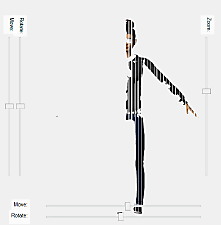
So out of nowhere, I was just starting up milkshape on my laptop, and I got this:

http://i39.tinypic.com/nqq049.jpg

Gah! i have no idea what's happening! Milkshape looks fine on my main comp, it's just my laptop. I re-installed it and it still looks like this. :o All perspective has gone out the window, and i can't imagine why. The grid is all off, there's lots of bleeding, and it does it with all my meshes. The only possible thing can think of is that I installed a windows (Vista) update prior to this milkshape use. Help! :cry: :help:

Edit: uninstall-reinstall, system restore, and updating have no effect.

Edit 2: Nor does removing the update

Rapsheba555
4th Mar 2009, 07:44 PM
Hello??

porkypine
5th Mar 2009, 05:06 AM
Hi, I've seen your post, I just don't have an answer for you.

Can you upload your file so someone can look at it?

You might want to look at the standard Milkshape configuration setup before you load your mesh: From HP and Tig's Unimesh new mesh basics...

http://www.sims2wiki.info/wiki.php?title=Tutorials:Unimesh_1_-_New_Mesh_Basics read part 6.

Open Milkshape
Select the groups tab
uncheck autosmooth


Your best bet for support on this issue is to try the Milkshape forums
http://www.milkshape3d.com When you get to the chubalum home page, find FORUM on the neft navigation panel and go ask there. Provide pictures, PC info, Milkshape version, etc.

Also, you may want to provide a phot of what it is supposed to look like (use your other computer).

Pixelhate
5th Mar 2009, 07:54 AM
Could it be some screen resolution trouble ? ( just trying)

SimArchitect
5th Mar 2009, 07:58 AM
I dont use milkshape, but what dows it normally look like?

Is there a screenshot somewhere online that shows its normal interface?


Also, was there an update for milkshape or something that made it change? (Just speaking my mind) lol

Rapsheba555
6th Mar 2009, 06:44 AM
No, it's not the mesh or anything, the mesh works fine on my desktop.

Unchecking autosmooth had no effect....

I think it may be that something is clashing with an update for my graphics driver or something. i'm not really sure, i'm not aware if it updated or not.

Well, it's not that squished normally, and that weird pattern of criss-crossing lines on the right is just freaky.

porkypine
7th Mar 2009, 11:17 PM
I think you'll have better luck asking on the Milkshape forum - It only affects your laptop, Vista OS.. Could be your video driver... Sorry I have no solution for you. Good luck.