View Full Version : Hair doesnt become binned right no matter what
Illirey
30th Mar 2011, 12:13 AM
HELP! I've tried at least 5 different guides in binning hair (read and followed them closely), but my Cc Hair Refuses to become Binned Properly!
I've made a Cap that has Brown hair Color, And I want it to show up in the brown section, not in the custom hair section. So I followed these Guides
http://rikkulidea.livejournal.com/22644.html
http://www.modthesims.info/showthread.php?t=150742
into the closest detail, but the Hair does Still remain in the Custom hair Color section. Can anyone helo me with this?
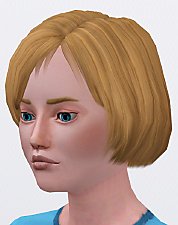
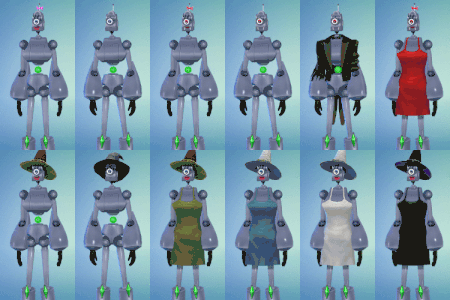
P.S: I've added a photo just i case I explain the current location of it blurry. I've also added the File if someone want ot take a closer peek at the problem/ fix it.
thanks in beforehand.
Mootilda
30th Mar 2011, 1:36 AM
Would this help? http://www.modthesims.info/download.php?t=434016
Illirey
30th Mar 2011, 11:25 AM
Mootilda ; No it doesn't work. It says that its been binned, but when I open Bodyshop, its still in the Custom Hair Bin.
Mootilda
30th Mar 2011, 4:06 PM
Because this is more of a CC creation / modification question than a game problem, you might have more help in the Create forum.
simsample
30th Mar 2011, 6:22 PM
I moved the thread for you, Illirey.
Illirey
30th Mar 2011, 6:47 PM
I 've looked there and read the terms for Help-posting there, which states my problem has nothing to do with those areas.. as its game and not site related.
In Case this information helps; The Hairtone XML (XHTN) states its a brown hair. In all genetics collumn there is a Number 0 ( not that I read anything about changing That, I just thought it could be related somehow). Instead of just 6 Property sets ( like I've seen in the other Guides) there is 10, 4 of them is Meshes. I replaced all but the Meshes ( In most Guides these are left unchanged) hairtone dtString.
Mootilda
30th Mar 2011, 8:28 PM
my Cc Hair Refuses to become Binned ProperlyI 've looked there and read the terms for Help-posting there, which states my problem has nothing to do with those areas.. as its game and not site related.Your problem is not a game problem. It is also not a site problem. It is a CC problem. There are two possibilities:
1) This is a problem with CC hair and you want the creator to fix it. If so, please contact the creator.
2) This is a problem with CC hair and you want to fix it yourself. If so, this is the place to get help with modding.
Illirey
30th Mar 2011, 9:30 PM
Your problem is not a game problem. It is also not a site problem. It is a CC problem. There are two possibilities:
1) This is a problem with CC hair and you want the creator to fix it. If so, please contact the creator.
2) This is a problem with CC hair and you want to fix it yourself. If so, this is the place to get help with modding.
The Creator is Me, so I can't ask it to fix the Issue.
I've looked in the CC section and found nothing solving or explaining my problem there.
Mootilda
31st Mar 2011, 5:07 PM
Hopefully, now that your thread is in the right forum, someone with more knowledge on this issue will be able to help you.
Phaenoh
2nd Apr 2011, 5:05 AM
Illirey, from your screenshot it looks like you are using a pre-Pets version of Bodyshop. Have you tried updating?
When you are making changes in SimPe, are you remembering to hit 'Commit' each time you do something and then 'Save' when you are done with it all?
Did you edit both the Hair Tone XML (XHTN) "proxy (dtString)" and each Property Set (GZPS) "hairtone (dtString)"?
Btw, this is the exact right forum for you to be in now. Here we help with the modding and coding behind bodyshop content. :)
Illirey
3rd Apr 2011, 5:46 PM
Illirey, from your screenshot it looks like you are using a pre-Pets version of Bodyshop. Have you tried updating?
When you are making changes in SimPe, are you remembering to hit 'Commit' each time you do something and then 'Save' when you are done with it all?
Did you edit both the Hair Tone XML (XHTN) "proxy (dtString)" and each Property Set (GZPS) "hairtone (dtString)"?
Btw, this is the exact right forum for you to be in now. Here we help with the modding and coding behind bodyshop content. :)
No, Im using the Sims 2 Seasons Version of Body Shop. Just in case I Updated Bodyshop and ran it, and then I ran TS2, the Hair is still in the Custom Hair Bin in both Programs.
Yep, I edited the XHTN's and the GZPS's proxy(dtstring)'s, and commited after every change. Then I thought I had maybe done something wrong, so I deleted the file and remade it, once again following every step of the Guide ( URL found in my first Post), but got the same result.
Phaenoh
3rd Apr 2011, 9:02 PM
Post Pets Bodyshop shows you 6 thumbnails on each page, that's why I thought you were using an old version. You have to use the new shortcut that comes with each as well ;) That being said, I don't really know why that would matter, just trying to think of everything.
Try resetting the 'Creator' string to all zeros, that's usually what gives something the CC star, but maybe something is going strange here.
When that all doesn't work, post it up, I'll have a look at it. :)
Illirey
17th Apr 2011, 1:08 PM
Post Pets Bodyshop shows you 6 thumbnails on each page, that's why I thought you were using an old version. You have to use the new shortcut that comes with each as well ;) That being said, I don't really know why that would matter, just trying to think of everything.
Try resetting the 'Creator' string to all zeros, that's usually what gives something the CC star, but maybe something is going strange here.
When that all doesn't work, post it up, I'll have a look at it. :)
I resetted the Creator string, but the file is still in the custom content Bin. Could you please have a Look at it? The current Cap looks a little different than the one on the picture, since I decided to pick another texture, but its the same file.
Gwenke33
17th Apr 2011, 2:07 PM
Hi,
I looked at both packages. I used the WardrobeWrangler.
The first one was indeed binned as brown but the second one was binned as custom. Funny thing is, none of them showed up for me in BodyShop in the custom bin (I also checked for the second one among the non-cc hairs but I could not find it - but then I am not familiar with hairs with hat so maybe I did not notice).
Anyway I binned the second version as brown with the WW - check to see if it works for you.
Another thing worth checking in such cases if you maybe have an earlier version hiding in another folder or in SavedSims. That could prevent the edited version from showing the changes you made. Happened to me a few times.
theawesomeeclipse
17th Apr 2011, 5:23 PM
Yes, check your savedsims files! I had the same problem, and realized that the old versions of my hair were in the savedsims folder. So take those out and you should be good to go!
Illirey
18th Apr 2011, 8:33 PM
Hi,
I looked at both packages. I used the WardrobeWrangler.
The first one was indeed binned as brown but the second one was binned as custom. Funny thing is, none of them showed up for me in BodyShop in the custom bin (I also checked for the second one among the non-cc hairs but I could not find it - but then I am not familiar with hairs with hat so maybe I did not notice).
Anyway I binned the second version as brown with the WW - check to see if it works for you.
Another thing worth checking in such cases if you maybe have an earlier version hiding in another folder or in SavedSims. That could prevent the edited version from showing the changes you made. Happened to me a few times.
So they Did work on another Sims. I suspected that it had to do with my own folders, but I wasnt sure since I didnt have any other sims to try it on. But the later one was wierd, since I Did Bin that one aswell ( and repeated another 3 times when it didnt change bin). I'll take a look at these and will be back in 10 mins to give a report, Thank!
Illirey
18th Apr 2011, 9:10 PM
Ok, after deleting every Possible file to the paper bin( including a couple of suspicious files in the projects folder called .hair) that had anything to do with the hair, I put the hair in the downloads folder and installed it. The Good News is that it doesnt show up in the CC bin, but the bad news is that it doesnt show up at all.. I think I have to dig deeper into this issue.
Phaenoh
18th Apr 2011, 11:57 PM
At this point, it might just be easier (and cleaner) to delete and restart entirely. When I've effed up a project pretty bad a fresh start always clears up the wonkiness.
Illirey
20th Apr 2011, 12:25 PM
At this point, it might just be easier (and cleaner) to delete and restart entirely. When I've effed up a project pretty bad a fresh start always clears up the wonkiness.
Okay, I must Agree, Phaenoh, this One wont Become any Better than this, though I'll still Keep the Texture, and it will still become a Binned-Bio-Brown Hair, and this Time I'll try the Wardrobe Wrangler. I'll Report back if it sorted the Issue. Thanks All for Helping out!
pinkygamer12
20th Apr 2011, 12:56 PM
i tried the hair binner it works this is what I did i check off the ff:
decustomize and make backup files try checking off that
__________________________________________________________________
1.) make the hair recolour
2.) import to game
3.)close bodyshop
4.) open hair binner
5.) uncheck those things
6.) chooses 4 files ( if you ae binning 1 file check of all the boxes but make sure you put the file first before unchecking all the boxes)
7.) select bin
8.) delete your package at savedsims
9.)place the binned packaged at your download folder
10. check it in bodyshop
11.) done hope it worked thanks to CatOfEvilGenius for this useful program :) :) :) :) :) :)
pinkygamer12
20th Apr 2011, 12:57 PM
if your still having problem i try to download the cap and bin them and send them to you
Illirey
20th Apr 2011, 1:00 PM
i tried the hair binner it works this is what I did i check off the ff:
decustomize and make backup files try checking off that
__________________________________________________________________
1.) make the hair recolour
2.) import to game
3.)close bodyshop
4.) open hair binner
5.) uncheck those things
6.) chooses 4 files ( if you ae binning 1 file check of all the boxes but make sure you put the file first before unchecking all the boxes)
7.) select bin
8.) delete your package at savedsims
9.)place the binned packaged at your download folder
10. check it in bodyshop
11.) done hope it worked thanks to CatOfEvilGenius for this useful program :) :) :) :) :) :)
I tried that option about three times, it did simply not work on my computer, it seems. Thanks anyway. :)
Illirey
20th Apr 2011, 1:03 PM
if your still having problem i try to download the cap and bin them and send them to you
Thanks, I'll just try to do what Phaenoh suggested me to do firstly, and meanwhile follow the other advices I got. Like I said, I'll Report if I still have Issues :)
Illirey
20th Apr 2011, 4:36 PM
Report; I Remade the File, Opened Bodyshop (freetime version), selected new project, genetics, the black cap thats a basegame include, exported, replaced textures, deleted any file that came with and had anything to do with it and then opened it in wardrobe wrangler and binned it brown. After this however, the file did completely disappear from the Bins. Odd, isnt it ?
There is however one thing I discovered; all my recolors miss the BINX files, files that I've found in Every other Binned Custom Hair I investigated ( not to steal or so, or even to copy, but to get a hint about what I could've done wrong), which Could explain my problem, as these files must be associated with the Hairs BinSettings, Right ?
Gwenke33
21st Apr 2011, 5:22 PM
Yes, you certainly need a BINX file for the hair to show up. Now I'd just start from scratch again and see if I have it before binning. It would be very strange if the binning process removed it.
Illirey
23rd Apr 2011, 6:00 PM
Yes, you certainly need a BINX file for the hair to show up. Now I'd just start from scratch again and see if I have it before binning. It would be very strange if the binning process removed it.
Actually, the interesting thing is that none of the Hairs had a Binx file, not even before they where Binned, Strange isnt it? Well, I managed to get them working by simply Copy a Binx file and paste it into the Caps while it was open in Simpe, it works fine now. Very Strange however that I never got one of those from the Beginning.. I'd better check this up if there has been a similar Issue with Bodyshop before. And if they didnt have Binx files.. then howcome they worked in the others Bodyshops ?
vBulletin v3.0.14, Copyright ©2000-2013, Jelsoft Enterprises Ltd.