
 Sign in to Mod The Sims
 Unholy Collection
 Unholy Collection
MTS has all free content, all the time. Donate to help keep it running.
SCREENSHOTS
unholy5.jpg - width=250 height=186
Featured Upload!
This is a featured upload! It showcases the best talent and creativity available on MTS and in the community. 

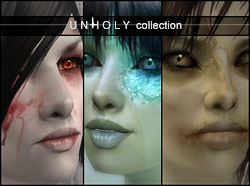
Hi again, everyone :] These skins are based on my Pixie template, so for a closer look on the muscle tone, please see any of the other Pixie skins. These are all brand new (in other words, not the same alien, vampire and zombie skins I've posted anywhere previously) and exclusive for MS2.
The Pixie HUNTER set includes,

Pixie Hunter skin,
Predator eyes and
Hunter makeup (the blood smeared on the cheeks)
The Pixie ROT set includes,

Pixie Rot skin,
Withered eyes and
Rot makeup (the ragged eyebrows and uneven lashes)
The Pixie ANOMALY set includes,

Pixie Anomaly skin,
Stranger eyes and
Anomaly makeup (the swirl around her left eye)
These skins are very detailed even without the makeup, but the makeup add some cool details that make them stand out a bit more. Note that none of the makeup will work with any other skins, so if you prefer to do without them, please delete them after the download.
The skin texture without makeup:

Only the skin, makeup and eyes are included and done by me... for the other material, please refer to –
Alien; hair by PeggySims 2
Zombie; hair by PeggySims 2
Vampire; hair by H.Lin at TSR
The Pixie HUNTER set includes,
Pixie Hunter skin,
Predator eyes and
Hunter makeup (the blood smeared on the cheeks)
The Pixie ROT set includes,
Pixie Rot skin,
Withered eyes and
Rot makeup (the ragged eyebrows and uneven lashes)
The Pixie ANOMALY set includes,
Pixie Anomaly skin,
Stranger eyes and
Anomaly makeup (the swirl around her left eye)
These skins are very detailed even without the makeup, but the makeup add some cool details that make them stand out a bit more. Note that none of the makeup will work with any other skins, so if you prefer to do without them, please delete them after the download.
The skin texture without makeup:
Only the skin, makeup and eyes are included and done by me... for the other material, please refer to –
Alien; hair by PeggySims 2
Zombie; hair by PeggySims 2
Vampire; hair by H.Lin at TSR
This is a Maxis Recolour which means that it is a recolour of an item that already exists in your game. Please check the Pack requirements to see which game pack it recolours.
| Filename | Size | Downloads | Date | |||||
|
pixiehunter-reuploaded.rar
Size: 1.95 MB · Downloads: 81,975 · 29th Aug 2006 |
1.95 MB | 81,975 | 29th Aug 2006 | |||||
|
pixierot.rar
Size: 2.13 MB · Downloads: 74,684 · 28th Aug 2006 |
2.13 MB | 74,684 | 28th Aug 2006 | |||||
|
pixieanomaly.rar
Size: 2.04 MB · Downloads: 87,446 · 28th Aug 2006 |
2.04 MB | 87,446 | 28th Aug 2006 | |||||
| For a detailed look at individual files, see the Information tab. | ||||||||
Key:
- - File was updated after upload was posted
Install Instructions
Basic Download and Install Instructions:
1. Download: Click the download link to save the .rar or .zip file(s) to your computer.
2. Extract the zip, rar, or 7z file.
3. Place in Downloads Folder: Cut and paste the .package file(s) into your Downloads folder:
1. Download: Click the download link to save the .rar or .zip file(s) to your computer.
2. Extract the zip, rar, or 7z file.
3. Place in Downloads Folder: Cut and paste the .package file(s) into your Downloads folder:
- Origin (Ultimate Collection): Users\(Current User Account)\Documents\EA Games\The Sims™ 2 Ultimate Collection\Downloads\
- Non-Origin, Windows Vista/7/8/10: Users\(Current User Account)\Documents\EA Games\The Sims 2\Downloads\
- Non-Origin, Windows XP: Documents and Settings\(Current User Account)\My Documents\EA Games\The Sims 2\Downloads\
- Mac: Users\(Current User Account)\Documents\EA Games\The Sims 2\Downloads
- Mac x64: /Library/Containers/com.aspyr.sims2.appstore/Data/Library/Application Support/Aspyr/The Sims 2/Downloads
- For a full, complete guide to downloading complete with pictures and more information, see: Game Help: Downloading for Fracking Idiots.
- Custom content not showing up in the game? See: Game Help: Getting Custom Content to Show Up.
- If you don't have a Downloads folder, just make one. See instructions at: Game Help: No Downloads Folder.
Also Thanked - Users who thanked this download also thanked:
Terms of use and etceteras
I've long since lost track of all the defaults that have been made using my pixie skins – and I'd love if the creators of them could send me the links, so I can link you up from here… I keep getting requests about where the items can be found and I can't quite remember, hehe.
Anyway; my name is Linda, and I'm a digital artist by trade. Sims 2 is my biggest hobby right now, next to mask-making, and I spend a bit too much time for my own good, making new skins.
I've made up a little list with my 'terms of use' as I keep getting asked these questions. If you have any inquiries, please read it before contacting me.
terms of use
Thank you; have fun with the skins :D
Anyway; my name is Linda, and I'm a digital artist by trade. Sims 2 is my biggest hobby right now, next to mask-making, and I spend a bit too much time for my own good, making new skins.
I've made up a little list with my 'terms of use' as I keep getting asked these questions. If you have any inquiries, please read it before contacting me.
terms of use
Thank you; have fun with the skins :D
More Downloads BETA
Here are some more of my downloads: