
 Sign in to Mod The Sims
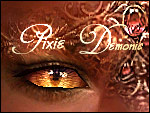
 Pixie Demonic
 Pixie Demonic
MTS has all free content, all the time. Donate to help keep it running.
SCREENSHOTS
Featured Upload!
This is a featured upload! It showcases the best talent and creativity available on MTS and in the community. 

First of all, my sincere thanks go out to Marvine – who not only allowed me to use her wonderful meshes for this project, but also converted and adapted the meshes so that they now work for both men and women. I've had great fun working on this project but it would all have been for naught if I hadn't had good meshes for the horns.
It is imperative that you download the meshes so that the horns will work in your game.
Go here and follow Marvine's instructions:
Meshes for the horns
These are Pixie skins; for more details on the muscle tone, please see any of my other Pixie skins.
Pixie Fiend
The Pixie Fiend is a deep red skin with very detailed patterning on the brow and also on the back and the chest. It has small, red gemstones in a few places as well as upon the horns that belong to the skin.

It comes packed with Ravish eyes and the matching horn recolour.
Pixie Incubi
The Pixie Incubi is softly lilac, with delicate designs over the brow and cheek, as well as lightly hinted designs over the rest of the body. It's tiny, cute horns have the same flowery pattern as the skin.

It comes packed with Seduce eyes and the matching horn recolour.
Pixie Serpent
The Pixie Serpent skin is quite pale, and has a greenish blue tone that gives it an icy, hard look. Its lips are dark and the small horns have tiny scales in the same style as the skin. The scales reoccur on other parts of the body as well.

It comes packed with Zenith eyes and the matching horn recolour.
Pixie Ashes
The Pixie Ashes skin is a dark, greyish brown with discreet undertones of purple. Its designs cover the brow, the cheeks and part of the chin and lips, and also shows on both back and stomach.

It comes packed with Hedonist eyes and the matching horn recolour.
If you're curious of the difference in colour tone, see this:

Seen in the pictures, and not done by me;
Fiend: Male hair by Hysterical Paroxysm, female hair by Peggysims2.
Incubi: Male hair by Hysterical Paroxysm, female hair by XM Sims.
Serpent: Male hair beosboxboy's male curly hair converted to all ages by Vetty, female hair by Sussisogoodsims2
Ashes: Male hair by Hysterical Paroxysm, female hair by Peggysims2.
For questions regarding use of the skins and eyes, see:
http://www.furiae.com/images2/enayla.txt
For use of the meshes for the horns, please refer to Marvine – I claim no credit at all for the meshes
It is imperative that you download the meshes so that the horns will work in your game.
Go here and follow Marvine's instructions:
Meshes for the horns
These are Pixie skins; for more details on the muscle tone, please see any of my other Pixie skins.
Pixie Fiend
The Pixie Fiend is a deep red skin with very detailed patterning on the brow and also on the back and the chest. It has small, red gemstones in a few places as well as upon the horns that belong to the skin.
It comes packed with Ravish eyes and the matching horn recolour.
Pixie Incubi
The Pixie Incubi is softly lilac, with delicate designs over the brow and cheek, as well as lightly hinted designs over the rest of the body. It's tiny, cute horns have the same flowery pattern as the skin.
It comes packed with Seduce eyes and the matching horn recolour.
Pixie Serpent
The Pixie Serpent skin is quite pale, and has a greenish blue tone that gives it an icy, hard look. Its lips are dark and the small horns have tiny scales in the same style as the skin. The scales reoccur on other parts of the body as well.
It comes packed with Zenith eyes and the matching horn recolour.
Pixie Ashes
The Pixie Ashes skin is a dark, greyish brown with discreet undertones of purple. Its designs cover the brow, the cheeks and part of the chin and lips, and also shows on both back and stomach.
It comes packed with Hedonist eyes and the matching horn recolour.
If you're curious of the difference in colour tone, see this:
Seen in the pictures, and not done by me;
Fiend: Male hair by Hysterical Paroxysm, female hair by Peggysims2.
Incubi: Male hair by Hysterical Paroxysm, female hair by XM Sims.
Serpent: Male hair beosboxboy's male curly hair converted to all ages by Vetty, female hair by Sussisogoodsims2
Ashes: Male hair by Hysterical Paroxysm, female hair by Peggysims2.
For questions regarding use of the skins and eyes, see:
http://www.furiae.com/images2/enayla.txt
For use of the meshes for the horns, please refer to Marvine – I claim no credit at all for the meshes

This is a Maxis Recolour which means that it is a recolour of an item that already exists in your game. Please check the Pack requirements to see which game pack it recolours.
| Filename | Size | Downloads | Date | |||||
|
pixieincubi.rar
Size: 1.49 MB · Downloads: 80,297 · 29th Sep 2006 |
1.49 MB | 80,297 | 29th Sep 2006 | |||||
|
pixieserpent.rar
Size: 1.53 MB · Downloads: 80,460 · 28th Sep 2006 |
1.53 MB | 80,460 | 28th Sep 2006 | |||||
|
pixiefiend.rar
Size: 1.38 MB · Downloads: 80,532 · 28th Sep 2006 |
1.38 MB | 80,532 | 28th Sep 2006 | |||||
|
pixieashes.rar
Size: 1.24 MB · Downloads: 81,153 · 28th Sep 2006 |
1.24 MB | 81,153 | 28th Sep 2006 | |||||
| For a detailed look at individual files, see the Information tab. | ||||||||
Key:
- - File was updated after upload was posted
Install Instructions
Basic Download and Install Instructions:
1. Download: Click the download link to save the .rar or .zip file(s) to your computer.
2. Extract the zip, rar, or 7z file.
3. Place in Downloads Folder: Cut and paste the .package file(s) into your Downloads folder:
1. Download: Click the download link to save the .rar or .zip file(s) to your computer.
2. Extract the zip, rar, or 7z file.
3. Place in Downloads Folder: Cut and paste the .package file(s) into your Downloads folder:
- Origin (Ultimate Collection): Users\(Current User Account)\Documents\EA Games\The Sims™ 2 Ultimate Collection\Downloads\
- Non-Origin, Windows Vista/7/8/10: Users\(Current User Account)\Documents\EA Games\The Sims 2\Downloads\
- Non-Origin, Windows XP: Documents and Settings\(Current User Account)\My Documents\EA Games\The Sims 2\Downloads\
- Mac: Users\(Current User Account)\Documents\EA Games\The Sims 2\Downloads
- Mac x64: /Library/Containers/com.aspyr.sims2.appstore/Data/Library/Application Support/Aspyr/The Sims 2/Downloads
- For a full, complete guide to downloading complete with pictures and more information, see: Game Help: Downloading for Fracking Idiots.
- Custom content not showing up in the game? See: Game Help: Getting Custom Content to Show Up.
- If you don't have a Downloads folder, just make one. See instructions at: Game Help: No Downloads Folder.
Also Thanked - Users who thanked this download also thanked:
Terms of use and etceteras
I've long since lost track of all the defaults that have been made using my pixie skins – and I'd love if the creators of them could send me the links, so I can link you up from here… I keep getting requests about where the items can be found and I can't quite remember, hehe.
Anyway; my name is Linda, and I'm a digital artist by trade. Sims 2 is my biggest hobby right now, next to mask-making, and I spend a bit too much time for my own good, making new skins.
I've made up a little list with my 'terms of use' as I keep getting asked these questions. If you have any inquiries, please read it before contacting me.
terms of use
Thank you; have fun with the skins :D
Anyway; my name is Linda, and I'm a digital artist by trade. Sims 2 is my biggest hobby right now, next to mask-making, and I spend a bit too much time for my own good, making new skins.
I've made up a little list with my 'terms of use' as I keep getting asked these questions. If you have any inquiries, please read it before contacting me.
terms of use
Thank you; have fun with the skins :D
More Downloads BETA
Here are some more of my downloads: