
 Sign in to Mod The Sims
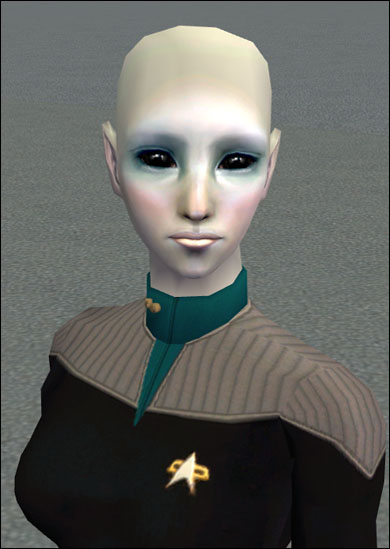
 Ellora Najali - lofty alien beauty
 Ellora Najali - lofty alien beauty
MTS has all free content, all the time. Donate to help keep it running.
SCREENSHOTS
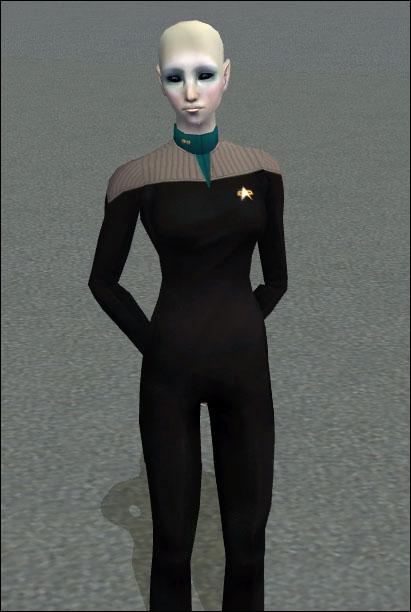

ellorafar.jpg - width=411 height=612
elloraclose02.jpg - width=390 height=549

Ellora is from Elaius Prime, the capital world of the Elaii Consociation, and she serves as Science Officer on the USS Cicero. She was cast out from Elaii society when she left her homeworld to join Starfleet against her parents' will. She is quiet and keeps mostly to herself, and many of her crewmates consider her a bit aloof - but if you take the time to get to know her, you'll find that she has a big heart, and that she is a fiercely loyal friend.
You may use Ellora to model your clothing/objects, but do not claim her as your own creation under any circumstances, lest I and my ferocious attack schnauzer hunt you down and force you to play "fetch" until your arms fall off.
Now, for some reason, BodyShop doesn't feel like packing the rank insignia mesh together with the Sim. Therefore, if you want the rank insignia, you need to get the file called MESH_nixnivis_twopips.package from here. Sorry about that!
Poly counts:
Body mesh: polys=2110, vertices=1498
Lieutenant's rank insignia: polys=122, vertices=32
Custom Content by Me:
- Sim
- Rank insignia for Starfleet lieutenant
- Starfleet Science Division uniform
- Body mesh
Custom Content Included:
- Eyes: Mayday Eyes - Alien by Rensim
- Lipstick: Floriental - Frangipani by Bruno
- Blush: Circonflex Anti-Shine by Rensim
- Skintone: Fae Blue skin by Enayla
Additional Credits:
Thank you to all the creators of the included content!
You may use Ellora to model your clothing/objects, but do not claim her as your own creation under any circumstances, lest I and my ferocious attack schnauzer hunt you down and force you to play "fetch" until your arms fall off.
Now, for some reason, BodyShop doesn't feel like packing the rank insignia mesh together with the Sim. Therefore, if you want the rank insignia, you need to get the file called MESH_nixnivis_twopips.package from here. Sorry about that!
Poly counts:
Body mesh: polys=2110, vertices=1498
Lieutenant's rank insignia: polys=122, vertices=32
Custom Content by Me:
- Sim
- Rank insignia for Starfleet lieutenant
- Starfleet Science Division uniform
- Body mesh
Custom Content Included:
- Eyes: Mayday Eyes - Alien by Rensim
- Lipstick: Floriental - Frangipani by Bruno
- Blush: Circonflex Anti-Shine by Rensim
- Skintone: Fae Blue skin by Enayla
Additional Credits:
Thank you to all the creators of the included content!
| Filename | Size | Downloads | Date | |||||
|
ElloraNajali.zip
Size: 3.57 MB · Downloads: 1,893 · 17th Oct 2007 |
3.57 MB | 1,893 | 17th Oct 2007 | |||||
| For a detailed look at individual files, see the Information tab. | ||||||||
Key:
- - File was updated after upload was posted
Install Instructions
Basic Download and Install Instructions:
1. Download: Click the download link to save the .rar or .zip file(s) to your computer.
2. Extract the zip, rar, or 7z file.
3. Install: Double-click on the .sims2pack file to install its contents to your game. The files will automatically be installed to the proper location(s).
1. Download: Click the download link to save the .rar or .zip file(s) to your computer.
2. Extract the zip, rar, or 7z file.
3. Install: Double-click on the .sims2pack file to install its contents to your game. The files will automatically be installed to the proper location(s).
- You may want to use the Sims2Pack Clean Installer instead of the game's installer, which will let you install sims and pets which may otherwise give errors about needing expansion packs. It also lets you choose what included content to install. Do NOT use Clean Installer to get around this error with lots and houses as that can cause your game to crash when attempting to use that lot. Get S2PCI here: Clean Installer Official Site.
- For a full, complete guide to downloading complete with pictures and more information, see: Game Help: Downloading for Fracking Idiots.
- Custom content not showing up in the game? See: Game Help: Getting Custom Content to Show Up.
- If you get an error that says "This content requires expansion pack data that is not installed", please use either Clean Installer to install this sim.
Also Thanked - Users who thanked this download also thanked:
Terms of Use
 With Credit and a Link, Please DO...
- ...recolour my meshes and include them with your recolours
- ...include my Bodyshop items with your Sims and my objects with your lots
- ...modify and/or use parts of my Bodyshop meshes
- ...clone my objects
- ...convert my items for The Sims 3
- ...use my custom content in screen shots, stories, movies, etc.; credit is always appreciated, but by no means required.
 But Please DON'T...
- ...claim my work as your own
- ...upload my items as is or with only v. minor changes (such as renaming them, but changing nothing else)
- ...convert my items for The Sims 4
- ...upload my items or content based on my items to paysites, including Patreon and sites that use ad.fly, or to TSR. (Sites that ask for voluntary donations through ko.fi, PayPal and the like are fine, though.)
[size=+3]But as long as it is for your own game,
you may of course do whatever you please![/size]
you may of course do whatever you please![/size]
~~~~~~~~~~~~~~~~~~~~~~~~~~~~~~~~~~~~~~~~
[size=+2]I'm no longer active at MTS, but I am still active in the Sims community.
I am NOT retired and my downloads here are NOT abandonware!
My terms of use still apply.[/size]
[size=+2]I'm no longer active at MTS, but I am still active in the Sims community.
I am NOT retired and my downloads here are NOT abandonware!
My terms of use still apply.[/size]
More Downloads BETA
Here are some more of my downloads: