
 Sign in to Mod The Sims
 Alarm Camouflage - New Meshes
 Alarm Camouflage - New Meshes
MTS has all free content, all the time. Donate to help keep it running.
SCREENSHOTS

vertical burglar alarms.jpg - width=600 height=450
firealarm2 mesh.jpg - width=591 height=450
firealarm1.jpg - width=598 height=397
firealarm3.jpg - width=409 height=379
firealarm2.jpg - width=508 height=419
firealarm3 recolor.jpg - width=583 height=358
the five.jpg - width=600 height=450
Picked Upload!
This is a picked upload! It showcases some of the best talent and creativity available on MTS and in the community.

Created by nanisim
Uploaded: 15th Mar 2008 at 12:54 AM
Updated: 19th Mar 2009 at 7:54 PM by -Maylin-
Updated: 19th Mar 2009 at 7:54 PM by -Maylin-
You have finished to decorate your favourite house. Pretty furniture all around, delightful floors and walls... curtains, plants, beautiful lamps, and... What's that terrific spotting object destroying your sight, arrrrrg???
Don't worry!, from now you can keep safe your sims from fires and robberies with this set of new objects that protect their houses without disturbing their souls: Put overmantels in your fireplaces, and put paintings in your foyers: avoid risks with style!
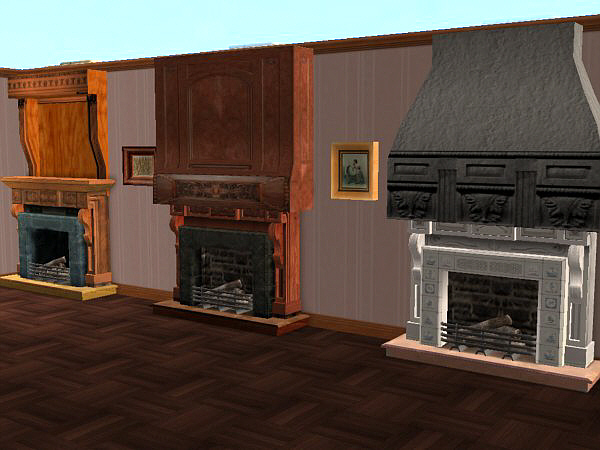
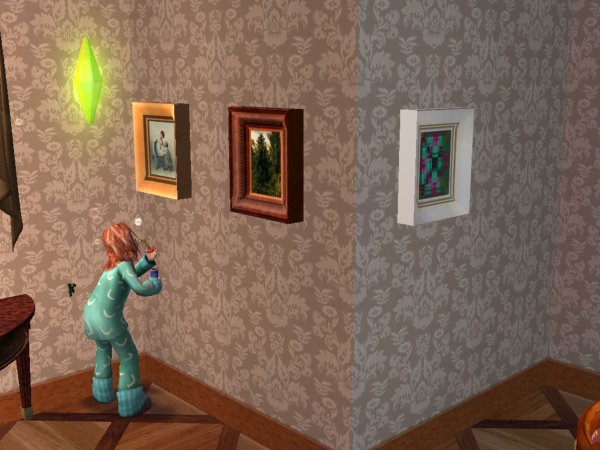
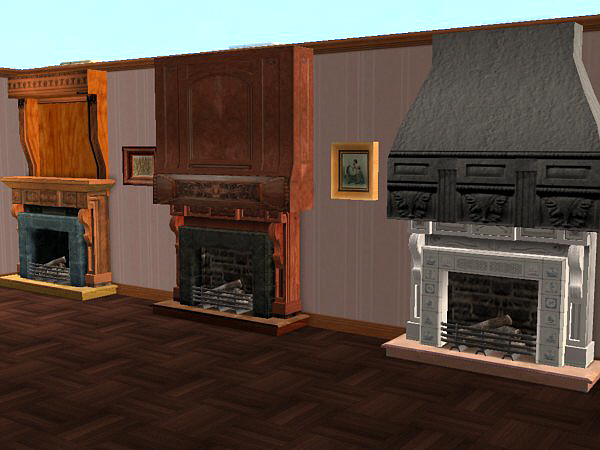
The Naniburglaralarms: A small set with two meshes simulating pictures in two different shapes with light wood frame, plus two recolors of each one, in dark wood and white frames.
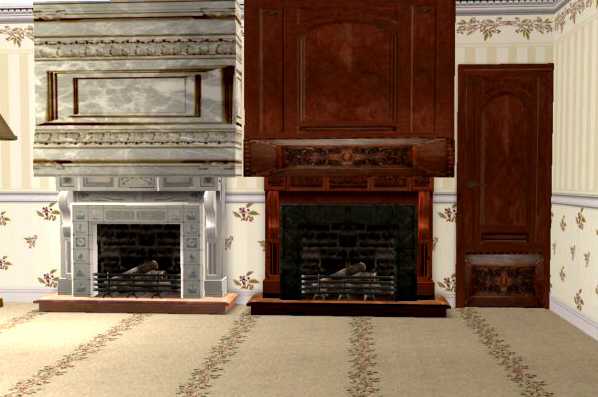
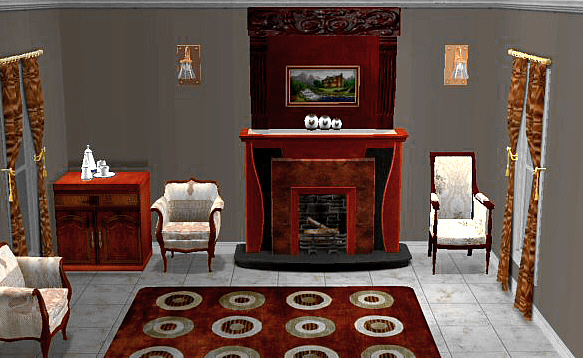
The Nanifirealarms: A set of three new meshes simulating overmantels in three different styles. Firealarm 1, in french style is almost square and fits the mantel of the fireplace. The mesh comes in white carved marble. The recolor comes in wood, matching one of my boiseries with doors.
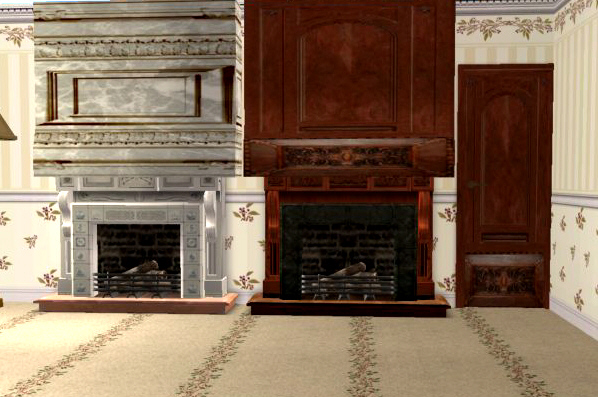
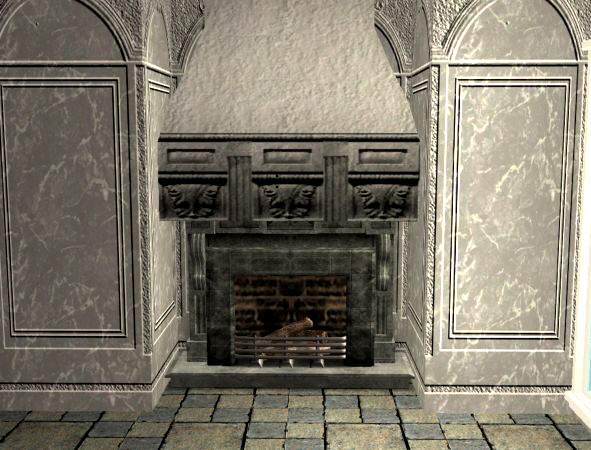
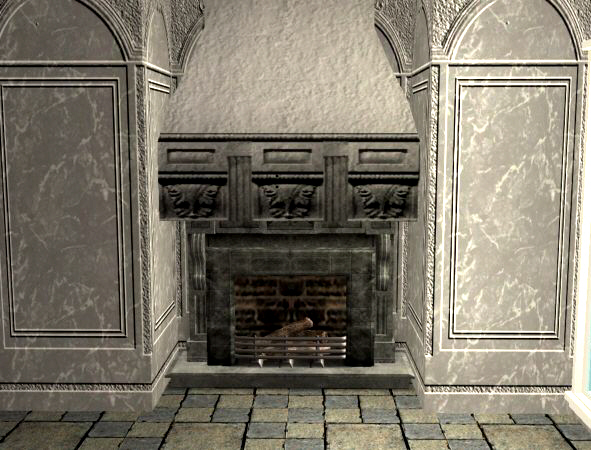
Firealarm 2 has been chosen to present the thread, made in a hooded way that admit all kind of textures. The mesh wears a texture in carved grey stone. See in another pic below how it looks in rustic!
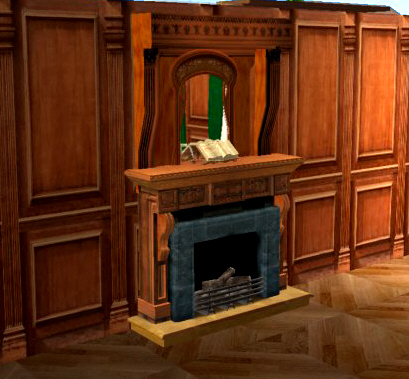
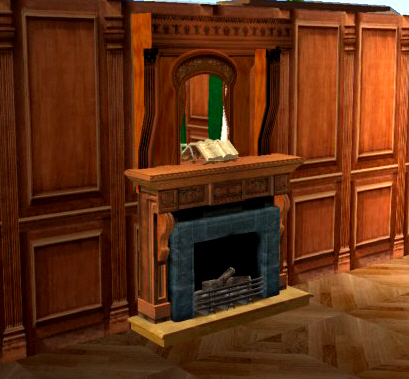
Finally, for those who cannot live without clutter, mirrors or paintings over their fireplaces, Firealarm 3 is designed in a trumeau style, with a thin background between two tall brakects. You can put in with the moveObjects cheat or the cntrl+alt paintings, mirrors or sconce lights. The mesh comes with texture in mahogany with Regency carving. Another recolor over the art deco fireplace is shown in the pics below.
As always... happy simming and enjoy decorating.
Polygon Counts:
Burglaralarms polycount: 40x30
Firealarm1: 470x330
Firealarm2: 470x380
Firealarm3: 800x700
Additional Credits:
First of all, I want to thank the help of Bluetexasbonnie and Lamammaforever during the "crafting" of the set, triying to improve the overmantels testing them, giving new ideas and with a friendly but critical point of view.
A huge, huge kiss to the people who added me as favourite and thanked my creations more than 5.000 times. I want to celebrate with of all you the 70.000 downloads, yay!
And as always, a big THANK YOU to the creators, maintainers and supporters of the CEP, SimPE and MTS2, for contribute to my personal enjoy.
Don't worry!, from now you can keep safe your sims from fires and robberies with this set of new objects that protect their houses without disturbing their souls: Put overmantels in your fireplaces, and put paintings in your foyers: avoid risks with style!
The Naniburglaralarms: A small set with two meshes simulating pictures in two different shapes with light wood frame, plus two recolors of each one, in dark wood and white frames.
The Nanifirealarms: A set of three new meshes simulating overmantels in three different styles. Firealarm 1, in french style is almost square and fits the mantel of the fireplace. The mesh comes in white carved marble. The recolor comes in wood, matching one of my boiseries with doors.
Firealarm 2 has been chosen to present the thread, made in a hooded way that admit all kind of textures. The mesh wears a texture in carved grey stone. See in another pic below how it looks in rustic!
Finally, for those who cannot live without clutter, mirrors or paintings over their fireplaces, Firealarm 3 is designed in a trumeau style, with a thin background between two tall brakects. You can put in with the moveObjects cheat or the cntrl+alt paintings, mirrors or sconce lights. The mesh comes with texture in mahogany with Regency carving. Another recolor over the art deco fireplace is shown in the pics below.
As always... happy simming and enjoy decorating.
Polygon Counts:
Burglaralarms polycount: 40x30
Firealarm1: 470x330
Firealarm2: 470x380
Firealarm3: 800x700
Additional Credits:
First of all, I want to thank the help of Bluetexasbonnie and Lamammaforever during the "crafting" of the set, triying to improve the overmantels testing them, giving new ideas and with a friendly but critical point of view.
A huge, huge kiss to the people who added me as favourite and thanked my creations more than 5.000 times. I want to celebrate with of all you the 70.000 downloads, yay!
And as always, a big THANK YOU to the creators, maintainers and supporters of the CEP, SimPE and MTS2, for contribute to my personal enjoy.
This is a new mesh, and means that it's a brand new self contained object that usually does not require a specific Pack (although this is possible depending on the type). It may have Recolours hosted on MTS - check below for more information.
| Filename | Size | Downloads | Date | |||||
|
nanifirealarms.rar
Size: 206.1 KB · Downloads: 9,495 · 15th Mar 2008 |
206.1 KB | 9,495 | 15th Mar 2008 | |||||
|
naniburglaralarms.rar
Size: 175.0 KB · Downloads: 9,373 · 15th Mar 2008 |
175.0 KB | 9,373 | 15th Mar 2008 | |||||
| For a detailed look at individual files, see the Information tab. | ||||||||
Key:
- - File was updated after upload was posted
Install Instructions
Basic Download and Install Instructions:
1. Download: Click the download link to save the .rar or .zip file(s) to your computer.
2. Extract the zip, rar, or 7z file.
3. Place in Downloads Folder: Cut and paste the .package file(s) into your Downloads folder:
1. Download: Click the download link to save the .rar or .zip file(s) to your computer.
2. Extract the zip, rar, or 7z file.
3. Place in Downloads Folder: Cut and paste the .package file(s) into your Downloads folder:
- Origin (Ultimate Collection): Users\(Current User Account)\Documents\EA Games\The Sims™ 2 Ultimate Collection\Downloads\
- Non-Origin, Windows Vista/7/8/10: Users\(Current User Account)\Documents\EA Games\The Sims 2\Downloads\
- Non-Origin, Windows XP: Documents and Settings\(Current User Account)\My Documents\EA Games\The Sims 2\Downloads\
- Mac: Users\(Current User Account)\Documents\EA Games\The Sims 2\Downloads
- Mac x64: /Library/Containers/com.aspyr.sims2.appstore/Data/Library/Application Support/Aspyr/The Sims 2/Downloads
- For a full, complete guide to downloading complete with pictures and more information, see: Game Help: Downloading for Fracking Idiots.
- Custom content not showing up in the game? See: Game Help: Getting Custom Content to Show Up.
- If you don't have a Downloads folder, just make one. See instructions at: Game Help: No Downloads Folder.
Recolours of this mesh
There are 1 recolours of this mesh on MTS:
Also Thanked - Users who thanked this download also thanked:
Packs Needed
None, this is Sims 2 base game compatible!
Other Information
Style:
– Retro
Room:
– Kitchen
– Living
: Living Room
– Outdoor
Maxis Flags:
– Not Applicable
Tags
#alarm, #overmantel, #fireplace, #fire, #burglar
Wide Open Policy
You can use my creations only in FREE SITES.
You can recolor, retexture and modify alphas LINKING BACK to the thread at MTS to get the meshes.
You can upload my objects with your lots in FREE SITES WITH CREDITS AND LINK TO MTS.
You can include pics of my creations freely WITH CREDIT TO NANISIM.
In any case, thanks to all who like and apreciate my work!
You can recolor, retexture and modify alphas LINKING BACK to the thread at MTS to get the meshes.
You can upload my objects with your lots in FREE SITES WITH CREDITS AND LINK TO MTS.
You can include pics of my creations freely WITH CREDIT TO NANISIM.
In any case, thanks to all who like and apreciate my work!
More Downloads BETA
Here are some more of my downloads: