
 Sign in to Mod The Sims
 Straight Edge Tattoos
 Straight Edge Tattoos
MTS has all free content, all the time. Donate to help keep it running.
SCREENSHOTS
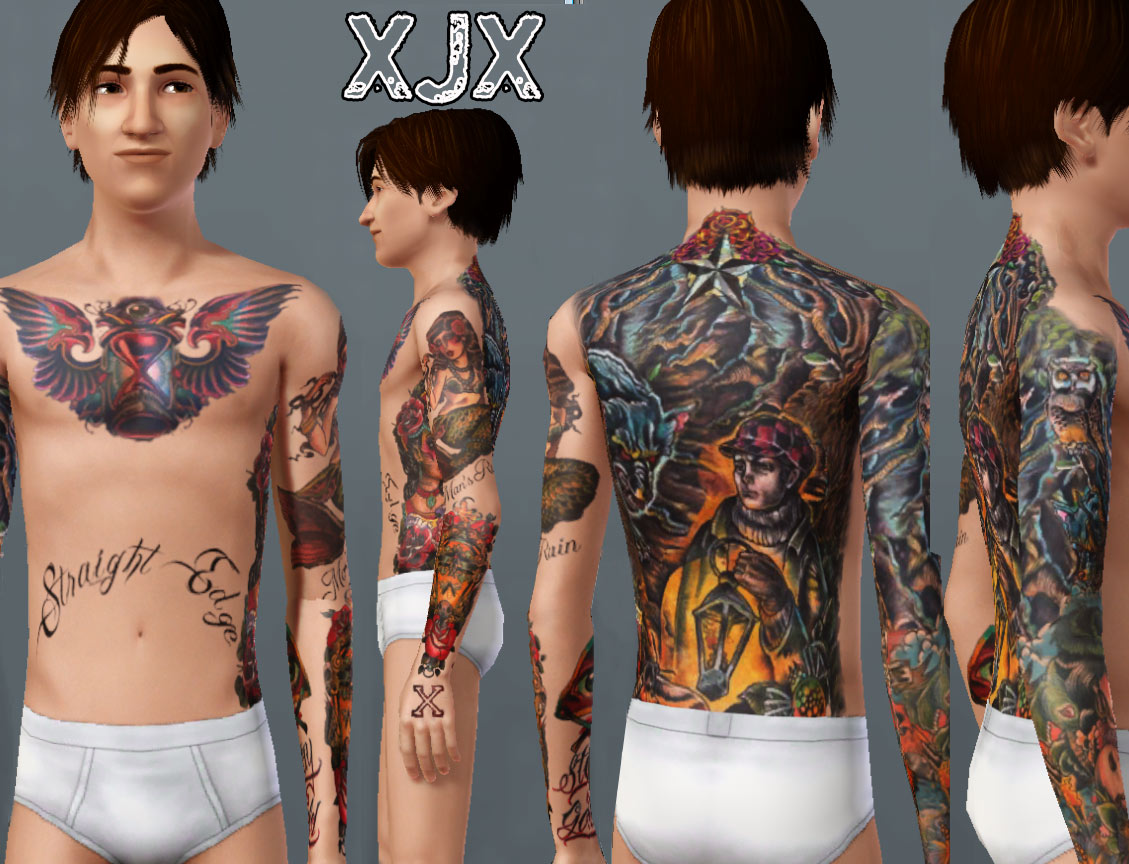
edgeskinMTS.jpg - width=1129 height=864
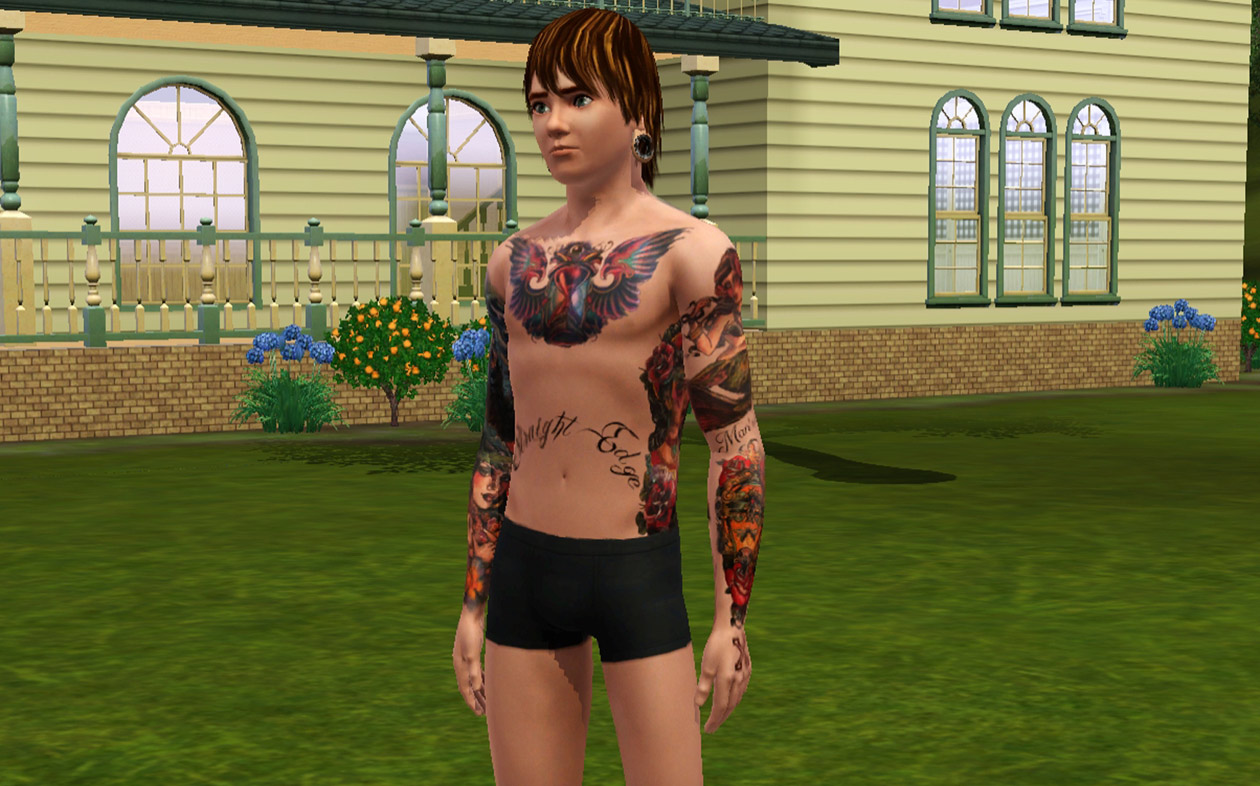
XJX.2010.Edgeskin1.jpg - width=1260 height=786
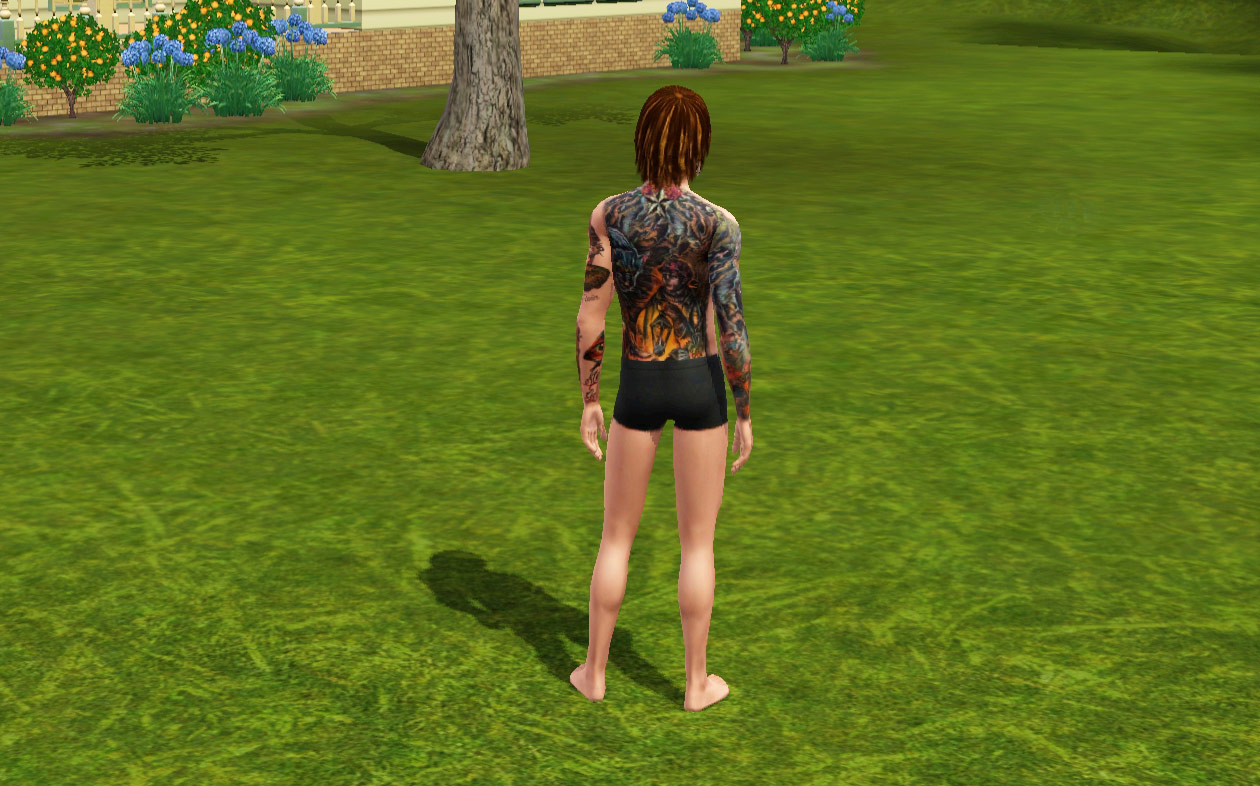
XJX.2010.Edgeskin2.jpg - width=1260 height=786
Created by XJonasX
Uploaded: 13th Jul 2010 at 4:11 PM
Updated: 27th Jun 2012 at 8:29 AM
Updated: 27th Jun 2012 at 8:29 AM
I was going to remake my Original SXE skin that I made in 2006 for the Sims 2
But I soon noticed that the graphics were very hard to bring together as one piece in the new Sims 3 system.
So I started from scratch again, only taking over the X-es on the hands from the original Skin.
So this is my first almost completely new skin in years.
I hope you like it. It was a lot of work so I hope you like it as much as I do!
It's an overlay recolor of socks, so it can be found at the bottem in the accessories.
It's not possibly to recolor ofcourse, but you can make them brighter/darker to you personal preferance. Might be needed to make the tattoos look good on lighter/darker skintones... Obviously these will not look good on very dark skintones.
I tested it and it doesn't stay on in the showers, I don't think a hack/mod is possible for this.... but it does stick in all other outfits, including the some of thework outfits that I've tested ...
Works for Young Adult, Adult & Elder Males!
This is my 3th Tattooskin for the sims3, I also have
1. Japanese Bodysuit
2. Old/Newschool bodysuit

 PLEASE, show your appreciation by clicking THANKS, leaving a Comment, or adding this upload to your favourites!
But I soon noticed that the graphics were very hard to bring together as one piece in the new Sims 3 system.
So I started from scratch again, only taking over the X-es on the hands from the original Skin.
So this is my first almost completely new skin in years.
I hope you like it. It was a lot of work so I hope you like it as much as I do!
It's an overlay recolor of socks, so it can be found at the bottem in the accessories.
It's not possibly to recolor ofcourse, but you can make them brighter/darker to you personal preferance. Might be needed to make the tattoos look good on lighter/darker skintones... Obviously these will not look good on very dark skintones.
I tested it and it doesn't stay on in the showers, I don't think a hack/mod is possible for this.... but it does stick in all other outfits, including the some of thework outfits that I've tested ...
Works for Young Adult, Adult & Elder Males!
- Left Forearm has An oldschool piece with roses, 2 tiny skulls and in the center a fly in the spotlight, the inside of the forearm has an "All seeing eye" with STAY GOLD under it. (Artwork By Uncle Allan)
The upperarm has a mermaid with "Man's Ruin" written under it (Mermaidl Artwork by Marija Asanovski)
- Right forearm has a wraparound of a Hawaian beauty with a volcano in the background. The banner says "Hang Loose"
The upperArm Has An Owl in a background that matches with the Backpiece (Artwork by Marija Asanovski))
- Back piece has Man walking in a dark wood with a lantern drawing the attention of insects and a big wolf.(Original Artwork by Marija Asanovski)
- Chest has an hourglass with wings
- Belly has "STRAIGHT EDGE" written on it.
- The Ribcage has a women surrounded with flowers(Artwork By Uncle Allan)
- The legs are not inked
This is my 3th Tattooskin for the sims3, I also have
1. Japanese Bodysuit
2. Old/Newschool bodysuit
 PLEASE, show your appreciation by clicking THANKS, leaving a Comment, or adding this upload to your favourites!
This is a Maxis Recolour which means that it is a recolour of an item that already exists in your game. Please check the Pack requirements to see which game pack it recolours.
| Filename | Size | Downloads | Date | |||||
|
XJX.2010.Edgeskin for MTS.rar
Size: 821.4 KB · Downloads: 45,754 · 13th Jul 2010 |
821.4 KB | 45,754 | 13th Jul 2010 | |||||
| For a detailed look at individual files, see the Information tab. | ||||||||
Key:
- - File was updated after upload was posted
Install Instructions
Quick Guide:
1. Click the file listed on the Files tab to download the file to your computer.
2. Extract the zip, rar, or 7z file. Now you will have either a .package or a .sims3pack file.
For Package files:
1. Cut and paste the file into your Documents\Electronic Arts\The Sims 3\Mods\Packages folder. If you do not already have this folder, you should read the full guide to Package files first: Sims 3:Installing Package Fileswiki, so you can make sure your game is fully patched and you have the correct Resource.cfg file.
2. Run the game, and find your content where the creator said it would be (build mode, buy mode, Create-a-Sim, etc.).
For Sims3Pack files:
1. Cut and paste it into your Documents\Electronic Arts\The Sims 3\Downloads folder. If you do not have this folder yet, it is recommended that you open the game and then close it again so that this folder will be automatically created. Then you can place the .sims3pack into your Downloads folder.
2. Load the game's Launcher, and click on the Downloads tab. Find the item in the list and tick the box beside it. Then press the Install button below the list.
3. Wait for the installer to load, and it will install the content to the game. You will get a message letting you know when it's done.
4. Run the game, and find your content where the creator said it would be (build mode, buy mode, Create-a-Sim, etc.).
Extracting from RAR, ZIP, or 7z: You will need a special program for this. For Windows, we recommend 7-Zip and for Mac OSX, we recommend Keka. Both are free and safe to use.
Need more help?
If you need more info, see:
1. Click the file listed on the Files tab to download the file to your computer.
2. Extract the zip, rar, or 7z file. Now you will have either a .package or a .sims3pack file.
For Package files:
1. Cut and paste the file into your Documents\Electronic Arts\The Sims 3\Mods\Packages folder. If you do not already have this folder, you should read the full guide to Package files first: Sims 3:Installing Package Fileswiki, so you can make sure your game is fully patched and you have the correct Resource.cfg file.
2. Run the game, and find your content where the creator said it would be (build mode, buy mode, Create-a-Sim, etc.).
For Sims3Pack files:
1. Cut and paste it into your Documents\Electronic Arts\The Sims 3\Downloads folder. If you do not have this folder yet, it is recommended that you open the game and then close it again so that this folder will be automatically created. Then you can place the .sims3pack into your Downloads folder.
2. Load the game's Launcher, and click on the Downloads tab. Find the item in the list and tick the box beside it. Then press the Install button below the list.
3. Wait for the installer to load, and it will install the content to the game. You will get a message letting you know when it's done.
4. Run the game, and find your content where the creator said it would be (build mode, buy mode, Create-a-Sim, etc.).
Extracting from RAR, ZIP, or 7z: You will need a special program for this. For Windows, we recommend 7-Zip and for Mac OSX, we recommend Keka. Both are free and safe to use.
Need more help?
If you need more info, see:
- For package files: Sims 3:Installing Package Fileswiki
- For Sims3pack files: Game Help:Installing TS3 Packswiki
Also Thanked - Users who thanked this download also thanked:
Packs Needed
None, this is Sims 3 base game compatible!
Other Information
Accessory Type:
– Misc
Age:
– Teen
– Young Adult
– Adult
– Elder
Maxis Flags:
– Not Applicable
Gender:
– Male
Tags
Jonas' Junk
Hey, thank you for checking out my DOWNLOADS, if you like them please hit the THANKS button... Or add them to your favourites
I try to make original things that most people don't feel like making, my ideas are allways bigger than my technical skills...
Even though I'm very proud of my tattooskins, I dare to say I'm one of the better ones around...
Enjoy, and if you feel like it, send me some screenshots, I allways love to see how other people use my stuff :)
I try to make original things that most people don't feel like making, my ideas are allways bigger than my technical skills...
Even though I'm very proud of my tattooskins, I dare to say I'm one of the better ones around...
Enjoy, and if you feel like it, send me some screenshots, I allways love to see how other people use my stuff :)
More Downloads BETA
Here are some more of my downloads: