
 Sign in to Mod The Sims
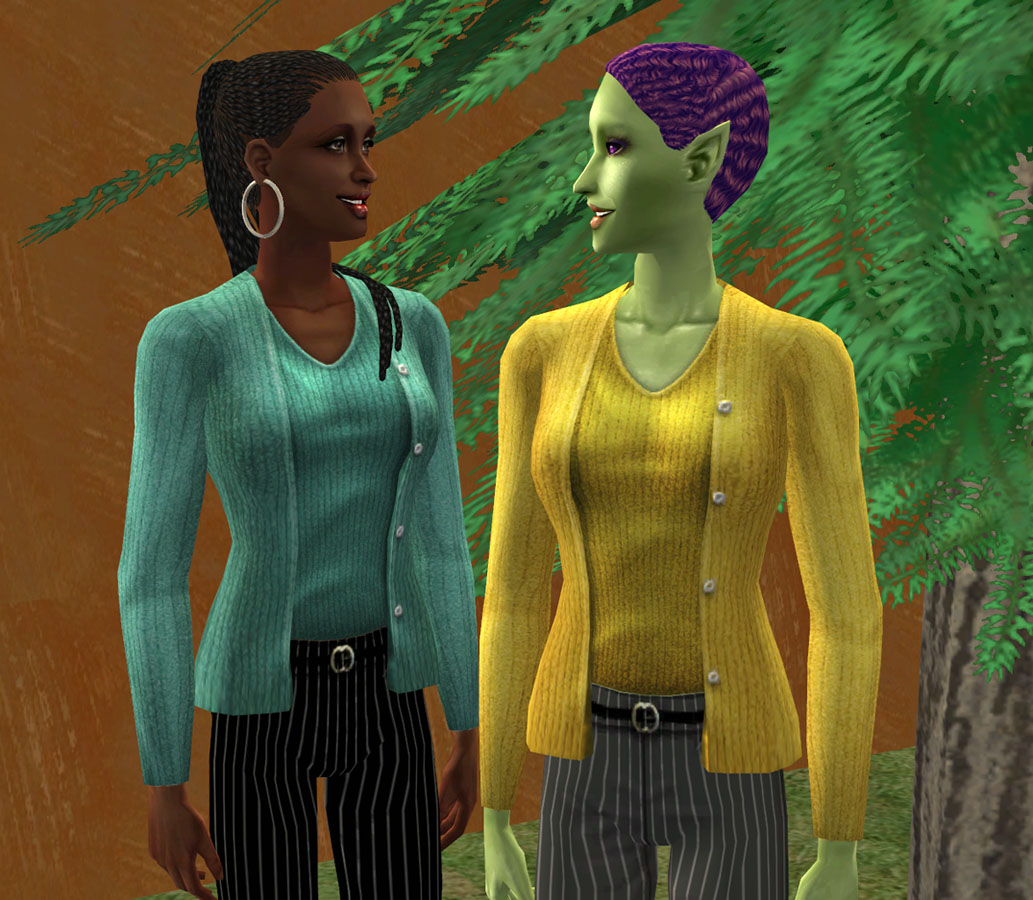
 Another Lost & Found Item - two found colors of the Ladies SweaterSet.
 Another Lost & Found Item - two found colors of the Ladies SweaterSet.
MTS has all free content, all the time. Donate to help keep it running.
SCREENSHOTS

2Sweaters-FULL.jpg - width=696 height=1024
2Sweaters-CLOSE.jpg - width=1033 height=900
EF_SweaterSetBS.jpg - width=793 height=557
Will be with your Basegame tops - without the custom content star.
Uploaded: 6th Apr 2011 at 12:08 AM
Updated: 7th Apr 2011 at 2:31 PM
Updated: 7th Apr 2011 at 2:31 PM
I'll tell you of at least two people who knew about these: foxcowpatt and jemmunoone. They both requested these on my L&F: EF Front Button blouse in Lavender thread. Thank you both for alerting me to these - I really like the green/turquoise one!
Here are Uzuri and Margaux, they went shopping together - can you tell? When they heard about these great new finds, they just couldn't wait to try them on. I think they liked them.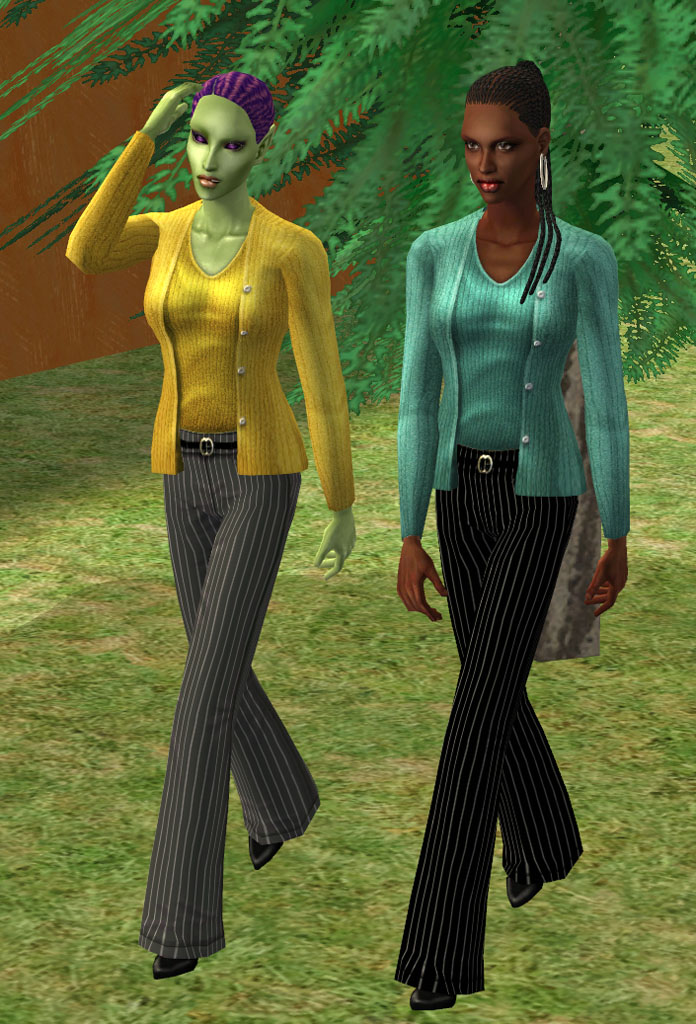
The yellow sweater Uzuri is wearing is a very BOLD yellow - not for the faint of heart. Margaux chose the more subdued green version. Well, the tag said green, but she and I both agree it's more of a turquoise than anything.
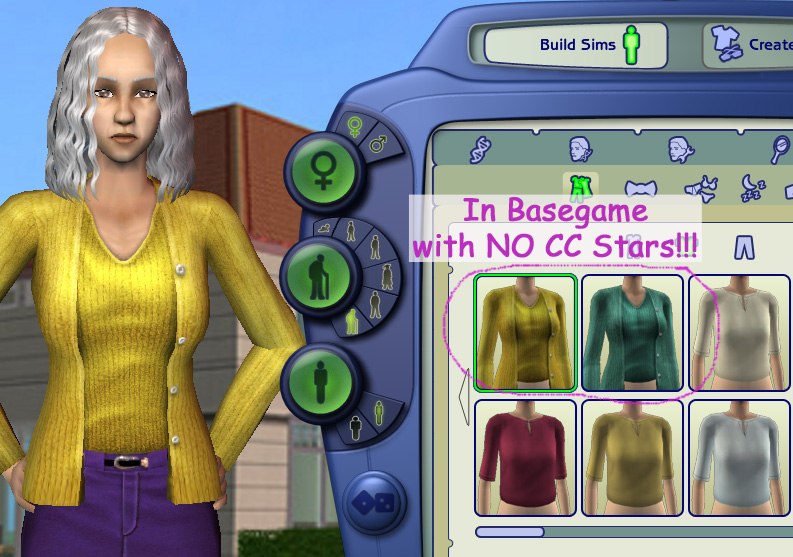
Here's a close-up: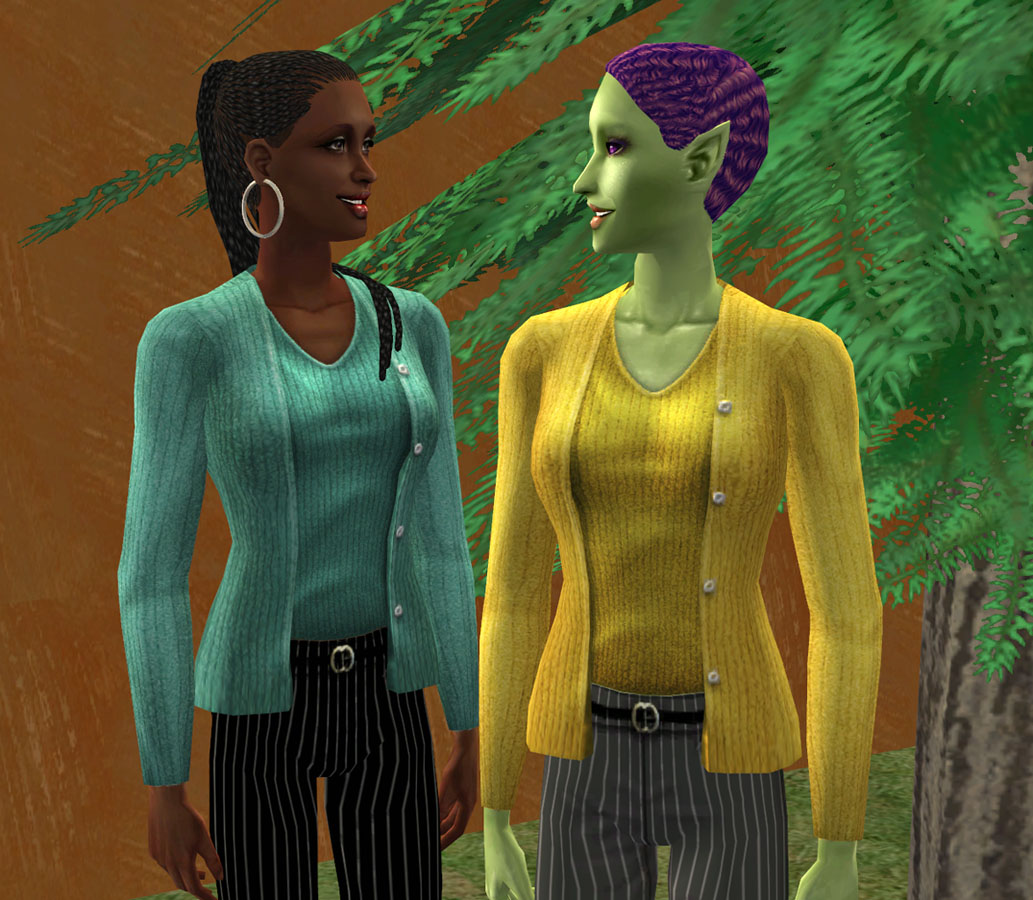
These use a base-game mesh, so no mesh required.
The textures are all EAxis. I just extracted them. (There weren't enough resources to texture reference them, so I made re-colors instead. Easier to do too!)
They will be found in the 'Tops' section of your catalog with the other basegame tops (though probably not next to their matching counterparts - don't ask!)
They are townified, and will not have the Custom Content Star. (See Body Shop picture below)
There are two colors and all three adult age groups (YA/AF/EF) - the downloads are grouped by color; one for the yellow sweater and one for the turquoise (ahem, green - silly Maxis! )
)
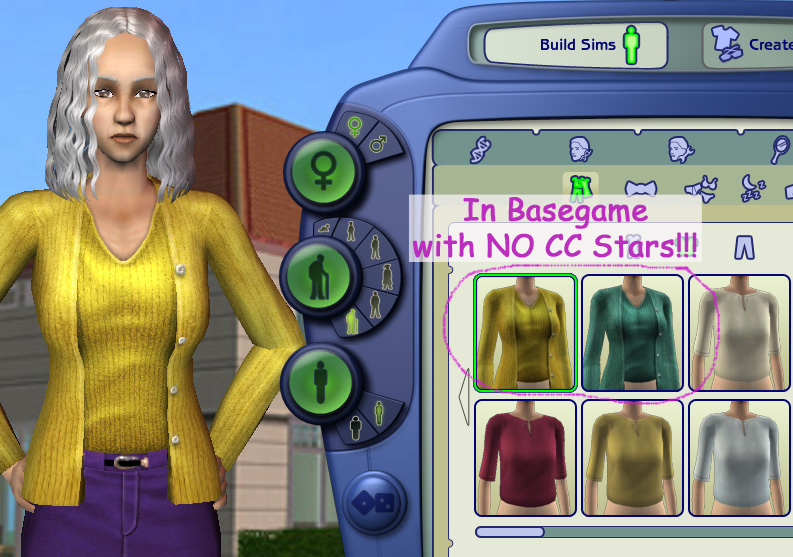
Both are wearing Striped Pants by Aszek with DEFAULT Replacement af_WideJeans by CatOfEvilGenius
FYI: I highly recommend Think...SPRING! Simple Sweater Set by Freesimmy21 - the Defaulted colors are much nicer than Maxis (IMHO) and she's got one that actually is green.
Oh... and the Golden Brown textured concrete wall in the background can be found here.
"Thankses" are always appreciated! You know where the button is...*wink, wink - nudge, nudge!*
Additional Credits:
Thank you to foxcowpatt and jemmunoone for finding these.
And to CatOfEvilGenius for teaching me so much! I went back to all my old notes for these...
MTS2 for a pixel home
And SimPE.
Here are Uzuri and Margaux, they went shopping together - can you tell? When they heard about these great new finds, they just couldn't wait to try them on. I think they liked them.
The yellow sweater Uzuri is wearing is a very BOLD yellow - not for the faint of heart. Margaux chose the more subdued green version. Well, the tag said green, but she and I both agree it's more of a turquoise than anything.
Here's a close-up:
These use a base-game mesh, so no mesh required.
The textures are all EAxis. I just extracted them. (There weren't enough resources to texture reference them, so I made re-colors instead. Easier to do too!)
They will be found in the 'Tops' section of your catalog with the other basegame tops (though probably not next to their matching counterparts -
 don't ask!)
They are townified, and will not have the Custom Content Star. (See Body Shop picture below)
There are two colors and all three adult age groups (YA/AF/EF) - the downloads are grouped by color; one for the yellow sweater and one for the turquoise (ahem, green - silly Maxis!
 )
) Model credits:
Margaux:
Skin = Idolatry of Flesh - Dark by HP
Hair = ThinBraidsPonytail by Nouk
Eyes = Adoring Eyes by DragonMandy
Brows = Thin Natural - Steel by Alkaloid
Eyeshadow = Eyelights - Twilight by Bruno; defaulted by me
Liner = LaFeme 03 by DragonMandy
Lips = Indus - Red by Curious B with my LipGloss Overlay
Earrings = Silver Hoops by Alkaloid
Uzuri:
Skin = Sparkle & Shine by Astiees
Hair = Fingerwaves - purple by TLMeyn
Eyes = Axiom Eyes by TimeSynth Azrael - Thank you, Almighty Hat for the link info!
Eyeshadow = Eyelights - Full Audience by Bruno; defaulted by me
Liner = Kajal Liner by Bruno
Lashes = Asian #4 by Bruno
Lips = Indus - Poppy by Curious B with my LipGloss Overlay
Margaux:
Skin = Idolatry of Flesh - Dark by HP
Hair = ThinBraidsPonytail by Nouk
Eyes = Adoring Eyes by DragonMandy
Brows = Thin Natural - Steel by Alkaloid
Eyeshadow = Eyelights - Twilight by Bruno; defaulted by me
Liner = LaFeme 03 by DragonMandy
Lips = Indus - Red by Curious B with my LipGloss Overlay
Earrings = Silver Hoops by Alkaloid
Uzuri:
Skin = Sparkle & Shine by Astiees
Hair = Fingerwaves - purple by TLMeyn
Eyes = Axiom Eyes by TimeSynth Azrael - Thank you, Almighty Hat for the link info!
Eyeshadow = Eyelights - Full Audience by Bruno; defaulted by me
Liner = Kajal Liner by Bruno
Lashes = Asian #4 by Bruno
Lips = Indus - Poppy by Curious B with my LipGloss Overlay
Both are wearing Striped Pants by Aszek with DEFAULT Replacement af_WideJeans by CatOfEvilGenius
FYI: I highly recommend Think...SPRING! Simple Sweater Set by Freesimmy21 - the Defaulted colors are much nicer than Maxis (IMHO) and she's got one that actually is green.

Oh... and the Golden Brown textured concrete wall in the background can be found here.

"Thankses" are always appreciated! You know where the button is...*wink, wink - nudge, nudge!*
Additional Credits:
Thank you to foxcowpatt and jemmunoone for finding these.
And to CatOfEvilGenius for teaching me so much! I went back to all my old notes for these...
MTS2 for a pixel home
And SimPE.
This is a Maxis Recolour which means that it is a recolour of an item that already exists in your game. Please check the Pack requirements to see which game pack it recolours.
| Filename | Size | Downloads | Date | |||||
|
SweaterSet-Yellow_RESTORED.rar
| Lost & Found Basegame SweaterSet for Adults, Young Adults, and Elders - in Yellow
Size: 689.6 KB · Downloads: 3,247 · 6th Apr 2011 |
689.6 KB | 3,247 | 6th Apr 2011 | |||||
|
SweaterSet-Green_RESTORED.rar
| Lost & Found Basegame SweaterSet for Adults, Young Adults, and Elders - in Green (well, Turquoise actually)
Size: 667.4 KB · Downloads: 3,342 · 6th Apr 2011 |
667.4 KB | 3,342 | 6th Apr 2011 | |||||
| For a detailed look at individual files, see the Information tab. | ||||||||
Key:
- - File was updated after upload was posted
Install Instructions
Basic Download and Install Instructions:
1. Download: Click the download link to save the .rar or .zip file(s) to your computer.
2. Extract the zip, rar, or 7z file.
3. Place in Downloads Folder: Cut and paste the .package file(s) into your Downloads folder:
1. Download: Click the download link to save the .rar or .zip file(s) to your computer.
2. Extract the zip, rar, or 7z file.
3. Place in Downloads Folder: Cut and paste the .package file(s) into your Downloads folder:
- Origin (Ultimate Collection): Users\(Current User Account)\Documents\EA Games\The Sims™ 2 Ultimate Collection\Downloads\
- Non-Origin, Windows Vista/7/8/10: Users\(Current User Account)\Documents\EA Games\The Sims 2\Downloads\
- Non-Origin, Windows XP: Documents and Settings\(Current User Account)\My Documents\EA Games\The Sims 2\Downloads\
- Mac: Users\(Current User Account)\Documents\EA Games\The Sims 2\Downloads
- Mac x64: /Library/Containers/com.aspyr.sims2.appstore/Data/Library/Application Support/Aspyr/The Sims 2/Downloads
- For a full, complete guide to downloading complete with pictures and more information, see: Game Help: Downloading for Fracking Idiots.
- Custom content not showing up in the game? See: Game Help: Getting Custom Content to Show Up.
- If you don't have a Downloads folder, just make one. See instructions at: Game Help: No Downloads Folder.
Also Thanked - Users who thanked this download also thanked:
Packs Needed
None, this is Sims 2 base game compatible!
Other Information
Age:
– Young Adult
– Adult
– Elder
Gender:
– Female
Clothing Type:
– Everyday
Clothing Style:
– No Style
: None of the below styles
Other Type:
– Not Applicable
Maxis Flags:
– Maxis Fixed
Outfit Type:
– Top
Tags
About Me
I mostly "build" - houses, apartments, recreational, and community lots - but, I also create walls (and murals), floors, terrain paint, and various other recolors. And I've written a few tutorials too. :luff: