
 Sign in to Mod The Sims
 Apocalyptic Effects, Trashamatic Recolours & Decorative Junk
 Apocalyptic Effects, Trashamatic Recolours & Decorative Junk
MTS has all free content, all the time. Donate to help keep it running.
SCREENSHOTS
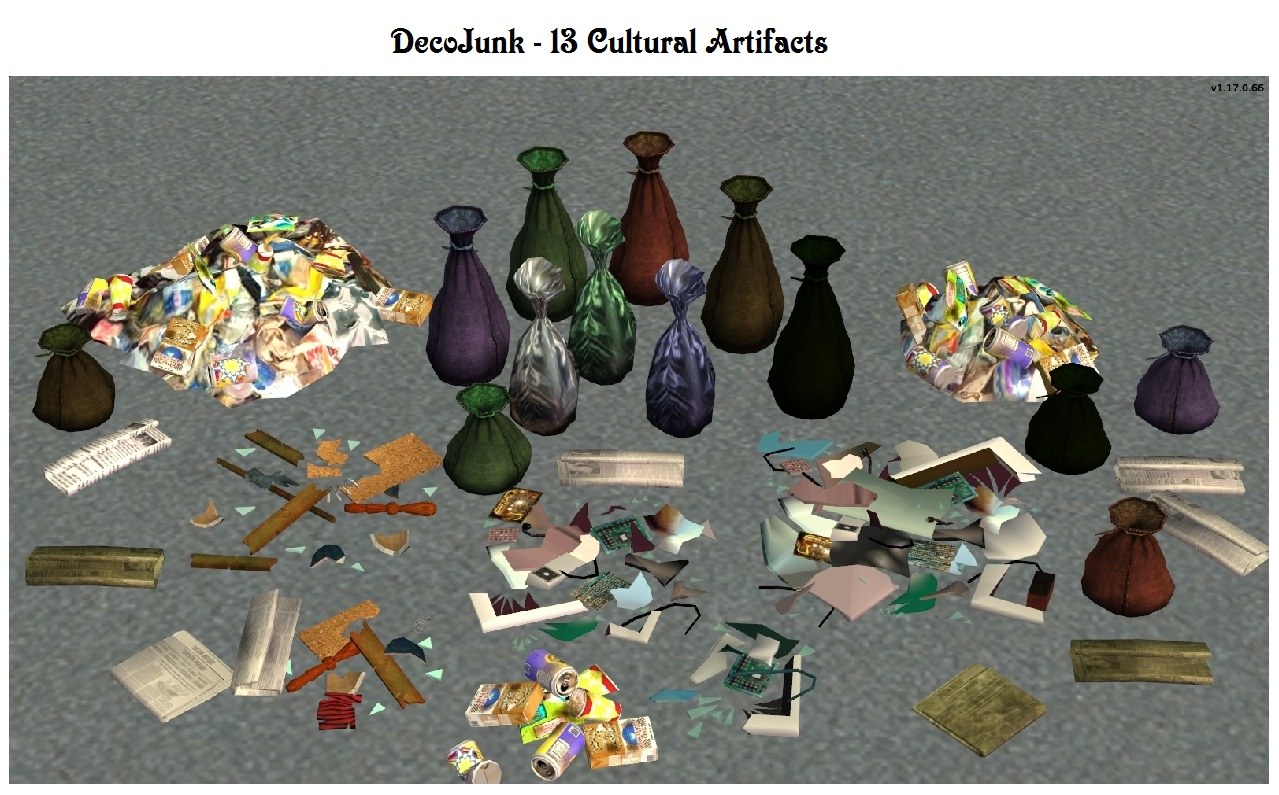
CulturalArtifacts13.jpg - width=1279 height=795
Basegame Decorative Junk
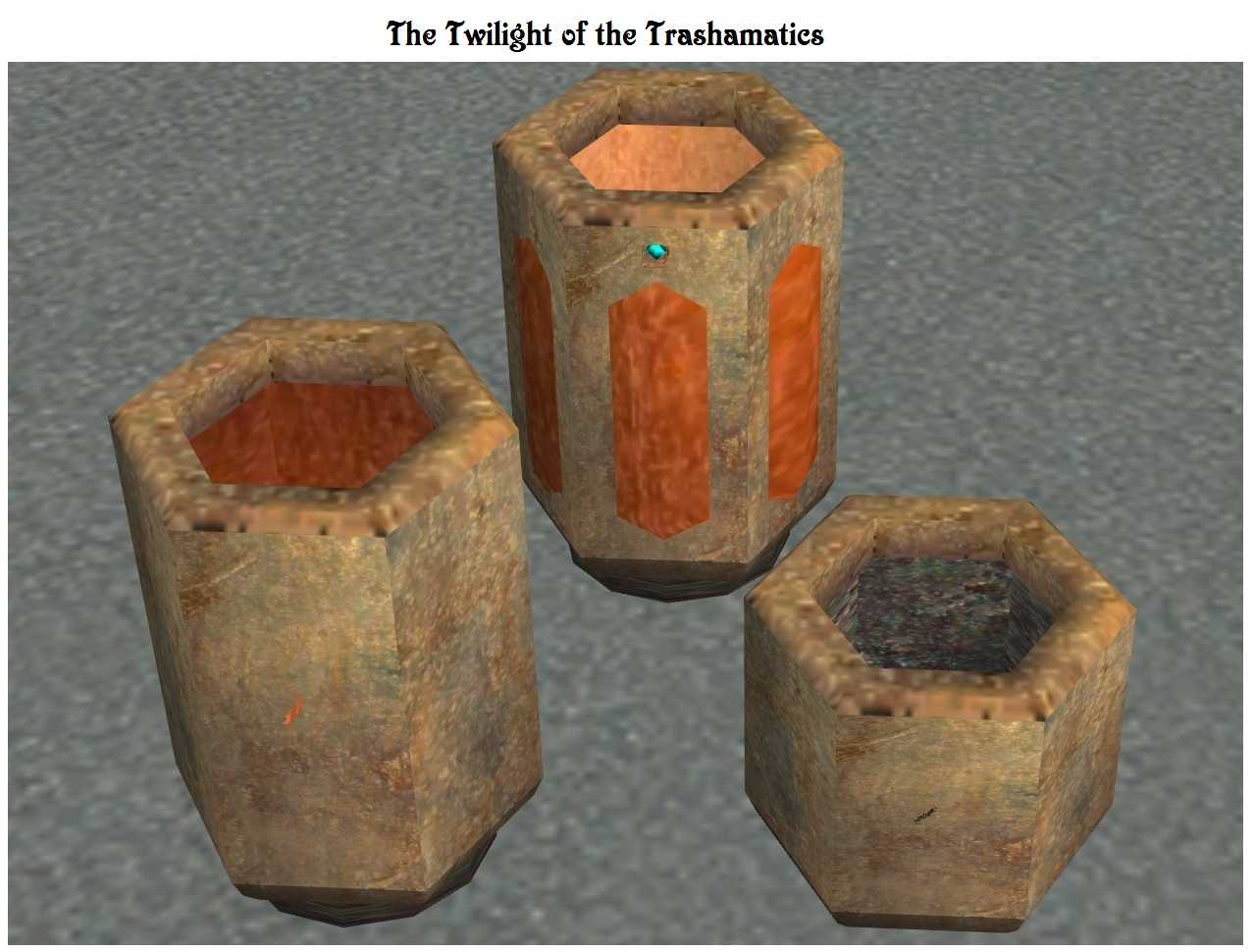
TwilightTrashamatic.jpg - width=1278 height=970
Rusty Trashamatic Recolours
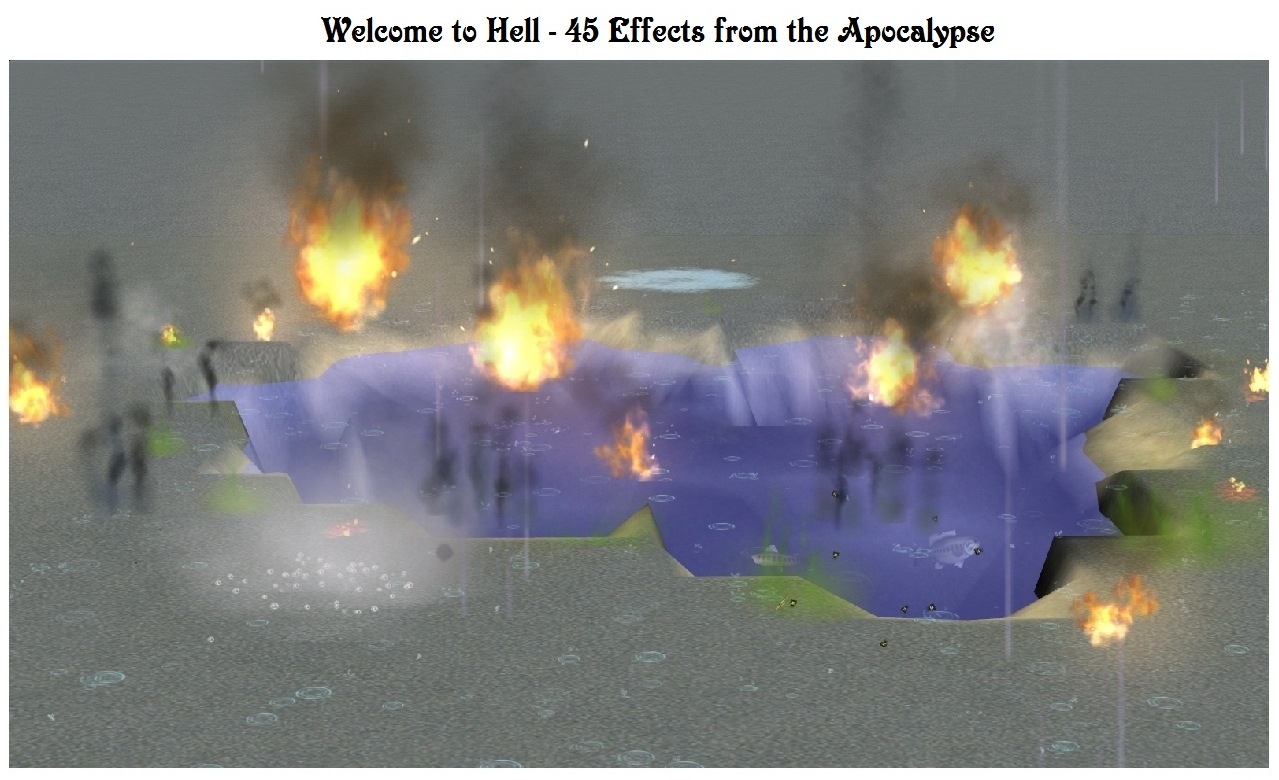
WelcomeToHell.jpg - width=1279 height=780
45 Basegame Effects
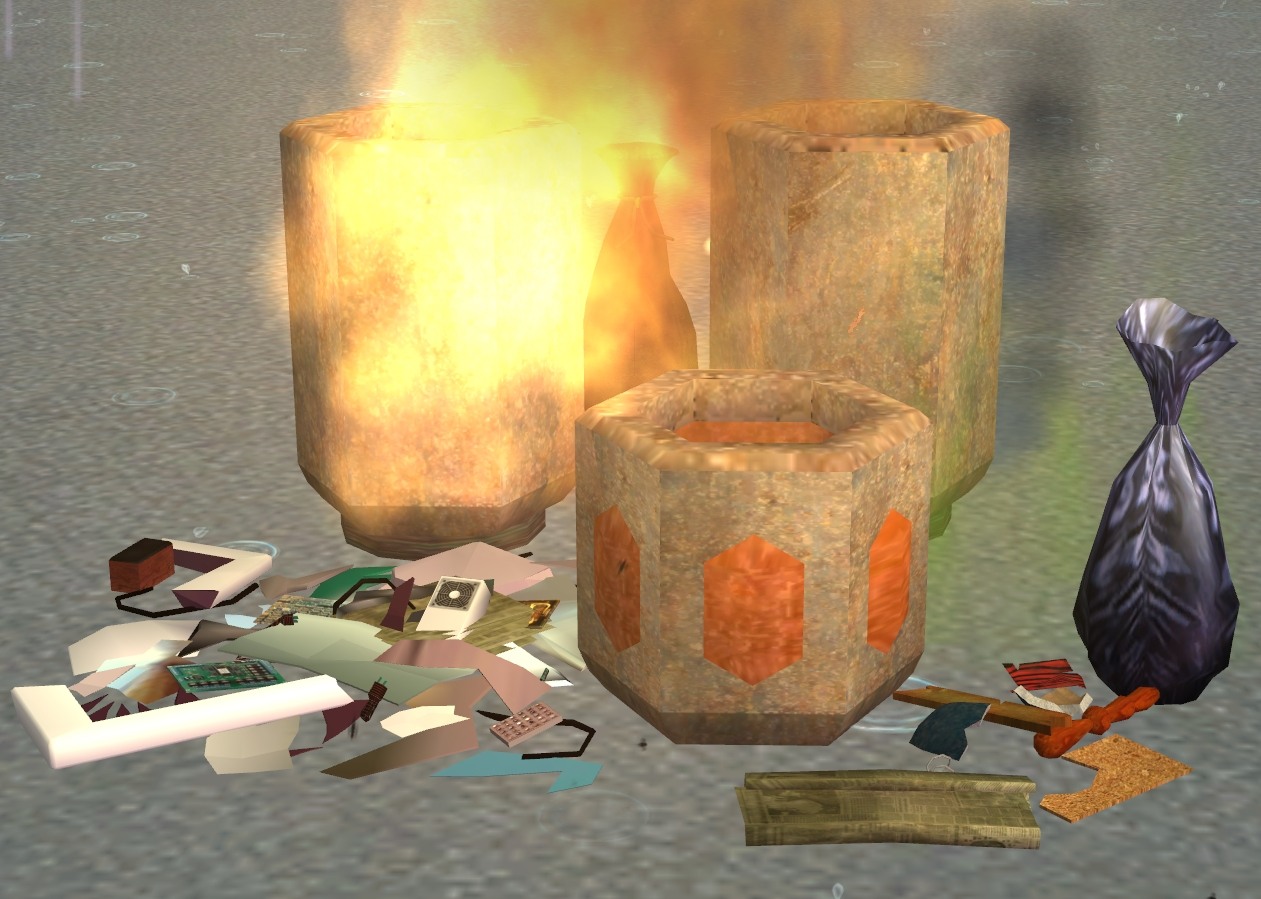
Sims2Apocalypse.jpg - width=1261 height=899
Sims 2 Apocalypse
Picked Upload!
This is a picked upload! It showcases some of the best talent and creativity available on MTS and in the community.

Created by Sophie-David
Uploaded: 31st Aug 2011 at 6:17 PM
Updated: 5th Apr 2016 at 11:37 PM - Posted the View Many bugfix.
Updated: 5th Apr 2016 at 11:37 PM - Posted the View Many bugfix.
Title: Apocalyptic Effects, Trashamatic Recolours & Decorative Junk
View Many Bugfix: Sept 30, 2013
The Decorative Junk items were causing a crash to the desktop, but only in those cases where Nightlife was the only EP installed. This release corrects the Nightlife problems, fixes the occasional jump bugs during "View Many", and now enables "View Many" if Mansions & Gardens is installed (even if FreeTime or Apartment Life are not available).
Stinky Skunk Bugfix: June 4, 2013
Thanks to the bug reports from nooobody and gazania concerning the Down from the 'Hood effects, I have posted a similar update for all the effects files in this archive so that Stinky Skunk no longer has a jump bug when the animal appears on a lot where an effect is in use. Please download sdEffectsBG.zip for the fix.
In addition this update removes the OMSP feature from these effects, which users had found annoying because of the tendency for the effects tiles to collect unwanted objects. And lastly, the effects tiles now reappear in buy and build mode to make them easier to find (but if you never want to see the tiles just use the built-in invisible recolours).
October 5, 2011 Update
Since not all players use collection files - myself included - I have now differentiated the effects according to price: Fire §9, Smoke §10, Stink §11, and Miscellaneous §12. Please re-download sdEffectsBG.zip for this update.
October 1, 2011 Updates
1) In the original upload the Small Adult Fire was erroneously given the filename AdultFireMedium.package. This update corrects the Small Adult Fire's filename to AdultFireSmall.package while maintaining its original GUID. The replacement AdultFireMedium.package now invokes the Medium Size Adult Fire effect. Please download sdEffectsBG.zip for these updates.
2) Collection files are now available to organize the effects into Fire, Smoke, Stink, and Miscellaneous. I have also included a collection for the Decorative Junk. Please be sure to select the appropriate version: either PrePets (including Basegame only) or PetsAndLater.
The Story
The overnight appearance of Trashamatics all over the neighbourhood was the first tangible and irrefutable sign that aliens really do walk among us. Some believed that Utopia had come, but time would show that we struggled futilely Against the Fall of Night. Not that the Trashamatics were themselves to blame, but it was our own unscrupulous modifications to them that brought about our downfall. With more and more Sims using the "Custom" models to avoid paying bills, doing homework or completing college assignments, society itself began to fall apart. The economy collapsed, the younger generations grew up in ignorance, and the alien council rejected our application to join the Galactic Federation in disgust. We were abandoned to live through the consequences of our own greed and stupidity.
This post-apocalyptic world is filled with the tokens of anarchy. Fires burn uncontrollably, smoke, stench and trash fill the landscape - and even the Trashamatics are showing signs of wear and neglect.
Purpose
1) To make45 46 Sims 2 built-in special effects readily available to all, for use in apolcalytpic and disaster scenarios, as well as in more routine ways.
2) To produce four appropriately weathered Trashamatic recolours.
3) To supply 13 decorative junk objects, which can be viewed, critiqued or disposed of.
General Description
All effects and decorative junk have the following features: they may be placed on locked tiles and beach tiles, may be struck by lighting but are non-flammable, cannot be stolen or repossessed, and they remain in place if the lot is sold. For maximum flexibility, these items are flagged to allow placement on all types of surfaces.
Although some of them may look dangerous or unpleasant, the Effects and Decorative Junk have almost no affect on Sims or other objects. The fire is completely harmless and does not cause panic, and all effects have a slightly positive affect on environmental scores. Note that Sims may come to see a newly placed effect or object, as they routinely do when new items are placed.
The Effects and Decorative Junk are found in the catalogue under Decorative/Misc. Fire Effects cost §9 each, Smoke Effects §10 each, Stink Effects §11 each, Miscellaneous Effects §12 each, and Decorative Junk costs §2 each.
The catalogue description indicates whether a particular Effect or Junk object is "Sinkable" or "Floatable". The sinkable items may be placed underwater or under the ocean, whereas the floatable ones are designed to rest on the water surface. The sinkable items are also height adjustable if Apartment Life or Mansions & Gardens is installed (because of game engine limitations, floatable objects cannot also be height adjustable). I have tried to select the items so that there is a mix of sinkable versus floatable for each type.
The Trashamatic recolours are for use with the any of the six Trashamatic Garbage Disposal/Dishwasher models posted here.
Note: please use caution when placing Effects, as they may cause slowdowns on older machines, or in large and complex lots. Fires are particularly resource hungry. When using effects, less is more.
Terms of Use
You may include the Effects, Decorative Junk and Trashamatic recolours in any uploaded lots, whether for free or pay. Please include a credit and link to this page. It would be nice if you sent me a PM with a link to your uploaded creation, but this is not required.
Credits:
GIMP 2, IrfranView, Microsoft Paint and Photo Editor for graphics editing, conversion, processing, sizing, and labeling
Milkshape 3D and Ultimate Unwrap3D Pro, for 3D modeling and mapping
Numenor's AnyGameStarter, for development and testing
SimPE, PJSE, and CEP for Sims 2 object creation
Against the Fall of Night is a story by Arthur C. Clarke, later expanded as The City and the Stars. I found it a beautiful and poignant tale - hightly recommended!
Polygon Counts:
All Effects Tiles: 2 faces, 4 vertices
All DecoJunk has identical or slightly less polys than the EA originals
Burglar Bag, Large: 1214 faces, 708 vertices
Burglar Bag, Small: 1214 faces, 708 vertices
Large Electronic Trash: 1666 faces, 2449 vertices
Large Trash Pile: 1340 faces, 1523 vertices
Medium Electronic Trash: 1049 faces, 1621 vertices
Medium Furniture Trash: 1168 faces, 1420 vertices
Medium Trash Pile: 1260 faces, 1373 vertices
Newspaper, Flat: 1254 faces, 882 vertices
Newspaper, Folded: 86 faces, 58 vertices
Small Electronic Trash: 452 faces, 698 vertices
Small Furniture Trash: 728 faces, 732 vertices
Small Trash Pile: 772 faces, 927 vertices
Trash Bag: 264 faces, 173 vertices
View Many Bugfix: Sept 30, 2013
The Decorative Junk items were causing a crash to the desktop, but only in those cases where Nightlife was the only EP installed. This release corrects the Nightlife problems, fixes the occasional jump bugs during "View Many", and now enables "View Many" if Mansions & Gardens is installed (even if FreeTime or Apartment Life are not available).
Stinky Skunk Bugfix: June 4, 2013
Thanks to the bug reports from nooobody and gazania concerning the Down from the 'Hood effects, I have posted a similar update for all the effects files in this archive so that Stinky Skunk no longer has a jump bug when the animal appears on a lot where an effect is in use. Please download sdEffectsBG.zip for the fix.
In addition this update removes the OMSP feature from these effects, which users had found annoying because of the tendency for the effects tiles to collect unwanted objects. And lastly, the effects tiles now reappear in buy and build mode to make them easier to find (but if you never want to see the tiles just use the built-in invisible recolours).
October 5, 2011 Update
Since not all players use collection files - myself included - I have now differentiated the effects according to price: Fire §9, Smoke §10, Stink §11, and Miscellaneous §12. Please re-download sdEffectsBG.zip for this update.
October 1, 2011 Updates
1) In the original upload the Small Adult Fire was erroneously given the filename AdultFireMedium.package. This update corrects the Small Adult Fire's filename to AdultFireSmall.package while maintaining its original GUID. The replacement AdultFireMedium.package now invokes the Medium Size Adult Fire effect. Please download sdEffectsBG.zip for these updates.
2) Collection files are now available to organize the effects into Fire, Smoke, Stink, and Miscellaneous. I have also included a collection for the Decorative Junk. Please be sure to select the appropriate version: either PrePets (including Basegame only) or PetsAndLater.
The Story
The overnight appearance of Trashamatics all over the neighbourhood was the first tangible and irrefutable sign that aliens really do walk among us. Some believed that Utopia had come, but time would show that we struggled futilely Against the Fall of Night. Not that the Trashamatics were themselves to blame, but it was our own unscrupulous modifications to them that brought about our downfall. With more and more Sims using the "Custom" models to avoid paying bills, doing homework or completing college assignments, society itself began to fall apart. The economy collapsed, the younger generations grew up in ignorance, and the alien council rejected our application to join the Galactic Federation in disgust. We were abandoned to live through the consequences of our own greed and stupidity.
This post-apocalyptic world is filled with the tokens of anarchy. Fires burn uncontrollably, smoke, stench and trash fill the landscape - and even the Trashamatics are showing signs of wear and neglect.
Purpose
1) To make
2) To produce four appropriately weathered Trashamatic recolours.
3) To supply 13 decorative junk objects, which can be viewed, critiqued or disposed of.
General Description
All effects and decorative junk have the following features: they may be placed on locked tiles and beach tiles, may be struck by lighting but are non-flammable, cannot be stolen or repossessed, and they remain in place if the lot is sold. For maximum flexibility, these items are flagged to allow placement on all types of surfaces.
Although some of them may look dangerous or unpleasant, the Effects and Decorative Junk have almost no affect on Sims or other objects. The fire is completely harmless and does not cause panic, and all effects have a slightly positive affect on environmental scores. Note that Sims may come to see a newly placed effect or object, as they routinely do when new items are placed.
The Effects and Decorative Junk are found in the catalogue under Decorative/Misc. Fire Effects cost §9 each, Smoke Effects §10 each, Stink Effects §11 each, Miscellaneous Effects §12 each, and Decorative Junk costs §2 each.
The catalogue description indicates whether a particular Effect or Junk object is "Sinkable" or "Floatable". The sinkable items may be placed underwater or under the ocean, whereas the floatable ones are designed to rest on the water surface. The sinkable items are also height adjustable if Apartment Life or Mansions & Gardens is installed (because of game engine limitations, floatable objects cannot also be height adjustable). I have tried to select the items so that there is a mix of sinkable versus floatable for each type.
The Trashamatic recolours are for use with the any of the six Trashamatic Garbage Disposal/Dishwasher models posted here.
How To Use the Effects
The Effects can be particularly useful when placed with objects that would otherwise be inert, such as lighting a fire in Buntah's Forge or StephSim's Steam Engine, putting flies and stink in a ditch or swamp, or even placing a perfectly safe and eternal glow in an EA fireplace.
When first placed in buy mode the Effects will appear as a square coloured tile. Once in run mode the tile will disappear and the effect itself will begin to be displayed. If you decide to relocate the Effect with the mouse, the tile will reappear when you pick it up and stay that way until the game returns to run mode. If you prefer, you can select the included invisible recolour so that the tile is never displayed at all.
The basegame rain is a unique case, in that it affects the whole lot - inside and out - regardless of where you put the tile. For this reason I supplied it with a menu option to turn the rain off or on, but by default it is always on. Because you may need to use the menu option, this is the only tile that remains visible when the game is running, although you may colour the tile invisible if you prefer. If you do want to leave the tile bright yellow it could be hidden in a discreet but accessible place, such between the foundation walls, in unusable attic space, or behind a tree. I suspect this effect wouid be of most use in lots that are predominantly outside, such as a rainforest park.
The Effects can be particularly useful when placed with objects that would otherwise be inert, such as lighting a fire in Buntah's Forge or StephSim's Steam Engine, putting flies and stink in a ditch or swamp, or even placing a perfectly safe and eternal glow in an EA fireplace.
When first placed in buy mode the Effects will appear as a square coloured tile. Once in run mode the tile will disappear and the effect itself will begin to be displayed. If you decide to relocate the Effect with the mouse, the tile will reappear when you pick it up and stay that way until the game returns to run mode. If you prefer, you can select the included invisible recolour so that the tile is never displayed at all.
The basegame rain is a unique case, in that it affects the whole lot - inside and out - regardless of where you put the tile. For this reason I supplied it with a menu option to turn the rain off or on, but by default it is always on. Because you may need to use the menu option, this is the only tile that remains visible when the game is running, although you may colour the tile invisible if you prefer. If you do want to leave the tile bright yellow it could be hidden in a discreet but accessible place, such between the foundation walls, in unusable attic space, or behind a tree. I suspect this effect wouid be of most use in lots that are predominantly outside, such as a rainforest park.
Note: please use caution when placing Effects, as they may cause slowdowns on older machines, or in large and complex lots. Fires are particularly resource hungry. When using effects, less is more.
Complete List of Effects
AdultFireMedium, AdultFireSmall, AshPileSmoke, AshPileSmokeSim, AshPileSmokeSmall, AshSmokeThin, BbqCoalsFlame, BbqCoalsFlameSmall, Bees, BeesMoths, BlackDeathSmoke, BlackDeathSmokeHeavy, BodyOdour, ChildFireSmall, ChimneySmoke, DiaperStink, DiningChairStink, FireHuge, FireLarge, FireMedium, FireModerate, FireProdigious, FireSmall, FireTiny, FireplaceFire, Flies, FoodStink, HearthFire, HotTubSunkenSteam, HotTubWildFroth, LampSmoke, Moths, PizzaSteam, RainEverywhere, SloppySimFlies, StoveSmoke, TailPipeSmokeHeavy, TailPipeSmokeLight, ToiletStink, TrashCanStink, TrashStinkLarge, TrashStinkMedium, TrashStinkSmall, WhiteDeathSmoke, WhiteDeathSmokeEnergized, WhiteGhostSmoke
AdultFireMedium, AdultFireSmall, AshPileSmoke, AshPileSmokeSim, AshPileSmokeSmall, AshSmokeThin, BbqCoalsFlame, BbqCoalsFlameSmall, Bees, BeesMoths, BlackDeathSmoke, BlackDeathSmokeHeavy, BodyOdour, ChildFireSmall, ChimneySmoke, DiaperStink, DiningChairStink, FireHuge, FireLarge, FireMedium, FireModerate, FireProdigious, FireSmall, FireTiny, FireplaceFire, Flies, FoodStink, HearthFire, HotTubSunkenSteam, HotTubWildFroth, LampSmoke, Moths, PizzaSteam, RainEverywhere, SloppySimFlies, StoveSmoke, TailPipeSmokeHeavy, TailPipeSmokeLight, ToiletStink, TrashCanStink, TrashStinkLarge, TrashStinkMedium, TrashStinkSmall, WhiteDeathSmoke, WhiteDeathSmokeEnergized, WhiteGhostSmoke
Notes on Viewable Objects
Autonomous viewing of decorative objects can be quite annoying, so Sims will not autonomously view any of this decorative junk unless a player directs a Sim to do so. However, once you ask a Sim to View or Critique an object, the object may then be viewed autonomously by any other Sim on the lot. If no Sim views the object for 30 to 36 game hours, the object will no longer be viewable autonomously. Alternately, the Reset Autonomy button can be used to disable autonomous viewing at any time.
For very serious Sims - those with a Playful score of one or less - a "Critique" option will appear instead of "View". If the object is viewed or critiqued enough an "Easter egg" will be revealed.
Critiquing or Viewing increases Fun and builds Skill at a rate of 2/3 that of the Painting Easel. Once Fun is maximized the Sim will stop Viewing the object. Note that the more serious Sims will spend longer with a Viewable object than fun lovers.
If FreeTime, or Apartment Life is installed, critiquing or viewing will increase Enthusiasm, and "View Many" will also be available, even on residential lots ("View Many" causes Sims to browse several decorative objects, one after the other). If the "View Many" Anywhere patch is installed, then the appreciation of Decorative Junk will be combined with that of other decorative objects. The Sophie-David viewable objects will typically be favoured by Sims, because any time spent with EA decorative objects will not be skill building. "View Many" is particularly useful for highly playful Sims because they tend to have short attention spans.
Selecting "View Many" on an object will not enable or affect autonomous viewing. However, an object which is already enabled for autonomous viewing is also enabled for autonomous "View Many".
Several different skill and enthusiasm combinations are provided by these items - please see the individual catalogue descriptions to see which object does what.
Note that since these objects are all linked to basegame accessory textures, most default replacement projects - such as those by Almighty Hat and sunni9676 - will also apply to these objects. In addition, a Sim's thought bubbles displayed during a View or Critique will be updated with default replacements if they are available.
Autonomous viewing of decorative objects can be quite annoying, so Sims will not autonomously view any of this decorative junk unless a player directs a Sim to do so. However, once you ask a Sim to View or Critique an object, the object may then be viewed autonomously by any other Sim on the lot. If no Sim views the object for 30 to 36 game hours, the object will no longer be viewable autonomously. Alternately, the Reset Autonomy button can be used to disable autonomous viewing at any time.
For very serious Sims - those with a Playful score of one or less - a "Critique" option will appear instead of "View". If the object is viewed or critiqued enough an "Easter egg" will be revealed.
Critiquing or Viewing increases Fun and builds Skill at a rate of 2/3 that of the Painting Easel. Once Fun is maximized the Sim will stop Viewing the object. Note that the more serious Sims will spend longer with a Viewable object than fun lovers.
If FreeTime, or Apartment Life is installed, critiquing or viewing will increase Enthusiasm, and "View Many" will also be available, even on residential lots ("View Many" causes Sims to browse several decorative objects, one after the other). If the "View Many" Anywhere patch is installed, then the appreciation of Decorative Junk will be combined with that of other decorative objects. The Sophie-David viewable objects will typically be favoured by Sims, because any time spent with EA decorative objects will not be skill building. "View Many" is particularly useful for highly playful Sims because they tend to have short attention spans.
Selecting "View Many" on an object will not enable or affect autonomous viewing. However, an object which is already enabled for autonomous viewing is also enabled for autonomous "View Many".
Several different skill and enthusiasm combinations are provided by these items - please see the individual catalogue descriptions to see which object does what.
Note that since these objects are all linked to basegame accessory textures, most default replacement projects - such as those by Almighty Hat and sunni9676 - will also apply to these objects. In addition, a Sim's thought bubbles displayed during a View or Critique will be updated with default replacements if they are available.
Complete List of DecoJunk
Flat Newspaper, Folded Newspaper, Large Burglar Bag, Large Electronic Trash, Large Trash Pile, Medium Electronic Trash, Medium Furniture Trash, Medium Trash Pile, Small Burglar Bag, Small Electronic Trash, Small Furniture Trash, Small Trash Pile, Trash Bag.
Flat Newspaper, Folded Newspaper, Large Burglar Bag, Large Electronic Trash, Large Trash Pile, Medium Electronic Trash, Medium Furniture Trash, Medium Trash Pile, Small Burglar Bag, Small Electronic Trash, Small Furniture Trash, Small Trash Pile, Trash Bag.
Terms of Use
You may include the Effects, Decorative Junk and Trashamatic recolours in any uploaded lots, whether for free or pay. Please include a credit and link to this page. It would be nice if you sent me a PM with a link to your uploaded creation, but this is not required.
Credits:
GIMP 2, IrfranView, Microsoft Paint and Photo Editor for graphics editing, conversion, processing, sizing, and labeling
Milkshape 3D and Ultimate Unwrap3D Pro, for 3D modeling and mapping
Numenor's AnyGameStarter, for development and testing
SimPE, PJSE, and CEP for Sims 2 object creation
Against the Fall of Night is a story by Arthur C. Clarke, later expanded as The City and the Stars. I found it a beautiful and poignant tale - hightly recommended!
Polygon Counts:
All Effects Tiles: 2 faces, 4 vertices
All DecoJunk has identical or slightly less polys than the EA originals
Burglar Bag, Large: 1214 faces, 708 vertices
Burglar Bag, Small: 1214 faces, 708 vertices
Large Electronic Trash: 1666 faces, 2449 vertices
Large Trash Pile: 1340 faces, 1523 vertices
Medium Electronic Trash: 1049 faces, 1621 vertices
Medium Furniture Trash: 1168 faces, 1420 vertices
Medium Trash Pile: 1260 faces, 1373 vertices
Newspaper, Flat: 1254 faces, 882 vertices
Newspaper, Folded: 86 faces, 58 vertices
Small Electronic Trash: 452 faces, 698 vertices
Small Furniture Trash: 728 faces, 732 vertices
Small Trash Pile: 772 faces, 927 vertices
Trash Bag: 264 faces, 173 vertices
This is a new mesh, and means that it's a brand new self contained object that usually does not require a specific Pack (although this is possible depending on the type). It may have Recolours hosted on MTS - check below for more information.
| Filename | Size | Downloads | Date | |||||
|
sdCollectionPetsAndLater_Apocalyptic.zip
| Optional Collection File for Pets and Later EPs
Size: 6.2 KB · Downloads: 5,650 · 2nd Oct 2011 |
6.2 KB | 5,650 | 2nd Oct 2011 | |||||
|
sdCollectionPrePets_Apocalyptic.zip
| Optional Collection File for Basegame and any EPs prior to Pets
Size: 12.4 KB · Downloads: 3,456 · 2nd Oct 2011 |
12.4 KB | 3,456 | 2nd Oct 2011 | |||||
|
sdTrashamaticRusty.zip
| Trashamatic Rusty Recolours
Size: 104.6 KB · Downloads: 5,841 · 31st Aug 2011 |
104.6 KB | 5,841 | 31st Aug 2011 | |||||
|
sdEffectsBG.zip
| Basegame Fire, Smoke, Stink & Misc. Effects
Size: 138.5 KB · Downloads: 8,918 · 31st Aug 2011 |
138.5 KB | 8,918 | 31st Aug 2011 | |||||
|
sdDecoJunkBG.zip
| Basegame Decorative Junk
Size: 189.5 KB · Downloads: 8,176 · 31st Aug 2011 |
189.5 KB | 8,176 | 31st Aug 2011 | |||||
| For a detailed look at individual files, see the Information tab. | ||||||||
Key:
- - File was updated after upload was posted
Install Instructions
Basic Download and Install Instructions:
1. Download: Click the download link to save the .rar or .zip file(s) to your computer.
2. Extract the zip, rar, or 7z file.
3. Place in Downloads Folder: Cut and paste the .package file(s) into your Downloads folder:
1. Download: Click the download link to save the .rar or .zip file(s) to your computer.
2. Extract the zip, rar, or 7z file.
3. Place in Downloads Folder: Cut and paste the .package file(s) into your Downloads folder:
- Origin (Ultimate Collection): Users\(Current User Account)\Documents\EA Games\The Sims™ 2 Ultimate Collection\Downloads\
- Non-Origin, Windows Vista/7/8/10: Users\(Current User Account)\Documents\EA Games\The Sims 2\Downloads\
- Non-Origin, Windows XP: Documents and Settings\(Current User Account)\My Documents\EA Games\The Sims 2\Downloads\
- Mac: Users\(Current User Account)\Documents\EA Games\The Sims 2\Downloads
- Mac x64: /Library/Containers/com.aspyr.sims2.appstore/Data/Library/Application Support/Aspyr/The Sims 2/Downloads
- For a full, complete guide to downloading complete with pictures and more information, see: Game Help: Downloading for Fracking Idiots.
- Custom content not showing up in the game? See: Game Help: Getting Custom Content to Show Up.
- If you don't have a Downloads folder, just make one. See instructions at: Game Help: No Downloads Folder.
Recommended
The creator also recommends the following uploads:
21 Lot Based Effects, Down from the 'Hood - This set expands on the Apocalyptic Effects by making several neighbourhood effects available within lots.
17 Magical Effects for Apartment Life
17 Magical Effects for Apartment Life
Also Thanked - Users who thanked this download also thanked:
Packs Needed
None, this is Sims 2 base game compatible!
Other Information
Style:
– Contemporary
– Sci-Fi
: Science Fiction
Room:
– Kitchen
– Living
: Living Room
– Dining
: Dining Room
– Nursery
– Bathroom
– Study
: Study/Office
– Outdoor
Maxis Flags:
– Unlocked
: Unlocked Maxis Content
Tags
More Downloads BETA
Here are some more of my downloads: