
 Sign in to Mod The Sims
 Sims 3 online pharmacy control script, pills, and cabinets
 Sims 3 online pharmacy control script, pills, and cabinets
MTS has all free content, all the time. Donate to help keep it running.
SCREENSHOTS
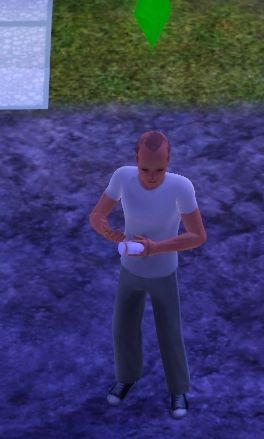
PepPills.jpg - width=264 height=439
Screenshot of "Take Pill" animation.
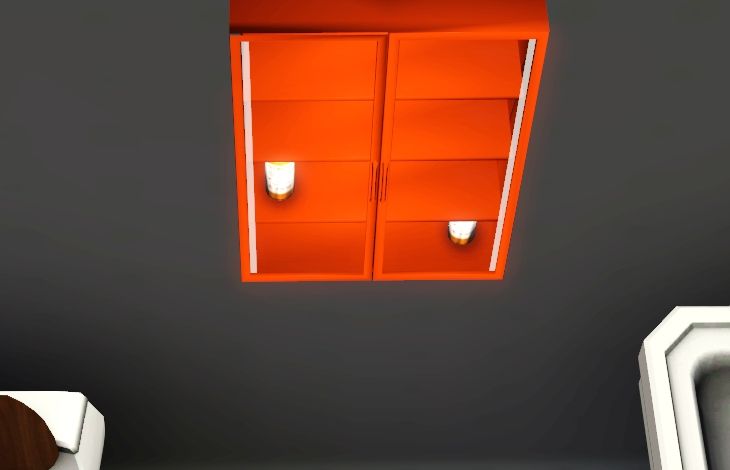
Screenshot-124.jpg - width=730 height=470
Wood preset
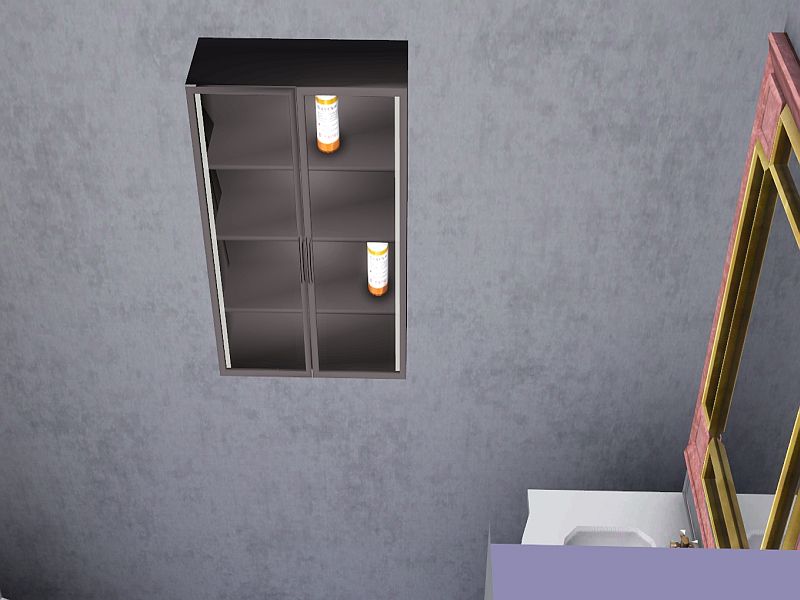
Screenshot-125.jpg - width=800 height=600
Metal preset

Created by lenglel
Uploaded: 26th Sep 2011 at 6:51 AM
Updated: 5th May 2014 at 11:08 PM - adding tiptorial and example pillbottle with self contained script.
Updated: 5th May 2014 at 11:08 PM - adding tiptorial and example pillbottle with self contained script.
may 5th, 2014 back up and running. My sim had a 22 day itchy moodlet from Ani's working bed mod. This inspired me
to create 'Scratchit'. I used the method outlined in the tutorial, so it isn't necessary to change the pillscript package.
Just download the new package and put it in your mods folder. I haven't added any bells and whistles yet. It just
removes the 'itchy' moodlet, if present, and nothing else.
july 25th, 2013 blew up my on-board graphics card. 1.55 patch won't load at all, even without mods. No money for new
card, which would require new monitor. I may as well not buy a new pc while I'm at it. Sorry folks, you're on your own with
this one now.
feb 24th, 2013 added tiptorial and example pillbottle.
april 30th, 2012 added simpatico. be sure to re-download and install LWE_pillscript if you download simpatico.
november 4th, 2011 added more moodlets. re-download and install the LWE_pillscript if you want more moodlets
*** tested with 1.50 patch, works as-is ***
The Pills
Trimasim
Tired of watching your sim sleep? Want to purge their stomach before they enter the eating contest? Give these a try! Based on real-world over-the-counter diet pills. These will lower a sim's hunger motive to make more room for gustatory delights and simultaneously convert their stomach contents to a full energy bar.
 Just make sure their tummy is at least half full, or they have a death flower in their inventory or your attempt to steal a few extra hours for skill-building could turn into a meeting with the grim reaper and a free urn stone!
TrimasimLT
A diluted version of Trimasim, approximately half-strength. Still possible to overdose, just a bit less likely. Eat well, and carry a death flower. You've been warned.
Simnip
Test sims stood rooted to the spot they swallowed this stuff on and acted very strangely. They said it was fun, and observed no ill effects. The scientists that cooked it up, however, had some observations of their own.
Sprinkler Pills
A simnip derivative with longer lasting effects.
Siminex
Our scientists applied reverse osmosis to Trimasim and came up with this stuff. Of course, sims are much too ethical to put it in their date's juice.
Siminaps
Derived from TrimasimLT, it took four doses of this stuff to send our test sims off to dream land.
Simpatico
Gave test sims a four hour 'tranquil' moodlet and a +10 mood boost. ...and they didn't so much as gag. Woo!
LWE9_pillscript_tutorial_example
This is the example pillbottle for the tiptorial. It contains it's own s3sa resource, which extends the main script.
If you already have the pill_script installed, you don't need to re-download it to add this pill type to your game.
Using the pills in live mode
Place pill bottle in sim inventory, if it isn't already there. Click for interactions in the usual way. "Read label" gives a count of the pills remaining. If you drag a pill bottle onto a surface, "Pick Up" will cause the active sim to route to the pill bottle and add it to their inventory. "Take one" causes the sim to take one pill from the bottle. If the "take one" interaction doesn't show up in the menu, the pill bottle is empty and can be sold, much like returning an empty soda bottle for deposit.
The Cabinets
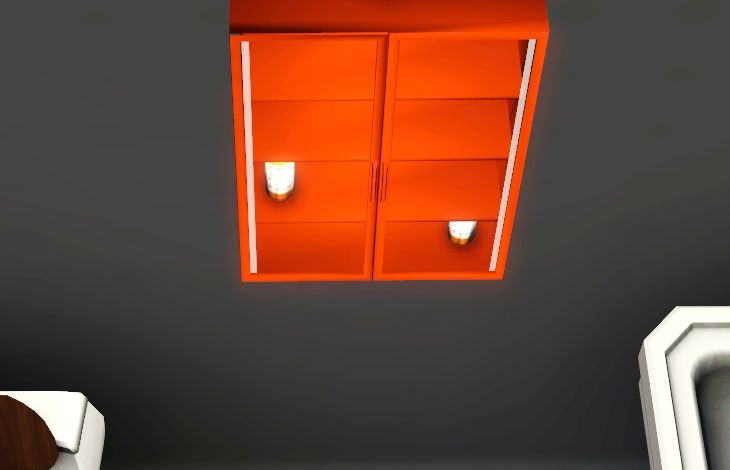
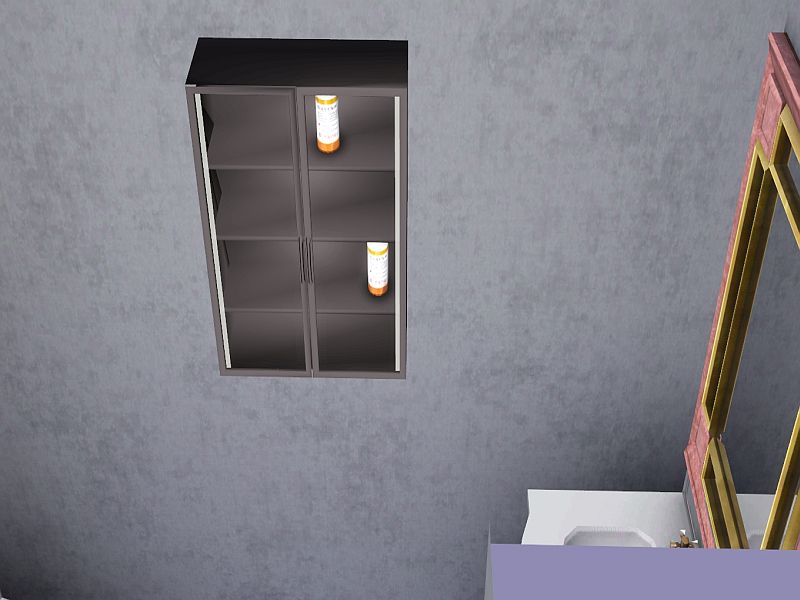
Using the cabinet in live mode
The working medicabi is a new object, not a replacement for the decorative medicabi that comes with the game. It comes with four interactions. "Show Info" lists the contents of the cabinet. "Put your pills in this cabinet" causes the active sim to walk to the cabinet and put any pills in their inventory into the cabinet. "go empty the medicine cabinet" causes the active sim to walk to the medicine cabinet and put all the pills from the cabinet into their inventory. "get a pill bottle from the cabinet" causes the active sim to walk to the cabinet. If there are two or more pill bottles in the cabinet, a list opens, and a pill bottle may be selected to add to the sim's inventory.
Install Instructions
To add to game, download and install the LWE_pillscript.package file to your mods folder. Then download and install any or all pill types you want to add to your game. The working medicine cabinet also relies on the pillscript package for it's script class. New types of pills will be added to this thread. If you want to use the new types, you will need to re-download and install the LWE_pillscript, which will be updated whenever new types of pills or cabinets are added to this set.
Buy pills and cabinets from bathroom accents, or miscellaneous decorations.
Polygon Counts:
pill bottle 150
medicine cabinet 118
Additional Credits:
Tools: S3PE, S3OC, milkshape.
Lots of helpful scripting advice: Cmomoney, Buzzler, Twallan
Encouragement: Inge Jones
Compatibility:
Developed and tested with base-game version 1.24.3.012001
Updated for game version 1.26.89.013001
Tested with game version 1.50
This object mod does not conflict with any other mod, because there is no other like it.
Quick and dirty make your own pill mod tiptorial (mod this mod!):
Have you done any of the scripting tutorials?
You need to know this one like it was your middle name:
http://www.modthesims.info/wiki.php..._Object_Modding
You need to have a working knowledge of c# programming, and a project template that links to the sims3
version of mscorlib, instead of the net version of mscorlib.
Do you have s3oc? You'll need it to clone one of the pillbottles, because that's the object that gets the
new script you'll be making. If you're into meshing or texturing, you can also retexture or scale your pill
bottle to make it different from the others. Just don't make it *too* different, because the basic 'take
a pill' animation is set up in the abstract pillbottlebase class, and can't be changed. But it can be added
to in your derived class. You will also need to edit the stbl resource in the cloned package to change
the name and description.
You need to export the LWE4.dll from the pillscript package, so you can link to it in your script. Put it with
the dlls you extracted when you did the object modding tutorial.
There are four overrides that need to be implemented. 1. OnStartup() to give your pills an in-game name
and description, and whatever other startup type stuff you need to do to get ready for the next 3 calls.
2. PreTakePill(Sim PillTaker) PillTaker is passed by the base class when the interaction runs. This is
where initialization stuff goes, such as getting motive values, etc.
3. TakePill(Sim theActor) Use whatever name you want in your overrides, just as long as it's of type
Sim. This is where you put stuff that happens after the sim takes the pill, but before they put it away.
4. PostTakePill(Sim theActor) This is where you do any cleanup, or set alarms etc. It gets called after
the sim puts the pills back in its inventory.
Here's the contents of class1.cs that I used to test out what I told you above:
to create 'Scratchit'. I used the method outlined in the tutorial, so it isn't necessary to change the pillscript package.
Just download the new package and put it in your mods folder. I haven't added any bells and whistles yet. It just
removes the 'itchy' moodlet, if present, and nothing else.
july 25th, 2013 blew up my on-board graphics card. 1.55 patch won't load at all, even without mods. No money for new
card, which would require new monitor. I may as well not buy a new pc while I'm at it. Sorry folks, you're on your own with
this one now.
feb 24th, 2013 added tiptorial and example pillbottle.
april 30th, 2012 added simpatico. be sure to re-download and install LWE_pillscript if you download simpatico.
november 4th, 2011 added more moodlets. re-download and install the LWE_pillscript if you want more moodlets
*** tested with 1.50 patch, works as-is ***
The Pills
Trimasim
Tired of watching your sim sleep? Want to purge their stomach before they enter the eating contest? Give these a try! Based on real-world over-the-counter diet pills. These will lower a sim's hunger motive to make more room for gustatory delights and simultaneously convert their stomach contents to a full energy bar.
 Just make sure their tummy is at least half full, or they have a death flower in their inventory or your attempt to steal a few extra hours for skill-building could turn into a meeting with the grim reaper and a free urn stone!
 TrimasimLT
A diluted version of Trimasim, approximately half-strength. Still possible to overdose, just a bit less likely. Eat well, and carry a death flower. You've been warned.
Simnip
Test sims stood rooted to the spot they swallowed this stuff on and acted very strangely. They said it was fun, and observed no ill effects. The scientists that cooked it up, however, had some observations of their own.
Sprinkler Pills
A simnip derivative with longer lasting effects.
Siminex
Our scientists applied reverse osmosis to Trimasim and came up with this stuff. Of course, sims are much too ethical to put it in their date's juice.
Siminaps
Derived from TrimasimLT, it took four doses of this stuff to send our test sims off to dream land.
Simpatico
Gave test sims a four hour 'tranquil' moodlet and a +10 mood boost. ...and they didn't so much as gag. Woo!
LWE9_pillscript_tutorial_example
This is the example pillbottle for the tiptorial. It contains it's own s3sa resource, which extends the main script.
If you already have the pill_script installed, you don't need to re-download it to add this pill type to your game.
Using the pills in live mode
Place pill bottle in sim inventory, if it isn't already there. Click for interactions in the usual way. "Read label" gives a count of the pills remaining. If you drag a pill bottle onto a surface, "Pick Up" will cause the active sim to route to the pill bottle and add it to their inventory. "Take one" causes the sim to take one pill from the bottle. If the "take one" interaction doesn't show up in the menu, the pill bottle is empty and can be sold, much like returning an empty soda bottle for deposit.

The Cabinets
Using the cabinet in live mode
The working medicabi is a new object, not a replacement for the decorative medicabi that comes with the game. It comes with four interactions. "Show Info" lists the contents of the cabinet. "Put your pills in this cabinet" causes the active sim to walk to the cabinet and put any pills in their inventory into the cabinet. "go empty the medicine cabinet" causes the active sim to walk to the medicine cabinet and put all the pills from the cabinet into their inventory. "get a pill bottle from the cabinet" causes the active sim to walk to the cabinet. If there are two or more pill bottles in the cabinet, a list opens, and a pill bottle may be selected to add to the sim's inventory.
Install Instructions
To add to game, download and install the LWE_pillscript.package file to your mods folder. Then download and install any or all pill types you want to add to your game. The working medicine cabinet also relies on the pillscript package for it's script class. New types of pills will be added to this thread. If you want to use the new types, you will need to re-download and install the LWE_pillscript, which will be updated whenever new types of pills or cabinets are added to this set.
Buy pills and cabinets from bathroom accents, or miscellaneous decorations.
Polygon Counts:
pill bottle 150
medicine cabinet 118
Additional Credits:
Tools: S3PE, S3OC, milkshape.
Lots of helpful scripting advice: Cmomoney, Buzzler, Twallan
Encouragement: Inge Jones
Compatibility:
Developed and tested with base-game version 1.24.3.012001
Updated for game version 1.26.89.013001
Tested with game version 1.50
This object mod does not conflict with any other mod, because there is no other like it.
Quick and dirty make your own pill mod tiptorial (mod this mod!):
Have you done any of the scripting tutorials?
You need to know this one like it was your middle name:
http://www.modthesims.info/wiki.php..._Object_Modding
You need to have a working knowledge of c# programming, and a project template that links to the sims3
version of mscorlib, instead of the net version of mscorlib.
Do you have s3oc? You'll need it to clone one of the pillbottles, because that's the object that gets the
new script you'll be making. If you're into meshing or texturing, you can also retexture or scale your pill
bottle to make it different from the others. Just don't make it *too* different, because the basic 'take
a pill' animation is set up in the abstract pillbottlebase class, and can't be changed. But it can be added
to in your derived class. You will also need to edit the stbl resource in the cloned package to change
the name and description.
You need to export the LWE4.dll from the pillscript package, so you can link to it in your script. Put it with
the dlls you extracted when you did the object modding tutorial.
There are four overrides that need to be implemented. 1. OnStartup() to give your pills an in-game name
and description, and whatever other startup type stuff you need to do to get ready for the next 3 calls.
2. PreTakePill(Sim PillTaker) PillTaker is passed by the base class when the interaction runs. This is
where initialization stuff goes, such as getting motive values, etc.
3. TakePill(Sim theActor) Use whatever name you want in your overrides, just as long as it's of type
Sim. This is where you put stuff that happens after the sim takes the pill, but before they put it away.
4. PostTakePill(Sim theActor) This is where you do any cleanup, or set alarms etc. It gets called after
the sim puts the pills back in its inventory.
Here's the contents of class1.cs that I used to test out what I told you above:
Code:
using System;
using System.Collections.Generic;
using System.Reflection;
using System.Runtime.CompilerServices;
using System.Runtime.InteropServices;
using System.Text;
using System.Xml;
using Sims3.Gameplay;
using Sims3.Gameplay.Abstracts;
using Sims3.Gameplay.Actors;
using Sims3.Gameplay.ActorSystems;
using Sims3.Gameplay.Autonomy;
using Sims3.Gameplay.CAS;
using Sims3.Gameplay.Controllers;
using Sims3.Gameplay.EventSystem;
using Sims3.Gameplay.Interactions;
using Sims3.Gameplay.Interfaces;
using Sims3.Gameplay.ObjectComponents;
using Sims3.Gameplay.Objects;
using Sims3.Gameplay.Objects.Decorations.Mimics;
using Sims3.Gameplay.Objects.FoodObjects;
using Sims3.Gameplay.Objects.Miscellaneous;
using Sims3.Gameplay.Objects.Plumbing;
using Sims3.Gameplay.Objects.RabbitHoles;
using Sims3.Gameplay.Skills;
using Sims3.Gameplay.Socializing;
using Sims3.Gameplay.UI;
using Sims3.Gameplay.Utilities;
using Sims3.Metadata;
using Sims3.Metadata.Tuning;
using Sims3.SimIFace;
using Sims3.SimIFace.CAS;
using Sims3.SimIFace.CustomContent;
using Sims3.SimIFace.Enums;
using Sims3.UI;
using Sims3.Gameplay.Core;
using Sims3.Gameplay.ThoughtBalloons;
using Sims3.Gameplay.Objects.Decorations.Mimics.LWE4;

//be sure to use this namespace, it's where the abstract base class is
namespace Sims3.Gameplay.Objects.Decorations.Mimics.LWE4
{
//rename this class to something unlikely to be used by anyone else.
    public class TutorialPills : PillBottleBase
    {
        public override void OnStartup()
        {
            base.OnStartup();
//this next one just calls a local procedure that adds the title and description text to the pillbottle
//but if you were going to add interactions to the sim this would be the place to do it, along with
//alarms to remove them when the pill 'wears off'
            AddTutorialPillsInteractions(this);
        }
        public void AddTutorialPillsInteractions(TutorialPills obj)
        {
            kTitle = "TutorialPills";
            kText = "This text pops up when the 'read label' interaction runs";
        }

//this runs before the sim starts routing to the pill bottle, or pulls it from their inventory
        public override void PreTakePill(Sim PillTaker)
        {
//the base class just does a basic test to see if the sim is human, teen or above and
//the pills aren't in use.  if you need to do more testing than that, such as gender or
//traits, this would be the place.  Just add flag variables to your class and set them
//here and use them to control the next two functions.  I've left in the code that
//makes the sim have the pill bottle thought bubble.

            //get the thumbnail for the pillbottle object
            ThoughtBalloonManager.BalloonData balloonData = new ThoughtBalloonManager.BalloonData((this as GameObject).GetThoughtBalloonThumbnailKey());
            //you can use reflector or ilspy to find other ThoughtBalloonTypes, such as kSpeechBalloon
            balloonData.BalloonType = ThoughtBalloonTypes.kThoughtBalloon;
            //just a quick thought
            balloonData.Duration = ThoughtBalloonDuration.Short;
            //I'm not really sure exactly what these next two do, but if they're not filled in the call to ShowBalloon fails
            balloonData.HighAxis = ThoughtBalloonAxis.kLike;
            balloonData.LowAxis = ThoughtBalloonAxis.kNeutral;
            //once all the balloonData is filled in for this balloon type it can be shown
            PillTaker.ThoughtBalloonManager.ShowBalloon(balloonData);
        }
        //animate here
        public override void TakePill(Sim theActor)
        {
        //just an existing animation.  jazz scripting and adding animations are covered in other tutorials on mts3
//this is from the simpatico pills
            theActor.PlaySoloAnimation("a_soc_idle_neutral_bigLaugh_x");
        }
        //do pill effects, alarms, etc.
        public override void PostTakePill(Sim theActor)
        {
            //pop up a message to show the interaction actually worked
            SimpleMessageDialog.Show("Pill Tutorial", "PostTakePill executed");
        }
    }
}
This mod has specific instructions!
Download and install LWE_pillscript.rar. This file has all the scripts for current and future pill types, and medicine cabinets. After that you can download and install your choice of pills and/or the medicine cabinets. I made the script separately from the objects so that I could add new types of pills and cabinets in the future while allowing users to choose which types they added to their game.| Filename | Size | Downloads | Date | |||||
|
LWE9_scratchit.zip
| Pill to remove the 'itchy' moodlet sims sometimes get from science experiments. Will remove any 'itchy' moodlet, regardless of origin.
Size: 7.2 KB · Downloads: 9,044 · 5th May 2014 |
7.2 KB | 9,044 | 5th May 2014 | |||||
|
LWE9_pillscript_tutorial_example.zip
| This one just pops up a message box when the sim takes it. It uses the script in the code section of the tiptorial.
Size: 7.2 KB · Downloads: 7,291 · 24th Feb 2013 |
7.2 KB | 7,291 | 24th Feb 2013 | |||||
|
LWE_pillscript.rar
| latest version of script class with Simpatico added and tested in game with latest patch
Size: 114.4 KB · Downloads: 19,540 · 30th Apr 2012 |
114.4 KB | 19,540 | 30th Apr 2012 | |||||
|
LWE_Simpatico.rar
| Gives a 4 hour tranquil moodlet.
Size: 4.6 KB · Downloads: 17,396 · 30th Apr 2012 |
4.6 KB | 17,396 | 30th Apr 2012 | |||||
|
LWE_Siminaps.rar
| Watered down version of siminex.
Size: 4.8 KB · Downloads: 14,371 · 19th Oct 2011 |
4.8 KB | 14,371 | 19th Oct 2011 | |||||
|
LWE_Siminex.rar
| Use this to keep trimasim from keeping your sim awake all night.
Size: 4.9 KB · Downloads: 18,098 · 19th Oct 2011 |
4.9 KB | 18,098 | 19th Oct 2011 | |||||
|
LWE_SimNip.rar
| This stuff does for sims what catnip does for cats.
Size: 4.9 KB · Downloads: 19,161 · 19th Oct 2011 |
4.9 KB | 19,161 | 19th Oct 2011 | |||||
|
LWE_SprinklerPills.rar
| Simnip in a time-release capsule.
Size: 4.9 KB · Downloads: 16,451 · 19th Oct 2011 |
4.9 KB | 16,451 | 19th Oct 2011 | |||||
|
LWE_TrimasimLT.rar
| Watered down version of trimasim. Now sims have to take 2 or 3 pills on an empty stomach to kill themselves, instead of just one.
Size: 4.9 KB · Downloads: 16,517 · 19th Oct 2011 |
4.9 KB | 16,517 | 19th Oct 2011 | |||||
|
LWE_Trimasim.rar
| Use this to keep your sim trim, or to boost energy at the expense of the hunger motive. Or commit simicide, up to you.
Size: 4.7 KB · Downloads: 18,138 · 19th Oct 2011 |
4.7 KB | 18,138 | 19th Oct 2011 | |||||
|
LWE_MedicineCabinet.rar
| The working medi-cabi. Use it to store pill bottles, and other small stuff.
Size: 56.5 KB · Downloads: 22,652 · 19th Oct 2011 |
56.5 KB | 22,652 | 19th Oct 2011 | |||||
| For a detailed look at individual files, see the Information tab. | ||||||||
Key:
- - File was updated after upload was posted
Install Instructions
Also Thanked - Users who thanked this download also thanked:
Packs Needed
None, this is Sims 3 base game compatible!
Other Information
Type:
More Downloads BETA
Here are some more of my downloads: