|
Welcome to Mod The Sims.
If you don't have an account, why not
sign up now? It's free! |
|
| Mod The Sims > Downloads > Game Mods > Global Mods - Finished |
|
|
|
Creator
Ad section
|
Download
Posted 28th Mar 2006 at 11:51 PM
- Updated 19th May 2008 at 02:18 AM by Numenor : Updated to "Kitchen & Bath" SP
- Viewed 244804 times.
Information (Click for more details): Direct link to this thread
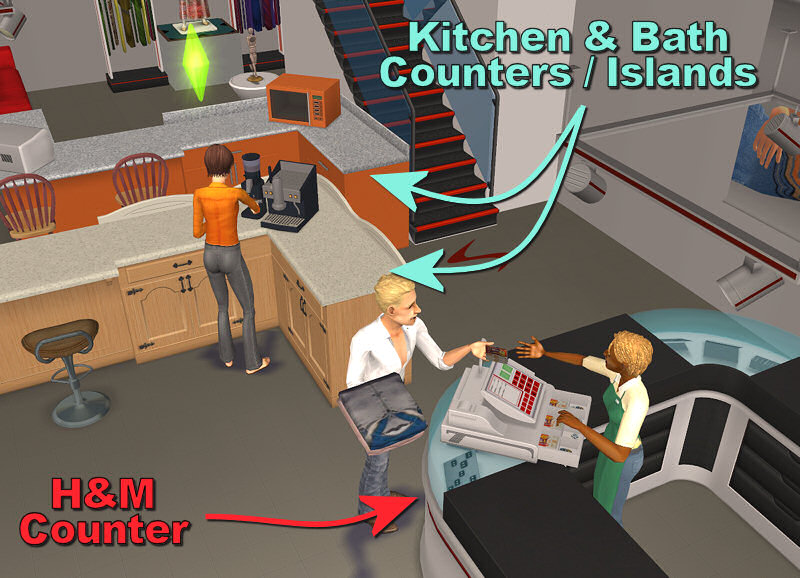
The SEP (Slot Enable Package) "COUNTERS" - v. 1.2 (19 may 08) ------------------------------------------------- WARNING: this is a global mod, i.e. it affects all the lots in the game (but it's NOT a hack: it will NOT be included in exported lots). WHAT IS THE SEP? The Slot Enable Packages is module than enables additional slots in the Maxis counters (residential and commercial counters and islands). Once installed, you'll be able to place objects in new spots, and in new positions, that previously weren't allowed by the game (see below for details). MODULE 1 - *COUNTERS* This module (currently the only one available EDIT: this one will forever be the only one available: I'm not going to add other modules ) will let you use the corner counters, allowing you to install on them espresso machines, mixers, telephones and anything else (all objects placeable on counters, of course); and the sims will correctly use the objects placed on the corners.The "SEP-Counters" module will work with *ALL* the existing counters (including the commercial ones) and counter islands shipped with the base game, UNI, NL, OFB, PETS, SSN, H&M and K&B (the other packs don't contain any counter). Obviously, if you have only the base game, you will NOT find new counters in your catalog! But if you have any of the mentioned EP, the SEP will automatically apply on the counters for that EP, enabling the diagonal objects for them.BASE-GAME and UNI USERS: your game doesn't allow you to create corners using islands (this is a feature introduced with NL; or better, it's a bug that was corrected with Nightlife ). Therefore, base-game and UNI users can only use corners created with normal counters.OFB USERS: the "SEP-Counters" works perfectly with OFB, and will allow you to put sellable objects (or even the cash register) on the corners, and your customer will have no problems in purchasing them; also, you will be able to correctly restock the sold objects (but remember that the game *has* some bugs related to the restocking function! So, don't blame me if your restock signs are misplaced )INSTALLATION AND USAGE Extract the package from the zip, and put it into your Downloads folder. IMPORTANT: the SEP will automatically affect all the counters and islands placed in your lot after having installed the mod; the corners already existing in your lot at the moment of the installation will NOT be automatically "enabled"! You have to pick them, move them around a little, and put them down again (no need to re-buy them). CREDITS AND ACKNOWLEDGMENTS As always, credits go to Maxis for the game itself, and for the counters in particular. Biggest thanks to MaryLou for her tireless beta-testing ![]() LICENSE AGREEMENT DO NOT repost the SEP, and any of its parts, on any site. Please BE WARNED that when you clone a Maxis counter with the SEP installed, some parts of the SEP will be included in your clone. This is allowed; but be warned that all the Resource Nodes included in the SEP contain a copyright line: if this is a problem for you, please remove the SEP before cloning Maxis counters.. If your cloned counter or island has the usable corners thanks to the SEP, you MUST give credits to Numenor for that, and put a link to this very thread (in order to allow people to report bugs and receive support). TECHNICAL EXPLANATION The Maxis corner counters, basically, have the same slots as the straight counters (one main slot in the center and two decorative slots on the back); but they are all misplaced, so that the objects are not usable, and the routes to the slots are badly tweaked (the sims can't reach the interaction point). I have moved and rotated the "std_0" slot, and adjusted all the related routes, editing each and every CRES for the Maxis counters, commercial counters and islands. I've also modified the footprint of each corner, to let the sim operate the object from both sides. On the other hand there was no need to edit the SLOT files themselves; as a consequence, the SEP package(s) contain only Resource Nodes and nothing else. One special mention is due for the "dec_2" slot. The corners have a third "decorative slot" that is missing in the straight counters; this caused the objects placed in that slot to "disappear" when the corner was moved and given a straight shape. This "dec_2" slot has been removed from all the corners, so that this problem is now fixed. 5038 people have said thanks to Numenor for this download. For more information about this creator and their policies or details, click here.
Screenshots
Downloads are not available to guests. Please login to download.
1. Download: Click the download link to save the .rar or .zip file(s) to your computer. 2. Extract: Use WinRAR (Windows) or Stuffit (Mac) to extract the .package file(s) from the .rar or .zip file(s). 3. Place in Downloads Folder: Cut and paste the .package file(s) into your Downloads folder:
Recommendations
Users who thanked this download also thanked: |
|||||||||||||||||||||||||||||||||||||||||||||||||||||||||||||||||||||||||||||||||||||||||||||||||||||||||||||||||||||||||||||||||||||||||||||||||||||||||||||||||
| Share this on... |
Twitter |
Facebook |
Digg |
del.icio.us |
StumbleUpon |
Google |


Download