
 Sign in to Mod The Sims
 Base Templates for Making Your Own CAS/BodyShop Faces
 Base Templates for Making Your Own CAS/BodyShop Faces
MTS has all free content, all the time. Donate to help keep it running.
SCREENSHOTS
male_face1_8.jpg - width=474 height=361

Townie/NPC looks are now more in your control!
This download is meant to help you get started on creating your own set of face templates. The potential for people doing their own sets is very open-ended. Want townies/NPCs that all have anime faces to match your playable anime sims? Particular facial characteristics of a certain race for an entire neighborhood (Chinese, Indian, Caucasian, Alien)? Elf/Vulcan ears on every template face?
Motoki's tutorial for doing this can be found here:
Motoki's Face Template Tutorial
Part of the tutorial requires you to extract the base template faces from the "CASfaces.package" file. I've already done that work and there doesn't seem to be any need to have people do it all over again since its a very tedious process involving many files.
(I didn't extract the alien face -- just remembered that. But it isn't hard to do it yourself.)
These files save you this step in the tutorial:
"Now the file you need to look for is Program Files\EA GAMES\The Sims 2\TSData\Res\Sims3D\CASFace.package. ... Now open the file. ... Now fine the face or faces in question (remember, you can get the names from the CAS in debug mode) and then export them. Make a new file in SimPE and import them. You can delete the exported files once you've added them to your new file and saved it. The face templates will always be in sets of 2, the regular and LOD15 version so make sure you get both geometric data container files for each template."
You can resume at this instruction:
"Now find a sim whose facial structure you like and open their package file in SimPE."
These files are EXTRACTIONS ONLY from the base game that have been put into individual package files. Don't put them in your Downloads folder. They won't have any affect on the game until they are modified.
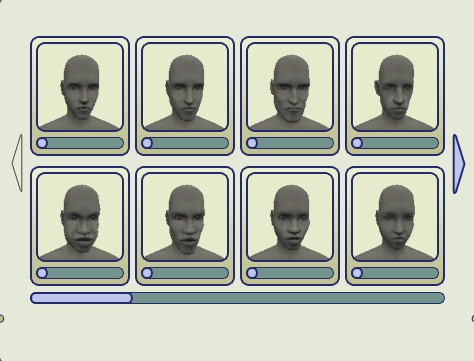
The thumbnail is a BodyShop snapshot showing the first page of default templates for adult males. The files you download are actually geometric face data containers. All genders, ages, and template families are included.
If you want a completely modded set without doing the work yourself, check these out:
FACE TEMPLATES AVAILABLE ON MTS2 (and beyond)! (updated 10/25/06)
AllenABQ's Replacement Face Templates for CAS/BodyShop
TreyNutz2's Simposieum CAS Templates
terrakosmos's CASface Replacements - All Faces, All Ages
Doc Doofus's Complete CAS FACE replacement
New default CAS faces - complete set by sarakadie
Complete CAS Face Template Replacements by AmberDiceless
(There are samples of single face replacements as well here in the "Genetics Sets" section of MTS2.)
Things to keep in mind
The number of templates in BodyShop/CAS are fixed, so modified templates will always overwrite the ones that exist in the game.
The template families named CPER and CSLA for some unknown reason only show up in CAS/BodyShop for adults/YAs and not any other age group. If someone can fix this, it would be helpful.
There are no files provided for Young Adults because YAs use the normal adult templates.
Start small. You don't have to create an entire set that replaces all the faces. Start with one template family of your choice -- pick one you really do not like and want to change. Do all members of the family (toddler, child, m/f teens, m/f adults, m/f elders - 8 faces total), take pictures when done, and post for others to try out. Then decide if you want to repeat the process some 25 more times to make a complete set!
If you want to publish a set, it's important that you name your .package files in some manner that they can be identified by age, sex, and family name (CPER, CMED, etc.) so that people will know what template is being replaced by a particular file. This is important because templates cannot be deleted from inside CAS/BodyShop. So if someone wants to replace a template "slot" they already have a download for, they will need to know how to identify what files needs to be replaced in the Downloads directory. If you put two templates in your Downloads folder that overwrite the same slot, only the last one loaded will show up in the game. (And I wouldn't take chances with having that happen very often.)
There is only one toddler and one child face template for each family. They are used by both sexes. All other ages have male and female versions. This means when creating a template family, try designing for a male/female combo that will look similar at young ages. The best way to do this is start with one sex at the adult stage, save your sim, clone and flip to the opposite sex and make fine adjustments.
When you mod a base file, you'll notice it'll be quite a bit larger in size than when you started. This is normal. Maxis has a compression scheme applied to the 3D data in the base files. When you mod the file you won't get the compression so it'll be a bit bigger.
This is a link to the original thread that started this mod. It has some useful insights:
Original discussion thread
This download is meant to help you get started on creating your own set of face templates. The potential for people doing their own sets is very open-ended. Want townies/NPCs that all have anime faces to match your playable anime sims? Particular facial characteristics of a certain race for an entire neighborhood (Chinese, Indian, Caucasian, Alien)? Elf/Vulcan ears on every template face?
Motoki's tutorial for doing this can be found here:
Motoki's Face Template Tutorial
Part of the tutorial requires you to extract the base template faces from the "CASfaces.package" file. I've already done that work and there doesn't seem to be any need to have people do it all over again since its a very tedious process involving many files.
(I didn't extract the alien face -- just remembered that. But it isn't hard to do it yourself.)
These files save you this step in the tutorial:
"Now the file you need to look for is Program Files\EA GAMES\The Sims 2\TSData\Res\Sims3D\CASFace.package. ... Now open the file. ... Now fine the face or faces in question (remember, you can get the names from the CAS in debug mode) and then export them. Make a new file in SimPE and import them. You can delete the exported files once you've added them to your new file and saved it. The face templates will always be in sets of 2, the regular and LOD15 version so make sure you get both geometric data container files for each template."
You can resume at this instruction:
"Now find a sim whose facial structure you like and open their package file in SimPE."
These files are EXTRACTIONS ONLY from the base game that have been put into individual package files. Don't put them in your Downloads folder. They won't have any affect on the game until they are modified.
The thumbnail is a BodyShop snapshot showing the first page of default templates for adult males. The files you download are actually geometric face data containers. All genders, ages, and template families are included.
If you want a completely modded set without doing the work yourself, check these out:
FACE TEMPLATES AVAILABLE ON MTS2 (and beyond)! (updated 10/25/06)
AllenABQ's Replacement Face Templates for CAS/BodyShop
TreyNutz2's Simposieum CAS Templates
terrakosmos's CASface Replacements - All Faces, All Ages
Doc Doofus's Complete CAS FACE replacement
New default CAS faces - complete set by sarakadie
Complete CAS Face Template Replacements by AmberDiceless
(There are samples of single face replacements as well here in the "Genetics Sets" section of MTS2.)
Things to keep in mind
The number of templates in BodyShop/CAS are fixed, so modified templates will always overwrite the ones that exist in the game.
The template families named CPER and CSLA for some unknown reason only show up in CAS/BodyShop for adults/YAs and not any other age group. If someone can fix this, it would be helpful.
There are no files provided for Young Adults because YAs use the normal adult templates.
Start small. You don't have to create an entire set that replaces all the faces. Start with one template family of your choice -- pick one you really do not like and want to change. Do all members of the family (toddler, child, m/f teens, m/f adults, m/f elders - 8 faces total), take pictures when done, and post for others to try out. Then decide if you want to repeat the process some 25 more times to make a complete set!
If you want to publish a set, it's important that you name your .package files in some manner that they can be identified by age, sex, and family name (CPER, CMED, etc.) so that people will know what template is being replaced by a particular file. This is important because templates cannot be deleted from inside CAS/BodyShop. So if someone wants to replace a template "slot" they already have a download for, they will need to know how to identify what files needs to be replaced in the Downloads directory. If you put two templates in your Downloads folder that overwrite the same slot, only the last one loaded will show up in the game. (And I wouldn't take chances with having that happen very often.)
There is only one toddler and one child face template for each family. They are used by both sexes. All other ages have male and female versions. This means when creating a template family, try designing for a male/female combo that will look similar at young ages. The best way to do this is start with one sex at the adult stage, save your sim, clone and flip to the opposite sex and make fine adjustments.
When you mod a base file, you'll notice it'll be quite a bit larger in size than when you started. This is normal. Maxis has a compression scheme applied to the 3D data in the base files. When you mod the file you won't get the compression so it'll be a bit bigger.
This is a link to the original thread that started this mod. It has some useful insights:
Original discussion thread
This is a new mesh, and means that it's a brand new self contained object that usually does not require a specific Pack (although this is possible depending on the type). It may have Recolours hosted on MTS - check below for more information.
| Filename | Size | Downloads | Date | |||||
|
facefile_19-27_FOR_TUTORIAL_USE.zip
Size: 2.38 MB · Downloads: 4,372 · 24th Nov 2005 |
2.38 MB | 4,372 | 24th Nov 2005 | |||||
|
facefile_10-18_FOR_TUTORIAL_USE.zip
Size: 2.41 MB · Downloads: 4,449 · 24th Nov 2005 |
2.41 MB | 4,449 | 24th Nov 2005 | |||||
|
facefile_01-09_FOR_TUTORIAL_USE.zip
Size: 2.18 MB · Downloads: 5,602 · 24th Nov 2005 |
2.18 MB | 5,602 | 24th Nov 2005 | |||||
| For a detailed look at individual files, see the Information tab. | ||||||||
Key:
- - File was updated after upload was posted
Install Instructions
Also Thanked - Users who thanked this download also thanked:
Packs Needed
None, this is Sims 2 base game compatible!
More Downloads BETA
Here are some more of my downloads: