
 Sign in to Mod The Sims
 Hearse with Options
 Hearse with Options
MTS has all free content, all the time. Donate to help keep it running.
SCREENSHOTS

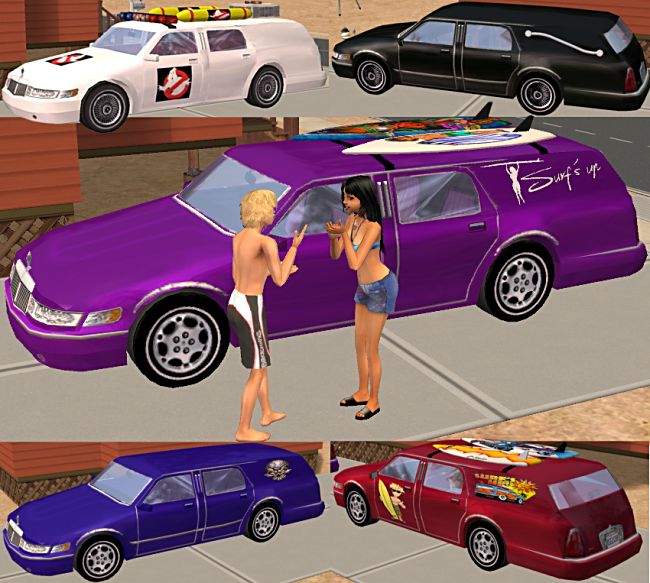
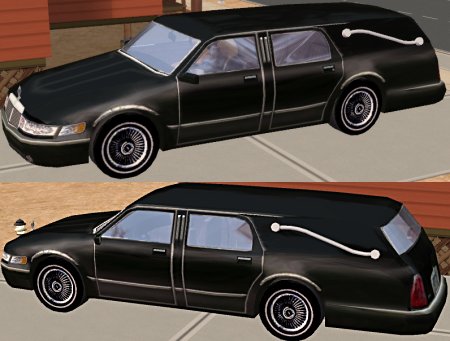
MTShearse.jpg - width=450 height=341
Hearse.jpg - width=650 height=583
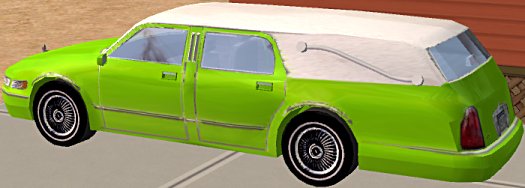
Lime.jpg - width=525 height=188
Featured Upload!
This is a featured upload! It showcases the best talent and creativity available on MTS and in the community. 



by Dr Pixel - Nov 2005
Updated December 2008 to be compatable with Numenor's Drivable Cars without NightLife game mod.
UPDATED:
- Several people asked for a 6 feet Under style color option (lime green), so I have included one.
This is a drivable vehicle, it REQUIRES the NightLife expansion pack
Doors and lights work correctly, but I had to disable the WooHoo "fog" effect.
It was coming up too far toward the rear of the car, and although I am sure I saw a fix posted here about this I was not able to find it. If anybody knows how to re-locate the WooHoo fog more towards the front of the car please let me know and I will try to fix it.
Everything else works correctly - the icons are a little small, but everything I tried to correct this made the car get "cut off" in the icons and in the "going downtown" screen, so I consider them to be acceptable this way.
The Hearse.zip is the mesh and the standard black hearse. It can be used with or without the Options.
The Options.zip file adds all the color and accessory options shown in the second picture. You MUST download and install the Hearse.zip file to use any of these other options.
The first color option in the game is the body color for the hearse, the second color option lets you choose which accessories you want to use.
This object may be recolored, and may be included in lot uploads.
The mesh was modified from the Maxis Limo, using Wes H's Milkshape plugins,
and the .Ms3dASCII export/import of SimPE. The .package file was modified from a clone of the Maxis sedan.
Polys = 6586 (Original Maxis Car = 5589)
Thanks to Vampcat, Cevic, Numenor, Pinhead, and Willem for their advice and information about editing the car meshes.
This is a new mesh, and means that it's a brand new self contained object that usually does not require a specific Pack (although this is possible depending on the type). It may have Recolours hosted on MTS - check below for more information.
| Filename | Size | Downloads | Date | |||||
|
Blarneystone_Hearse.zip
Size: 617.3 KB · Downloads: 41,072 · 26th Dec 2008 |
617.3 KB | 41,072 | 26th Dec 2008 | |||||
|
Blarneystone_Hearse_Lime.zip
Size: 58.6 KB · Downloads: 24,102 · 1st Dec 2005 |
58.6 KB | 24,102 | 1st Dec 2005 | |||||
|
Blarneystone_Hearse_Options.zip
Size: 373.1 KB · Downloads: 32,756 · 30th Nov 2005 |
373.1 KB | 32,756 | 30th Nov 2005 | |||||
| For a detailed look at individual files, see the Information tab. | ||||||||
Key:
- - File was updated after upload was posted
Install Instructions
Basic Download and Install Instructions:
1. Download: Click the download link to save the .rar or .zip file(s) to your computer.
2. Extract the zip, rar, or 7z file.
3. Place in Downloads Folder: Cut and paste the .package file(s) into your Downloads folder:
1. Download: Click the download link to save the .rar or .zip file(s) to your computer.
2. Extract the zip, rar, or 7z file.
3. Place in Downloads Folder: Cut and paste the .package file(s) into your Downloads folder:
- Origin (Ultimate Collection): Users\(Current User Account)\Documents\EA Games\The Sims™ 2 Ultimate Collection\Downloads\
- Non-Origin, Windows Vista/7/8/10: Users\(Current User Account)\Documents\EA Games\The Sims 2\Downloads\
- Non-Origin, Windows XP: Documents and Settings\(Current User Account)\My Documents\EA Games\The Sims 2\Downloads\
- Mac: Users\(Current User Account)\Documents\EA Games\The Sims 2\Downloads
- Mac x64: /Library/Containers/com.aspyr.sims2.appstore/Data/Library/Application Support/Aspyr/The Sims 2/Downloads
- For a full, complete guide to downloading complete with pictures and more information, see: Game Help: Downloading for Fracking Idiots.
- Custom content not showing up in the game? See: Game Help: Getting Custom Content to Show Up.
- If you don't have a Downloads folder, just make one. See instructions at: Game Help: No Downloads Folder.
Also Thanked - Users who thanked this download also thanked:
Packs Needed
Other Information
Car Type:
– Estate
– Special
: Special Type
Car Era:
– 1980s
Tags
#surf
Packs Needed
| Base Game | |
|---|---|
 | Sims 2 |
| Expansion Pack | |
|---|---|
 | Nightlife |
What's New:
I do NOT do Requests - this is a hobby for me, and I don't even have time to make all the things I personally would like to do so please don't ask.
==================================
Recent updates:
The Bodyshop Mechanic program was updated March 14 - if you use Bodyshop at all, you might want to take a look.
All my vehicles have now been updated to work, without alterations, with Numenor's Drivable Cars without NightLife mod.
Some of my downloads got corrupted in the recent hard-drive crash - These are all replaced now - and a big thanks to those who helped by sending the original .zip files.
==================================
Recent updates:
The Bodyshop Mechanic program was updated March 14 - if you use Bodyshop at all, you might want to take a look.
All my vehicles have now been updated to work, without alterations, with Numenor's Drivable Cars without NightLife mod.
Some of my downloads got corrupted in the recent hard-drive crash - These are all replaced now - and a big thanks to those who helped by sending the original .zip files.
More Downloads BETA
Here are some more of my downloads: