
 Sign in to Mod The Sims
 -Testers Wanted- New Fence
 -Testers Wanted- New Fence
MTS has all free content, all the time. Donate to help keep it running.
SCREENSHOTS
DoubleArchesStucconIron.jpg - width=400 height=300
Picked Upload!
This is a picked upload! It showcases some of the best talent and creativity available on MTS and in the community.

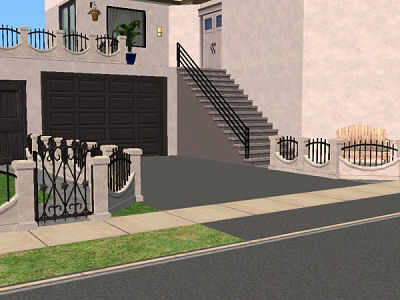
Here's a new fence for your game. Be gentle, it's my first half-way decent mesh that I'm sharing here. It's a lot like the fences you would find in front of houses here in Southern California, and I wanted one like this, maybe someone else has been looking for one like it as well. Poly count for the straight part of the fence is 458, for the diagonal sections it's 506, and the post comes in at 56. Not too bad, I hope. I don't have a very good computer, and I'm not having any more lag with this in game than I would without.
*Note-I put it as requiring all games, but from what I'm to understand about the fences, you need to have at least one EP for them to work. It's based off of a Base game fence, so it doesn't matter which EP you have, as long as there is at least one. Also, I'm using my GUID numbers for this, too, so there shouldn't, in theory, be any conflicts, but if there are, let me know.
Anyways, I know there are better looking fences around, I'm sure, but this is my attempt for you all anyways.
*Note-I put it as requiring all games, but from what I'm to understand about the fences, you need to have at least one EP for them to work. It's based off of a Base game fence, so it doesn't matter which EP you have, as long as there is at least one. Also, I'm using my GUID numbers for this, too, so there shouldn't, in theory, be any conflicts, but if there are, let me know.
Anyways, I know there are better looking fences around, I'm sure, but this is my attempt for you all anyways.
This is a new mesh, and means that it's a brand new self contained object that usually does not require a specific Pack (although this is possible depending on the type). It may have Recolours hosted on MTS - check below for more information.
| Filename | Size | Downloads | Date | |||||
|
MSN_DoubleArchesMortarnIron_221205.zip
Size: 99.8 KB · Downloads: 19,351 · 23rd Dec 2005 |
99.8 KB | 19,351 | 23rd Dec 2005 | |||||
| For a detailed look at individual files, see the Information tab. | ||||||||
Key:
- - File was updated after upload was posted
Install Instructions
Basic Download and Install Instructions:
1. Download: Click the download link to save the .rar or .zip file(s) to your computer.
2. Extract the zip, rar, or 7z file.
3. Place in Downloads Folder: Cut and paste the .package file(s) into your Downloads folder:
1. Download: Click the download link to save the .rar or .zip file(s) to your computer.
2. Extract the zip, rar, or 7z file.
3. Place in Downloads Folder: Cut and paste the .package file(s) into your Downloads folder:
- Origin (Ultimate Collection): Users\(Current User Account)\Documents\EA Games\The Sims™ 2 Ultimate Collection\Downloads\
- Non-Origin, Windows Vista/7/8/10: Users\(Current User Account)\Documents\EA Games\The Sims 2\Downloads\
- Non-Origin, Windows XP: Documents and Settings\(Current User Account)\My Documents\EA Games\The Sims 2\Downloads\
- Mac: Users\(Current User Account)\Documents\EA Games\The Sims 2\Downloads
- Mac x64: /Library/Containers/com.aspyr.sims2.appstore/Data/Library/Application Support/Aspyr/The Sims 2/Downloads
- For a full, complete guide to downloading complete with pictures and more information, see: Game Help: Downloading for Fracking Idiots.
- Custom content not showing up in the game? See: Game Help: Getting Custom Content to Show Up.
- If you don't have a Downloads folder, just make one. See instructions at: Game Help: No Downloads Folder.
Also Thanked - Users who thanked this download also thanked:
Packs Needed
None, this is Sims 2 base game compatible!