
 Sign in to Mod The Sims
 Artemide "Chimera" - *First object with multiple custom lights!!!
 Artemide "Chimera" - *First object with multiple custom lights!!!
MTS has all free content, all the time. Donate to help keep it running.
SCREENSHOTS
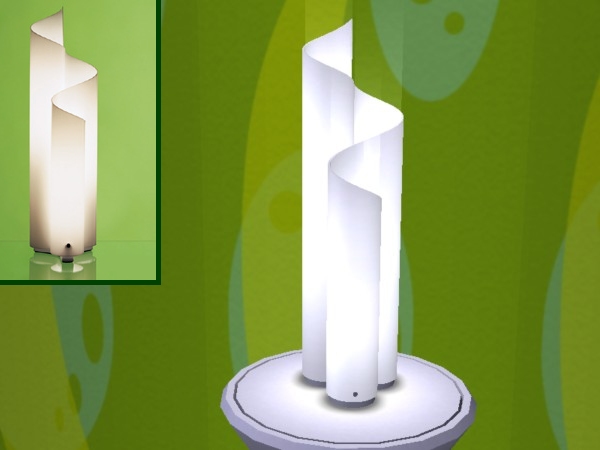

Screenshot_Chimera.jpg - width=600 height=450
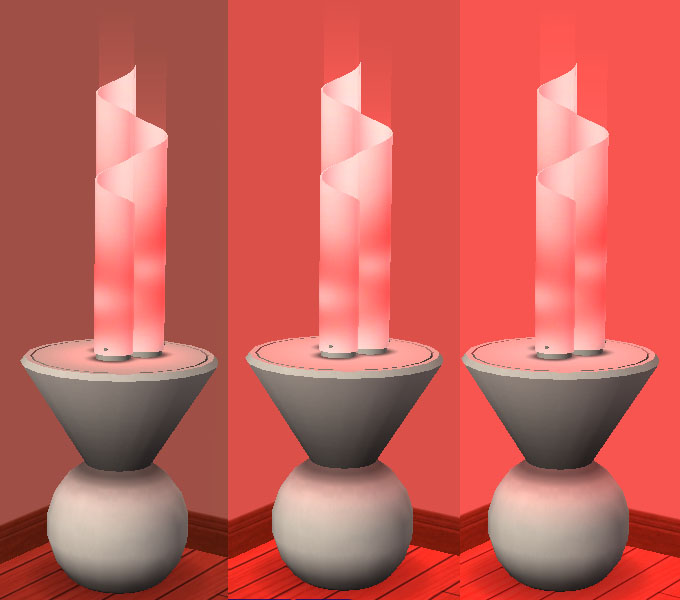
Screenshot_Intensity.jpg - width=680 height=600
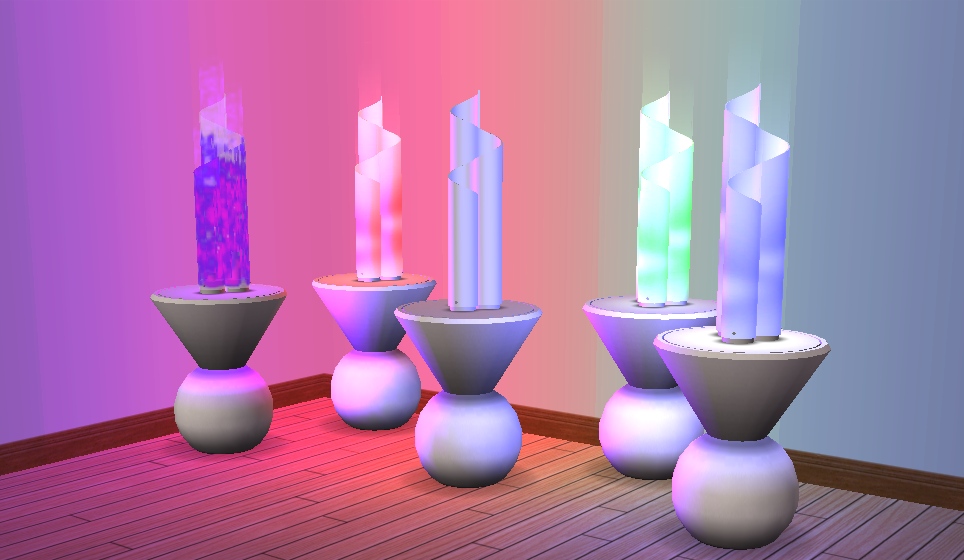
Screenshot_Colours.jpg - width=1024 height=433
Screenshot_LightEffects.jpg - width=964 height=560
Featured Upload!
This is a featured upload! It showcases the best talent and creativity available on MTS and in the community. 


Created by Numenor
Uploaded: 11th Jan 2006 at 11:27 PM
Updated: 20th Oct 2008 at 2:22 PM by -Maylin-
Updated: 20th Oct 2008 at 2:22 PM by -Maylin-
ARTEMIDE "CHIMERA" and "MEZZA CHIMERA"
The very first objects that contains custom light definitions!
The very first objects that contains custom light definitions!
"One of the most beautiful examples of the Italian Style: created by Artemide back in 1970, the "Chimera" and the "Mezza Chimera" (Half Chimera) were never discontinued, and still today they are a must-have piece of modern furniture!"
By Numenor - Do not clone - Visit www.numenor-moddings.com for full Copyright Policy and... *hint* ...donations :nod:
FEATURES
- The lamp is provided in two sizes: the "Mezza Chimera" - smaller - is to be placed on tables (any height); the "Chimera" - taller - just sits on the ground.
- The light intensity can be set to three different levels: Low, Medium and High (see operating instructions below)
- The bulb colours can be set to eight (eight!) different colours, including the default White and a special, animated "Magic Light" (see operating instruction below)
- Both lamps, and all their coloured custom light, work with any game configuration (non-NL users will particularly appreciate these lamps, I think, since these are the only non-NL lamps with multi-coloured light :D)
- The Chimera lamps are NOT recolourable (the different textures and lights are applied via internal BHAV routines)
IN-GAME OPERATING INSTRUCTIONS
The lamps can be operated like any other Maxis lamps: they can be set to On, Off and Auto-light; in addition - but only when the lamp is LIT - there are two more menu options: "Intensity" -> Low/Medium/High; and "Change Bulbs" -> (8 different colour options).
Mind that you can change the bulbs, but the external plexiglas part is always white (therefore, when the lamp is off, it will always be white; this is intentional: Artemide never produced this lamp in other colours).
Please note also that the current setting aren't visible in the menus: i.e., if the lamp is lit you won't find the option "Turn on / This Light" (you'll find only "Turn on / This Room" and ".../All lights); if the bulbs are red you won't find the "Red" option; if the Intensity is set to medium, you won't find the "Medium" option.
INSTALLATION INSTRUCTIONS
The basic installation requires downloading and installing only the "Artemide_Chimera_lamps.zip": install it just like any other object (extract the two .package files from the zip archive and put both of them into your Downloads folder). Then, read the following important paragraph.
KNOWN BUG (Nightlife only!) and WORKAROUND
Almost all Maxis lights definitions are placed outside the object package, and are contained in several text files located in a specific folder in the game installation dir; only few Maxis objects, and now these lamps
 contain the light definitions inside the package itself.
There is a known bug that affects all the objects of this last type (including the Maxis ones): with Nightlife, exiting and re-entering the lot prevents the light to be reflected by walls and floor ; only the objects will reflect the light. Technically speaking, the "diffusion light" stops working, while the "direct light" is not affected.
The only WORKAROUND for this problem is to install a small text file, containing the light definitions, in the proper game installation dir. Here is how to do that:
- Be sure to have installed the SCRIPTORIUM .
- Download the attached "Chimera_Light_Definitions.zip" and extract the file contained within (it is called "numenor_chimera_light.nlo", it's a plaint text file).
- Put the .nlo file in the folder "Scriptorium_CustomLights", easily accessible from the shortcut in your Downloads.
CREDITS
Credits for the original (real) lamp to Artemide
Credits (and many thanks!) to MaryLou for the beautiful textures and for the excellent beta-testing (and for the screenshots!
)Credits to Numenor (that's me!
 ) for having decoded and implemented the custom lights into an object package, for the mesh, the BHAVs and anything else... :p
-----------------------------------------------------------------
| Filename | Type | Size |
|---|---|---|
| Chimera_Light_Definitions.zip | zip | |
| numenor_chimera_light.nlo | nlo | 5853 |
This is a new mesh, and means that it's a brand new self contained object that usually does not require a specific Pack (although this is possible depending on the type). It may have Recolours hosted on MTS - check below for more information.
| Filename | Size | Downloads | Date | |||||
|
Chimera_Light_Definitions.zip
Size: 825 Bytes · Downloads: 50,333 · 11th Jan 2006 |
825 Bytes | 50,333 | 11th Jan 2006 | |||||
|
Artemide_Chimera_Lamps.zip
Size: 435.5 KB · Downloads: 56,002 · 11th Jan 2006 |
435.5 KB | 56,002 | 11th Jan 2006 | |||||
| For a detailed look at individual files, see the Information tab. | ||||||||
Key:
- - File was updated after upload was posted
Install Instructions
Basic Download and Install Instructions:
1. Download: Click the download link to save the .rar or .zip file(s) to your computer.
2. Extract the zip, rar, or 7z file.
3. Place in Downloads Folder: Cut and paste the .package file(s) into your Downloads folder:
1. Download: Click the download link to save the .rar or .zip file(s) to your computer.
2. Extract the zip, rar, or 7z file.
3. Place in Downloads Folder: Cut and paste the .package file(s) into your Downloads folder:
- Origin (Ultimate Collection): Users\(Current User Account)\Documents\EA Games\The Sims™ 2 Ultimate Collection\Downloads\
- Non-Origin, Windows Vista/7/8/10: Users\(Current User Account)\Documents\EA Games\The Sims 2\Downloads\
- Non-Origin, Windows XP: Documents and Settings\(Current User Account)\My Documents\EA Games\The Sims 2\Downloads\
- Mac: Users\(Current User Account)\Documents\EA Games\The Sims 2\Downloads
- Mac x64: /Library/Containers/com.aspyr.sims2.appstore/Data/Library/Application Support/Aspyr/The Sims 2/Downloads
- For a full, complete guide to downloading complete with pictures and more information, see: Game Help: Downloading for Fracking Idiots.
- Custom content not showing up in the game? See: Game Help: Getting Custom Content to Show Up.
- If you don't have a Downloads folder, just make one. See instructions at: Game Help: No Downloads Folder.
Also Thanked - Users who thanked this download also thanked:
Packs Needed
None, this is Sims 2 base game compatible!
Other Information
Style:
– Retro
Room:
– Living
: Living Room
– Bedroom
Maxis Flags:
– Not Applicable
Redistribution Policy and License Agreement
*** I RETIRED FROM MODDING ***
You may contact me via personal messages here at MTS, and I will reply, but I don't grant I can help you, as a long time has gone by since I created my mods.
This following policy applies to ALL my creations, unless otherwise stated on the download thread.
It's FORBIDDEN: to repost my stuff anywhere.
It's FORBIDDEN: to clone my creations.
It's ALLOWED: to create recolours for my objects (and post them on any site, including paysites), BUT you can't include the mesh in your recolour: you must give credits to me for the mesh, and provide a link to the mesh download thread.
It's ALLOWED: to include my creations in your lots, BUT the lots must be uploaded on free sites (except the Exchange), and you must provide credits and a link to the download thread.
You may contact me via personal messages here at MTS, and I will reply, but I don't grant I can help you, as a long time has gone by since I created my mods.
This following policy applies to ALL my creations, unless otherwise stated on the download thread.
It's FORBIDDEN: to repost my stuff anywhere.
It's FORBIDDEN: to clone my creations.
It's ALLOWED: to create recolours for my objects (and post them on any site, including paysites), BUT you can't include the mesh in your recolour: you must give credits to me for the mesh, and provide a link to the mesh download thread.
It's ALLOWED: to include my creations in your lots, BUT the lots must be uploaded on free sites (except the Exchange), and you must provide credits and a link to the download thread.
More Downloads BETA
Here are some more of my downloads: