
 Sign in to Mod The Sims
 Another type of Elf Ear
 Another type of Elf Ear
MTS has all free content, all the time. Donate to help keep it running.
SCREENSHOTS
elfears1.jpg - width=632 height=583
Picked Upload!
This is a picked upload! It showcases some of the best talent and creativity available on MTS and in the community.
Created by generalzoi
Uploaded: 23rd Jan 2006 at 12:48 AM
Updated: 15th May 2010 at 12:58 AM by CatOfEvilGenius
Updated: 15th May 2010 at 12:58 AM by CatOfEvilGenius
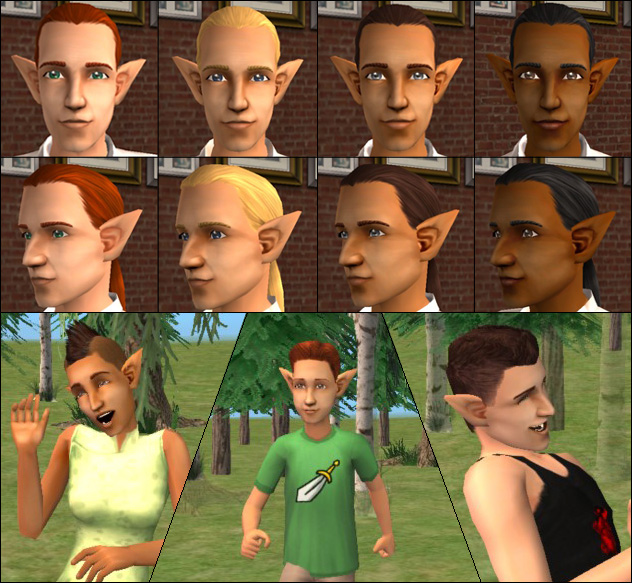
This was another request. I had thought there were plenty of elf ears out there, but apparently there are some strict recoloring policies on some of them, and the only other mesh I've found here are much longer than these. So here ya go.
These are for child-elder, male and female. They will stay on all the time. There are four colors to match the four Maxis default skintones. I don't know what the actual names of all the skintones are, so I've called them Pale, Medium, Tan, and Dark. And if you can't figure out which is which, I'm not telling you. If I'm recalling the aging process correctly though (it's been so long since I've actually played), elder skintones are slightly different from younger ages' skintones. So the ears may not match exactly for elders. They don't match quite exactly now, but I did the best I could do.
The texture map of my ears is the exact same as Maxis ears. You can literally use the face image of the skintone you want to use - which is what I did - but for some reason accessories come up darker than skin and clothes, so you do have to do some adjustment to the brightness/contrast.
Disclaimer: Recolor at will, but do not redistribute the mesh without permission. All recolors should link back to this post. Do not upload to any paysites, and do not upload to the Exchange. I know they're pretty much nonexistant, but feel free to use any color I include with my meshes in your own creations, as long as credit is given and a link to the mesh is provided. HOWEVER, this doesn't apply to anyone else's recolors of my meshes. Those are the property of the respective creators, and you have to ask them about redistribution. All content is by Maxis or me.
These are for child-elder, male and female. They will stay on all the time. There are four colors to match the four Maxis default skintones. I don't know what the actual names of all the skintones are, so I've called them Pale, Medium, Tan, and Dark. And if you can't figure out which is which, I'm not telling you. If I'm recalling the aging process correctly though (it's been so long since I've actually played), elder skintones are slightly different from younger ages' skintones. So the ears may not match exactly for elders. They don't match quite exactly now, but I did the best I could do.
The texture map of my ears is the exact same as Maxis ears. You can literally use the face image of the skintone you want to use - which is what I did - but for some reason accessories come up darker than skin and clothes, so you do have to do some adjustment to the brightness/contrast.
Disclaimer: Recolor at will, but do not redistribute the mesh without permission. All recolors should link back to this post. Do not upload to any paysites, and do not upload to the Exchange. I know they're pretty much nonexistant, but feel free to use any color I include with my meshes in your own creations, as long as credit is given and a link to the mesh is provided. HOWEVER, this doesn't apply to anyone else's recolors of my meshes. Those are the property of the respective creators, and you have to ask them about redistribution. All content is by Maxis or me.
This is a new mesh, and means that it's a brand new self contained object that usually does not require a specific Pack (although this is possible depending on the type). It may have Recolours hosted on MTS - check below for more information.
| Filename | Size | Downloads | Date | |||||
|
MESH_ZoiElfEars.rar
Size: 22.1 KB · Downloads: 14,267 · 23rd Jan 2006 |
22.1 KB | 14,267 | 23rd Jan 2006 | |||||
|
ElfEars - Dark.rar
Size: 77.0 KB · Downloads: 9,428 · 23rd Jan 2006 |
77.0 KB | 9,428 | 23rd Jan 2006 | |||||
|
ElfEars - Tan.rar
Size: 86.9 KB · Downloads: 9,748 · 23rd Jan 2006 |
86.9 KB | 9,748 | 23rd Jan 2006 | |||||
|
ElfEars - Medium.rar
Size: 82.8 KB · Downloads: 10,309 · 23rd Jan 2006 |
82.8 KB | 10,309 | 23rd Jan 2006 | |||||
|
ElfEars - Pale.rar
Size: 74.9 KB · Downloads: 11,608 · 23rd Jan 2006 |
74.9 KB | 11,608 | 23rd Jan 2006 | |||||
| For a detailed look at individual files, see the Information tab. | ||||||||
Key:
- - File was updated after upload was posted
Install Instructions
Basic Download and Install Instructions:
1. Download: Click the download link to save the .rar or .zip file(s) to your computer.
2. Extract the zip, rar, or 7z file.
3. Place in Downloads Folder: Cut and paste the .package file(s) into your Downloads folder:
1. Download: Click the download link to save the .rar or .zip file(s) to your computer.
2. Extract the zip, rar, or 7z file.
3. Place in Downloads Folder: Cut and paste the .package file(s) into your Downloads folder:
- Origin (Ultimate Collection): Users\(Current User Account)\Documents\EA Games\The Sims™ 2 Ultimate Collection\Downloads\
- Non-Origin, Windows Vista/7/8/10: Users\(Current User Account)\Documents\EA Games\The Sims 2\Downloads\
- Non-Origin, Windows XP: Documents and Settings\(Current User Account)\My Documents\EA Games\The Sims 2\Downloads\
- Mac: Users\(Current User Account)\Documents\EA Games\The Sims 2\Downloads
- Mac x64: /Library/Containers/com.aspyr.sims2.appstore/Data/Library/Application Support/Aspyr/The Sims 2/Downloads
- For a full, complete guide to downloading complete with pictures and more information, see: Game Help: Downloading for Fracking Idiots.
- Custom content not showing up in the game? See: Game Help: Getting Custom Content to Show Up.
- If you don't have a Downloads folder, just make one. See instructions at: Game Help: No Downloads Folder.
Recolours of this mesh
There are 3 recolours of this mesh on MTS:
Also Thanked - Users who thanked this download also thanked:
Packs Needed
None, this is Sims 2 base game compatible!
Other Information
Accessory Type:
– Misc
Age:
– Child
– Teen
– Young Adult
– Adult
– Elder
Gender:
– Male
– Female
About Me
I haven't made anything new in two and a half years. Use my stuff for whatever you like, but don't ask me for requests.
More Downloads BETA
Here are some more of my downloads: