
 Sign in to Mod The Sims
 Testers Wanted: Color Binning Tool 0.2.30.1
 Testers Wanted: Color Binning Tool 0.2.30.1
MTS has all free content, all the time. Donate to help keep it running.
SCREENSHOTS
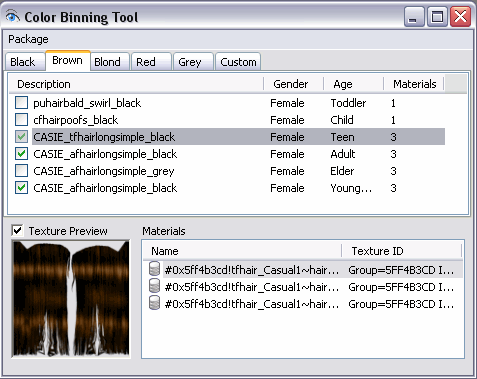
tool_brown.png - width=477 height=379
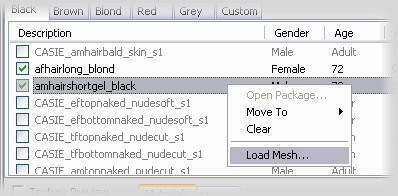
skintone_loadmesh1.png - width=398 height=196
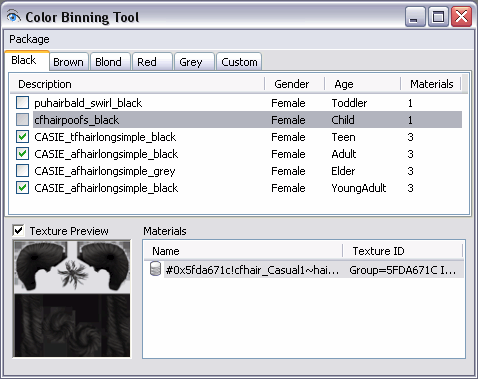
tool_select_pset.png - width=478 height=379
Featured Upload!
This is a featured upload! It showcases the best talent and creativity available on MTS and in the community. 


Color Binning Tool
The color binning tool is a custom plugin for SimPE 0.63+
Its purpose is to change custom hair packages so that custom hair recolors appear in the standard color bins.
It was designed to be easy to use: on each standard color tab, you can load a hair package file; after you load the four packages into their respective bins, you can save the result.
There is no need to edit any PropertySet, as the binning logic is already done for you.
More information and some tutorials can be found in the plugin's website: http://theos.chewbakkas.net/tools/c...nning-tool.html
Installation
- Extract the file theos.gbct.plugin.dll
- Copy it into SimPE's Plugins folder, which in a default installation is at C:\Program Files\SimPE\Plugins
- Run SimPE and verify that you have a menu item named "Color Binning Tool" under SimPE's Tools menu.
Basic Usage
After the plugin is installed, start SimPE.
On the Tools menu, click on the "Color Binning Tool" item, and the plugin's main window should appear. Initially, the "Black" color tab is selected by default.
Use the "Package" menu or the context menu to load a package file into the selected tab. Repeat this process for the other tabs (Brown, Blond and Red).
You can select which age groups you wish to keep or remove on each color tab. You must pay special attention to the fact that a properly binned hair should have only one elder (grey) recolor, so you must choose carefully one elder recolor out of the four available.
On most cases you can ignore the Grey and Custom tabs, so you may proceed to review the package options (available in the menu Package->Options), and finally save the resulting package files.
Credits
I would like to thank to everyone that contributed to this project, and in particular to Motoki, for giving the momentum that started this project; Pinhead, whose invaluable knowledge put the code right on track again; and of course all the folks at MATY that were willing to test the plugin on its early stages.
The color binning tool is a custom plugin for SimPE 0.63+
Its purpose is to change custom hair packages so that custom hair recolors appear in the standard color bins.
It was designed to be easy to use: on each standard color tab, you can load a hair package file; after you load the four packages into their respective bins, you can save the result.
There is no need to edit any PropertySet, as the binning logic is already done for you.
More information and some tutorials can be found in the plugin's website: http://theos.chewbakkas.net/tools/c...nning-tool.html
Installation
- Extract the file theos.gbct.plugin.dll
- Copy it into SimPE's Plugins folder, which in a default installation is at C:\Program Files\SimPE\Plugins
- Run SimPE and verify that you have a menu item named "Color Binning Tool" under SimPE's Tools menu.
Basic Usage
After the plugin is installed, start SimPE.
On the Tools menu, click on the "Color Binning Tool" item, and the plugin's main window should appear. Initially, the "Black" color tab is selected by default.
Use the "Package" menu or the context menu to load a package file into the selected tab. Repeat this process for the other tabs (Brown, Blond and Red).
You can select which age groups you wish to keep or remove on each color tab. You must pay special attention to the fact that a properly binned hair should have only one elder (grey) recolor, so you must choose carefully one elder recolor out of the four available.
On most cases you can ignore the Grey and Custom tabs, so you may proceed to review the package options (available in the menu Package->Options), and finally save the resulting package files.
Credits
I would like to thank to everyone that contributed to this project, and in particular to Motoki, for giving the momentum that started this project; Pinhead, whose invaluable knowledge put the code right on track again; and of course all the folks at MATY that were willing to test the plugin on its early stages.
| Filename | Type | Size |
|---|---|---|
| ColorBinningTool_2301.zip | zip | |
| theos.gbct.plugin.dll | dll | 102400 |
| readme.html | html | 3421 |
| Filename | Size | Downloads | Date | |||||
|
ColorBinningTool_2301.zip
Size: 39.9 KB · Downloads: 12,860 · 27th Dec 2007 |
39.9 KB | 12,860 | 27th Dec 2007 | |||||
| For a detailed look at individual files, see the Information tab. | ||||||||
Key:
- - File was updated after upload was posted
Install Instructions
Basic Download and Install Instructions:
1. Download: Click the download link to save the .rar or .zip file(s) to your computer.
2. Extract the zip, rar, or 7z file.
3. Place in Downloads Folder: Cut and paste the .package file(s) into your Downloads folder:
1. Download: Click the download link to save the .rar or .zip file(s) to your computer.
2. Extract the zip, rar, or 7z file.
3. Place in Downloads Folder: Cut and paste the .package file(s) into your Downloads folder:
- Origin (Ultimate Collection): Users\(Current User Account)\Documents\EA Games\The Sims™ 2 Ultimate Collection\Downloads\
- Non-Origin, Windows Vista/7/8/10: Users\(Current User Account)\Documents\EA Games\The Sims 2\Downloads\
- Non-Origin, Windows XP: Documents and Settings\(Current User Account)\My Documents\EA Games\The Sims 2\Downloads\
- Mac: Users\(Current User Account)\Documents\EA Games\The Sims 2\Downloads
- Mac x64: /Library/Containers/com.aspyr.sims2.appstore/Data/Library/Application Support/Aspyr/The Sims 2/Downloads
- For a full, complete guide to downloading complete with pictures and more information, see: Game Help: Downloading for Fracking Idiots.
- Custom content not showing up in the game? See: Game Help: Getting Custom Content to Show Up.
- If you don't have a Downloads folder, just make one. See instructions at: Game Help: No Downloads Folder.
Also Thanked - Users who thanked this download also thanked:
Packs Needed
None, this is Sims 2 base game compatible!
Other Information
Operating System:
– Windows
: Windows XP, Windows Vista, Windows 7, etc
Utility Type:
– CC Editors
: Tools for modifying .package files, sims*pack files, and resources contained within those files.
Plugin Type:
– SimPE
: Plugins for SimPE
More Downloads BETA
Here are some more of my downloads: