
 Sign in to Mod The Sims
 Ashley Cataline Plain Double Bed MESH and 7 recolors (test please)
 Ashley Cataline Plain Double Bed MESH and 7 recolors (test please)
MTS has all free content, all the time. Donate to help keep it running.
SCREENSHOTS
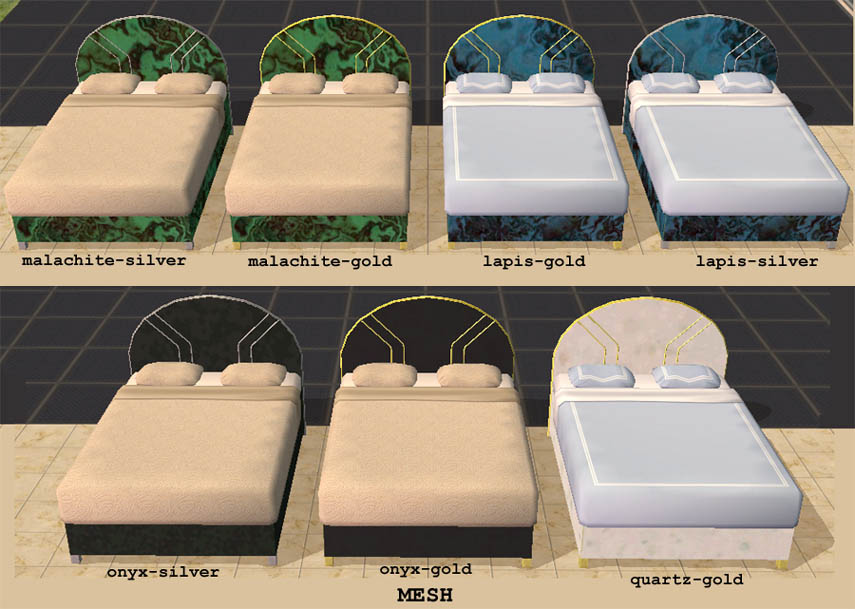
su_ashcatbedsmts2.jpg - width=855 height=609
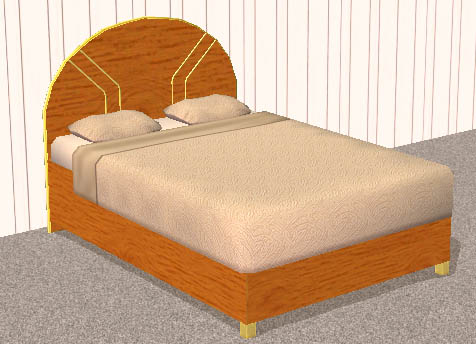
ashcatwoodbed1.jpg - width=476 height=344
This is my first completed mesh. It is based on my own bed which is part of the Ashley Cataline Onyx set. My first recolor was inspired by the catalog picture of the Ashley Cataline Onyx set. I liked the texture but thought a lapis version would be cool too. I also decided for some odd reason to try out a white texture that was sort of like quartz. Then I decided to make silver accents instead of gold. There was a quartz-silver one made but it was so horrible I immediately deleted it when I saw how it looked in the game.
If you can't see the pictures, the bed has a rounded headboard with curved trim on the outside and raised accents on the inner part.
Since the picture I uploaded isn't that great but I don't want to tax the bandwidth of this site too much, I uploaded a picture of the bes using various custom beddings from all over (I don't remember where I got each one).
Screencap
I used regular Maxis bedding, even though its not my favorite, for the screenshots because I couldn't remember where I got most of my bedding and I didn't think it would be fair to not be able to say where to get it from.
Thanks to Teknofil for showing me how to mesh, to Fresh-Prince for patiently spending hours guiding me through SimPE and the object creation process and answering my questions, to HystericalParoxysm, Simaddict, LyricLee, JohnBrehaut, Lethe, Delphy, Starbuck, Anna, Missangela, and everyone else at the sims2community chat who put up with my incessant questions (sorry for any names I left out), and to Monkeeleader for inspiration. I could not have done it without you folks! Thank you!
The material definitions have been edited to make it a bit more shiny/glossy.
Recolors: Please feel free to recolor as much as you want. I would love to see what people come up with. I tried to make the texture map easy to recolor. I don't know how well I did since this was my first time trying it (I had to remap over a dozen times before I found something I was happy with). The mesh is free for everyone. I don't mind if people include it in their downloads, but I would appreciate knowing if you are using it because it will make me feel special.
You can see the texture map here
Since this is my first completely custom object I don't know if it has any problems. It seems ok in my game, however if anyone encounters problems, please let me know. Feedback is greatly appreciated.
Price: 500
Comfort: 8
Energy: 8
Room: 6
I believe the poly count is 1828
Note: You MUST load the onyxgldMESH file or else the recolors will not work!
Files:
su_ashcatbedplngloss_onyxgldMESH.rar ->MESH, black with gold trim
su_ashcatbedplngloss_onyxsilv.rar ->black with silver trim
su_ashcatbedplngloss_lapisgld.rar ->blue/black pattern with gold trim
su_ashcatbedplngloss_lapissilv.rar ->blue/black pattern with silver trim
su_ashcatbedplngloss_malactgld.rar ->green/black pattern with gold trim
su_ashcatbedplngloss_malactsilv.rar ->green/black pattern with silver trim
su_ashcatbedplngloss_quartzgld.rar ->white crystal-like pattern with gold trim
UPDATE:
Added su_ashcatbed_wood1.rar ->wood texture with gold trim
If you can't see the pictures, the bed has a rounded headboard with curved trim on the outside and raised accents on the inner part.
Since the picture I uploaded isn't that great but I don't want to tax the bandwidth of this site too much, I uploaded a picture of the bes using various custom beddings from all over (I don't remember where I got each one).
Screencap
I used regular Maxis bedding, even though its not my favorite, for the screenshots because I couldn't remember where I got most of my bedding and I didn't think it would be fair to not be able to say where to get it from.
Thanks to Teknofil for showing me how to mesh, to Fresh-Prince for patiently spending hours guiding me through SimPE and the object creation process and answering my questions, to HystericalParoxysm, Simaddict, LyricLee, JohnBrehaut, Lethe, Delphy, Starbuck, Anna, Missangela, and everyone else at the sims2community chat who put up with my incessant questions (sorry for any names I left out), and to Monkeeleader for inspiration. I could not have done it without you folks! Thank you!
The material definitions have been edited to make it a bit more shiny/glossy.
Recolors: Please feel free to recolor as much as you want. I would love to see what people come up with. I tried to make the texture map easy to recolor. I don't know how well I did since this was my first time trying it (I had to remap over a dozen times before I found something I was happy with). The mesh is free for everyone. I don't mind if people include it in their downloads, but I would appreciate knowing if you are using it because it will make me feel special.
You can see the texture map here
Since this is my first completely custom object I don't know if it has any problems. It seems ok in my game, however if anyone encounters problems, please let me know. Feedback is greatly appreciated.
Price: 500
Comfort: 8
Energy: 8
Room: 6
I believe the poly count is 1828
Note: You MUST load the onyxgldMESH file or else the recolors will not work!
Files:
su_ashcatbedplngloss_onyxgldMESH.rar ->MESH, black with gold trim
su_ashcatbedplngloss_onyxsilv.rar ->black with silver trim
su_ashcatbedplngloss_lapisgld.rar ->blue/black pattern with gold trim
su_ashcatbedplngloss_lapissilv.rar ->blue/black pattern with silver trim
su_ashcatbedplngloss_malactgld.rar ->green/black pattern with gold trim
su_ashcatbedplngloss_malactsilv.rar ->green/black pattern with silver trim
su_ashcatbedplngloss_quartzgld.rar ->white crystal-like pattern with gold trim
UPDATE:
Added su_ashcatbed_wood1.rar ->wood texture with gold trim
This is a new mesh, and means that it's a brand new self contained object that usually does not require a specific Pack (although this is possible depending on the type). It may have Recolours hosted on MTS - check below for more information.
| Filename | Size | Downloads | Date | |||||
|
su_ashcatbed_wood1.rar
Size: 87.5 KB · Downloads: 928 · 4th Aug 2006 |
87.5 KB | 928 | 4th Aug 2006 | |||||
|
su_ashcatbedplngloss_quartzgld.rar
Size: 63.7 KB · Downloads: 1,118 · 19th Jul 2006 |
63.7 KB | 1,118 | 19th Jul 2006 | |||||
|
su_ashcatbedplngloss_malactsilv.rar
Size: 88.4 KB · Downloads: 1,043 · 19th Jul 2006 |
88.4 KB | 1,043 | 19th Jul 2006 | |||||
|
su_ashcatbedplngloss_malactgld.rar
Size: 89.9 KB · Downloads: 1,059 · 19th Jul 2006 |
89.9 KB | 1,059 | 19th Jul 2006 | |||||
|
su_ashcatbedplngloss_lapissilv.rar
Size: 111.6 KB · Downloads: 1,075 · 19th Jul 2006 |
111.6 KB | 1,075 | 19th Jul 2006 | |||||
|
su_ashcatbedplngloss_lapisgld.rar
Size: 114.8 KB · Downloads: 1,077 · 19th Jul 2006 |
114.8 KB | 1,077 | 19th Jul 2006 | |||||
|
su_ashcatbedplngloss_onyxsilv.rar
Size: 40.7 KB · Downloads: 1,178 · 19th Jul 2006 |
40.7 KB | 1,178 | 19th Jul 2006 | |||||
|
su_ashcatbedplngloss_onyxgldMESH.rar
Size: 389.0 KB · Downloads: 1,306 · 19th Jul 2006 |
389.0 KB | 1,306 | 19th Jul 2006 | |||||
| For a detailed look at individual files, see the Information tab. | ||||||||
Key:
- - File was updated after upload was posted
Install Instructions
Basic Download and Install Instructions:
1. Download: Click the download link to save the .rar or .zip file(s) to your computer.
2. Extract the zip, rar, or 7z file.
3. Place in Downloads Folder: Cut and paste the .package file(s) into your Downloads folder:
1. Download: Click the download link to save the .rar or .zip file(s) to your computer.
2. Extract the zip, rar, or 7z file.
3. Place in Downloads Folder: Cut and paste the .package file(s) into your Downloads folder:
- Origin (Ultimate Collection): Users\(Current User Account)\Documents\EA Games\The Sims™ 2 Ultimate Collection\Downloads\
- Non-Origin, Windows Vista/7/8/10: Users\(Current User Account)\Documents\EA Games\The Sims 2\Downloads\
- Non-Origin, Windows XP: Documents and Settings\(Current User Account)\My Documents\EA Games\The Sims 2\Downloads\
- Mac: Users\(Current User Account)\Documents\EA Games\The Sims 2\Downloads
- Mac x64: /Library/Containers/com.aspyr.sims2.appstore/Data/Library/Application Support/Aspyr/The Sims 2/Downloads
- For a full, complete guide to downloading complete with pictures and more information, see: Game Help: Downloading for Fracking Idiots.
- Custom content not showing up in the game? See: Game Help: Getting Custom Content to Show Up.
- If you don't have a Downloads folder, just make one. See instructions at: Game Help: No Downloads Folder.
Also Thanked - Users who thanked this download also thanked:
Packs Needed
None, this is Sims 2 base game compatible!
Tags
#double bed, #black, #onyx, #malachite, #lapis, #gold, #trim, #glossy, #ashley cataline
About Me
I like to share things and it makes me feel good to know when people like my stuff. People may recolor my stuff to their heart's content but all recolors must be on free sites (or at least in free sections). Feel free to use my meshes and objects in uploaded lots. I want people to enjoy my work. You don't need permission from me to recolor my stuff, but if you do recolor I would love to see it.
I can sometimes do requests (so long as its not too complicated) so feel free to PM me with any requests or suggestions. Be warned that I work quite slowly though.
I haven't yet figured out how to make items for Sims 3 and I've lost all of my data for Sims 2.
I am interested in learning more about making Sims 3 items though.
Also, I talk way too much...
I can sometimes do requests (so long as its not too complicated) so feel free to PM me with any requests or suggestions. Be warned that I work quite slowly though.
I haven't yet figured out how to make items for Sims 3 and I've lost all of my data for Sims 2.
I am interested in learning more about making Sims 3 items though.
Also, I talk way too much...