
 Sign in to Mod The Sims
 Boeing Commercial Airliners
 Boeing Commercial Airliners
MTS has all free content, all the time. Donate to help keep it running.
SCREENSHOTS



snapshot_00000001_f1cb0d2d.jpg - width=600 height=450
snapshot_00000001_b1cb3de3.jpg - width=600 height=450
snapshot_00000001_51cb3d44.jpg - width=600 height=450
snapshot_00000001_91cb3c06.jpg - width=600 height=450
snapshot_00000001_51cb3cd3.jpg - width=600 height=450
snapshot_00000001_31cb3d04.jpg - width=600 height=450
snapshot_00000001_31cb0e70.jpg - width=600 height=450
snapshot_00000001_11cdb8cd.jpg - width=600 height=450


Created by crocobaura
Uploaded: 20th Jul 2006 at 4:48 AM
Updated: 10th Sep 2006 at 12:13 PM - added NL versions
Updated: 10th Sep 2006 at 12:13 PM - added NL versions
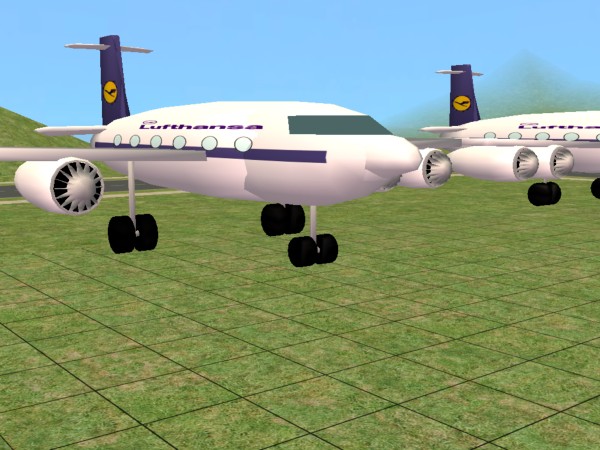
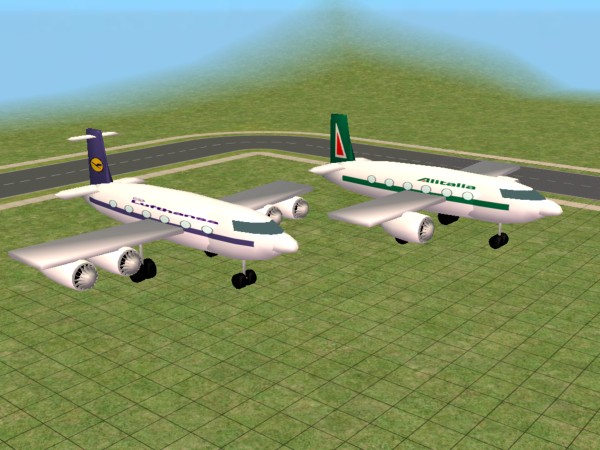
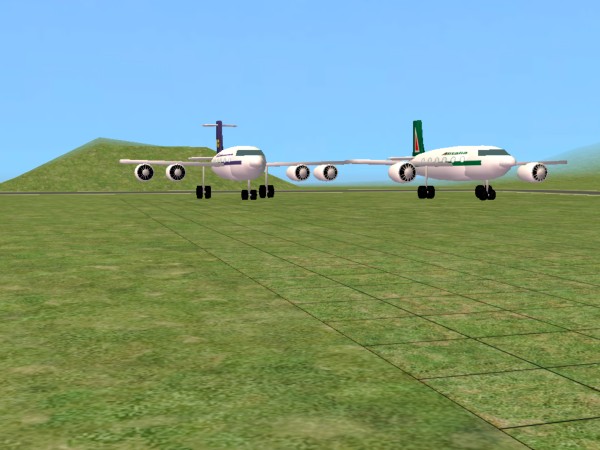
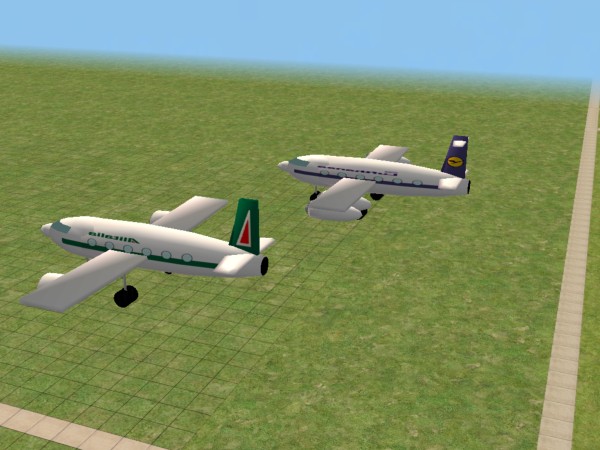
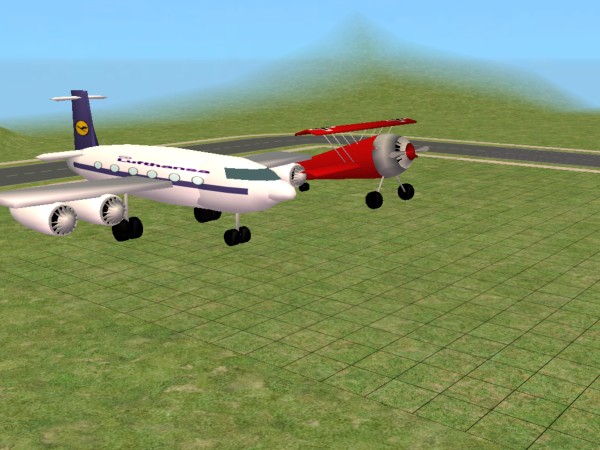
Ok, so after I uploaded my first airplane, I received two requests for some Boeing planes, a 737 and a 747. Initially, I was going to postpone them for a while, but as my icecream machine was too stubborn to appear right in the game, I decided to have a try at the airliners. Now, I think they turned out all right, even though they are rather small, so here I present you with a Boeing 737 and a Boeing 747, operated by Lufthansa and Alitalia respectively. Just fasten your seat belts tight!
Drawbacks: the Sims can walk through them. But this is also an advantage, because the second half of the planes is out of the green squares so you can place them on the very edge of your lot and have a nice busy airport on a smaller lot. Also, the airline name appears mirrored on one side of the plane. I didn't foresee this when I made the texture.
Good thing they show up in neighbourhood view so they are very good for decoration. actually, that's all they do. You can find them in the catalog under Decorations/Miscellaneous. Enjoy!
Numbers:
Boeing 737: 2774 vertices / 2912 faces
Boeing 747: 3550 vertices / 3722 faces
Drawbacks: the Sims can walk through them. But this is also an advantage, because the second half of the planes is out of the green squares so you can place them on the very edge of your lot and have a nice busy airport on a smaller lot. Also, the airline name appears mirrored on one side of the plane. I didn't foresee this when I made the texture.
Good thing they show up in neighbourhood view so they are very good for decoration. actually, that's all they do.
 You can find them in the catalog under Decorations/Miscellaneous. Enjoy!
Numbers:
Boeing 737: 2774 vertices / 2912 faces
Boeing 747: 3550 vertices / 3722 faces
This is a new mesh, and means that it's a brand new self contained object that usually does not require a specific Pack (although this is possible depending on the type). It may have Recolours hosted on MTS - check below for more information.
| Filename | Size | Downloads | Date | |||||
|
Boeing 747 & 737 for NL.rar
Size: 203.5 KB · Downloads: 5,823 · 26th Aug 2006 |
203.5 KB | 5,823 | 26th Aug 2006 | |||||
|
Crocobaura_Boeing_747_Quantas.rar
Size: 12.1 KB · Downloads: 6,222 · 22nd Jul 2006 |
12.1 KB | 6,222 | 22nd Jul 2006 | |||||
|
Boeing Commercial Liners.rar
Size: 307.7 KB · Downloads: 8,250 · 20th Jul 2006 |
307.7 KB | 8,250 | 20th Jul 2006 | |||||
| For a detailed look at individual files, see the Information tab. | ||||||||
Key:
- - File was updated after upload was posted
Install Instructions
Basic Download and Install Instructions:
1. Download: Click the download link to save the .rar or .zip file(s) to your computer.
2. Extract the zip, rar, or 7z file.
3. Place in Downloads Folder: Cut and paste the .package file(s) into your Downloads folder:
1. Download: Click the download link to save the .rar or .zip file(s) to your computer.
2. Extract the zip, rar, or 7z file.
3. Place in Downloads Folder: Cut and paste the .package file(s) into your Downloads folder:
- Origin (Ultimate Collection): Users\(Current User Account)\Documents\EA Games\The Sims™ 2 Ultimate Collection\Downloads\
- Non-Origin, Windows Vista/7/8/10: Users\(Current User Account)\Documents\EA Games\The Sims 2\Downloads\
- Non-Origin, Windows XP: Documents and Settings\(Current User Account)\My Documents\EA Games\The Sims 2\Downloads\
- Mac: Users\(Current User Account)\Documents\EA Games\The Sims 2\Downloads
- Mac x64: /Library/Containers/com.aspyr.sims2.appstore/Data/Library/Application Support/Aspyr/The Sims 2/Downloads
- For a full, complete guide to downloading complete with pictures and more information, see: Game Help: Downloading for Fracking Idiots.
- Custom content not showing up in the game? See: Game Help: Getting Custom Content to Show Up.
- If you don't have a Downloads folder, just make one. See instructions at: Game Help: No Downloads Folder.
Also Thanked - Users who thanked this download also thanked:
Packs Needed
Tags
Packs Needed
| Base Game | |
|---|---|
 | Sims 2 |
| Expansion Pack | |
|---|---|
 | University |
 | Nightlife |
 | Open for Business |
Distribution policy:
Use freely as long as you give credit. Please ask for permission if you want to use my meshes on pay or donation sites or other commercial activities.
If you want to convert any of my Sims2 objects to be used in Sims3, please feel free to do it yourself. Thank you!
If you want to convert any of my Sims2 objects to be used in Sims3, please feel free to do it yourself. Thank you!
More Downloads BETA
Here are some more of my downloads: