
 Sign in to Mod The Sims
 *UPDATED* Base Game & EP Floor Loom w/ Anims, Skill,and $$
 *UPDATED* Base Game & EP Floor Loom w/ Anims, Skill,and $$
MTS has all free content, all the time. Donate to help keep it running.
SCREENSHOTS


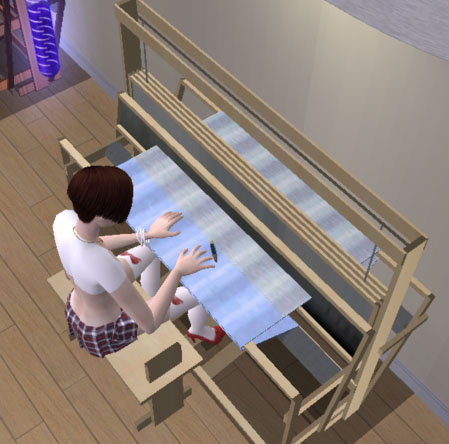
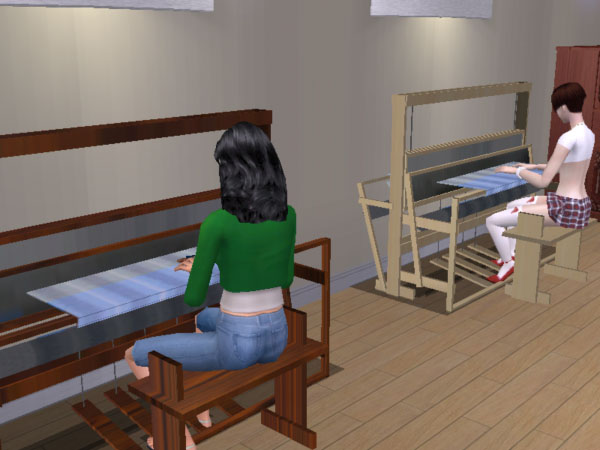
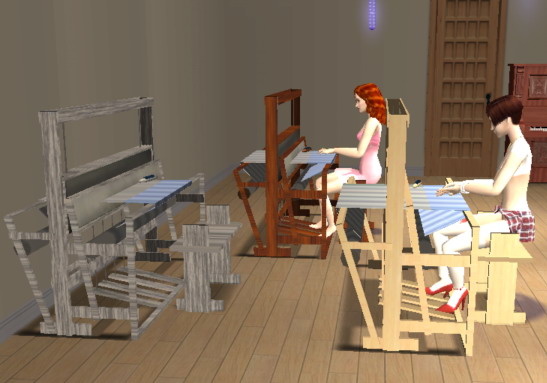

loomlt.jpg - width=315 height=334
loomdark.jpg - width=358 height=350
loomabove.jpg - width=449 height=444
loomdouble.jpg - width=600 height=450
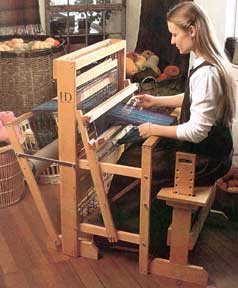
harrisa6 loom.jpg - width=238 height=288
EPloomside.jpg - width=547 height=383
EPloom4.jpg - width=449 height=337
Featured Upload!
This is a featured upload! It showcases the best talent and creativity available on MTS and in the community. 



Created by cokenasmile
Uploaded: 21st Jul 2006 at 2:19 AM
Updated: 4th Dec 2008 at 1:24 PM by -Maylin-
Updated: 4th Dec 2008 at 1:24 PM by -Maylin-
 ***UPDATE*** There is now a Base Game Only and a seperate EP's version that pay your sim $1000 per skill point earned on them. I wish I could've made it pay by the hour, but that is currently beyond my ability. I tweaked the animations to play the ones that I felt looked better than the standard, and improved my shadows and textures a bit. The light and dark wood versions of the Base versions have different GUIDS for numerous technical reasons. The base versions cost $1200 and have 1734 vertices and 1198 faces. The Base Game version is "cokenasmilebaselooma.rar". The base game only version doesn't work with EP's. The new version for EP's is "cokenasmileloomsEP.rar" and costs $1900. These two new versions have different file names and GUID's so they will NOT overwrite anything.*** ***NOTICE: It has been confirmed that the EP versions do not work if you have university only. I have added cokenasmileUNIloom.rar which has a version that does not pay out but is compatible with University for those that have only that expansion pack. It has unique GUID's and filenames so it will not overwrite anything and comes in both light and dark wood.***
The Similock Floor Loom will increase a Sim’s creativity and may be used by children through elders. This Floor Loom comes with a boat shuttle and bobbin and is pre-warped to save you time and frustration! Comes in light and dark wood color sets, PLUS a Simstones rock recolor of the EP version that pays-out.
I made this from the Maxis piano and it borrows the animations from there. The EP versions work with any and all of the EP's but they need at least one because the coding changed from the base game.
Original upload only "cokenasmilefloorlooms.rar":Contrary to the Sewing Station, A Sim with *medium to high* creativity looks best in the animations because they reach left and right as you would to weave. (I tweaked the anims to be those of higher skills in the base game version and for the newer EP version so they look better no matter the skill level.) This will appear under Living Room and Misc and under Hobbies. It costs $1875.
I changed the pie menu for this item to allow your Sim to “Weave”. I also disabled the piano music so you won’t hear that during the animations. I was NOT able to take out the pie menu option of “Perform/Jazz/Rock/Country”, but if you choose them, they fade away (your Sim would rather weave anyway). So, the loom does not play music, but any piano’s you have will still be just fine and play as normal. Please let me know if you find otherwise.
Maxis piano had: 3210 faces and 4220 vertices
Floor Loom has: 1278 faces and 1858 vertices
Pay Loom has: 1234 faces and 1768 vertices
For tutorials that helped me go from 0 to this in a couple days, BigThanks to:
boblishman
Numenor
JWoods
tiggerypum
Echo: Programmer’s guide to BHAV’s tutorial and Making your first custom BHAV tutorial
Programs used in the making of this: SimPE CEP MilkShape 3D
UVMapper Classic
Adobe Photoshop CS2
And Plug-ins by :
wes_h http://www.modthesims2.com/showthread.php?t=122399 UniMesh plug-in
demon432 http://www.modthesims2.com/showthread.php?t=139859
***DO NOT upload to any paysite or anything like a paysite. My work is to stay on MTS2. Period. DO NOT recolor or clone without my permission. I worked hard on this and would want any recolors or inclusions in other items to be by my permission and with credit and a link here for the mesh.***
~ cokenasmile
This is a new mesh, and means that it's a brand new self contained object that usually does not require a specific Pack (although this is possible depending on the type). It may have Recolours hosted on MTS - check below for more information.
| Filename | Size | Downloads | Date | |||||
|
cokenasmileUNIloom.rar
Size: 292.7 KB · Downloads: 14,685 · 1st Sep 2006 |
292.7 KB | 14,685 | 1st Sep 2006 | |||||
|
cokenasmileloomsEP.rar
Size: 378.9 KB · Downloads: 22,068 · 2nd Aug 2006 |
378.9 KB | 22,068 | 2nd Aug 2006 | |||||
|
cokenasmilebaselooma.rar
Size: 134.4 KB · Downloads: 18,719 · 1st Aug 2006 |
134.4 KB | 18,719 | 1st Aug 2006 | |||||
|
cokenasmilefloorlooms.rar
Size: 331.5 KB · Downloads: 23,011 · 21st Jul 2006 |
331.5 KB | 23,011 | 21st Jul 2006 | |||||
| For a detailed look at individual files, see the Information tab. | ||||||||
Key:
- - File was updated after upload was posted
Install Instructions
Basic Download and Install Instructions:
1. Download: Click the download link to save the .rar or .zip file(s) to your computer.
2. Extract the zip, rar, or 7z file.
3. Place in Downloads Folder: Cut and paste the .package file(s) into your Downloads folder:
1. Download: Click the download link to save the .rar or .zip file(s) to your computer.
2. Extract the zip, rar, or 7z file.
3. Place in Downloads Folder: Cut and paste the .package file(s) into your Downloads folder:
- Origin (Ultimate Collection): Users\(Current User Account)\Documents\EA Games\The Sims™ 2 Ultimate Collection\Downloads\
- Non-Origin, Windows Vista/7/8/10: Users\(Current User Account)\Documents\EA Games\The Sims 2\Downloads\
- Non-Origin, Windows XP: Documents and Settings\(Current User Account)\My Documents\EA Games\The Sims 2\Downloads\
- Mac: Users\(Current User Account)\Documents\EA Games\The Sims 2\Downloads
- Mac x64: /Library/Containers/com.aspyr.sims2.appstore/Data/Library/Application Support/Aspyr/The Sims 2/Downloads
- For a full, complete guide to downloading complete with pictures and more information, see: Game Help: Downloading for Fracking Idiots.
- Custom content not showing up in the game? See: Game Help: Getting Custom Content to Show Up.
- If you don't have a Downloads folder, just make one. See instructions at: Game Help: No Downloads Folder.
Also Thanked - Users who thanked this download also thanked:
Packs Needed
None, this is Sims 2 base game compatible!
Other Information
Style:
– Retro
Room:
– Study
: Study/Office
Maxis Flags:
– Not Applicable
Tags
#weave, #weaving, #loom, #floor loom, #creativity, #hobbies, #simstones