
 Sign in to Mod The Sims
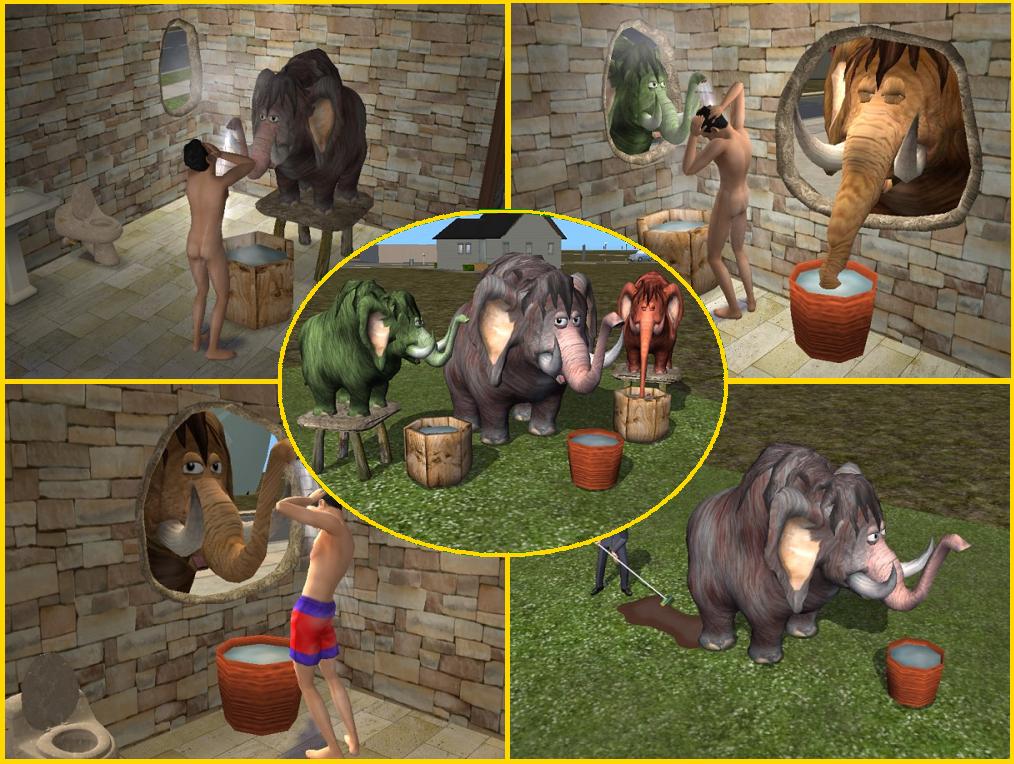
 The Mod Squad Presents- The Mammoth Shower! Teaser Piece for upcoming set.
 The Mod Squad Presents- The Mammoth Shower! Teaser Piece for upcoming set.
MTS has all free content, all the time. Donate to help keep it running.
SCREENSHOTS
MammothShowers.jpg - width=1014 height=764
Picked Upload!
This is a picked upload! It showcases some of the best talent and creativity available on MTS and in the community.
Uploaded: 21st Jul 2006 at 7:05 PM
Updated: 8th Sep 2006 at 9:29 PM - Minor tweak for the outdoor shower
Updated: 8th Sep 2006 at 9:29 PM - Minor tweak for the outdoor shower
The Mod Squad would like to proudly announce our new set which has been posted here, with over 100 new meshes and recolors!

This is our teaser piece for you all. The SimStone Mammoth Outdoor Shower!
FEATURES:
- Idle animations: the mammoths move the eyes and - every now and then - move the nose to sip some water; obviously, drinking so much water during the day causes occasional "wet surprises" from the... back end
Keep a mop at hand!
PS: keep the game volume up, to enjoy the funny sounds that come with the animations
- Placement: both mammoths can be placed outside a house, with their head passing through a window; placed this way, they can be used as indoor shower, while not taking the whole space of the bathroom (hey, they are mammoths, after all! ) - The Simstone "Hole in the Wall" windows are specifically designed for the purpose. (coming soon!)
- Dress changing: the big mammoth, as said, is intended to be an outdoor shower; therefore, the sims will change to swimwear (and not naked) while showering. The smaller mammoth (coming soon!) is a normal indoor shower, and the sims will shower naked.
- Game Compatibility: both mammoth showers are compatible with any game configuration.
- Recolours: the mammoths are separately recolourable; each package contains its own textures. Three additional recolours are provided (in separate download): green, grey-brown and reddish brown.
- Poly Count: Big shower (9 tiles) : 3716 faces / 2178 verts;
***************** UPDATED 27 July 2006 ******************
Just a minor tweak: the "rear externalizations" are a bit less frequent...
(both the "swimwear" and the "naked" versions have been updated)
Just a minor tweak: the "rear externalizations"
 are a bit less frequent...
(both the "swimwear" and the "naked" versions have been updated)
***************** UPDATED 25 July 2006 ******************
Do you want your sims to shower in swimwear or naked?
Choose your flavour, but ONLY ONE! You can't have both
"MammothShowerOutdoorMESH.rar" ------> Swimwear
"MammothShowerOutdoorMESH_(NAKED).rar -> Naked
******************************************************
Do you want your sims to shower in swimwear or naked?
Choose your flavour, but ONLY ONE! You can't have both
"MammothShowerOutdoorMESH.rar" ------> Swimwear
"MammothShowerOutdoorMESH_(NAKED).rar -> Naked
******************************************************
This is our teaser piece for you all. The SimStone Mammoth Outdoor Shower!
FEATURES:
- Idle animations: the mammoths move the eyes and - every now and then - move the nose to sip some water; obviously, drinking so much water during the day causes occasional "wet surprises" from the... back end
Keep a mop at hand!
PS: keep the game volume up, to enjoy the funny sounds that come with the animations
- Placement: both mammoths can be placed outside a house, with their head passing through a window; placed this way, they can be used as indoor shower, while not taking the whole space of the bathroom (hey, they are mammoths, after all! ) - The Simstone "Hole in the Wall" windows are specifically designed for the purpose. (coming soon!)
- Dress changing: the big mammoth, as said, is intended to be an outdoor shower; therefore, the sims will change to swimwear (and not naked) while showering. The smaller mammoth (coming soon!) is a normal indoor shower, and the sims will shower naked.
- Game Compatibility: both mammoth showers are compatible with any game configuration.
- Recolours: the mammoths are separately recolourable; each package contains its own textures. Three additional recolours are provided (in separate download): green, grey-brown and reddish brown.
- Poly Count: Big shower (9 tiles) : 3716 faces / 2178 verts;
This is a new mesh, and means that it's a brand new self contained object that usually does not require a specific Pack (although this is possible depending on the type). It may have Recolours hosted on MTS - check below for more information.
| Filename | Size | Downloads | Date | |||||
|
MammothShowerOutdoorMESH_(NAKED).rar
Size: 302.8 KB · Downloads: 11,099 · 25th Jul 2006 |
302.8 KB | 11,099 | 25th Jul 2006 | |||||
|
MammothShowerRecolours.rar
Size: 377.6 KB · Downloads: 14,596 · 21st Jul 2006 |
377.6 KB | 14,596 | 21st Jul 2006 | |||||
|
MammothShowerOutdoorMESH.rar
Size: 302.8 KB · Downloads: 14,994 · 21st Jul 2006 |
302.8 KB | 14,994 | 21st Jul 2006 | |||||
| For a detailed look at individual files, see the Information tab. | ||||||||
Key:
- - File was updated after upload was posted
Install Instructions
Basic Download and Install Instructions:
1. Download: Click the download link to save the .rar or .zip file(s) to your computer.
2. Extract the zip, rar, or 7z file.
3. Place in Downloads Folder: Cut and paste the .package file(s) into your Downloads folder:
1. Download: Click the download link to save the .rar or .zip file(s) to your computer.
2. Extract the zip, rar, or 7z file.
3. Place in Downloads Folder: Cut and paste the .package file(s) into your Downloads folder:
- Origin (Ultimate Collection): Users\(Current User Account)\Documents\EA Games\The Sims™ 2 Ultimate Collection\Downloads\
- Non-Origin, Windows Vista/7/8/10: Users\(Current User Account)\Documents\EA Games\The Sims 2\Downloads\
- Non-Origin, Windows XP: Documents and Settings\(Current User Account)\My Documents\EA Games\The Sims 2\Downloads\
- Mac: Users\(Current User Account)\Documents\EA Games\The Sims 2\Downloads
- Mac x64: /Library/Containers/com.aspyr.sims2.appstore/Data/Library/Application Support/Aspyr/The Sims 2/Downloads
- For a full, complete guide to downloading complete with pictures and more information, see: Game Help: Downloading for Fracking Idiots.
- Custom content not showing up in the game? See: Game Help: Getting Custom Content to Show Up.
- If you don't have a Downloads folder, just make one. See instructions at: Game Help: No Downloads Folder.
Also Thanked - Users who thanked this download also thanked:
About Me
This is a group account for our creations. Please do NOT PM this account, your mails will be unanswered. Post questions in the threads, if you have them, or contact some of the creators directly.
You may use our creations in your creations on MTS2 alone. For any other use, you must contact the individual who made the item.
You may use our creations in your creations on MTS2 alone. For any other use, you must contact the individual who made the item.
More Downloads BETA
Here are some more of my downloads: