
 Sign in to Mod The Sims
 Enayla's Eyes as Default
 Enayla's Eyes as Default
MTS has all free content, all the time. Donate to help keep it running.
SCREENSHOTS
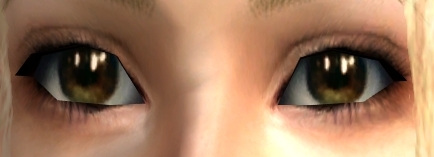

Brown.jpg - width=434 height=157
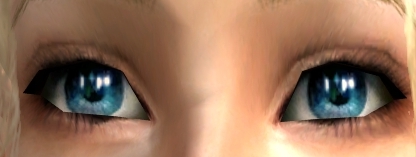
Dark Blue.jpg - width=416 height=157
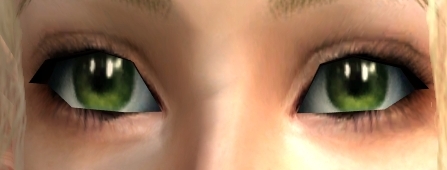
Green.jpg - width=447 height=170
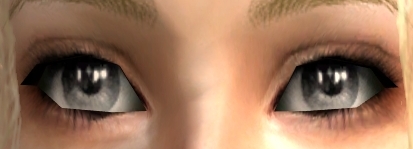
Grey.jpg - width=413 height=149
Light Blue.jpg - width=437 height=155
Picked Upload!
This is a picked upload! It showcases some of the best talent and creativity available on MTS and in the community.
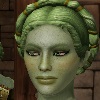
We're all so happy to have Enayla back sharing her wonderful art with all of us. Here is a default replacement set of her eyes.
You can find the original set here:
http://www.modthesims2.com/showthread.php?t=181070
If you would prefer, there is another default set by kashinthegreen using Enayla's "Eyes for the Eyeless" set here:
http://modthesims2.com/showthread.php?t=182710
You have to choose one or the other though, you can only have one default replacement at a time.
**Remove any current eye defaults you have first before downloading these**
Unzip to your downloads folder.
CTNutmeger wrote the tutorial I used to do this. You can find it here:
http://homepage.myeastern.com/~kamaba/EyeDefault.htm
It's quite simple really, you can customize them differently if you like.
I used dark bronze for the brown, heavenly for dark blue, olive for green, mist for grey, and angel eyes for light blue.
Thanks again to Enayla.
You can find the original set here:
http://www.modthesims2.com/showthread.php?t=181070
If you would prefer, there is another default set by kashinthegreen using Enayla's "Eyes for the Eyeless" set here:
http://modthesims2.com/showthread.php?t=182710
You have to choose one or the other though, you can only have one default replacement at a time.
**Remove any current eye defaults you have first before downloading these**
Unzip to your downloads folder.
CTNutmeger wrote the tutorial I used to do this. You can find it here:
http://homepage.myeastern.com/~kamaba/EyeDefault.htm
It's quite simple really, you can customize them differently if you like.
I used dark bronze for the brown, heavenly for dark blue, olive for green, mist for grey, and angel eyes for light blue.
Thanks again to Enayla.
| Filename | Size | Downloads | Date | |||||
|
Enayla Eyes as Default.zip
Size: 160.4 KB · Downloads: 11,024 · 10th Aug 2006 |
160.4 KB | 11,024 | 10th Aug 2006 | |||||
| For a detailed look at individual files, see the Information tab. | ||||||||
Key:
- - File was updated after upload was posted
Install Instructions
Basic Download and Install Instructions:
1. Download: Click the download link to save the .rar or .zip file(s) to your computer.
2. Extract the zip, rar, or 7z file.
3. Place in Downloads Folder: Cut and paste the .package file(s) into your Downloads folder:
1. Download: Click the download link to save the .rar or .zip file(s) to your computer.
2. Extract the zip, rar, or 7z file.
3. Place in Downloads Folder: Cut and paste the .package file(s) into your Downloads folder:
- Origin (Ultimate Collection): Users\(Current User Account)\Documents\EA Games\The Sims™ 2 Ultimate Collection\Downloads\
- Non-Origin, Windows Vista/7/8/10: Users\(Current User Account)\Documents\EA Games\The Sims 2\Downloads\
- Non-Origin, Windows XP: Documents and Settings\(Current User Account)\My Documents\EA Games\The Sims 2\Downloads\
- Mac: Users\(Current User Account)\Documents\EA Games\The Sims 2\Downloads
- Mac x64: /Library/Containers/com.aspyr.sims2.appstore/Data/Library/Application Support/Aspyr/The Sims 2/Downloads
- For a full, complete guide to downloading complete with pictures and more information, see: Game Help: Downloading for Fracking Idiots.
- Custom content not showing up in the game? See: Game Help: Getting Custom Content to Show Up.
- If you don't have a Downloads folder, just make one. See instructions at: Game Help: No Downloads Folder.
Also Thanked - Users who thanked this download also thanked:
More Downloads BETA
Here are some more of my downloads: