
 Sign in to Mod The Sims
 September Plant Collection
 September Plant Collection
MTS has all free content, all the time. Donate to help keep it running.
SCREENSHOTS
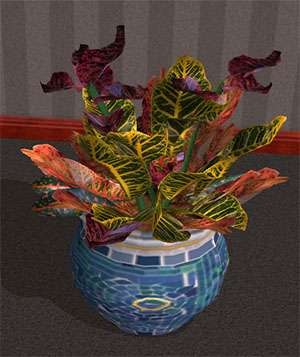

Croton.jpg - width=300 height=357
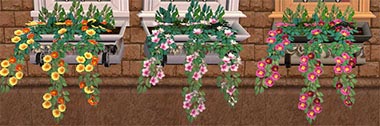
FlowerBox1.jpg - width=380 height=126
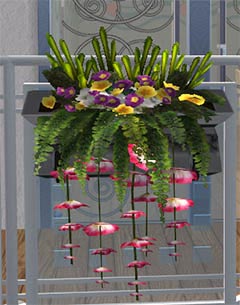
FlowerBox2.jpg - width=240 height=305
Autumn.jpg - width=320 height=322
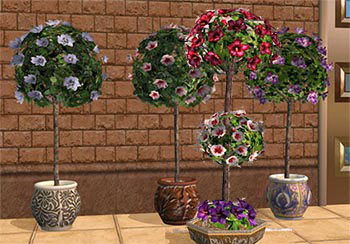
Hibiscus.jpg - width=350 height=244
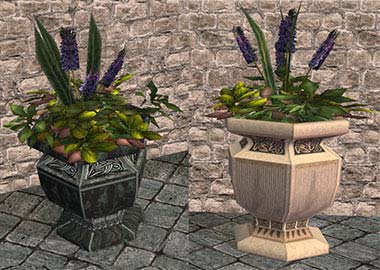
hexagonal.jpg - width=380 height=270
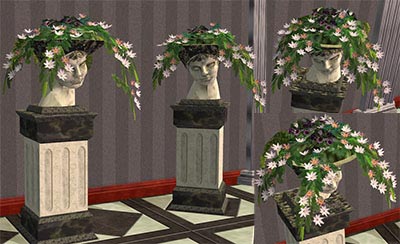
flowerhead.jpg - width=400 height=244
Featured Upload!
This is a featured upload! It showcases the best talent and creativity available on MTS and in the community. 


A collection of potted plants, flower boxes and garden planters.
The poly count for some of them is really quite high, so if your computer barely covers the system requirements, I suggest you don't download the high poly ones (I could have reduced the number of polygons but that would have resulted in poorer quality).
Here's the info for the different objects:
Potted Hibiscus Polys - 1240; Two recolourable parts: the pot and the tree. The file comes with tree pot and three tree recolours
Tri-coloured Potted Hibiscus polys -1780; Has 2 recolourable parts: the pot and the tree. the file does not contain any additional recolours.
Flower Boxes polys - 1470; 2 recolourable parts.
Polys - 1210; 2 recolourable parts. Comes in 3 colours as shown int the picture.
The boxes can be placed on diagonal windows only if you use the boolprop allow45degreeangleofrotation and boolprop snap objects to grid cheats.
The Flower Head Statue Polys - 1960; 2 recolourable parts: the base and the flowers. Comes with one recolour of the flowers.
Autumn Flower Planter Polys - 1618; has 2 recolourable parts.
Croton Polys - 1430; 2 recolourable parts: the pot and the plant itself.
All plants have an increased Niceness Multiplier. (They add more to the environment score of the room than the original Maxis plants.)
As always, feel free to recolour. Please do not upload to pay sites.
Enjoy!
P.S. In my haste I had uploaded the 3_coloured Hibiscus twice instead of the Hibiscus Tree. Please accept my apologies. The file has been replaced with the correct one. Corvidophile2, thank you for telling me about it
P.P.S. The plants can be placed on balconies and windows on upper floors with the moveobjects on cheat
The poly count for some of them is really quite high, so if your computer barely covers the system requirements, I suggest you don't download the high poly ones (I could have reduced the number of polygons but that would have resulted in poorer quality).
Here's the info for the different objects:
Potted Hibiscus Polys - 1240; Two recolourable parts: the pot and the tree. The file comes with tree pot and three tree recolours
Tri-coloured Potted Hibiscus polys -1780; Has 2 recolourable parts: the pot and the tree. the file does not contain any additional recolours.
Flower Boxes polys - 1470; 2 recolourable parts.
Polys - 1210; 2 recolourable parts. Comes in 3 colours as shown int the picture.
The boxes can be placed on diagonal windows only if you use the boolprop allow45degreeangleofrotation and boolprop snap objects to grid cheats.
The Flower Head Statue Polys - 1960; 2 recolourable parts: the base and the flowers. Comes with one recolour of the flowers.
Autumn Flower Planter Polys - 1618; has 2 recolourable parts.
Croton Polys - 1430; 2 recolourable parts: the pot and the plant itself.
All plants have an increased Niceness Multiplier. (They add more to the environment score of the room than the original Maxis plants.)
As always, feel free to recolour. Please do not upload to pay sites.
Enjoy!
P.S. In my haste I had uploaded the 3_coloured Hibiscus twice instead of the Hibiscus Tree. Please accept my apologies. The file has been replaced with the correct one. Corvidophile2, thank you for telling me about it

P.P.S. The plants can be placed on balconies and windows on upper floors with the moveobjects on cheat
This is a new mesh, and means that it's a brand new self contained object that usually does not require a specific Pack (although this is possible depending on the type). It may have Recolours hosted on MTS - check below for more information.
| Filename | Size | Downloads | Date | |||||
|
HibiscusTree_macarossi.rar
Size: 138.2 KB · Downloads: 41,780 · 19th Sep 2006 |
138.2 KB | 41,780 | 19th Sep 2006 | |||||
|
Croton_3ColouredHibiscus_Macarossi.rar
Size: 284.0 KB · Downloads: 46,727 · 15th Sep 2006 |
284.0 KB | 46,727 | 15th Sep 2006 | |||||
|
FlowerBox_Macarossi.rar
Size: 464.9 KB · Downloads: 46,511 · 15th Sep 2006 |
464.9 KB | 46,511 | 15th Sep 2006 | |||||
|
GardenPlanters_Macarossi.rar
Size: 477.7 KB · Downloads: 47,526 · 15th Sep 2006 |
477.7 KB | 47,526 | 15th Sep 2006 | |||||
| For a detailed look at individual files, see the Information tab. | ||||||||
Key:
- - File was updated after upload was posted
Install Instructions
Basic Download and Install Instructions:
1. Download: Click the download link to save the .rar or .zip file(s) to your computer.
2. Extract the zip, rar, or 7z file.
3. Place in Downloads Folder: Cut and paste the .package file(s) into your Downloads folder:
1. Download: Click the download link to save the .rar or .zip file(s) to your computer.
2. Extract the zip, rar, or 7z file.
3. Place in Downloads Folder: Cut and paste the .package file(s) into your Downloads folder:
- Origin (Ultimate Collection): Users\(Current User Account)\Documents\EA Games\The Sims™ 2 Ultimate Collection\Downloads\
- Non-Origin, Windows Vista/7/8/10: Users\(Current User Account)\Documents\EA Games\The Sims 2\Downloads\
- Non-Origin, Windows XP: Documents and Settings\(Current User Account)\My Documents\EA Games\The Sims 2\Downloads\
- Mac: Users\(Current User Account)\Documents\EA Games\The Sims 2\Downloads
- Mac x64: /Library/Containers/com.aspyr.sims2.appstore/Data/Library/Application Support/Aspyr/The Sims 2/Downloads
- For a full, complete guide to downloading complete with pictures and more information, see: Game Help: Downloading for Fracking Idiots.
- Custom content not showing up in the game? See: Game Help: Getting Custom Content to Show Up.
- If you don't have a Downloads folder, just make one. See instructions at: Game Help: No Downloads Folder.
Recolours of this mesh
There are 4 recolours of this mesh on MTS:
Also Thanked - Users who thanked this download also thanked:
Packs Needed
None, this is Sims 2 base game compatible!
My Policy
I offer free objects and I'd like them to stay that way. Please do not upload my meshes and recolours to pay and donation sites.
Thank you.
Thank you.
More Downloads BETA
Here are some more of my downloads: