
 Sign in to Mod The Sims
 Functioning Soda Machine - Dr Pepper RECOLOUR
 Functioning Soda Machine - Dr Pepper RECOLOUR
MTS has all free content, all the time. Donate to help keep it running.
SCREENSHOTS
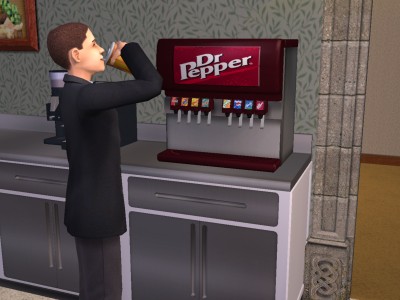
snapshot_f271e63d_327846fd.jpg - width=400 height=300

Created by DJSteveQ
Uploaded: 28th Nov 2006 at 11:54 AM
Updated: 27th Oct 2008 at 2:58 PM by -Maylin-
Updated: 27th Oct 2008 at 2:58 PM by -Maylin-
As requested in a pm from some one here is the Dr Pepper recolour, another recolour has been requested and will be uploaded also. I just hope the wonderful Mod The Sims 2 people let it happen 
Anyway here you go and dont forget to check out my other recolour of this soda machine!
The Pepsi Recolour can be found here.
If you place this on your sims 2 content site can you please PM me and tell me please. Thanks

Anyway here you go and dont forget to check out my other recolour of this soda machine!
The Pepsi Recolour can be found here.
If you place this on your sims 2 content site can you please PM me and tell me please. Thanks
This is a new mesh recolour, and means that you will need to download the particular mesh itself in order for this to show up in your game. See the Meshes Needed section or read the text for more information.
| Filename | Size | Downloads | Date | |||||
|
xnm-nmn_SodaMachine_main_djsteveqdrpepperrecolor.rar
Size: 270.4 KB · Downloads: 10,767 · 28th Nov 2006 |
270.4 KB | 10,767 | 28th Nov 2006 | |||||
| For a detailed look at individual files, see the Information tab. | ||||||||
Key:
- - File was updated after upload was posted
Install Instructions
Basic Download and Install Instructions:
1. Download: Click the download link to save the .rar or .zip file(s) to your computer.
2. Extract the zip, rar, or 7z file.
3. Place in Downloads Folder: Cut and paste the .package file(s) into your Downloads folder:
1. Download: Click the download link to save the .rar or .zip file(s) to your computer.
2. Extract the zip, rar, or 7z file.
3. Place in Downloads Folder: Cut and paste the .package file(s) into your Downloads folder:
- Origin (Ultimate Collection): Users\(Current User Account)\Documents\EA Games\The Sims™ 2 Ultimate Collection\Downloads\
- Non-Origin, Windows Vista/7/8/10: Users\(Current User Account)\Documents\EA Games\The Sims 2\Downloads\
- Non-Origin, Windows XP: Documents and Settings\(Current User Account)\My Documents\EA Games\The Sims 2\Downloads\
- Mac: Users\(Current User Account)\Documents\EA Games\The Sims 2\Downloads
- Mac x64: /Library/Containers/com.aspyr.sims2.appstore/Data/Library/Application Support/Aspyr/The Sims 2/Downloads
- For a full, complete guide to downloading complete with pictures and more information, see: Game Help: Downloading for Fracking Idiots.
- Custom content not showing up in the game? See: Game Help: Getting Custom Content to Show Up.
- If you don't have a Downloads folder, just make one. See instructions at: Game Help: No Downloads Folder.
Meshes needed
This download requires one or more meshes to work properly. Please check the Description tab for information about the meshes needed, then download them below:| MTS cannot guarantee any off-site links will be available |
| Functioning Soda Machine!!! by exnem |
Also Thanked - Users who thanked this download also thanked:
Packs Needed
None, this is Sims 2 base game compatible!
Other Information
Style:
– Modern
Room:
– Kitchen
– Study
: Study/Office
– Outdoor
Maxis Flags:
– Not Applicable
Tags
#dr pepper, #soda machine, #pop
More Downloads BETA
Here are some more of my downloads: