
 Sign in to Mod The Sims
 Global FIX - "Night Club" Counter, Island and Bar - *Now included in CEP*
 Global FIX - "Night Club" Counter, Island and Bar - *Now included in CEP*
MTS has all free content, all the time. Donate to help keep it running.
SCREENSHOTS
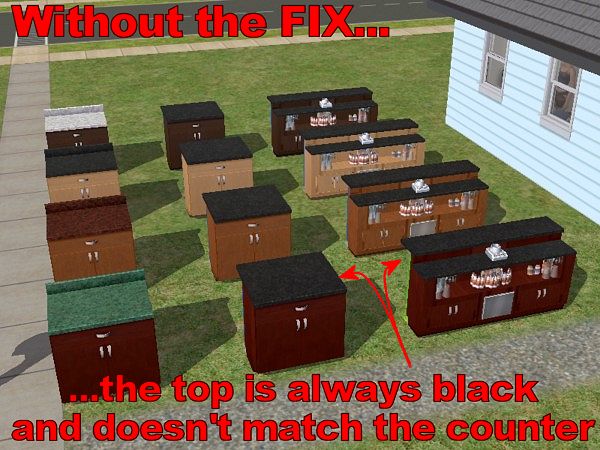
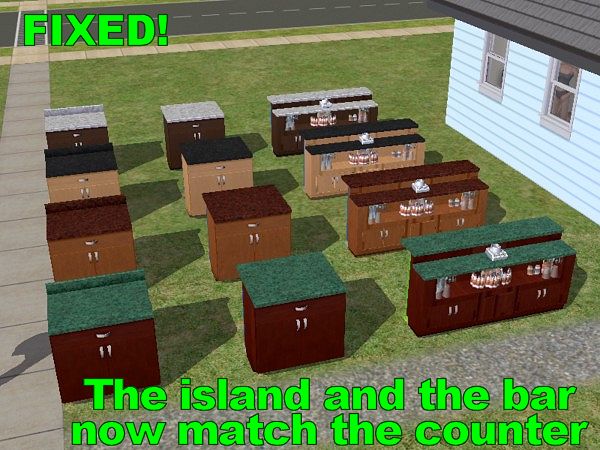
Bad.jpg - width=600 height=450
Fixed.jpg - width=600 height=450

Created by Numenor
Uploaded: 13th Dec 2006 at 11:56 PM
Updated: 6th Oct 2007 at 2:20 AM - Attachment removed - Fix included in CEP7
Updated: 6th Oct 2007 at 2:20 AM - Attachment removed - Fix included in CEP7


 03 FEB 2007 - Fixed a problem with the corner counter (the top couldn't be recoloured). The problem affected only the corner counter, not the straight counters nor the islands. PLEASE REDOWNLOAD: all the existing "Night Club" counters will be automatically fixed.
NOTICE - This is a GLOBAL FIX, which means that:
- it may be included in your uploaded lots (so, use the Clean Installer to remove unwanted hacks from your lots before uploading them);
- it will be copied into any "Night Club" counter/island/bar you clone with SimPE, if you have included the Downloads folder in the File Table (so, uncheck the Downloads if you want a "clean" clone).
WHY THIS FIX?
The "Night Club" set is the one that came with Nightlife (the one with the neon back panel); as you might have noticed, while the counter has a recolourable Top, the Island and the Bar from the same set always have the black marble top. Of course, this prevents a perfect matching of the various "Night Club" items...
Using this FIX, the Top of the island and the bar can be recoloured, so to perfectly match the various counter colours.
There's a side effect, though, that you have to know: this Fix doesn't allow to match any top with any finish: each finish will have only one matching top (see the screenshots: the white top is always coupled with the darkwood finish, the black top with the lightwood finish, etc.).
IN-GAME USAGE
Since the Top and the Finish are coupled together, you will have only one row of colours in the catalog, for the Counter: clicking on an icon will apply that colour to both the Top and the Finish at the same time.
For the Island and the Bar you will have the usual two rows of icons: one for the neon back panel, and one for the Top+Finish.
INSTALLATION INSTRUCTIONS
Unpack the attached file to your Downloads (using the Q-Xpress is OK). To uninstall, remove the file "Numenor_GLOBAL-FIX_NightClubCounter+Island+Bar.package" from the Downloads.
RECOLOURS
This is the heart of this Fix
 Every recolour you create or download for the "Night Club" Counter (including the ones you have already installed in the past) will automatically apply to the Island and the Bar, too.
If you want to create your own recolours, select the Counter, from the Object Workshop list.
GAME COMPATIBILITY
Nightlife is required, of course. Beside that, no other game requirements have to be met (i.e. the Fix works in any game, as long as your game includes Nightlife).
| Filename | Size | Downloads | Date | |||||
|
FAKE-ATTACHMENT_This-Fix-is-now-included-in-the-CEP.zip
Size: 22 Bytes · Downloads: 3,582 · 6th Oct 2007 |
22 Bytes | 3,582 | 6th Oct 2007 | |||||
| For a detailed look at individual files, see the Information tab. | ||||||||
Key:
- - File was updated after upload was posted
Install Instructions
Basic Download and Install Instructions:
1. Download: Click the download link to save the .rar or .zip file(s) to your computer.
2. Extract the zip, rar, or 7z file.
3. Place in Downloads Folder: Cut and paste the .package file(s) into your Downloads folder:
1. Download: Click the download link to save the .rar or .zip file(s) to your computer.
2. Extract the zip, rar, or 7z file.
3. Place in Downloads Folder: Cut and paste the .package file(s) into your Downloads folder:
- Origin (Ultimate Collection): Users\(Current User Account)\Documents\EA Games\The Sims™ 2 Ultimate Collection\Downloads\
- Non-Origin, Windows Vista/7/8/10: Users\(Current User Account)\Documents\EA Games\The Sims 2\Downloads\
- Non-Origin, Windows XP: Documents and Settings\(Current User Account)\My Documents\EA Games\The Sims 2\Downloads\
- Mac: Users\(Current User Account)\Documents\EA Games\The Sims 2\Downloads
- Mac x64: /Library/Containers/com.aspyr.sims2.appstore/Data/Library/Application Support/Aspyr/The Sims 2/Downloads
- For a full, complete guide to downloading complete with pictures and more information, see: Game Help: Downloading for Fracking Idiots.
- Custom content not showing up in the game? See: Game Help: Getting Custom Content to Show Up.
- If you don't have a Downloads folder, just make one. See instructions at: Game Help: No Downloads Folder.
Also Thanked - Users who thanked this download also thanked:
Packs Needed
| Base Game | |
|---|---|
 | Sims 2 |
| Expansion Pack | |
|---|---|
 | Nightlife |
Redistribution Policy and License Agreement
*** I RETIRED FROM MODDING ***
You may contact me via personal messages here at MTS, and I will reply, but I don't grant I can help you, as a long time has gone by since I created my mods.
This following policy applies to ALL my creations, unless otherwise stated on the download thread.
It's FORBIDDEN: to repost my stuff anywhere.
It's FORBIDDEN: to clone my creations.
It's ALLOWED: to create recolours for my objects (and post them on any site, including paysites), BUT you can't include the mesh in your recolour: you must give credits to me for the mesh, and provide a link to the mesh download thread.
It's ALLOWED: to include my creations in your lots, BUT the lots must be uploaded on free sites (except the Exchange), and you must provide credits and a link to the download thread.
You may contact me via personal messages here at MTS, and I will reply, but I don't grant I can help you, as a long time has gone by since I created my mods.
This following policy applies to ALL my creations, unless otherwise stated on the download thread.
It's FORBIDDEN: to repost my stuff anywhere.
It's FORBIDDEN: to clone my creations.
It's ALLOWED: to create recolours for my objects (and post them on any site, including paysites), BUT you can't include the mesh in your recolour: you must give credits to me for the mesh, and provide a link to the mesh download thread.
It's ALLOWED: to include my creations in your lots, BUT the lots must be uploaded on free sites (except the Exchange), and you must provide credits and a link to the download thread.
More Downloads BETA
Here are some more of my downloads: