
 Sign in to Mod The Sims
 Pajama Party Madness- Teens Upadted 12/01/07
 Pajama Party Madness- Teens Upadted 12/01/07
MTS has all free content, all the time. Donate to help keep it running.
SCREENSHOTS
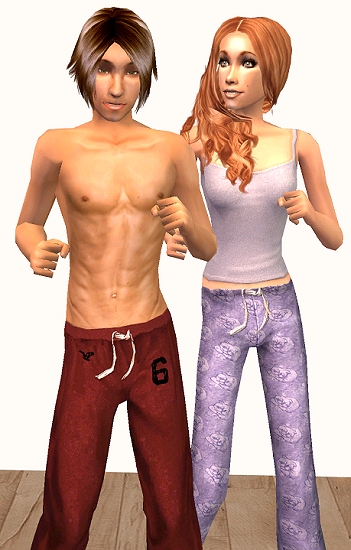
teenpj.jpg - width=351 height=550
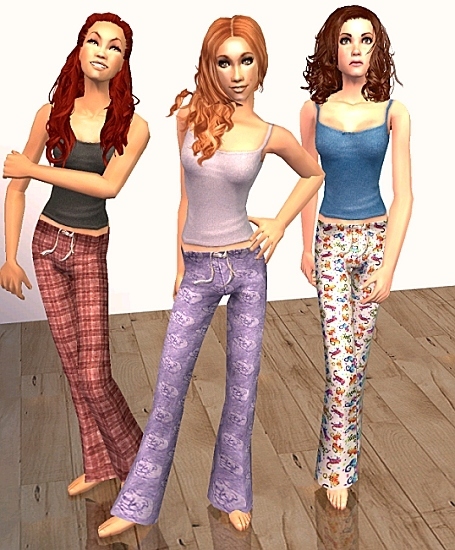
teengirlsset2.jpg - width=455 height=550
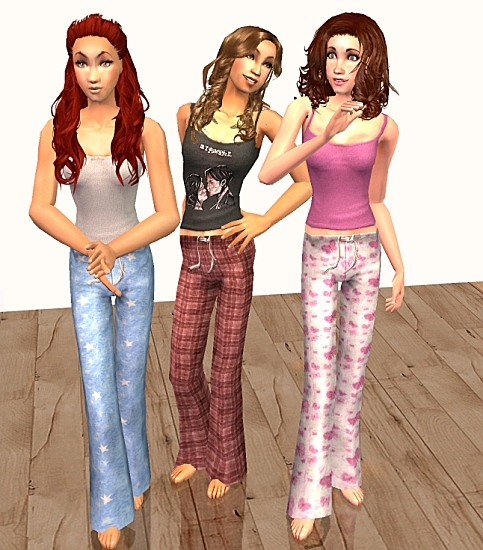
teengirlset1.jpg - width=483 height=550
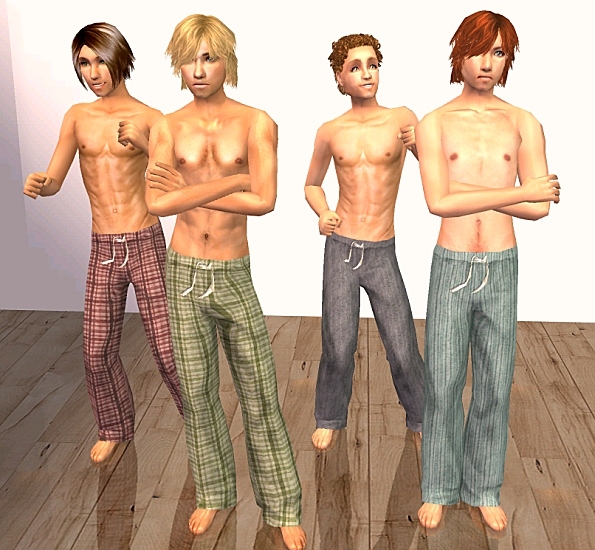
teenboysset1.jpg - width=595 height=550
teenboyset2.jpg - width=597 height=550
Picked Upload!
This is a picked upload! It showcases some of the best talent and creativity available on MTS and in the community.

Created by kalynn06
Uploaded: 25th Feb 2007 at 12:13 AM
Updated: 27th Oct 2008 at 6:38 PM by CatOfEvilGenius
Updated: 27th Oct 2008 at 6:38 PM by CatOfEvilGenius
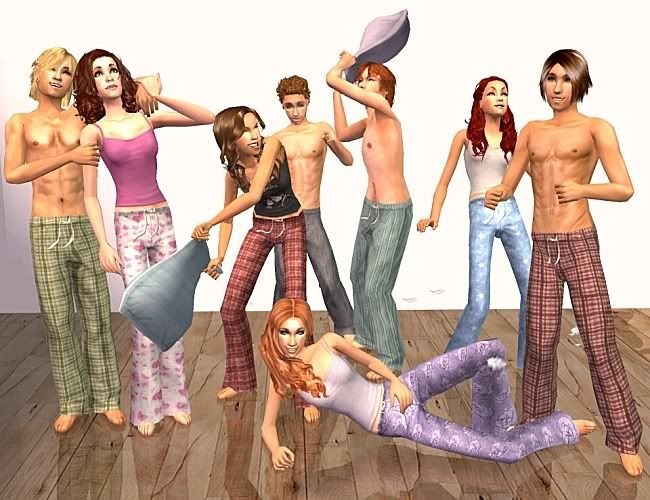
More of my Pajama obsession. this time for teens!
12/01/07: Having problems with the male mesh? See my post here: http://www.modthesims2.com/showpost...89&postcount=44
2/26- I added a zip of all the male pjs and one for all of the females, so you can get them ala carte or in bulk
 And because it's a popular question: If you want to Know where I got the skintones See my answer here: http://www.modthesims2.com/showthre...167#post1587167
These were made with a Patched Vesrion of Pets Bodyshop and should work with all versions of the game. The girls' pjs use the wonderful mesh by Kate at Parsimonious which is included in the zips. The boys' pjs use a mesh by me, which is also included in the zips (see mesh details and TOS below)
The Girls
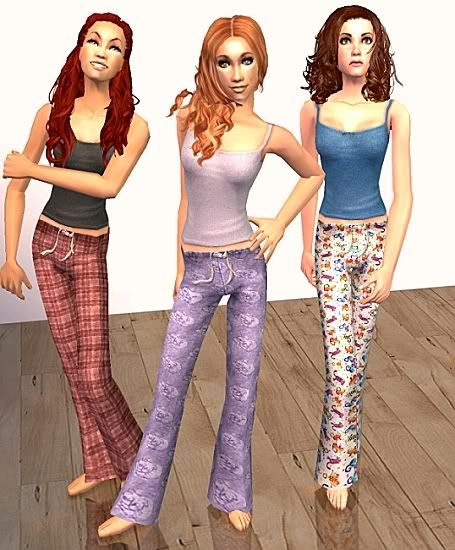
From Left to Right: Black Tank with Red Plaid Pants, Purple Tank with Purple Sleeping Kitties Pants, and Blue Tank with Colorful Kitties Pants
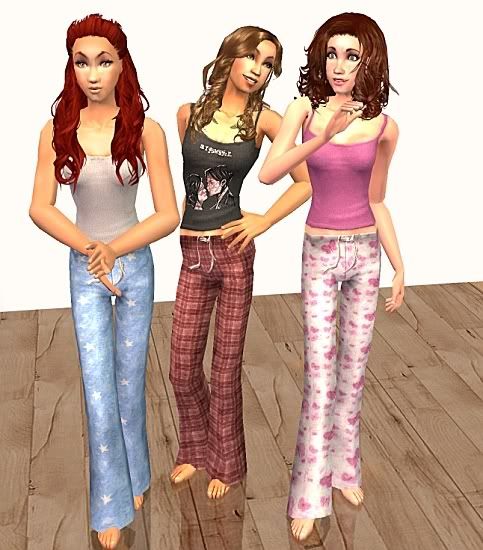
From Left to Right: Light Gray Tank with Blue Stars Pants, "My Chemical Romance" Tank with Red Plaid Pants, and Pink Tank with Butterflies Pants
The Guys
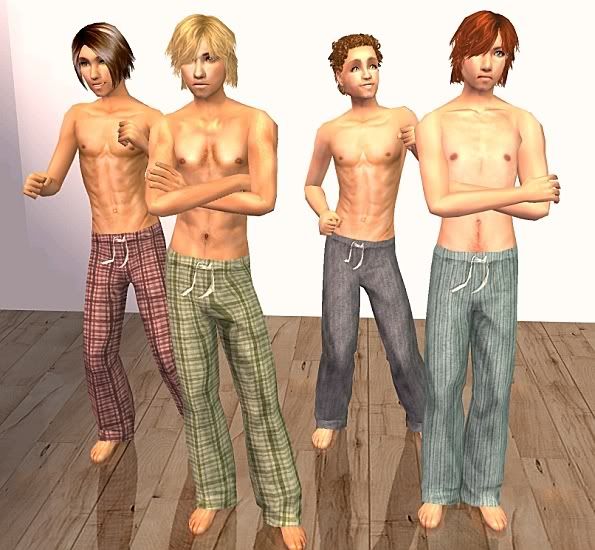
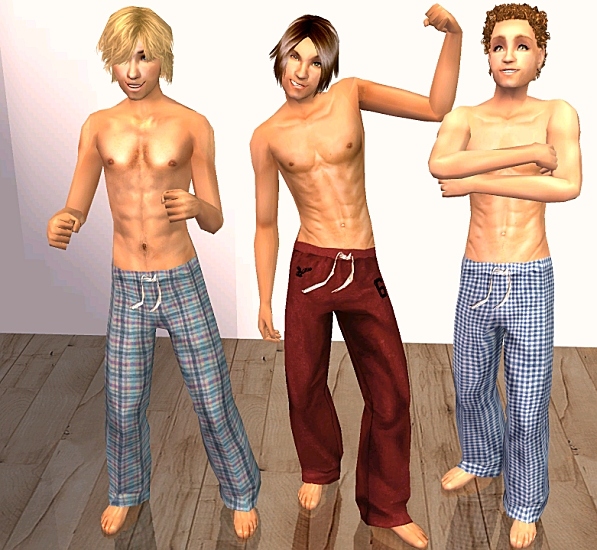
From Left to Right: Red Plaid Pants, Green Plaid Pants, Gray Striped Pants, Green Striped Pants
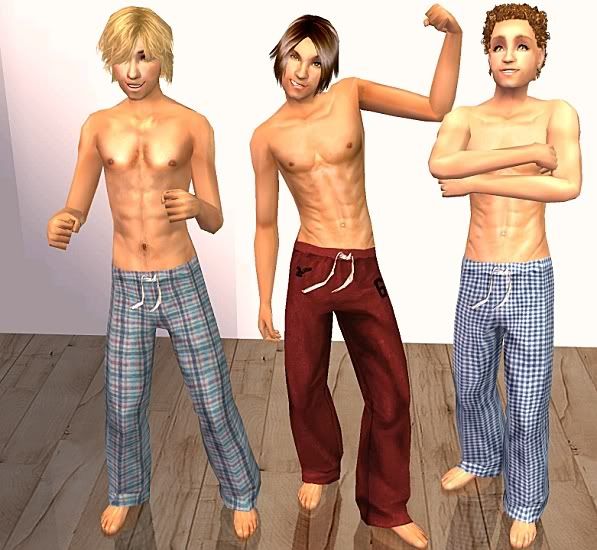
From Left to Right: Blue Plaid Pants, Red Sweats and Blue Checked Pants
Mesh Details
This mesh has been posted elsewhere before, and used without problems, but because it's new to MTS2, I'm including the usual details.
The Mesh was made in Milkshape, using WesH's plugins and Demon's Tools, and it was extracted and put into the game using SimPe. All thanks to Tiggerypum; without her wonderful tutorials I would never have had the courage to try my hand at moving around vertices and chopping up meshes.
This mesh has 1916 Faces and 1310 Vertices, and is bump map enabled.
Recolor Policy
* You can freely retexture this mesh, but please do not use my textures in your recolors. You can use my alphas if you wish.
* If you recolor to post on MTS2 please just link back to this thread for the mesh.
* If you post elsewhere you may include my mesh in your zips with credit to me and a link on the page with your recolors
* If you do recolor. Please, please, please let me know by sending a quick pm, because I would love to hear about it and see your creations! This would make me very very happy .
Thanks for looking and enjoy. If you find a use for this, thanks and comments are appreciated more than you know
Kalynn
12/01/07: Having problems with the male mesh? See my post here: http://www.modthesims2.com/showpost...89&postcount=44
2/26- I added a zip of all the male pjs and one for all of the females, so you can get them ala carte or in bulk

These were made with a Patched Vesrion of Pets Bodyshop and should work with all versions of the game. The girls' pjs use the wonderful mesh by Kate at Parsimonious which is included in the zips. The boys' pjs use a mesh by me, which is also included in the zips (see mesh details and TOS below)
The Girls
From Left to Right: Black Tank with Red Plaid Pants, Purple Tank with Purple Sleeping Kitties Pants, and Blue Tank with Colorful Kitties Pants
From Left to Right: Light Gray Tank with Blue Stars Pants, "My Chemical Romance" Tank with Red Plaid Pants, and Pink Tank with Butterflies Pants
The Guys
From Left to Right: Red Plaid Pants, Green Plaid Pants, Gray Striped Pants, Green Striped Pants
From Left to Right: Blue Plaid Pants, Red Sweats and Blue Checked Pants
Mesh Details
This mesh has been posted elsewhere before, and used without problems, but because it's new to MTS2, I'm including the usual details.
The Mesh was made in Milkshape, using WesH's plugins and Demon's Tools, and it was extracted and put into the game using SimPe. All thanks to Tiggerypum; without her wonderful tutorials I would never have had the courage to try my hand at moving around vertices and chopping up meshes.
This mesh has 1916 Faces and 1310 Vertices, and is bump map enabled.
Recolor Policy
* You can freely retexture this mesh, but please do not use my textures in your recolors. You can use my alphas if you wish.
* If you recolor to post on MTS2 please just link back to this thread for the mesh.
* If you post elsewhere you may include my mesh in your zips with credit to me and a link on the page with your recolors
* If you do recolor. Please, please, please let me know by sending a quick pm, because I would love to hear about it and see your creations! This would make me very very happy .
Thanks for looking and enjoy. If you find a use for this, thanks and comments are appreciated more than you know
Kalynn
This is a new mesh recolour, and means that you will need to download the particular mesh itself in order for this to show up in your game. See the Meshes Needed section or read the text for more information.
| Filename | Size | Downloads | Date | |||||
|
Teen Female Collection.zip
Size: 1.92 MB · Downloads: 34,412 · 26th Feb 2007 |
1.92 MB | 34,412 | 26th Feb 2007 | |||||
|
Teen Male Collection.zip
Size: 1.98 MB · Downloads: 45,528 · 26th Feb 2007 |
1.98 MB | 45,528 | 26th Feb 2007 | |||||
|
TeenMale_RedSweats.zip
Size: 332.2 KB · Downloads: 11,557 · 25th Feb 2007 |
332.2 KB | 11,557 | 25th Feb 2007 | |||||
|
TeenMale_RedPlaid.zip
Size: 364.7 KB · Downloads: 10,662 · 25th Feb 2007 |
364.7 KB | 10,662 | 25th Feb 2007 | |||||
|
TeenMale_GreenStripe.zip
Size: 366.5 KB · Downloads: 9,662 · 25th Feb 2007 |
366.5 KB | 9,662 | 25th Feb 2007 | |||||
|
TeenMale_GreenPlaid.zip
Size: 370.3 KB · Downloads: 10,187 · 25th Feb 2007 |
370.3 KB | 10,187 | 25th Feb 2007 | |||||
|
TeenMale_GrayStripes.zip
Size: 364.3 KB · Downloads: 10,675 · 25th Feb 2007 |
364.3 KB | 10,675 | 25th Feb 2007 | |||||
|
TeenMale_BluePlaid.zip
Size: 380.7 KB · Downloads: 10,899 · 25th Feb 2007 |
380.7 KB | 10,899 | 25th Feb 2007 | |||||
|
TeenMale_BlueCheck.zip
Size: 371.7 KB · Downloads: 12,228 · 25th Feb 2007 |
371.7 KB | 12,228 | 25th Feb 2007 | |||||
|
TeenFemalePinkwithButterflies.zip
Size: 398.8 KB · Downloads: 9,279 · 25th Feb 2007 |
398.8 KB | 9,279 | 25th Feb 2007 | |||||
|
TeenFemale_PurplewithKitties.zip
Size: 388.0 KB · Downloads: 9,145 · 25th Feb 2007 |
388.0 KB | 9,145 | 25th Feb 2007 | |||||
|
TeenFemale_MCRwithRedplaid.zip
Size: 429.7 KB · Downloads: 9,505 · 25th Feb 2007 |
429.7 KB | 9,505 | 25th Feb 2007 | |||||
|
TeenFemale_BluewithStars.zip
Size: 377.6 KB · Downloads: 9,650 · 25th Feb 2007 |
377.6 KB | 9,650 | 25th Feb 2007 | |||||
|
TeenFemale_BluewithKitties.zip
Size: 387.4 KB · Downloads: 9,574 · 25th Feb 2007 |
387.4 KB | 9,574 | 25th Feb 2007 | |||||
|
TeenFemale_BlackwithRedPlaid.zip
Size: 427.9 KB · Downloads: 11,451 · 25th Feb 2007 |
427.9 KB | 11,451 | 25th Feb 2007 | |||||
| For a detailed look at individual files, see the Information tab. | ||||||||
Key:
- - File was updated after upload was posted
Install Instructions
Basic Download and Install Instructions:
1. Download: Click the download link to save the .rar or .zip file(s) to your computer.
2. Extract the zip, rar, or 7z file.
3. Place in Downloads Folder: Cut and paste the .package file(s) into your Downloads folder:
1. Download: Click the download link to save the .rar or .zip file(s) to your computer.
2. Extract the zip, rar, or 7z file.
3. Place in Downloads Folder: Cut and paste the .package file(s) into your Downloads folder:
- Origin (Ultimate Collection): Users\(Current User Account)\Documents\EA Games\The Sims™ 2 Ultimate Collection\Downloads\
- Non-Origin, Windows Vista/7/8/10: Users\(Current User Account)\Documents\EA Games\The Sims 2\Downloads\
- Non-Origin, Windows XP: Documents and Settings\(Current User Account)\My Documents\EA Games\The Sims 2\Downloads\
- Mac: Users\(Current User Account)\Documents\EA Games\The Sims 2\Downloads
- Mac x64: /Library/Containers/com.aspyr.sims2.appstore/Data/Library/Application Support/Aspyr/The Sims 2/Downloads
- For a full, complete guide to downloading complete with pictures and more information, see: Game Help: Downloading for Fracking Idiots.
- Custom content not showing up in the game? See: Game Help: Getting Custom Content to Show Up.
- If you don't have a Downloads folder, just make one. See instructions at: Game Help: No Downloads Folder.
Meshes needed
This download requires one or more meshes to work properly. Please check the Description tab for information about the meshes needed, then download them below:| MTS cannot guarantee any off-site links will be available |
| parsimonious.org/ (non-MTS link) |
Recolours of this mesh
There are 5 recolours of this mesh on MTS:
Also Thanked - Users who thanked this download also thanked:
Packs Needed
None, this is Sims 2 base game compatible!
Other Information
Age:
– Teen
Gender:
– Male
– Female
Clothing Type:
– Sleepwear
Clothing Style:
– No Style
: None of the below styles
– Modern
Other Type:
– Not Applicable
Maxis Flags:
– Not Applicable
Outfit Type:
– Full Outfit
Tags
Enjoy :)
Hi, I've created on and off for the Sims for years. Since my graphics card melted, I've been semi-retired from creating, but I have a new computer and I'm playing again, so it's probably only a matter of time before I start making stuff. I now actually have a computer that doesn't threaten to blow up every time I load the game, so that a plus too. I'm thrilled that people still use the stuff I made so long ago. Thanks for visiting :).
Policy
****Pretty much, do as you will .***
Policy
****Pretty much, do as you will .***
More Downloads BETA
Here are some more of my downloads: