
 Sign in to Mod The Sims
 Natural Redhead Project: 20 recolors/alpha edits (5 reds) of XM Sims' hair 37 (page 22)
 Natural Redhead Project: 20 recolors/alpha edits (5 reds) of XM Sims' hair 37 (page 22)
MTS has all free content, all the time. Donate to help keep it running.
SCREENSHOTS
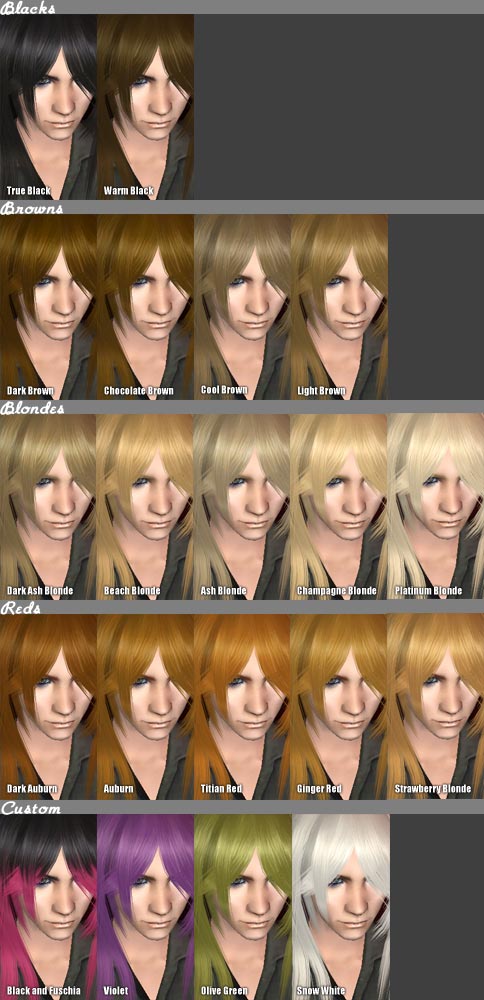


alkaloidxm37colorchart.jpg - width=484 height=1000
reds_xm37.jpg - width=658 height=366
blondes_xm37.jpg - width=658 height=366
browns_xm37.jpg - width=658 height=366
blacks_xm37.jpg - width=658 height=366
custom_xm37.jpg - width=658 height=366
sideback1.jpg - width=712 height=323
previewad.jpg - width=300 height=300

 UPLOADING MY FILES TO THE EXCHANGE OR PAY SITES IS BAD KARMA.
 MESH: http://www.xmsims.com/sims2/ehtm/hair/hair22.htm
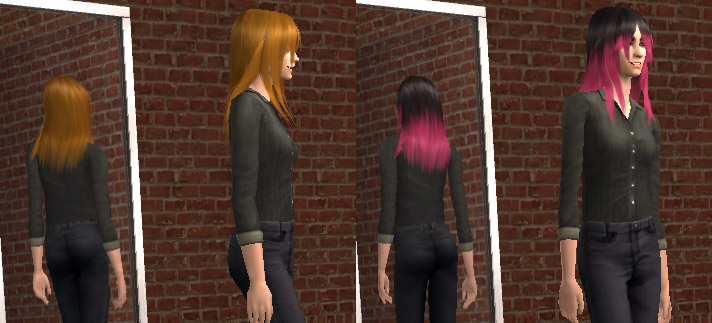
For the Natural Redhead Project: 20 recolors/alpha edits of XMSims' hair mesh #37. I know Flora also did a white, but if you export the image files, you will see that I really did a recolor. The alpha edit basically consisted of taking the back length up from waist-length to shoulderblade-length.

These are all color-binned (except custom colors), made with Legacy BodyShop, and grouped in the same family (which means the mesh doesn't "drop" if you switch hair colors).
If you want to download all the colors in one go, choose the "alkaloid_hair_xmmesh37_ALLCOLORS.rar" file. It's the one with a Q-Express link. If you want to pick and choose, all of the colors have also been packaged individually.

Colors:
Click on image for full version:


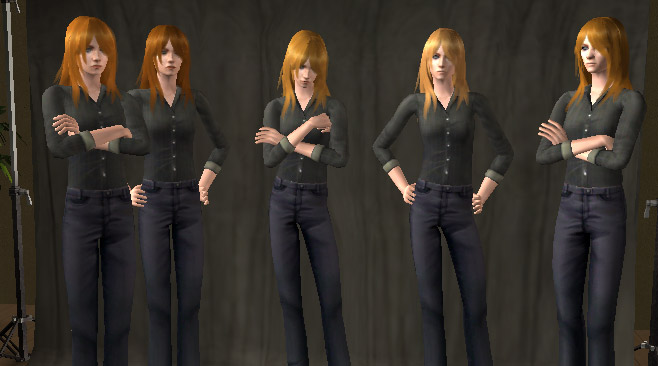
Reds: Dark Auburn (with brown eyebrows), Auburn, Titian Red, Ginger, and Strawberry Blonde.
Blonds: Dark Ash Blonde, Beach Blonde, Ash Blonde, Champagne Blonde and Platinum Blonde.
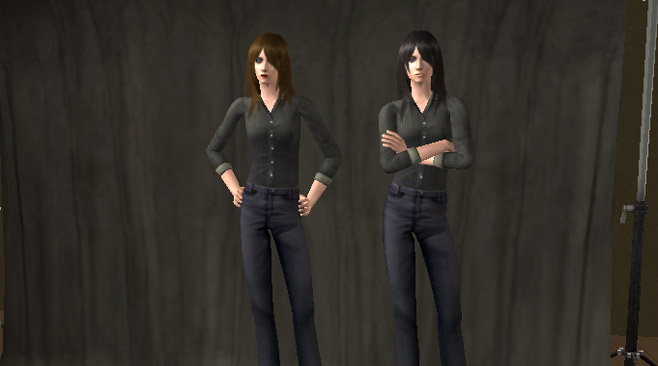
Browns: Dark Brown, Chocolate Brown, Cool Brown and Light Brown.
Blacks: Warm Black (a black with subtle brown highlights) and True Black.
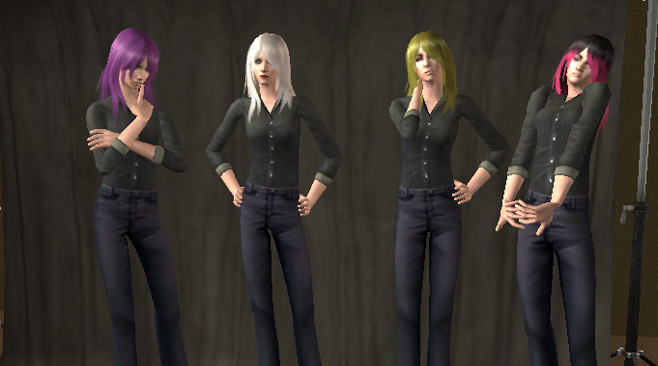
Custom: Olive Drab, Violet, White and Black/Fuschia.
Please don't ask me to remember precisely which grey goes with which natural color. I know I did a white, a silver grey, and a middling warm grey. They roughly correspond to how light or dark the original hair color was. I also did a steel grey for the True Black elder color.
White and Olive Drab have the same color for all ages. White has Blonde eyebrows, and Olive Drab has brown eyebrows.
The Violet color is Ash Blonde for toddlers and children, and is a vaguely lavenderish grey for elders - sort of like those older ladies that have been hitting the Silver Fox a little too hard.
The Black/Fuschia color is Warm Black for toddlers and childen, and is very obviously dyed True Black for elders.
Terms of use for my textures/recolors: These files may be redistributed via shared sims, so long as those sims are available in the free section of any site, and I am credited with a link back to my profile on this site. You may not charge money or a membership fee for my files: this includes "donation files" on an otherwise free site, and sites where my files would only periodically be free.
These files may also be shared via Neighborhood 99, so long as I am properly credited.
You may recolor these files and/or use the alpha so long as your derivative works are only posted on free sites as described in the previous paragraph. Additionally, these files are subject to XMSims' recolor policies.
Additional Credits:
The skintone is an unreleased one by myself. The eyes are by myself, the eye makeup is by Helaene, and the lip color is by Rensim. The eyebrows are the Rensim default replacements. The model in the preview ad is using an Enayla skintone, and lipstick by Helaene.
Clothes are by Maxis.
This is a new mesh recolour, and means that you will need to download the particular mesh itself in order for this to show up in your game. See the Meshes Needed section or read the text for more information.
| Filename | Size | Downloads | Date | |||||
|
alkaloid_hair_xmmesh37_warmblack.rar
Size: 252.7 KB · Downloads: 335 · 18th Apr 2007 |
252.7 KB | 335 | 18th Apr 2007 | |||||
|
alkaloid_hair_xmmesh37_trueblack.rar
Size: 257.3 KB · Downloads: 427 · 18th Apr 2007 |
257.3 KB | 427 | 18th Apr 2007 | |||||
|
alkaloid_hair_xmmesh37_titianred.rar
Size: 264.1 KB · Downloads: 265 · 18th Apr 2007 |
264.1 KB | 265 | 18th Apr 2007 | |||||
|
alkaloid_hair_xmmesh37_strawberryblonde.rar
Size: 266.0 KB · Downloads: 223 · 18th Apr 2007 |
266.0 KB | 223 | 18th Apr 2007 | |||||
|
alkaloid_hair_xmmesh37_snowwhite.rar
Size: 139.0 KB · Downloads: 356 · 18th Apr 2007 |
139.0 KB | 356 | 18th Apr 2007 | |||||
|
alkaloid_hair_xmmesh37_purple.rar
Size: 382.2 KB · Downloads: 195 · 18th Apr 2007 |
382.2 KB | 195 | 18th Apr 2007 | |||||
|
alkaloid_hair_xmmesh37_platinumblonde.rar
Size: 263.7 KB · Downloads: 256 · 18th Apr 2007 |
263.7 KB | 256 | 18th Apr 2007 | |||||
|
alkaloid_hair_xmmesh37_pinkblack.rar
Size: 347.0 KB · Downloads: 312 · 18th Apr 2007 |
347.0 KB | 312 | 18th Apr 2007 | |||||
|
alkaloid_hair_xmmesh37_olivegreen.rar
Size: 136.0 KB · Downloads: 173 · 18th Apr 2007 |
136.0 KB | 173 | 18th Apr 2007 | |||||
|
alkaloid_hair_xmmesh37_lightbrown.rar
Size: 257.3 KB · Downloads: 218 · 18th Apr 2007 |
257.3 KB | 218 | 18th Apr 2007 | |||||
|
alkaloid_hair_xmmesh37_gingerred.rar
Size: 262.6 KB · Downloads: 216 · 18th Apr 2007 |
262.6 KB | 216 | 18th Apr 2007 | |||||
|
alkaloid_hair_xmmesh37_darkbrown.rar
Size: 254.2 KB · Downloads: 277 · 18th Apr 2007 |
254.2 KB | 277 | 18th Apr 2007 | |||||
|
alkaloid_hair_xmmesh37_darkauburn.rar
Size: 257.0 KB · Downloads: 296 · 18th Apr 2007 |
257.0 KB | 296 | 18th Apr 2007 | |||||
|
alkaloid_hair_xmmesh37_darkashblonde.rar
Size: 254.7 KB · Downloads: 192 · 18th Apr 2007 |
254.7 KB | 192 | 18th Apr 2007 | |||||
|
alkaloid_hair_xmmesh37_coolbrown.rar
Size: 256.8 KB · Downloads: 222 · 18th Apr 2007 |
256.8 KB | 222 | 18th Apr 2007 | |||||
|
alkaloid_hair_xmmesh37_chocolatebrown.rar
Size: 255.4 KB · Downloads: 285 · 18th Apr 2007 |
255.4 KB | 285 | 18th Apr 2007 | |||||
|
alkaloid_hair_xmmesh37_champagneblonde.rar
Size: 264.2 KB · Downloads: 282 · 18th Apr 2007 |
264.2 KB | 282 | 18th Apr 2007 | |||||
|
alkaloid_hair_xmmesh37_beachblonde.rar
Size: 262.6 KB · Downloads: 279 · 18th Apr 2007 |
262.6 KB | 279 | 18th Apr 2007 | |||||
|
alkaloid_hair_xmmesh37_auburn.rar
Size: 375.1 KB · Downloads: 237 · 18th Apr 2007 |
375.1 KB | 237 | 18th Apr 2007 | |||||
|
alkaloid_hair_xmmesh37_ashblonde.rar
Size: 262.8 KB · Downloads: 303 · 18th Apr 2007 |
262.8 KB | 303 | 18th Apr 2007 | |||||
|
alkaloid_hair_xmmesh37_ALLCOLORS.rar
Size: 5.23 MB · Downloads: 4,067 · 18th Apr 2007 |
5.23 MB | 4,067 | 18th Apr 2007 | |||||
| For a detailed look at individual files, see the Information tab. | ||||||||
Key:
- - File was updated after upload was posted
Install Instructions
Basic Download and Install Instructions:
1. Download: Click the download link to save the .rar or .zip file(s) to your computer.
2. Extract the zip, rar, or 7z file.
3. Place in Downloads Folder: Cut and paste the .package file(s) into your Downloads folder:
1. Download: Click the download link to save the .rar or .zip file(s) to your computer.
2. Extract the zip, rar, or 7z file.
3. Place in Downloads Folder: Cut and paste the .package file(s) into your Downloads folder:
- Origin (Ultimate Collection): Users\(Current User Account)\Documents\EA Games\The Sims™ 2 Ultimate Collection\Downloads\
- Non-Origin, Windows Vista/7/8/10: Users\(Current User Account)\Documents\EA Games\The Sims 2\Downloads\
- Non-Origin, Windows XP: Documents and Settings\(Current User Account)\My Documents\EA Games\The Sims 2\Downloads\
- Mac: Users\(Current User Account)\Documents\EA Games\The Sims 2\Downloads
- Mac x64: /Library/Containers/com.aspyr.sims2.appstore/Data/Library/Application Support/Aspyr/The Sims 2/Downloads
- For a full, complete guide to downloading complete with pictures and more information, see: Game Help: Downloading for Fracking Idiots.
- Custom content not showing up in the game? See: Game Help: Getting Custom Content to Show Up.
- If you don't have a Downloads folder, just make one. See instructions at: Game Help: No Downloads Folder.
Meshes needed
This download requires one or more meshes to work properly. Please check the Description tab for information about the meshes needed, then download them below:| MTS cannot guarantee any off-site links will be available |
| xmsims.com/sims2/ehtm/hair/hair22.htm (non-MTS link) |
Also Thanked - Users who thanked this download also thanked:
Retired
Retired.
ToU: Please see individual posts for my creation policies. IN GENERAL, I have fairly liberal policies, but there are a few items that are subject to other creators' policies. Therefore, I don't have a blanket ToU.
Future expansion packs: due to the headaches I have experienced from SecurROM - including damage to my computer, a complete reinstall of my computer, and the need to buy a brand new antivirus program, and eventually the need to fully replace my computer due to unremovable rootkits that took advantage of the security loopholes caused by SecruROM - I will not purchase or install/reinstall any EA or Sony products. There are conditions that may cause me to change my mind, but I don't consider them likely. This means that if any of my CC is broken by an expansion or stuff pack, I won't know and I won't be able to work on fixing any potential problems. I grant anyone permission to patch my CC for compatibility with any Sims 2 expansion or stuff pack, as long as the patched items are 100% free.
Beyond that, I'm not interested in pirating securom-infested eps, and I would never help EA advertise malware-infested products by creating content for them, so please stop e-mailing me with 'helpful' information.
Which brings me to... Take the SecuROM-free pledge!
ToU: Please see individual posts for my creation policies. IN GENERAL, I have fairly liberal policies, but there are a few items that are subject to other creators' policies. Therefore, I don't have a blanket ToU.
Future expansion packs: due to the headaches I have experienced from SecurROM - including damage to my computer, a complete reinstall of my computer, and the need to buy a brand new antivirus program, and eventually the need to fully replace my computer due to unremovable rootkits that took advantage of the security loopholes caused by SecruROM - I will not purchase or install/reinstall any EA or Sony products. There are conditions that may cause me to change my mind, but I don't consider them likely. This means that if any of my CC is broken by an expansion or stuff pack, I won't know and I won't be able to work on fixing any potential problems. I grant anyone permission to patch my CC for compatibility with any Sims 2 expansion or stuff pack, as long as the patched items are 100% free.
Beyond that, I'm not interested in pirating securom-infested eps, and I would never help EA advertise malware-infested products by creating content for them, so please stop e-mailing me with 'helpful' information.
Which brings me to... Take the SecuROM-free pledge!
More Downloads BETA
Here are some more of my downloads: