
 Sign in to Mod The Sims
 Screen Walls - Requested
 Screen Walls - Requested
MTS has all free content, all the time. Donate to help keep it running.
SCREENSHOTS
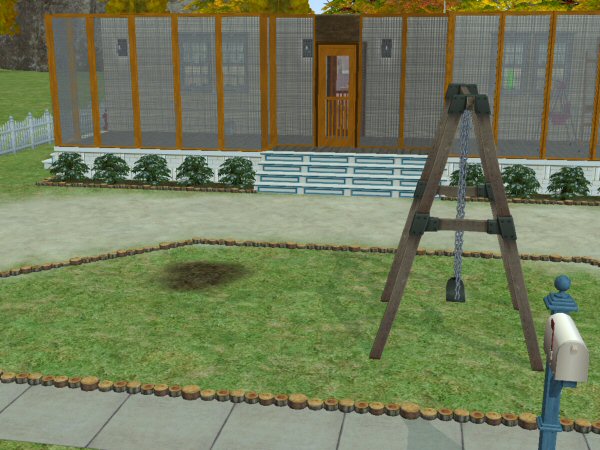
BecksPorchScreen.jpg - width=600 height=450
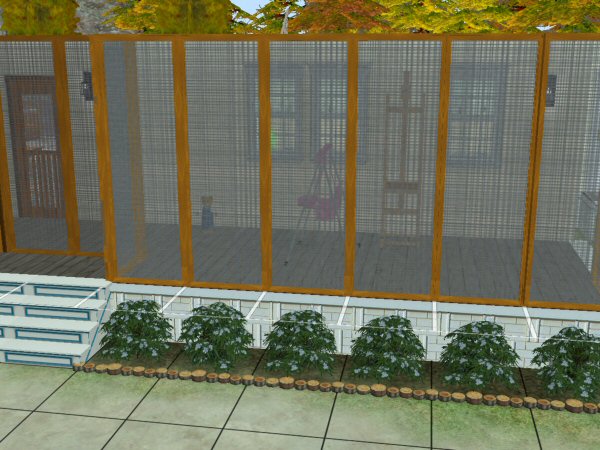
BecksPorchScreen2.jpg - width=600 height=450
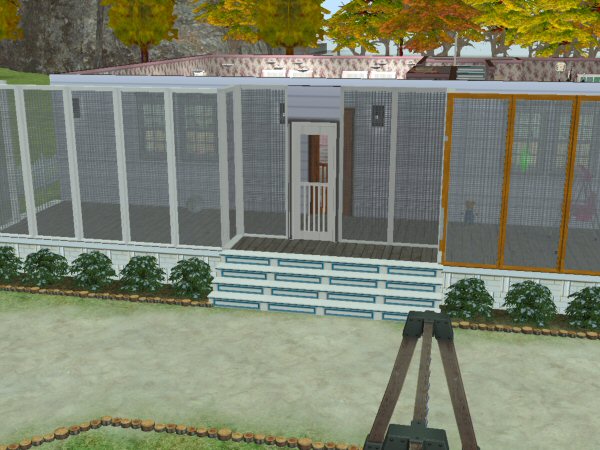
BecksPorchScreenWhite.jpg - width=600 height=450
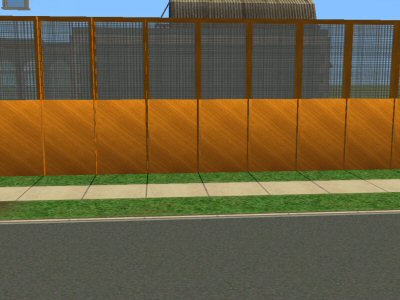
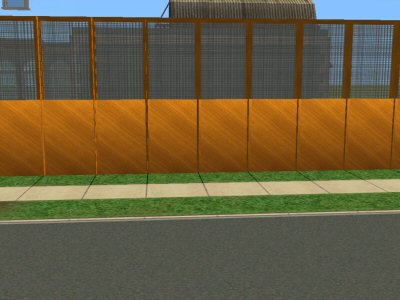
HalfwallHalfScreen.jpg - width=400 height=300
rebecah unfortunately passed away in Jan 2024. She was a profilic creator and will be missed by the whole community both here and at AffinitySims.


Created by rebecah
Uploaded: 11th Aug 2007 at 4:59 PM
Updated: 30th Nov 2007 at 12:57 PM - added halfscreen wall
Updated: 30th Nov 2007 at 12:57 PM - added halfscreen wall
Added 11/30/07: Halfscreen wall requested by Mimi52861. Thanks for the request Mimi52861.
Update 08/19/07: Thanks to Numenor templates found here:
http://www.modthesims2.com/showthread.php?t=245246
The flashing blue problem for walls down is now fixed.
Fixed I've found that with walls down the upper portion goes to flashing blue. It seems that a portion is not being pulled to assign a texture to the walls down portion, and I have no clue how to figure this out. I've tried several options with no success. I reclonded with older versions of SimPE and still can't find what is needed. Sorry
These do work fine with walls up.
Kimdelee said: "Now we need real screens...!" I agree so here are a couple.
Seasons is required for these. It there is enough interest I will try to create some of other EP's. I cloned the greenhouse walls to create these. Items are not recolorable except by cloning and you're welcome to do so if you so desire.
To place my screen door I had to use a regular wall inbetween the screen walls.
These are found under gardening for $300.
My screen door is found here:
http://www.modthesims2.com/showthread.php?t=243859


Polygon Counts:
Face count approximately 360
House is the Walton house by wolfsim68. You can find his great houses on http://www.insimenator.net
Additional Credits:
Credits to: All that help make this possible. SimPE creators, CEP creators, Peter & Inge Jones for the PJSE SimPE plugin, MTS2 for this site, and Stephen Cox creator of UVMapper.
Thanks to all of the following tutorial creators:
Some of my favorites tutorial writers are Echo, JWoods, HystericalParoxysm, IgnorantBliss, Numenor, and Adidus great extensive tutorials. Fisheyes wrote a great tutorial on slots and routes.
Thanks to all that take the time to click the thanks button and leave comments.
Update 08/19/07: Thanks to Numenor templates found here:
http://www.modthesims2.com/showthread.php?t=245246
The flashing blue problem for walls down is now fixed.
Fixed I've found that with walls down the upper portion goes to flashing blue. It seems that a portion is not being pulled to assign a texture to the walls down portion, and I have no clue how to figure this out. I've tried several options with no success. I reclonded with older versions of SimPE and still can't find what is needed. Sorry
These do work fine with walls up.
Kimdelee said: "Now we need real screens...!" I agree so here are a couple.
Seasons is required for these. It there is enough interest I will try to create some of other EP's. I cloned the greenhouse walls to create these. Items are not recolorable except by cloning and you're welcome to do so if you so desire.
To place my screen door I had to use a regular wall inbetween the screen walls.
These are found under gardening for $300.
My screen door is found here:
http://www.modthesims2.com/showthread.php?t=243859
Polygon Counts:
Face count approximately 360
House is the Walton house by wolfsim68. You can find his great houses on http://www.insimenator.net
Additional Credits:
Credits to: All that help make this possible. SimPE creators, CEP creators, Peter & Inge Jones for the PJSE SimPE plugin, MTS2 for this site, and Stephen Cox creator of UVMapper.
Thanks to all of the following tutorial creators:
Some of my favorites tutorial writers are Echo, JWoods, HystericalParoxysm, IgnorantBliss, Numenor, and Adidus great extensive tutorials. Fisheyes wrote a great tutorial on slots and routes.
Thanks to all that take the time to click the thanks button and leave comments.
This is a new mesh, and means that it's a brand new self contained object that usually does not require a specific Pack (although this is possible depending on the type). It may have Recolours hosted on MTS - check below for more information.
| Filename | Size | Downloads | Date | |||||
|
BecksHalfScreenwall.zip
Size: 150.1 KB · Downloads: 2,812 · 30th Nov 2007 |
150.1 KB | 2,812 | 30th Nov 2007 | |||||
|
BecksScreenWallsWhite.zip
Size: 148.8 KB · Downloads: 4,250 · 11th Aug 2007 |
148.8 KB | 4,250 | 11th Aug 2007 | |||||
|
BecksScreenWalls.zip
Size: 169.1 KB · Downloads: 4,260 · 11th Aug 2007 |
169.1 KB | 4,260 | 11th Aug 2007 | |||||
| For a detailed look at individual files, see the Information tab. | ||||||||
Key:
- - File was updated after upload was posted
Install Instructions
Basic Download and Install Instructions:
1. Download: Click the download link to save the .rar or .zip file(s) to your computer.
2. Extract the zip, rar, or 7z file.
3. Place in Downloads Folder: Cut and paste the .package file(s) into your Downloads folder:
1. Download: Click the download link to save the .rar or .zip file(s) to your computer.
2. Extract the zip, rar, or 7z file.
3. Place in Downloads Folder: Cut and paste the .package file(s) into your Downloads folder:
- Origin (Ultimate Collection): Users\(Current User Account)\Documents\EA Games\The Sims™ 2 Ultimate Collection\Downloads\
- Non-Origin, Windows Vista/7/8/10: Users\(Current User Account)\Documents\EA Games\The Sims 2\Downloads\
- Non-Origin, Windows XP: Documents and Settings\(Current User Account)\My Documents\EA Games\The Sims 2\Downloads\
- Mac: Users\(Current User Account)\Documents\EA Games\The Sims 2\Downloads
- Mac x64: /Library/Containers/com.aspyr.sims2.appstore/Data/Library/Application Support/Aspyr/The Sims 2/Downloads
- For a full, complete guide to downloading complete with pictures and more information, see: Game Help: Downloading for Fracking Idiots.
- Custom content not showing up in the game? See: Game Help: Getting Custom Content to Show Up.
- If you don't have a Downloads folder, just make one. See instructions at: Game Help: No Downloads Folder.
Also Thanked - Users who thanked this download also thanked:
Packs Needed
| Base Game | |
|---|---|
 | Sims 2 |
| Expansion Pack | |
|---|---|
 | Seasons |
Beck's Policy
Not finding something you know I created? Please check www.affinitysims.com, I am working to have all of my creations posted on that site. I do not want to waste space at MTS2 for items that do not have star quality.
I personally don't agree with personal policies and would very much like to see all policies be controlled by the board that items are posted on. It would make life so much easier for everyone. It would also eliminate the selfish/self center creators that have done so much harm to this caring and sharing community. Not one creator that I know of is able to do these things without the help of Maxis, Simpe, SimPE plugins, CEP and all the great tutorials available.
Just in case someone wants to know my feelings on it...it is as follows:
You may use my creations freely. The only request I have is that you do not claim them as your own and PLEASE do not post on pay sites.
You may include them with you lot creations if you so desire. :)
All items are created with Maxis code, and SimPE according to the terms of use Maxis owns all rights to this code.
Most of my meshes come from remeshing maxis items or can be found in the 3d mesh of unknown authors. If you wish to remesh any of my meshes you are free to do so. You may also include them with your recolors.
I do this strickly for fun. If you find anything wrong with my creations please let me know and I'll fix them if I capable of doing so or will at least post the problems found. I don't want to post junk!
I personally don't agree with personal policies and would very much like to see all policies be controlled by the board that items are posted on. It would make life so much easier for everyone. It would also eliminate the selfish/self center creators that have done so much harm to this caring and sharing community. Not one creator that I know of is able to do these things without the help of Maxis, Simpe, SimPE plugins, CEP and all the great tutorials available.
Just in case someone wants to know my feelings on it...it is as follows:
You may use my creations freely. The only request I have is that you do not claim them as your own and PLEASE do not post on pay sites.
You may include them with you lot creations if you so desire. :)
All items are created with Maxis code, and SimPE according to the terms of use Maxis owns all rights to this code.
Most of my meshes come from remeshing maxis items or can be found in the 3d mesh of unknown authors. If you wish to remesh any of my meshes you are free to do so. You may also include them with your recolors.
I do this strickly for fun. If you find anything wrong with my creations please let me know and I'll fix them if I capable of doing so or will at least post the problems found. I don't want to post junk!
More Downloads BETA
Here are some more of my downloads: