
 Sign in to Mod The Sims
 Neighborhood decorations can be placed anywhere.
 Neighborhood decorations can be placed anywhere.
MTS has all free content, all the time. Donate to help keep it running.
SCREENSHOTS

rockbeach2.jpg - width=600 height=450
rockpond2.jpg - width=600 height=450
rockpond3.jpg - width=600 height=450
rockpond4.jpg - width=600 height=450
rockpond5.jpg - width=600 height=450
rockpond6.jpg - width=600 height=450
rockpond7.jpg - width=600 height=450
rockpond1.jpg - width=600 height=450
Picked Upload!
This is a picked upload! It showcases some of the best talent and creativity available on MTS and in the community.

What It Is
It's a hack that allows all neighborhood deco to go inside lots, go on top of roads, go on land, and go on water.
For example, the palm tree groves that came with BV refuse to go on the edge of water, screaming at you that they can only be placed on land... even though you are placing them on land. Damn game. And the lighthouse that's on a rock used to ony be allowed in water, but now can be placed on land, too.
Pretty much all the deco objects are included. All the trees, rocks, buildings, BV objects, signs, etc. The ones that aren't included are things like flowers and fields, which can't be seen from inside of lots anyway, and so are useless anyway.
This REPLACES my "bonus rock hack" that's on MTS2. It does not replace the smaller rocks, so don't remove those. The hack you'll want to delete had the name of smk_Boulders_place_in_lots.package
What To Install
There are several files inside the zip. Basically, each EP added some nhood deco. So get the files for all the EPs you've got, as well as the base game. For example, if you have NL and BV only, you would get the base game hack, the NL hack, and the BV hack, but not the OFB or Seasons hacks.
Technical Info
Provided for reference... can be used to edit custom objects.
There are four things that can be changed about the way nhood objects are placed.
All of them are changed in the Neighborhood Object XML (XNGB), which is located inside a file called catcanhobjects.bundle.package in C:\Program Files\EA GAMES\XXX\TSData\Res\Catalog\CANHObjects (where XXX refers to the base game or specific EP). For custom objects, this would be inside the .package file you downloaded, of course.
placementsurface refers to whether an object is allowed on water or land.
Acceptable codes are 0x00000000 (land), 0x00000001 (water), 0x00000002 (water and land).
allowedinlot refers to whether you can place an object inside of a lot.
Acceptable codes are 0x00000000 (no), 0x00000001 (yes).
allowedonroad refers to whether you can place an object on top of a road.
Acceptable codes are 0x00000000 (no), 0x00000001 (yes).
removeonlotplop VERY IMPORTANT!!! If you do not disallow this, the object will NOT be placeable inside of lots or on roads, even if you allowed it in allowedinlot and allowedonroad.
THE CODE YOU SHOULD USE IS 0x00000000. Do not use 0x00000001.
Practical Applications
You might be wondering how all this stuff can be used in the actual game.
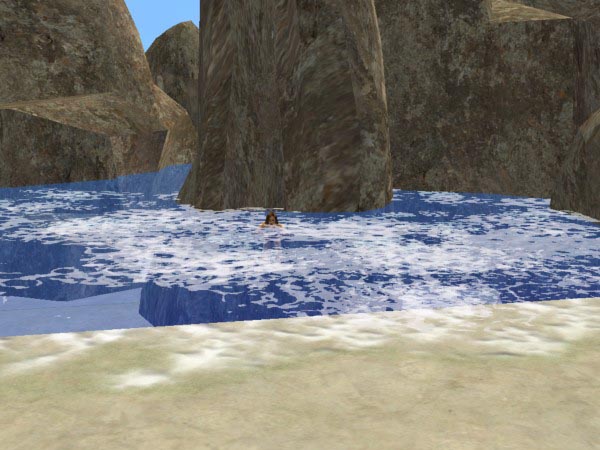
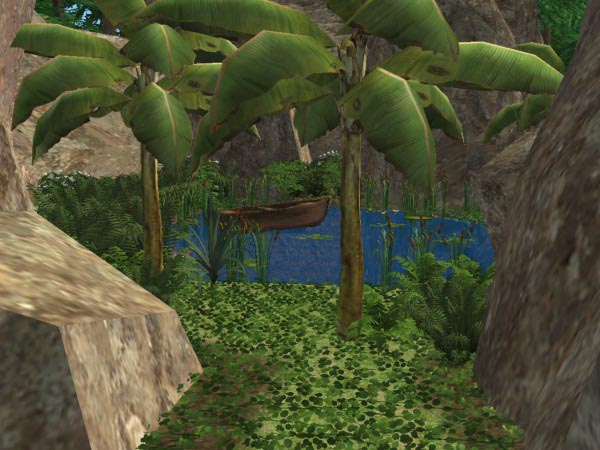
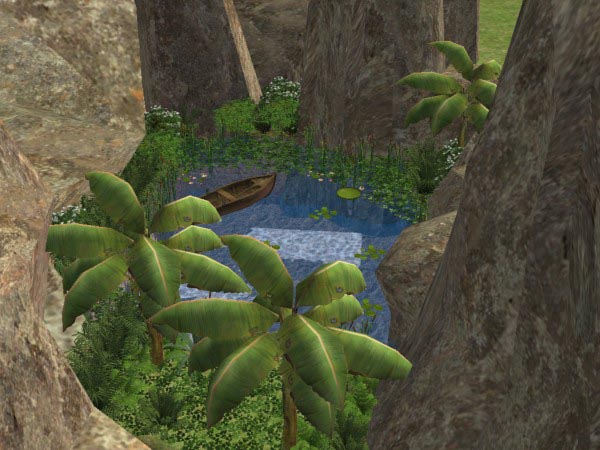
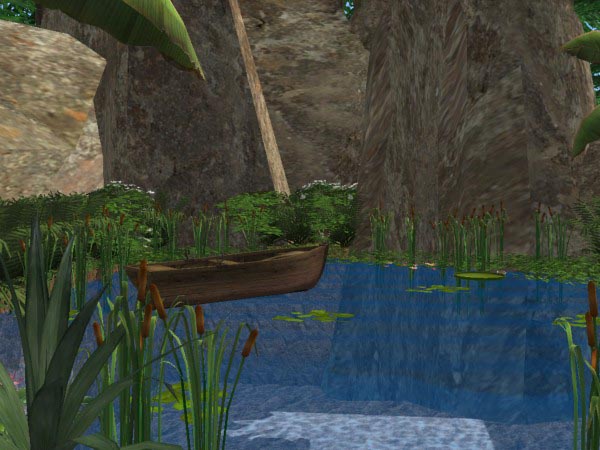
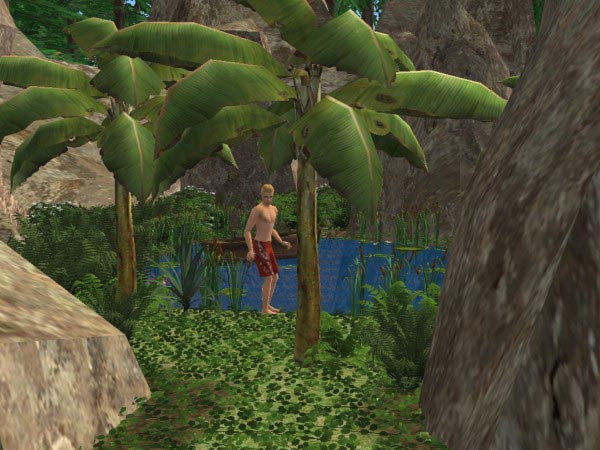
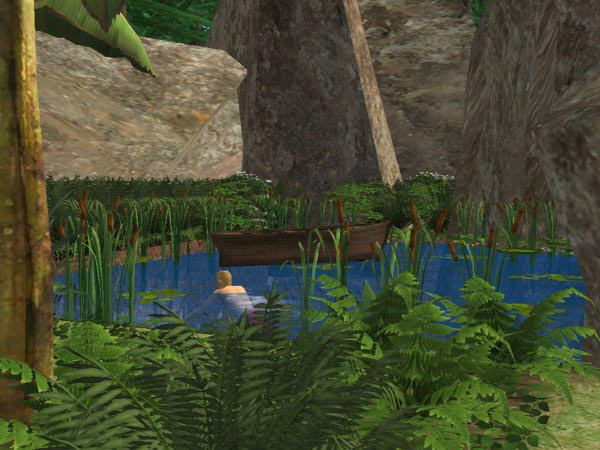
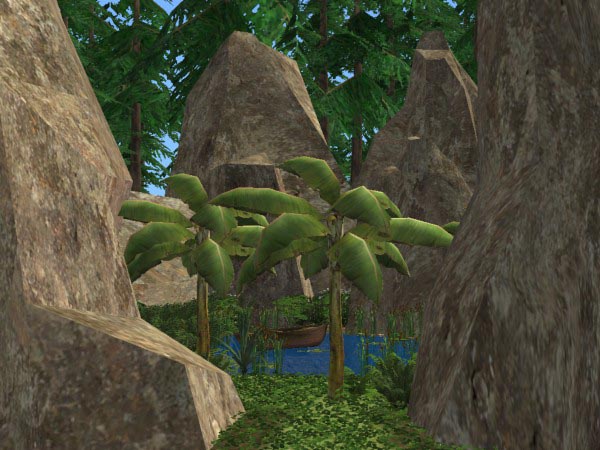
Here are some pictures of a beach lot, where the yucky edges/seams have been disguised by rocks, and a community "pond" that is actually a disguised swimming pool. If you have ever tried to disguise a swimming pool using just plants, you know how dumb it looks to have a jungle growing around all four edges of the pool. Using the rocks gives a more natural appearance. Take note of the way the rocks extend INSIDE the swimming pool, giving the underwater sides a natural, rough look. I put this example together too hastily, so not every edge of the pool was concealled; ideally you would make the rocks extend slightly more inside the pool. Invisible fences (available on MTS2) are used to keep sims from walking through any nhood object inside the lot.
It's a hack that allows all neighborhood deco to go inside lots, go on top of roads, go on land, and go on water.
For example, the palm tree groves that came with BV refuse to go on the edge of water, screaming at you that they can only be placed on land... even though you are placing them on land. Damn game. And the lighthouse that's on a rock used to ony be allowed in water, but now can be placed on land, too.
Pretty much all the deco objects are included. All the trees, rocks, buildings, BV objects, signs, etc. The ones that aren't included are things like flowers and fields, which can't be seen from inside of lots anyway, and so are useless anyway.
This REPLACES my "bonus rock hack" that's on MTS2. It does not replace the smaller rocks, so don't remove those. The hack you'll want to delete had the name of smk_Boulders_place_in_lots.package
What To Install
There are several files inside the zip. Basically, each EP added some nhood deco. So get the files for all the EPs you've got, as well as the base game. For example, if you have NL and BV only, you would get the base game hack, the NL hack, and the BV hack, but not the OFB or Seasons hacks.
Technical Info
Provided for reference... can be used to edit custom objects.
There are four things that can be changed about the way nhood objects are placed.
All of them are changed in the Neighborhood Object XML (XNGB), which is located inside a file called catcanhobjects.bundle.package in C:\Program Files\EA GAMES\XXX\TSData\Res\Catalog\CANHObjects (where XXX refers to the base game or specific EP). For custom objects, this would be inside the .package file you downloaded, of course.
placementsurface refers to whether an object is allowed on water or land.
Acceptable codes are 0x00000000 (land), 0x00000001 (water), 0x00000002 (water and land).
allowedinlot refers to whether you can place an object inside of a lot.
Acceptable codes are 0x00000000 (no), 0x00000001 (yes).
allowedonroad refers to whether you can place an object on top of a road.
Acceptable codes are 0x00000000 (no), 0x00000001 (yes).
removeonlotplop VERY IMPORTANT!!! If you do not disallow this, the object will NOT be placeable inside of lots or on roads, even if you allowed it in allowedinlot and allowedonroad.
THE CODE YOU SHOULD USE IS 0x00000000. Do not use 0x00000001.
Practical Applications
You might be wondering how all this stuff can be used in the actual game.
Here are some pictures of a beach lot, where the yucky edges/seams have been disguised by rocks, and a community "pond" that is actually a disguised swimming pool. If you have ever tried to disguise a swimming pool using just plants, you know how dumb it looks to have a jungle growing around all four edges of the pool. Using the rocks gives a more natural appearance. Take note of the way the rocks extend INSIDE the swimming pool, giving the underwater sides a natural, rough look. I put this example together too hastily, so not every edge of the pool was concealled; ideally you would make the rocks extend slightly more inside the pool. Invisible fences (available on MTS2) are used to keep sims from walking through any nhood object inside the lot.
| Filename | Size | Downloads | Date | |||||
|
smk_allowedinlots_hack.zip
Size: 9.9 KB · Downloads: 42,935 · 27th Dec 2007 |
9.9 KB | 42,935 | 27th Dec 2007 | |||||
| For a detailed look at individual files, see the Information tab. | ||||||||
Key:
- - File was updated after upload was posted
Install Instructions
Basic Download and Install Instructions:
1. Download: Click the download link to save the .rar or .zip file(s) to your computer.
2. Extract the zip, rar, or 7z file.
3. Place in Downloads Folder: Cut and paste the .package file(s) into your Downloads folder:
1. Download: Click the download link to save the .rar or .zip file(s) to your computer.
2. Extract the zip, rar, or 7z file.
3. Place in Downloads Folder: Cut and paste the .package file(s) into your Downloads folder:
- Origin (Ultimate Collection): Users\(Current User Account)\Documents\EA Games\The Sims™ 2 Ultimate Collection\Downloads\
- Non-Origin, Windows Vista/7/8/10: Users\(Current User Account)\Documents\EA Games\The Sims 2\Downloads\
- Non-Origin, Windows XP: Documents and Settings\(Current User Account)\My Documents\EA Games\The Sims 2\Downloads\
- Mac: Users\(Current User Account)\Documents\EA Games\The Sims 2\Downloads
- Mac x64: /Library/Containers/com.aspyr.sims2.appstore/Data/Library/Application Support/Aspyr/The Sims 2/Downloads
- For a full, complete guide to downloading complete with pictures and more information, see: Game Help: Downloading for Fracking Idiots.
- Custom content not showing up in the game? See: Game Help: Getting Custom Content to Show Up.
- If you don't have a Downloads folder, just make one. See instructions at: Game Help: No Downloads Folder.
Also Thanked - Users who thanked this download also thanked:
Packs Needed
None, this is Sims 2 base game compatible!
Tags
#pond, #medieval, #victorian, #old fashioned, #swimming pool, #disguise, #neighborhood deco, #nhood deco
MY POLICY
You can use, modify, re-post, and do whatever else you want with anything I create. Credit is not necessary. Once I post something, I consider it to be in the public domain and I don't care what happens to it.