
 Sign in to Mod The Sims
 Updated: Tiled Arches and Windows-- now Basegame compatible
 Updated: Tiled Arches and Windows-- now Basegame compatible
MTS has all free content, all the time. Donate to help keep it running.
SCREENSHOTS
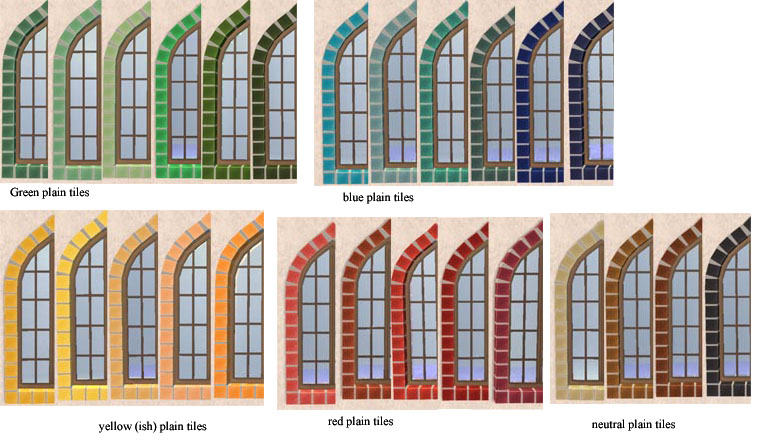



solid colors.jpg - width=760 height=443
patterned recolors.jpg - width=640 height=500
mortar colors.jpg - width=531 height=318
plain checkered colors.jpg - width=353 height=326
stone recolors.jpg - width=477 height=420
overview2.jpg - width=600 height=450
all windows2.jpg - width=775 height=479
arches2.jpg - width=580 height=630
Featured Upload!
This is a featured upload! It showcases the best talent and creativity available on MTS and in the community. 

Created by BabaYaga
Uploaded: 27th Apr 2008 at 12:04 PM
Updated: 10th Oct 2008 at 7:31 AM - updated/changed files
Updated: 10th Oct 2008 at 7:31 AM - updated/changed files
---
UPDATE Oct 10 2008:
I have uploaded new versions of the arches, and both arches and windows should now actually be basegame compatible. I tested them with the Anygame Starter and they worked fine.
If you have the old set of arches and you want to use the new ones, you have to delete the old arches first. The GUIDs are unchanged, and all recolors will still work with the new versions.
Also, as requested I have uploaded new versions of the mullioned windows that have recolorable mullions instead of recolorable mortar. Again, you must delete the old mullioned windows if you want to use the new ones.
No recolors of the mullions yet (wood frustrates me) but I'm working on a set of matching doors, and I'll most likely have some window recolors when I upload those.
-----
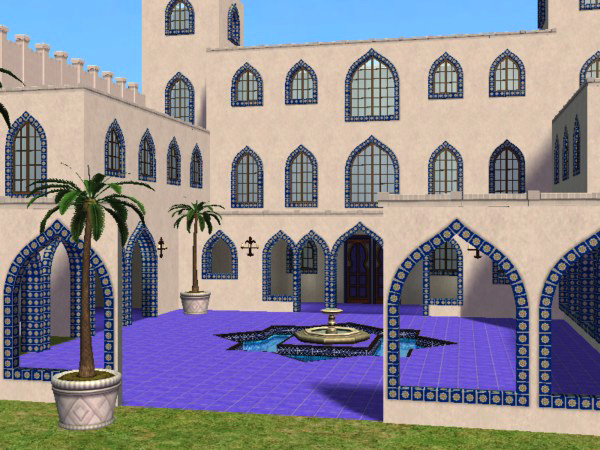
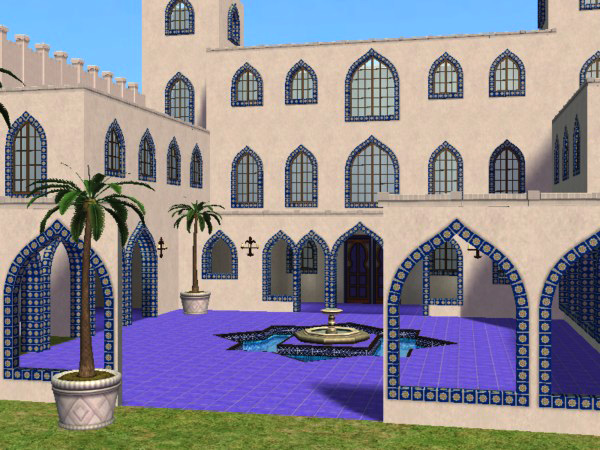
This set grew out of my current obsession with the mediterranean-influenced architectural style sometimes known as Mission Revival or Spanish (Colonial) Revival which is pretty common where I live.
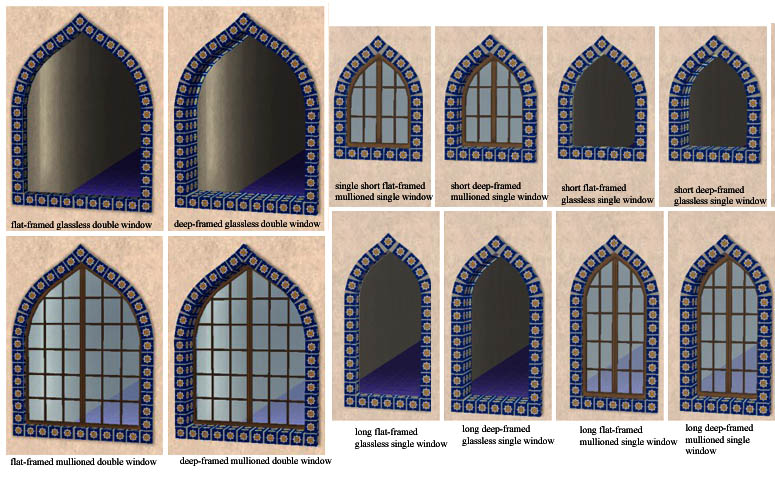
The set consists of double and single archways, double and single full-length windows, and single shorter windows. The particular pointed arch shape of the archways and windows is called a lancet.
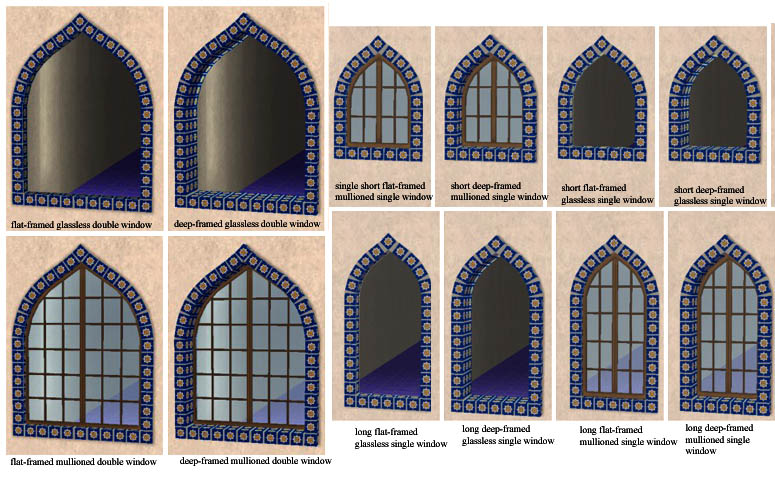
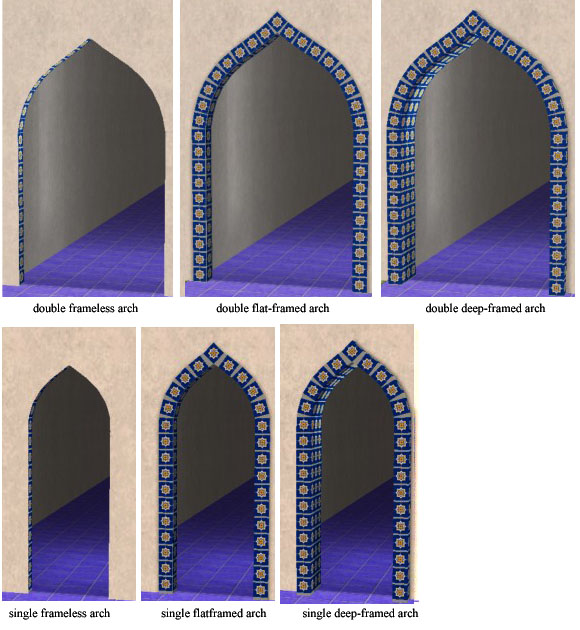
All of the archways and windows come with a choice of two frame styles, deep or flat. The windows also come in both an empty glassless version for porches etc, and a version with glass and mullions (wooden frame/crossbars).
The arches also come in a version with no frame.
Everything is usable on diagonal walls.
Note: the single windows and arches are oversized-- the frames overlap onto the adjoining walls.
The set is built with the texture repository method, using MaryLou's helpful window repository templates. The master mesh is the Double Deep-Framed Arch. That means you need to have that file in your game in order for any of the others to work properly.
So, to make a recolor (which is encouraged) you need to recolor the Double Deep-Framed Arch mesh.
For the windows to show up correctly, you also need to have the Single Deep-Framed Mullioned Window in the game in addition to the master arch.
I specifically made this set to be very easy to recolor. All you need is one square tile texture, which is then repeated across all the meshes. ("Tiled", I think they call that!)
I also made the mortar between the tiles recolorable, which gives you a lot of interesting possible combinations, none of which I can show you because I already have too many other images to upload. But still, there are aboout 20 different colors of mortar, intense colors as well as neutrals.
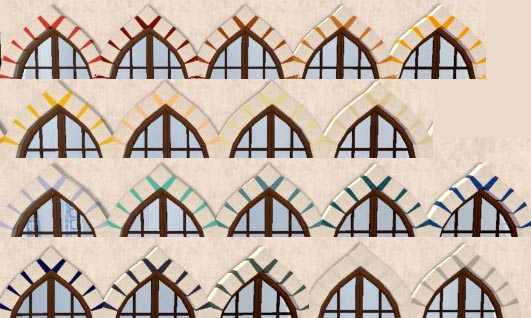
(However, because I chose to make the mortar recolorable, the mullions are not. Alas. So brown is the only option there.)***See above for update about recolorability***
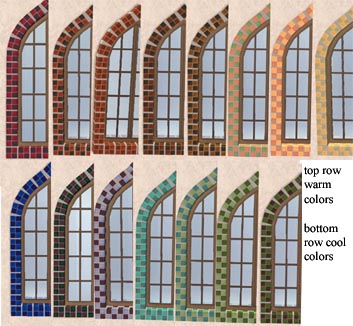
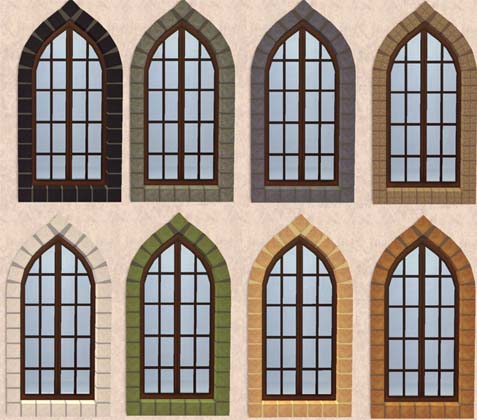
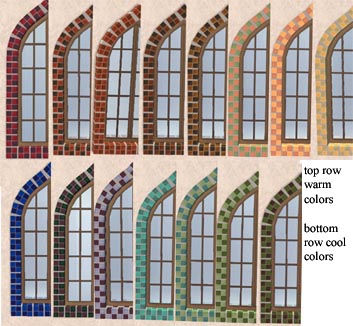
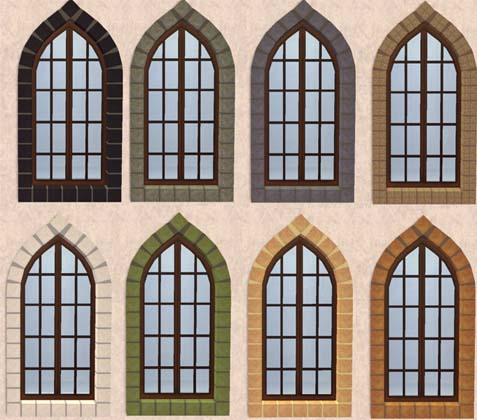
Since this set is so easy to recolor, I did way too many recolors. Seriously. So I did _not_ do in game screenshots of every single separate recolor each conveniently labeled with the corresponding filename. I did break up the recolors into related sets with pix of each set, however.
Solid Colors:
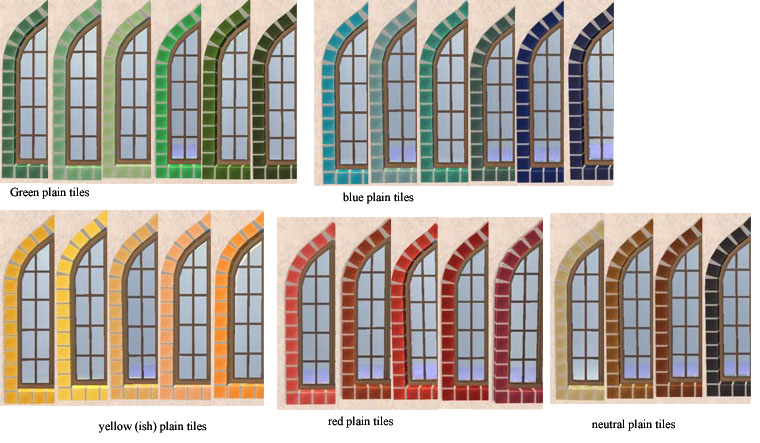
Checkered Tiles:
Stone textures:
A million more:

Edit:
My sharing policy-- Do as you will-- recolor, clone, share, etc. As long as it all stays free, and you don't take credit for my work, it's all good.
Polygon Counts:
1140
1140
152
152
928
928
928
928
125
125
1140
1140
730
1282
1282
1282
1282
954
954
954
954
730
730
730
1928
1928
1476
1476
1476
1476
1100
1100
1100
1100
1928
1928
Additional Credits:
all the tutorial-writers here on MTS2, MaryLou for her window templates, SimPE, Milkshape,
This is a new mesh, and means that it's a brand new self contained object that usually does not require a specific Pack (although this is possible depending on the type). It may have Recolours hosted on MTS - check below for more information.
| Filename | Size | Downloads | Date | |||||
|
new Babayaga_LancetSet_Windows_recolorableMullions.rar
Size: 271.8 KB · Downloads: 7,513 · 10th Oct 2008 |
271.8 KB | 7,513 | 10th Oct 2008 | |||||
|
Babayaga_LancetSet_Arches_BASEGAME.rar
Size: 248.9 KB · Downloads: 8,198 · 10th Oct 2008 |
248.9 KB | 8,198 | 10th Oct 2008 | |||||
|
Babayaga Lancet RC tiles Stone.rar
Size: 327.7 KB · Downloads: 11,171 · 27th Apr 2008 |
327.7 KB | 11,171 | 27th Apr 2008 | |||||
|
Babayaga LancetSet RC tiles plain checkered warm colors.rar
Size: 295.1 KB · Downloads: 10,159 · 27th Apr 2008 |
295.1 KB | 10,159 | 27th Apr 2008 | |||||
|
Babayaga LancetSet tiles RC neutral solids.rar
Size: 153.8 KB · Downloads: 10,744 · 27th Apr 2008 |
153.8 KB | 10,744 | 27th Apr 2008 | |||||
|
Babayaga Lancet RC tiles yellow and multicolored patterns.rar
Size: 717.8 KB · Downloads: 10,147 · 27th Apr 2008 |
717.8 KB | 10,147 | 27th Apr 2008 | |||||
|
Babayaga Lancet RC tiles warm patterns.rar
Size: 490.7 KB · Downloads: 10,442 · 27th Apr 2008 |
490.7 KB | 10,442 | 27th Apr 2008 | |||||
|
Babayaga Lancet RC tiles solid yellows oranges.rar
Size: 153.6 KB · Downloads: 9,789 · 27th Apr 2008 |
153.6 KB | 9,789 | 27th Apr 2008 | |||||
|
Babayaga Lancet RC tiles solid reds.rar
Size: 164.9 KB · Downloads: 9,700 · 27th Apr 2008 |
164.9 KB | 9,700 | 27th Apr 2008 | |||||
|
Babayaga Lancet RC tiles solid greens.rar
Size: 192.3 KB · Downloads: 9,811 · 27th Apr 2008 |
192.3 KB | 9,811 | 27th Apr 2008 | |||||
|
Babayaga Lancet RC tiles solid blues.rar
Size: 191.3 KB · Downloads: 10,331 · 27th Apr 2008 |
191.3 KB | 10,331 | 27th Apr 2008 | |||||
|
Babayaga Lancet RC tiles red patterns.rar
Size: 521.9 KB · Downloads: 10,436 · 27th Apr 2008 |
521.9 KB | 10,436 | 27th Apr 2008 | |||||
|
Babayaga Lancet RC tiles plain checkered cool colors.rar
Size: 275.1 KB · Downloads: 10,785 · 27th Apr 2008 |
275.1 KB | 10,785 | 27th Apr 2008 | |||||
|
Babayaga Lancet RC tiles greenish patterns.rar
Size: 589.4 KB · Downloads: 10,651 · 27th Apr 2008 |
589.4 KB | 10,651 | 27th Apr 2008 | |||||
|
Babayaga Lancet RC tiles blue patterns.rar
Size: 923.1 KB · Downloads: 11,352 · 27th Apr 2008 |
923.1 KB | 11,352 | 27th Apr 2008 | |||||
|
Babayaga Lancet RC mortar.rar
Size: 161.2 KB · Downloads: 11,356 · 27th Apr 2008 |
161.2 KB | 11,356 | 27th Apr 2008 | |||||
|
Babayaga_LancetSet_Windows_wGlass&Mullions.rar
Size: 273.9 KB · Downloads: 12,605 · 27th Apr 2008 |
273.9 KB | 12,605 | 27th Apr 2008 | |||||
|
Babayaga_LancetSet_Windows_NoGlass.rar
Size: 177.6 KB · Downloads: 12,905 · 27th Apr 2008 |
177.6 KB | 12,905 | 27th Apr 2008 | |||||
| For a detailed look at individual files, see the Information tab. | ||||||||
Key:
- - File was updated after upload was posted
Install Instructions
Basic Download and Install Instructions:
1. Download: Click the download link to save the .rar or .zip file(s) to your computer.
2. Extract the zip, rar, or 7z file.
3. Place in Downloads Folder: Cut and paste the .package file(s) into your Downloads folder:
1. Download: Click the download link to save the .rar or .zip file(s) to your computer.
2. Extract the zip, rar, or 7z file.
3. Place in Downloads Folder: Cut and paste the .package file(s) into your Downloads folder:
- Origin (Ultimate Collection): Users\(Current User Account)\Documents\EA Games\The Sims™ 2 Ultimate Collection\Downloads\
- Non-Origin, Windows Vista/7/8/10: Users\(Current User Account)\Documents\EA Games\The Sims 2\Downloads\
- Non-Origin, Windows XP: Documents and Settings\(Current User Account)\My Documents\EA Games\The Sims 2\Downloads\
- Mac: Users\(Current User Account)\Documents\EA Games\The Sims 2\Downloads
- Mac x64: /Library/Containers/com.aspyr.sims2.appstore/Data/Library/Application Support/Aspyr/The Sims 2/Downloads
- For a full, complete guide to downloading complete with pictures and more information, see: Game Help: Downloading for Fracking Idiots.
- Custom content not showing up in the game? See: Game Help: Getting Custom Content to Show Up.
- If you don't have a Downloads folder, just make one. See instructions at: Game Help: No Downloads Folder.
Also Thanked - Users who thanked this download also thanked:
About Me
my sharing policy
Do as you will-- recolor, clone, share, etc. As long as it all stays free, and you don't take credit for my work, it's all good.
Do as you will-- recolor, clone, share, etc. As long as it all stays free, and you don't take credit for my work, it's all good.
More Downloads BETA
Here are some more of my downloads: