
 Sign in to Mod The Sims
 Mannequin babies can be born
 Mannequin babies can be born
MTS has all free content, all the time. Donate to help keep it running.
SCREENSHOTS


baby1.jpg - width=817 height=687
baby2.jpg - width=953 height=970
Picked Upload!
This is a picked upload! It showcases some of the best talent and creativity available on MTS and in the community.

Created by bloodredtoe
Uploaded: 9th Jul 2008 at 3:13 PM
Updated: 12th Oct 2008 at 10:01 PM - added info
Updated: 12th Oct 2008 at 10:01 PM - added info
Are you one of those people who decided to create a goth looking sim with mannequin skin and then painfully found out they cannot have babies?
I am. People told me it was impossible to fix, so I decided to prove them wrong. And I did.
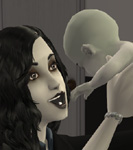
Pictures below present the first mannequin-skinned baby to be born with this fix - Sven Testsen.
With this fix in your downloads folder the game won't crash after mannequin-skinned sim goes into labor. Instead you'll get a fully functional gray-skinned infant.
To create a mannequin sim (toddler to elder) you have to open CAS in debug mode. Type "boolprop testingcheatsenabled true" in cheat log while in neighborhood and press shift+n in CAS to activate debug for CAS (shift (or shift+m, for me it's just shift) pressed again disables debug mode).
In testing. It worked perfectly in my game. Transition to toddler was fine too. Should you encounter any problems - post feedback.
Another purpose for testing - I know the file contains some useless data, but I didn't know what else I could remove from it, feedback on that also welcome.
It works with all mannequin sims, also the ones created before putting in this fix. Consider your expecting ladies saved
Additional Credits:
eyes and lipgloss - bruno
hairstyle - Sims Artists Union
outfit - found in BV files by Lord Darcy
eye shadow - custom recolor
rest - EAxis and IKEA
I am. People told me it was impossible to fix, so I decided to prove them wrong. And I did.
Pictures below present the first mannequin-skinned baby to be born with this fix - Sven Testsen.
With this fix in your downloads folder the game won't crash after mannequin-skinned sim goes into labor. Instead you'll get a fully functional gray-skinned infant.
To create a mannequin sim (toddler to elder) you have to open CAS in debug mode. Type "boolprop testingcheatsenabled true" in cheat log while in neighborhood and press shift+n in CAS to activate debug for CAS (shift (or shift+m, for me it's just shift) pressed again disables debug mode).
In testing. It worked perfectly in my game. Transition to toddler was fine too. Should you encounter any problems - post feedback.
Another purpose for testing - I know the file contains some useless data, but I didn't know what else I could remove from it, feedback on that also welcome.
It works with all mannequin sims, also the ones created before putting in this fix. Consider your expecting ladies saved

Additional Credits:
eyes and lipgloss - bruno
hairstyle - Sims Artists Union
outfit - found in BV files by Lord Darcy
eye shadow - custom recolor
rest - EAxis and IKEA
| Filename | Size | Downloads | Date | |||||
|
mannequin_babies_can_be_born.zip
Size: 80.2 KB · Downloads: 18,040 · 9th Jul 2008 |
80.2 KB | 18,040 | 9th Jul 2008 | |||||
| For a detailed look at individual files, see the Information tab. | ||||||||
Key:
- - File was updated after upload was posted
Install Instructions
Basic Download and Install Instructions:
1. Download: Click the download link to save the .rar or .zip file(s) to your computer.
2. Extract the zip, rar, or 7z file.
3. Place in Downloads Folder: Cut and paste the .package file(s) into your Downloads folder:
1. Download: Click the download link to save the .rar or .zip file(s) to your computer.
2. Extract the zip, rar, or 7z file.
3. Place in Downloads Folder: Cut and paste the .package file(s) into your Downloads folder:
- Origin (Ultimate Collection): Users\(Current User Account)\Documents\EA Games\The Sims™ 2 Ultimate Collection\Downloads\
- Non-Origin, Windows Vista/7/8/10: Users\(Current User Account)\Documents\EA Games\The Sims 2\Downloads\
- Non-Origin, Windows XP: Documents and Settings\(Current User Account)\My Documents\EA Games\The Sims 2\Downloads\
- Mac: Users\(Current User Account)\Documents\EA Games\The Sims 2\Downloads
- Mac x64: /Library/Containers/com.aspyr.sims2.appstore/Data/Library/Application Support/Aspyr/The Sims 2/Downloads
- For a full, complete guide to downloading complete with pictures and more information, see: Game Help: Downloading for Fracking Idiots.
- Custom content not showing up in the game? See: Game Help: Getting Custom Content to Show Up.
- If you don't have a Downloads folder, just make one. See instructions at: Game Help: No Downloads Folder.
Also Thanked - Users who thanked this download also thanked:
About Me
I'm no longer providing support for my Sims 2 stuff (I haven't touched the game in years and I don't remember how all this stuff worked anymore).
More Downloads BETA
Here are some more of my downloads: