
 Sign in to Mod The Sims
 1 Tile Colonial Style Window with Shutters - Maxis Match
 1 Tile Colonial Style Window with Shutters - Maxis Match
MTS has all free content, all the time. Donate to help keep it running.
SCREENSHOTS
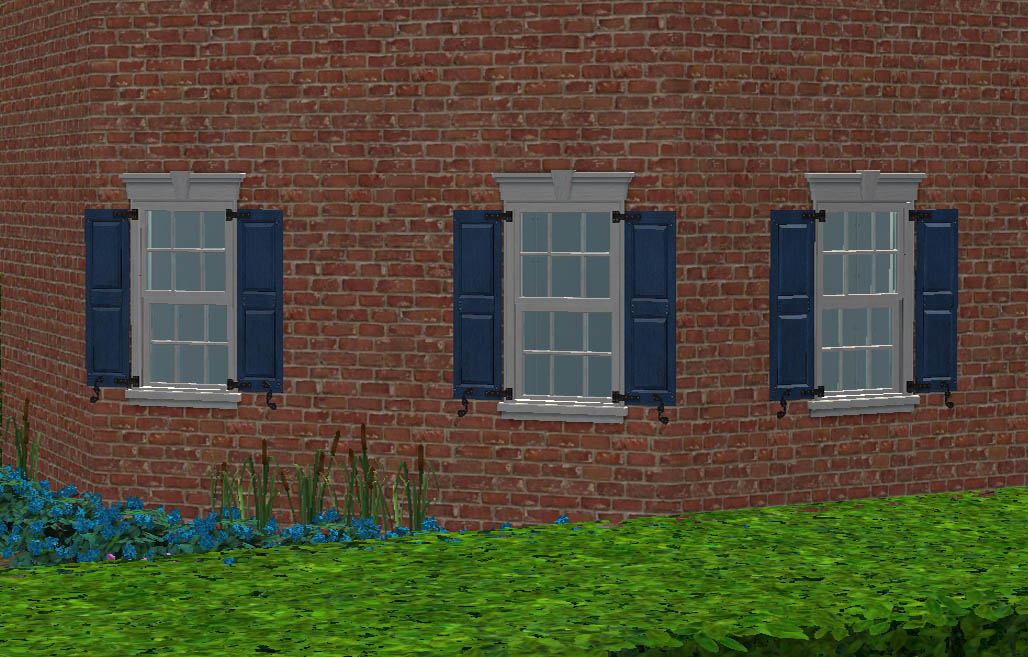

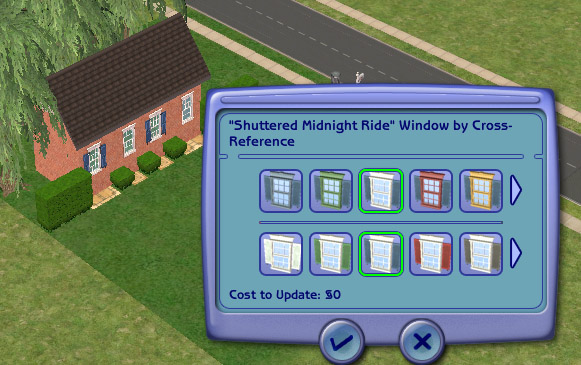
colonial diagonal.jpg - width=1028 height=657
colonial set.jpg - width=1084 height=738
Recolourable.jpg - width=581 height=365
colonial set copy.jpg - width=567 height=387
Picked Upload!
This is a picked upload! It showcases some of the best talent and creativity available on MTS and in the community.


Created by leefish
Uploaded: 6th Nov 2008 at 4:02 PM
Updated: 7th Jul 2011 at 11:21 AM by leesester - explain this is one window not 4
Updated: 7th Jul 2011 at 11:21 AM by leesester - explain this is one window not 4
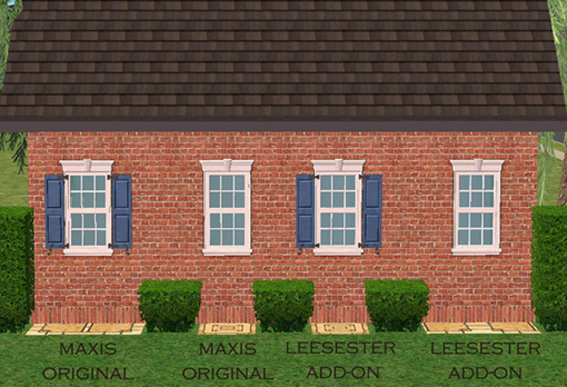
And here it is (at last) the colonial "Midnight Ride" window with shutters. This is the second of two windows I made to add on to the existing Maxis set see below
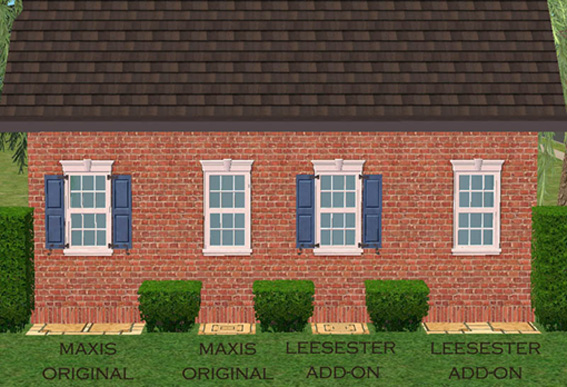
For those of you who cannot see the difference, that was the plan........ If you look at the tiles below the windows in the image you will see that I have made EXACT COPIES of the originals, just changed the tile size.
The cost of the window is 175 simoleons like the original and can be found in the build catalogue with all the other windows.
The window (and the other windows in the links in this post) are all linked to the original windows so recolours of the master(s) will apply across the full set.
 This is just the 1 tile shuttered version - if you want the no shutter window go to the links in the post
These windows are design mode enabled like the originals see below
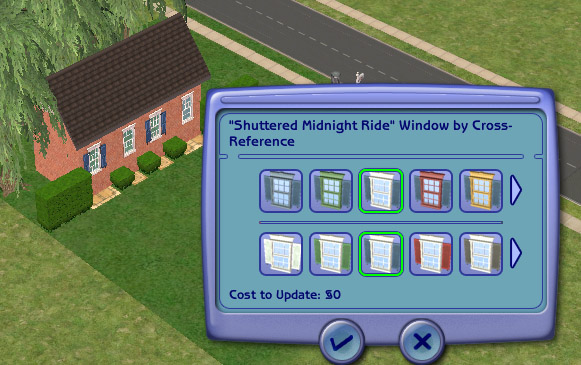
I hope you like this window, meanwhile, here are my other windows: You can download them after this one if you like
http://www.modthesims2.com/download.php?t=305890
http://www.modthesims2.com/download.php?t=305649 = 2 tile colonial no shutters
half size la fenêtre Window on 2 tiles
You have to put both files (diagonal and straight) in the download folder to work
Polygon Counts:
Both windows have the same polygon count as the Maxis originals
1178 Polys, 2010 Vertices (Straight version)
1178 Polys, 2010 Vertices (Diagonal version)
Additional Credits:
JWoods for object creation tutorial, IgnorantBliss for the custom window tutorial + the subset tutorial + the repository tutorial, Numenor for the diagonal window tutorial (and being able to help when I just got totally stuck....), SimPE, MTS2 for giving a place to learn
For those of you who cannot see the difference, that was the plan........ If you look at the tiles below the windows in the image you will see that I have made EXACT COPIES of the originals, just changed the tile size.
The cost of the window is 175 simoleons like the original and can be found in the build catalogue with all the other windows.
The window (and the other windows in the links in this post) are all linked to the original windows so recolours of the master(s) will apply across the full set.
 This is just the 1 tile shuttered version - if you want the no shutter window go to the links in the post
 These windows are design mode enabled like the originals see below
I hope you like this window, meanwhile, here are my other windows: You can download them after this one if you like

http://www.modthesims2.com/download.php?t=305890
http://www.modthesims2.com/download.php?t=305649 = 2 tile colonial no shutters
half size la fenêtre Window on 2 tiles
You have to put both files (diagonal and straight) in the download folder to work
Polygon Counts:
Both windows have the same polygon count as the Maxis originals
1178 Polys, 2010 Vertices (Straight version)
1178 Polys, 2010 Vertices (Diagonal version)
Additional Credits:
JWoods for object creation tutorial, IgnorantBliss for the custom window tutorial + the subset tutorial + the repository tutorial, Numenor for the diagonal window tutorial (and being able to help when I just got totally stuck....), SimPE, MTS2 for giving a place to learn
This is a new mesh, and means that it's a brand new self contained object that usually does not require a specific Pack (although this is possible depending on the type). It may have Recolours hosted on MTS - check below for more information.
| Filename | Size | Downloads | Date | |||||
|
1 tile colonial window with shutters.rar
Size: 57.3 KB · Downloads: 9,519 · 6th Nov 2008 |
57.3 KB | 9,519 | 6th Nov 2008 | |||||
| For a detailed look at individual files, see the Information tab. | ||||||||
Key:
- - File was updated after upload was posted
Install Instructions
Basic Download and Install Instructions:
1. Download: Click the download link to save the .rar or .zip file(s) to your computer.
2. Extract the zip, rar, or 7z file.
3. Place in Downloads Folder: Cut and paste the .package file(s) into your Downloads folder:
1. Download: Click the download link to save the .rar or .zip file(s) to your computer.
2. Extract the zip, rar, or 7z file.
3. Place in Downloads Folder: Cut and paste the .package file(s) into your Downloads folder:
- Origin (Ultimate Collection): Users\(Current User Account)\Documents\EA Games\The Sims™ 2 Ultimate Collection\Downloads\
- Non-Origin, Windows Vista/7/8/10: Users\(Current User Account)\Documents\EA Games\The Sims 2\Downloads\
- Non-Origin, Windows XP: Documents and Settings\(Current User Account)\My Documents\EA Games\The Sims 2\Downloads\
- Mac: Users\(Current User Account)\Documents\EA Games\The Sims 2\Downloads
- Mac x64: /Library/Containers/com.aspyr.sims2.appstore/Data/Library/Application Support/Aspyr/The Sims 2/Downloads
- For a full, complete guide to downloading complete with pictures and more information, see: Game Help: Downloading for Fracking Idiots.
- Custom content not showing up in the game? See: Game Help: Getting Custom Content to Show Up.
- If you don't have a Downloads folder, just make one. See instructions at: Game Help: No Downloads Folder.
Also Thanked - Users who thanked this download also thanked:
About me
Welcome to my Profile Page
In addition to all the things I have uploaded to MTS I also have a site of my own, leefish.nl. We have free downloads from various creators and accept Sims related uploads from members. Click on the link below to visit the site.
www.leefish.nl
Extra Policy Information
Please feel free to use my meshes in your lots as long as you give me credit for it and please do not share elsewhere as your own work.
The only exception to my policy for uploading with lots is the milk bottle door changer, which should not be uploaded in a lot.
Feel free to include any of my meshes in mesh packs etc in your uploads EXCEPT for on Pay Sites.
If you use my items I would love to know about it, but you don't have to tell me if you don't want to.
In addition to all the things I have uploaded to MTS I also have a site of my own, leefish.nl. We have free downloads from various creators and accept Sims related uploads from members. Click on the link below to visit the site.
www.leefish.nl
Extra Policy Information
Please feel free to use my meshes in your lots as long as you give me credit for it and please do not share elsewhere as your own work.
The only exception to my policy for uploading with lots is the milk bottle door changer, which should not be uploaded in a lot.
Feel free to include any of my meshes in mesh packs etc in your uploads EXCEPT for on Pay Sites.
If you use my items I would love to know about it, but you don't have to tell me if you don't want to.
More Downloads BETA
Here are some more of my downloads: