
 Sign in to Mod The Sims
 Euro / Classical Ascension Porch Set *w/Recolorable - Open Underneath - Modular Stairs*
 Euro / Classical Ascension Porch Set *w/Recolorable - Open Underneath - Modular Stairs*
MTS has all free content, all the time. Donate to help keep it running.
SCREENSHOTS
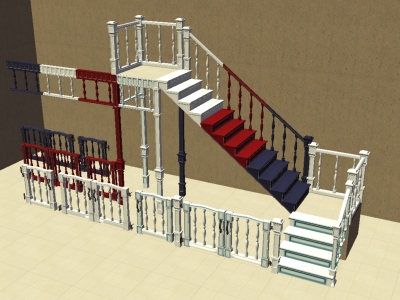

eurogatestair.jpg - width=400 height=300
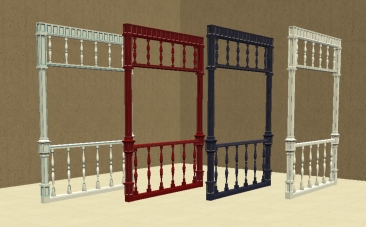
europorchfence.jpg - width=366 height=227
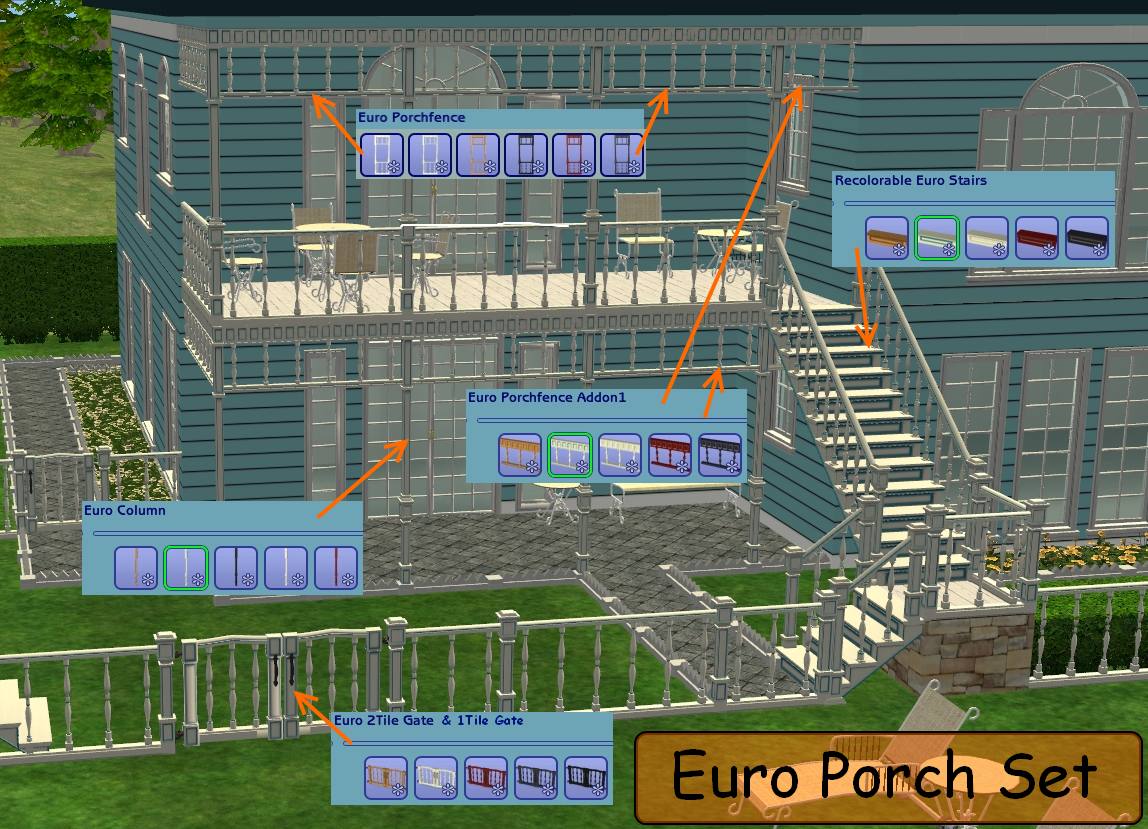
ScreenShot007-3.jpg - width=1148 height=829
Picked Upload!
This is a picked upload! It showcases some of the best talent and creativity available on MTS and in the community.


Created by tbudgett
Uploaded: 20th Nov 2008 at 2:22 PM
Updated: 11th Oct 2011 at 2:06 AM - Changed main pic
Updated: 11th Oct 2011 at 2:06 AM - Changed main pic
Euro / Classical Ascension Porch Set *w/Recolorable - Open Underneath - Modular Stairs*
If you like my creation or effort, please hit the THANKS button. It only takes a few seconds
[LEFT] **PLEASE NOTE - Objects have various game compatibilities**
Euro / Classical Ascension Porch Set consists of the following:
2 Maxis Classical Ascension Fence Recolors (Open For Business is needed)
Classical Ascension Porch Fence Mesh White/Teal and 4 Recolors (1 Expansion Pack is needed)
Euro Recolorable Modular Stair Mesh White/Teal and 4 Recolors (Base Game Compatible)
Euro / Classical Ascension Trim Mesh White/Teal and 4 Recolors < FOUND in Decorative/MISC.> (You Need NightLife or Higher **Note you can use them with the BaseGame and UNI if you use the 'moveobjects on' cheat**)
Euro / Classical Ascension 1Tile Gate Mesh White/Teal and 4 Recolors (BaseGame Compatible)
Euro / Classical Ascension 2Tile Gate Mesh (Slave to 1Tile Gate) (BaseGame Compatible)
The Euro Modular stairs need to be installed by either placing the 1779_tb_Recolorable_Euro_Stairs.txt file into your Scriptorium_ModularStairs folder or copying the text, in the file, to the bottom of the modularstairs.txt file in this folder: C:\Program Files\EA GAMES\The Sims 2\TSData\Res\Catalog\Scripts.
If you like my creation or effort, please hit the THANKS button. It only takes a few seconds
[LEFT] **PLEASE NOTE - Objects have various game compatibilities**
Euro / Classical Ascension Porch Set consists of the following:
2 Maxis Classical Ascension Fence Recolors (Open For Business is needed)
Classical Ascension Porch Fence Mesh White/Teal and 4 Recolors (1 Expansion Pack is needed)
Euro Recolorable Modular Stair Mesh White/Teal and 4 Recolors (Base Game Compatible)
Euro / Classical Ascension Trim Mesh White/Teal and 4 Recolors < FOUND in Decorative/MISC.> (You Need NightLife or Higher **Note you can use them with the BaseGame and UNI if you use the 'moveobjects on' cheat**)
Euro / Classical Ascension 1Tile Gate Mesh White/Teal and 4 Recolors (BaseGame Compatible)
Euro / Classical Ascension 2Tile Gate Mesh (Slave to 1Tile Gate) (BaseGame Compatible)
The Euro Modular stairs need to be installed by either placing the 1779_tb_Recolorable_Euro_Stairs.txt file into your Scriptorium_ModularStairs folder or copying the text, in the file, to the bottom of the modularstairs.txt file in this folder: C:\Program Files\EA GAMES\The Sims 2\TSData\Res\Catalog\Scripts.
Wrought Iron Set Available HERE
Chic Set Available HERE
How to apply recolors to recolorable modular stairs - You will not find the different colours in the catalog
1) Choose the sytle of recolorable modular stairs you want (Chic, Euro, Pinegultcher, etc.) from the catalog
2) Place them on the lot. Add the railings if you like.
3) Select the Design Tool and click, in turn, on each step: now you can choose between the available recolours.
Detailed instructions with pictures can be found on the Numenor's "Holy Smoke" thread http://www.modthesims2.com/download.php?t=50737
1) Choose the sytle of recolorable modular stairs you want (Chic, Euro, Pinegultcher, etc.) from the catalog
2) Place them on the lot. Add the railings if you like.
3) Select the Design Tool and click, in turn, on each step: now you can choose between the available recolours.
Detailed instructions with pictures can be found on the Numenor's "Holy Smoke" thread http://www.modthesims2.com/download.php?t=50737
Polygon Counts:
NAME: Faces/Vertices
2Tile Euro/Classical Ascension Gate: 4402/4601
1Tile Euro/Classical Ascension Gate: 2124/3242
Euro/Classical Ascension Porch Fence Straight: 2484/3620
Euro/Classical Ascension Porch Fence Diagonal: 3158/4646
Euro/Classical Ascension Porch Post / Column: 660/1140
Euro/Classical Ascension Porch Trim: 1338/2002
Euro Recolorable Modular Stairs: Less Than Maxis.
2Tile Euro/Classical Ascension Gate: 4402/4601
1Tile Euro/Classical Ascension Gate: 2124/3242
Euro/Classical Ascension Porch Fence Straight: 2484/3620
Euro/Classical Ascension Porch Fence Diagonal: 3158/4646
Euro/Classical Ascension Porch Post / Column: 660/1140
Euro/Classical Ascension Porch Trim: 1338/2002
Euro Recolorable Modular Stairs: Less Than Maxis.
This is a new mesh, and means that it's a brand new self contained object that usually does not require a specific Pack (although this is possible depending on the type). It may have Recolours hosted on MTS - check below for more information.
| Filename | Size | Downloads | Date | |||||
|
tb-EuroPorchSet-BlackRecolor.rar
| 4/25/09
Size: 29.8 KB · Downloads: 5,938 · 25th Apr 2009 |
29.8 KB | 5,938 | 25th Apr 2009 | |||||
|
tb-Euro Porch Set ALL.rar
| 4/29/09
Size: 515.5 KB · Downloads: 11,559 · 20th Nov 2008 |
515.5 KB | 11,559 | 20th Nov 2008 | |||||
| For a detailed look at individual files, see the Information tab. | ||||||||
Key:
- - File was updated after upload was posted
Install Instructions
Basic Download and Install Instructions:
1. Download: Click the download link to save the .rar or .zip file(s) to your computer.
2. Extract the zip, rar, or 7z file.
3. Place in Downloads Folder: Cut and paste the .package file(s) into your Downloads folder:
1. Download: Click the download link to save the .rar or .zip file(s) to your computer.
2. Extract the zip, rar, or 7z file.
3. Place in Downloads Folder: Cut and paste the .package file(s) into your Downloads folder:
- Origin (Ultimate Collection): Users\(Current User Account)\Documents\EA Games\The Sims™ 2 Ultimate Collection\Downloads\
- Non-Origin, Windows Vista/7/8/10: Users\(Current User Account)\Documents\EA Games\The Sims 2\Downloads\
- Non-Origin, Windows XP: Documents and Settings\(Current User Account)\My Documents\EA Games\The Sims 2\Downloads\
- Mac: Users\(Current User Account)\Documents\EA Games\The Sims 2\Downloads
- Mac x64: /Library/Containers/com.aspyr.sims2.appstore/Data/Library/Application Support/Aspyr/The Sims 2/Downloads
- For a full, complete guide to downloading complete with pictures and more information, see: Game Help: Downloading for Fracking Idiots.
- Custom content not showing up in the game? See: Game Help: Getting Custom Content to Show Up.
- If you don't have a Downloads folder, just make one. See instructions at: Game Help: No Downloads Folder.
Also Thanked - Users who thanked this download also thanked:
Packs Needed
| Base Game | |
|---|---|
 | Sims 2 |
| Expansion Pack | |
|---|---|
 | Open for Business |
Policy for April's Picture's:
You are not allowed to use April's pictures anywhere, for any reason. Do NOT reuse her textures for unrelated projects. She maintains sole ownership of her work.
More Downloads BETA
Here are some more of my downloads: