
 Sign in to Mod The Sims
 Testers Wanted: Metal Barstool Base in Gold
 Testers Wanted: Metal Barstool Base in Gold
MTS has all free content, all the time. Donate to help keep it running.
SCREENSHOTS
thumbnail.jpg - width=167 height=250

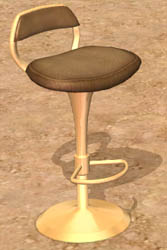
This was an experiment with recoloring an object that does not use a texture image. The original colors for this object are Chrome and Black metal. I thought it looked relatively nice, so I decided to share my little test with you guys.
This is the method that would be used to change the color/reflectivity/transparency and so on of any object that does not use a texture image, and also could be used to add shininess to objects that don't have it to begin with.
Let me know if you have any problems with it.
RG
This is the method that would be used to change the color/reflectivity/transparency and so on of any object that does not use a texture image, and also could be used to add shininess to objects that don't have it to begin with.
Let me know if you have any problems with it.
RG
This is a Maxis Recolour which means that it is a recolour of an item that already exists in your game. Please check the Pack requirements to see which game pack it recolours.
This custom content if it is not clothing, may require a seperate download to work properly. This is available at Colour Enable Package (CEP) by Numenor.
| Filename | Size | Downloads | Date | |||||
|
RGiles Barstool Base Gold.zip
Size: 18.5 KB · Downloads: 2,478 · 7th Mar 2005 |
18.5 KB | 2,478 | 7th Mar 2005 | |||||
| For a detailed look at individual files, see the Information tab. | ||||||||
Key:
- - File was updated after upload was posted
Install Instructions
Basic Download and Install Instructions:
1. Download: Click the download link to save the .rar or .zip file(s) to your computer.
2. Extract the zip, rar, or 7z file
3. Place in Downloads Folder: Cut and paste the .package file(s) into your Downloads folder:
Need more information?
1. Download: Click the download link to save the .rar or .zip file(s) to your computer.
2. Extract the zip, rar, or 7z file
3. Place in Downloads Folder: Cut and paste the .package file(s) into your Downloads folder:
- Origin (Ultimate Collection): Users\(Current User Account)\Documents\EA Games\The Sims™ 2 Ultimate Collection\Downloads\
- Non-Origin, Windows Vista/7/8/10: Users\(Current User Account)\Documents\EA Games\The Sims 2\Downloads\
- Non-Origin, Windows XP: Documents and Settings\(Current User Account)\My Documents\EA Games\The Sims 2\Downloads\
- Mac: Users\(Current User Account)\Documents\EA Games\The Sims 2\Downloads
- Mac x64:
/Library/Containers/com.aspyr.sims2.appstore/Data/Library/Application Support/Aspyr/The Sims 2/Downloads
Need more information?
- For a full, complete guide to downloading complete with pictures and more information, see: Game Help: Downloading for Fracking Idiots.
- Custom content not showing up in the game? See: Game Help: Getting Custom Content to Show Up.
- If you don't have a Downloads folder, just make one. See instructions at: Game Help: No Downloads Folder.
Also Thanked - Users who thanked this download also thanked:
Packs Needed
None, this is Sims 2 base game compatible!
Other Information
Style:
– Retro
Room:
– Kitchen
– Living
: Living Room
– Dining
: Dining Room
– Outdoor
Maxis Flags:
– Not Applicable