
 Sign in to Mod The Sims
 Decorative Parking Spaces - with random cars parked
 Decorative Parking Spaces - with random cars parked
MTS has all free content, all the time. Donate to help keep it running.
SCREENSHOTS
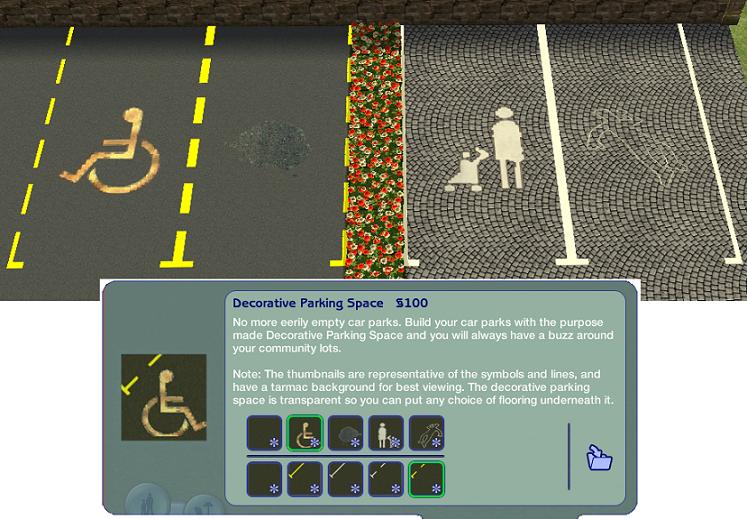

SymbolSet.JPG - width=747 height=519
Various symbols are provided in the parking spaces
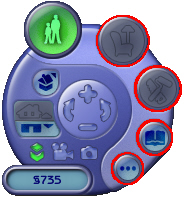
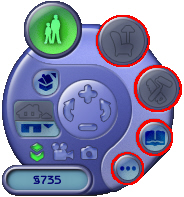
LiveModeAnnotated.jpg - width=184 height=197
How to jump out/in Live mode
Times.JPG - width=875 height=164
The time slots and their percentage chance of generating a car
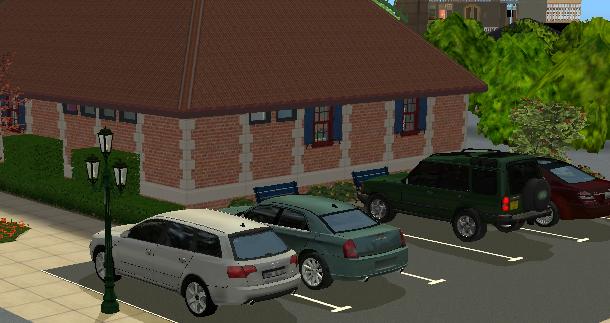
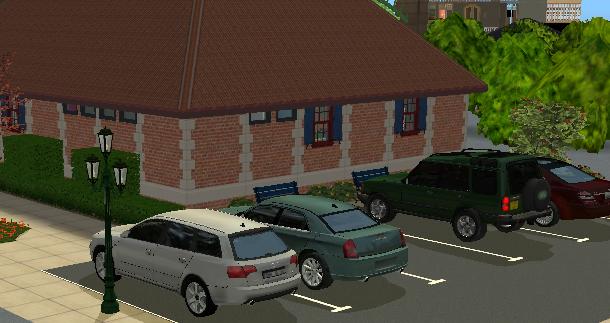
DecorativeParkingSpace.JPG - width=610 height=323
Example lot with Decorative Parking Spaces
Featured Upload!
This is a featured upload! It showcases the best talent and creativity available on MTS and in the community. 

Created by MogHughson
Uploaded: 18th May 2009 at 3:45 PM
Updated: 17th May 2011 at 6:16 PM - Removed internal categorisation as a driveway
Updated: 17th May 2011 at 6:16 PM - Removed internal categorisation as a driveway
*Updated 7th November 2010*
 Removed internal categorisation as a driveway so cars don't park in it - see section below
In the very first Sims 2 game I was curious why the various community lots in Pleasantview had large car parking areas where there were no cars. Then the Nightlife Expansion Pack came out and Sims had cars to drive, but parked on the side of the road when visiting community lots. I find these empty car parks a little bit spooky and decided to make an object to create a little life in the car parks. I also made it possible to Park in the Car Park in another mod. Removed internal categorisation as a driveway so cars don't park in it - see section below
Now I know there are placeable objects with the same meshes as the cars which you can download and decorate your community lot car parks with, but for me there were some downsides to that scheme.
- You would have every car mesh in your download folder twice.
- Everytime you visited the lot, exactly the same cars would be parked in the car park. That's spooky in itself!
- I would have to try to arrange them in a random manner and I'm not that artistic. I prefer to have the game surprise me.
So what it is and how do I use it?
This object is a Decorative Parking space. When placed on a lot it will randomly generate a car parked in the space. To use it, first lay your prefered car park flooring; e.g tarmac, grass, cobblestones, then locate the Decorative Parking Space object in Build Mode->Garage (along with the driveways) and place one or more of them on top of your pre-prepared car park flooring.
Cars will only be generated when live mode starts. Then the cars generated will stick for the period of time you are at the community lot. This has an extra benefit - if you don't like the random selection of cars that have been generated you can try again, by switching out of and then back to live mode.
Live Mode
Live mode starts when you enter a lot or when you switch back to playing from build or buy mode or options setting - those buttons circled in red below. You can switch out of live mode and back again to regenerate the random cars by pressing any of these buttons.
The randomness of cars
The cars will be randomly generated from the ownable cars available in your game and downloads folders (see small
 caveat). The randomness is based on the time of day and the type of community lot and should thus mean that an appropriate number of cars are parked whenever you are visiting your community lot.
Car Generation Details
This table shows the liklihood of a car being generated in any one Decorative Parking Space, given the time of day and the type of lot.

 A lot is considered to be a 'Venue' if
- there is an "Electrono Ticket Machine" on the lot (this object comes with the Open For Business EP). Being a 'Venue' lot will override being either a 'Restaurant' lot or a 'Nightclub' lot.
- it is trying to be both a 'Restaurant' and a 'Nightclub' - i.e. it is busy for more hours of the day.
A lot is considered to be a 'Restaurant' if there is a host podium on the lot.N.B. Prior to the Open for Business EP there was only one host podium and it was not categorised at all. This means that I have had to use the specific GUID for the "Gastronomique" Restuarant Podium to tell a lot is a 'Restaurant' lot for any of you that do not have OFB. If you have made a Custom Content Host Podium with a new unique GUID, let me know what it is and I will happily add it to this object.
A lot is considered to be a 'Hotel' if there is a hotel desk on the lot (this object comes with the Bon Voyage EP). Being a 'Hotel' lot will override being a 'Venue' lot. A lot is considered to be a 'Nightclub' if there is one of the two DJ Booths on the lot.- The GrooveLayer 9000 Professional DJ Booth by HotBeets
- The GrooveLayer 10k Professional DJ Booth by HotBeets
A note about the generated cars
These cars in the parking spaces are not yours, someone else parked them there. You can't sit in them, drive away in them, or in any way use them. All interactions on these cars have been disabled. This should have no affect on your real cars (i.e. those that are not generated by the parking space). If you see any problems of course let me know.
 Expansion Pack Requirements
This object works with all EPs from NightLife onwards, including if you do not have NightLife, but do have Numenors Driveable Cars without NL. If you have no EPs beyond Nightlife (i.e. you have NL only or UNI and NL) please download the additional package entitled "NIGHTLIFE-ONLY-decorative-parking-space-Mog-20090327" in addition to the main package. If you have any EP beyond NightLife do not download this additional package.
Please note: You must have the NightLife EP OR any EP/SP later than NL as per the description of Numenors Driveable Cars without NL. In short, if you have cars, you can use this mod.
Parking Space symbols
Apart from the choice of dashed and solid, white and yellow lines, or no lines at the edges of the parking spaces, you have a choice of symbols to annotate your parking space with:-
- Plain ordinary parking space
- Disabled parking space symbol
- Oil patch in middle of parking space
- Mother and Child parking space symbol
- Chalk outline
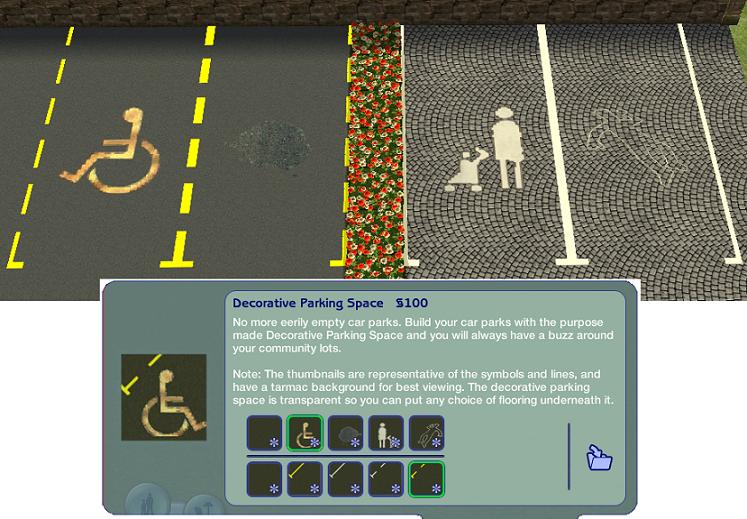
Of course if there is a car parked in the parking space you won't be able to see them, but occaisionally they will be visible and will surprise you again!
There are also custom thumbnails for the catalog since the object is mainly transparent which made it difficult to see which lines or symbol you were choosing.
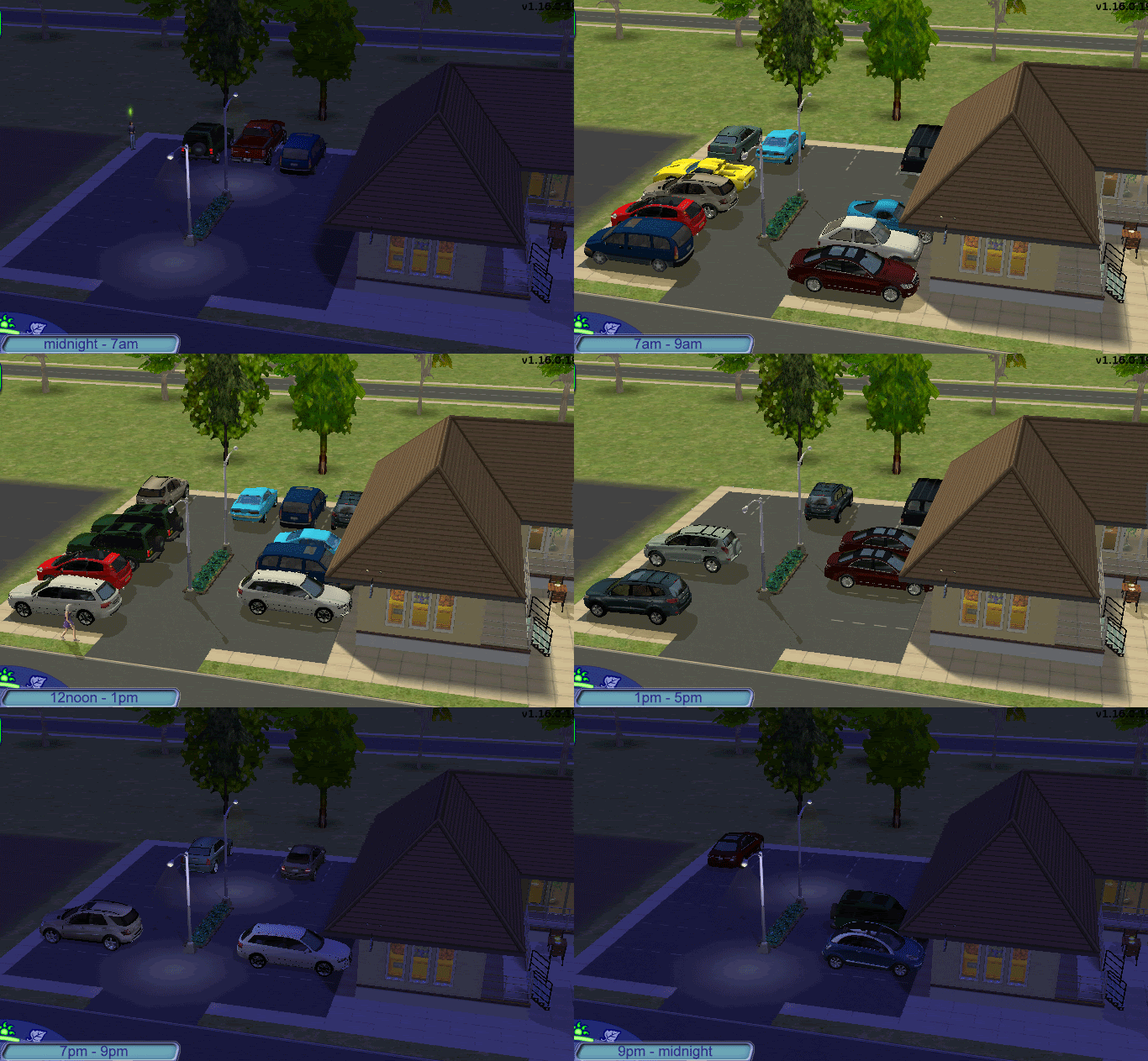
Example Lots These are some photos of a variety of lots that you will likely recognise (they are EA provided lots) that I had added car parks to, to illustrate how this would look. Please note that although the photos change with each time slot, when playing with these car parking spaces, the cars will not change unless you switch out of and back into live mode as noted above. Also I built Parcheggio Mall which uses these parking spaces.
290 Main Street in Pleasantview
This lot always had an empty car park (and was one of the triggers for me making this object originally) - so I have simply added transparent decorative parking spaces in between the lines already marked out. This lot is considered an 'Other' (at least as it comes in the game).
 photo
photoRodney's Hideout in Downtown
This lot had a pond next to it, so for these photos, I replaced the pond with a small car park. This lot is considered a 'Restaurant'.
 photo
photoLuLu Lounge in Downtown
This lot had number of decorative pools adding to the ambience of the outside view. Here, most of them are replaced with car parking spaces. This lot is considered to be a 'Nightclub'.
 photo
photoSky Vista Hotel in Three Lakes
I removed a tree filled area here to place a grassy/bark surface car park using the completely transparent version. This lot is considered to be a 'Hotel'.
 photo
photoHow to use Build Mode in hotels
If you want to add car parks to any of your hotels, you will need to follow these instructions (which allow you to use build mode in hotels for changing any other things too).
- Enter the lot and press <Ctrl>+<Shift>+<c> to bring up the cheats window and in it type the following:-
changeLotZoning community
to change the lot into a type that is buildable. - Exit from the lot
- Re-enter the lot and you should now be able to use all the build mode controls - so now you can, among other things, add decorative parking spaces.
- When you are happy with your build mode changes, press <Ctrl>+<Shift>+<c> to bring up the cheats window and in it type the following:-
changeLotZoning hotel
to change the lot back into a functioning hotel. - Save and exit the lot
Which cars are actually used?
In order to have any specific car mesh found and used in your car parking space, that car must be marked with a particular selector value. This package comes with an additional separate download with the Maxis cars marked appropriately. If you are using this with Numenors Driveable Cars without NL do not download this additional package. The cars.package that comes with that mod is updated to work with this mod - use it instead. For custom cars, there is a very small step that anyone familiar with SimPE could do for themselves, or, hopefully, car mesh owners will gradually update their cars to include. For details go here. Check out the Related Pages tab. I will put links here to cars that I am aware of having been updated in this way.
I do not currently know of any hacks that this mod might conflict with, but of course there is always the possibility. For the benefit of other modders, the details are below.
Possible Hack Clashes
In order to disable the interactions on the cars when they are contained in a decorative parking space, I have updated the following BHAVs in Car Globals. If you have a mod that also touches these, our mods will clash. Get in touch if you want to use both mods.
- Sub - Can I Drive Anywhere (0x20D7)
- Interaction - Ownable - Sit - TEST (0x2092)
- Interaction - Ownable - Change Owner - TEST (0x2101)
In order to make the Maxis Cars selectable (see above) I have updated the OBJDs for each of these objects. If you have changed the category/price or other such details for them, our mods will clash. Get in touch if you want to use both mods.
- Car Ownable - Hatchback (GUID 0xAFA39EFE)
- Car Ownable - MiniVan (GUID 0x0FA36FF6)
- Car Ownable - Pickup (GUID 0xEFA3B83B)
- Car Ownable - Restorable (GUID 0x5424FD22)
- Car Ownable - Sedan (GUID 0x2FA39A0C)
- Car Ownable - Super Sports (GUID 0x6F43251F)
Cheers
Mog

Update History
20May2009
- Now works for user with no EPs beyond Nightlife, see here
- Thanks to a suggestion from Numenor, I am able to include custom DJ Booths when determining whether a lot is a NightClub lot.
- Now works with Numenors Driveable Cars without NL - thanks to thesims29 for letting me know that it was such a simple change and testing it out for me. The Cars.package in Numenor's download is updated to work with this mod.
- Maxis cars now removed from the main mod package and available as a separately downloadable package. If you want the Maxis cars to show up in your parking space and you DO have NightLife, then download that package as well.
- Fixed an issue with the Maxis Pickup Truck where my update to it meant that it didn't show up anymore.
07Nov2010
- Removed internal categorisation as a driveway - to allow it to work with Park in Car Park mod, otherwise cars try to park in it!
Additional Credits: :lovestruc
Quaxi for SimPE.
Creators of Wings3D.
Echo for her tutorial on Understanding the Scenegraph without which I'd have never got this started (Driveways are very annoying!).
Numenor for this which got me past the invisibility problem, for the AnyGameStarter and for the know-how to find Custom Content DJ Booths.
tunaisafish for all the advice that produced this tutorial without which this object couldn't be made to work with all the custom content cars out there. In fact without which it would have been a complete non-starter.
Jasana_BugBreeder for all the help with custom thumbnails that produced these two tutorials.
Thanks to psychosim0 for the idea of a 'Nightclub' community lot type.
Thanks to melethana for the chalk outline idea.
Thanks to thesims29 for letting me know that it was such a simple change and testing it out for me.
Thanks to Clarina for reporting the problem with the Maxis Pickup Truck.
| Filename | Size | Downloads | Date | |||||
|
MUST-HAVE-NIGHTLIFE-maxis-ownable-cars-Mog-20090327.rar
| Maxis cars updated to work with the parking space - DO NOT Download if using with Numenor's "Driveable Cars without NL"
Size: 602 Bytes · Downloads: 38,129 · 22nd Nov 2009 |
602 Bytes | 38,129 | 22nd Nov 2009 | |||||
|
NIGHTLIFE-ONLY-decorative-parking-space-Mog-20090327.rar
| Additional package required for user with no EPs beyond NightLife
Size: 334 Bytes · Downloads: 19,889 · 20th May 2009 |
334 Bytes | 19,889 | 20th May 2009 | |||||
|
decorative-parking-space-Mog-20090327.rar
| A decorative parking space
Size: 138.9 KB · Downloads: 61,332 · 18th May 2009 |
138.9 KB | 61,332 | 18th May 2009 | |||||
| For a detailed look at individual files, see the Information tab. | ||||||||
Key:
- - File was updated after upload was posted
Install Instructions
Basic Download and Install Instructions:
1. Download: Click the download link to save the .rar or .zip file(s) to your computer.
2. Extract the zip, rar, or 7z file.
3. Place in Downloads Folder: Cut and paste the .package file(s) into your Downloads folder:
1. Download: Click the download link to save the .rar or .zip file(s) to your computer.
2. Extract the zip, rar, or 7z file.
3. Place in Downloads Folder: Cut and paste the .package file(s) into your Downloads folder:
- Origin (Ultimate Collection): Users\(Current User Account)\Documents\EA Games\The Sims™ 2 Ultimate Collection\Downloads\
- Non-Origin, Windows Vista/7/8/10: Users\(Current User Account)\Documents\EA Games\The Sims 2\Downloads\
- Non-Origin, Windows XP: Documents and Settings\(Current User Account)\My Documents\EA Games\The Sims 2\Downloads\
- Mac: Users\(Current User Account)\Documents\EA Games\The Sims 2\Downloads
- Mac x64: /Library/Containers/com.aspyr.sims2.appstore/Data/Library/Application Support/Aspyr/The Sims 2/Downloads
- For a full, complete guide to downloading complete with pictures and more information, see: Game Help: Downloading for Fracking Idiots.
- Custom content not showing up in the game? See: Game Help: Getting Custom Content to Show Up.
- If you don't have a Downloads folder, just make one. See instructions at: Game Help: No Downloads Folder.
Recommended
The creator also recommends the following uploads:
Park among these cars using Park in the Car Park.
Cars that I am aware of that have been updated for use with the Decorative Parking Space:
Cars that I am aware of that have been updated for use with the Decorative Parking Space:
Also Thanked - Users who thanked this download also thanked:
by Nopke
Packs Needed
Other Information
Type:
– Object Mods
: Object Interaction Mods (things that change how sims interact with objects or their environment, like "Multi-owner door" or "sunbathe anywhere")
Tags
#cars, #parking, #better parking
Packs Needed
| Base Game | |
|---|---|
 | Sims 2 |
| Expansion Pack | |
|---|---|
 | Nightlife |
More Downloads BETA
Here are some more of my downloads: