
 Sign in to Mod The Sims
 Four Assorted Sci-Fi Eyes as Contacts
 Four Assorted Sci-Fi Eyes as Contacts
MTS has all free content, all the time. Donate to help keep it running.
SCREENSHOTS
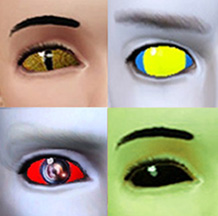


cybereye_closeup.jpg - width=252 height=230
cybereyes_x_3.jpg - width=835 height=490
PT9 and Lounge Lizard examples.jpg - width=638 height=612
scifieyes2colourareas.jpg - width=886 height=538
newsci-fithumbnail.jpg - width=218 height=216
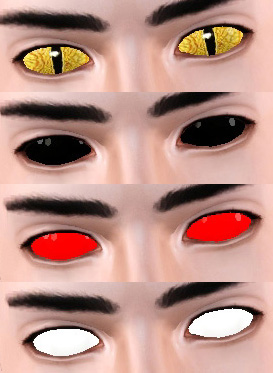
4x eyes.jpg - width=273 height=373
random_freak_family.jpg - width=720 height=525
Picked Upload!
This is a picked upload! It showcases some of the best talent and creativity available on MTS and in the community.
Created by Esmeralda
Uploaded: 27th Jul 2009 at 6:15 AM
Updated: 20th Aug 2012 at 9:21 PM by EsmeraldaF - Major overhaul to thread
Updated: 20th Aug 2012 at 9:21 PM by EsmeraldaF - Major overhaul to thread
UPDATE 11 AUGUST 2012: I've made a major overhaul to this upload, adding improvements to the original items such as recolourability and removing the need for the player to have to set all the colours of each eye to white first before using it, as was the 'old way' of using contacts. I've also added one completely new eye. If you've downloaded the old versions of these and would like the 'new improved' versions, please re-download!
________________________________________________________________
Thanks to Wintermuteai1's great tutorial (http://modthesims.info/showthread.php?t=358457 ) and the research done by Xanathon (http://www.modthesims.info/showthre...#startcomments), we can now have non-default eyes as contacts cloned from the Costume Makeup item. So I had to rush right off and make some Sci-Fi style ones for myself, and I hope you'll find these useful for your own Sci-Fi or fantasy creations too.
They are for both genders and all ages, Toddler to Elder. They are all found in the Costume Makeup section in CAS, and each will have a thumbnail picture showing which eye it is.
This set consists of:
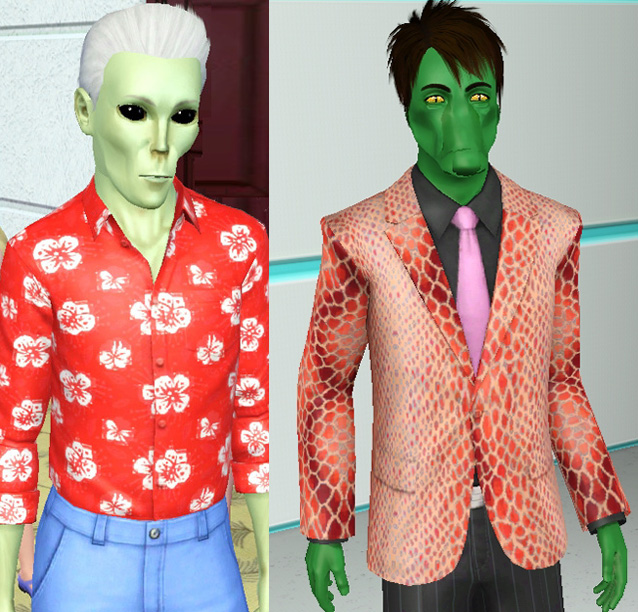
1. Eyes that are one solid colour. My old version came as three separate package files, white, black and red. The new version is one file with three presets for white, black, and red. The white preset is fully recolourable, so your sim can have solid colour eyes of any colour (or pattern) you like, or you can choose one of the other two presets to just instantly give your sim solid black eyes (such as my alien guy below) or red eyes without having to fiddle with CaST settings.
2. Lizard eyes. Good for humanoid lizardmen and other scaly creatures, such as my Lounge Lizard guy below (snout face made, although not very successfully, with the aid of a facial slider range multiplier). These are by default a natural gold-ish colour, not 100% recolourable but can be tinted in CAS to achieve other colours.
Lizard eyes, Black Eyes, Red Eyes, White Eyes
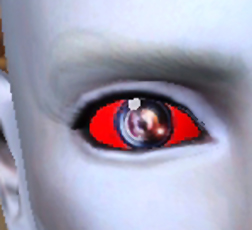
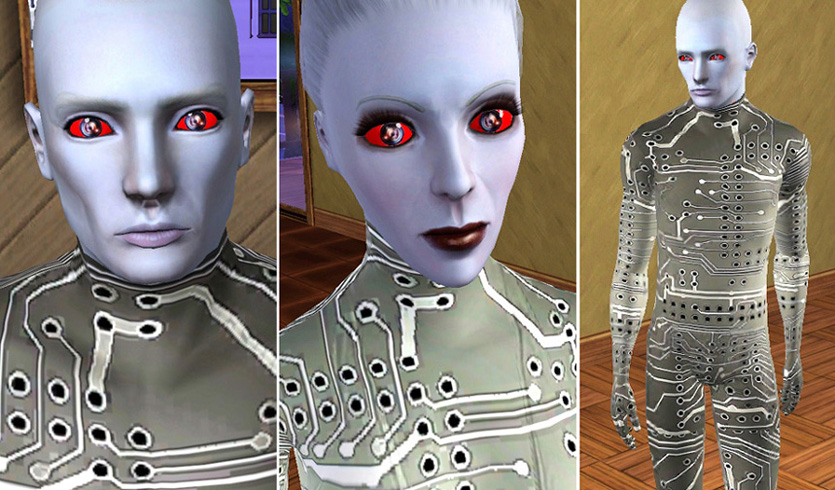
3. Cyber Camera Eyes, a dramatic-looking Sci-Fi eye consisting of photorealistic camera lens pupils/irises on a laser red sclera. Great for cyborgs, robots, aliens, and similar scary non-humans. These are preset as depicted below and not really recolourable, although they can be over-tinted a bit.
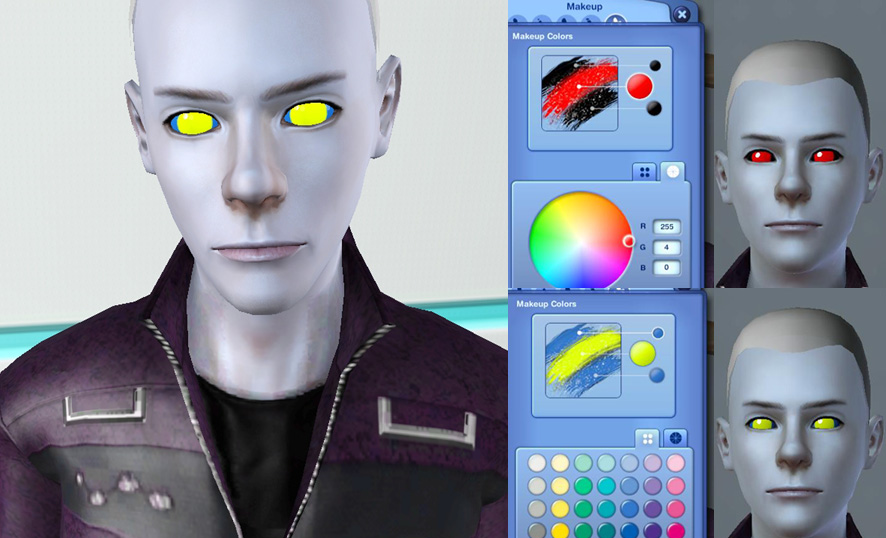
4. Solid Eyes With 2 Recolourable Areas. These are similar to the Solid Eyes but have two separate recolour areas, a large iris/pupil area and a background. They give you a similar effect to the Cyborg Eye mesh I've uploaded here, but they affect both eyes and they colour the sim's own eye rather than protruding like my Cyborg Eye does. The pic below includes depictions on how to colour the two eye areas in CaST:
Thank you for looking, hope you'll find these useful for your Sci Fi sims!
INSTALLATION:
All four eyes are in one zip file together. Just unzip the zip file and copy the .package file(s) of your choice to your Mods\Packages folder. Each eye is in its own separate package, so you can choose whether to install all of them or just one or two.
If you don't have a Mods\Packages folder and/or don't know how to install .package files, please see full instructions here: http://www.modthesims.info/wiki.php...g_Package_Files
All eyes were made with CAS Texture Unitool.
________________________________________________________________
Thanks to Wintermuteai1's great tutorial (http://modthesims.info/showthread.php?t=358457 ) and the research done by Xanathon (http://www.modthesims.info/showthre...#startcomments), we can now have non-default eyes as contacts cloned from the Costume Makeup item. So I had to rush right off and make some Sci-Fi style ones for myself, and I hope you'll find these useful for your own Sci-Fi or fantasy creations too.
They are for both genders and all ages, Toddler to Elder. They are all found in the Costume Makeup section in CAS, and each will have a thumbnail picture showing which eye it is.
This set consists of:
1. Eyes that are one solid colour. My old version came as three separate package files, white, black and red. The new version is one file with three presets for white, black, and red. The white preset is fully recolourable, so your sim can have solid colour eyes of any colour (or pattern) you like, or you can choose one of the other two presets to just instantly give your sim solid black eyes (such as my alien guy below) or red eyes without having to fiddle with CaST settings.
2. Lizard eyes. Good for humanoid lizardmen and other scaly creatures, such as my Lounge Lizard guy below (snout face made, although not very successfully, with the aid of a facial slider range multiplier). These are by default a natural gold-ish colour, not 100% recolourable but can be tinted in CAS to achieve other colours.
Lizard eyes, Black Eyes, Red Eyes, White Eyes
3. Cyber Camera Eyes, a dramatic-looking Sci-Fi eye consisting of photorealistic camera lens pupils/irises on a laser red sclera. Great for cyborgs, robots, aliens, and similar scary non-humans. These are preset as depicted below and not really recolourable, although they can be over-tinted a bit.
4. Solid Eyes With 2 Recolourable Areas. These are similar to the Solid Eyes but have two separate recolour areas, a large iris/pupil area and a background. They give you a similar effect to the Cyborg Eye mesh I've uploaded here, but they affect both eyes and they colour the sim's own eye rather than protruding like my Cyborg Eye does. The pic below includes depictions on how to colour the two eye areas in CaST:
Thank you for looking, hope you'll find these useful for your Sci Fi sims!
INSTALLATION:
All four eyes are in one zip file together. Just unzip the zip file and copy the .package file(s) of your choice to your Mods\Packages folder. Each eye is in its own separate package, so you can choose whether to install all of them or just one or two.
If you don't have a Mods\Packages folder and/or don't know how to install .package files, please see full instructions here: http://www.modthesims.info/wiki.php...g_Package_Files
All eyes were made with CAS Texture Unitool.
| Filename | Size | Downloads | Date | |||||
|
Set_of_4_SciFi_Eyes_FIXED_and_with_thumbnails_ByEsmeraldaF.zip
| All 4 eye sets in one zip file
Size: 408.5 KB · Downloads: 22,035 · 28th Jul 2009 |
408.5 KB | 22,035 | 28th Jul 2009 | |||||
| For a detailed look at individual files, see the Information tab. | ||||||||
Key:
- - File was updated after upload was posted
Install Instructions
Quick Guide:
1. Click the file listed on the Files tab to download the file to your computer.
2. Extract the zip, rar, or 7z file. Now you will have either a .package or a .sims3pack file.
For Package files:
1. Cut and paste the file into your Documents\Electronic Arts\The Sims 3\Mods\Packages folder. If you do not already have this folder, you should read the full guide to Package files first: Sims 3:Installing Package Fileswiki, so you can make sure your game is fully patched and you have the correct Resource.cfg file.
2. Run the game, and find your content where the creator said it would be (build mode, buy mode, Create-a-Sim, etc.).
For Sims3Pack files:
1. Cut and paste it into your Documents\Electronic Arts\The Sims 3\Downloads folder. If you do not have this folder yet, it is recommended that you open the game and then close it again so that this folder will be automatically created. Then you can place the .sims3pack into your Downloads folder.
2. Load the game's Launcher, and click on the Downloads tab. Find the item in the list and tick the box beside it. Then press the Install button below the list.
3. Wait for the installer to load, and it will install the content to the game. You will get a message letting you know when it's done.
4. Run the game, and find your content where the creator said it would be (build mode, buy mode, Create-a-Sim, etc.).
Extracting from RAR, ZIP, or 7z: You will need a special program for this. For Windows, we recommend 7-Zip and for Mac OSX, we recommend Keka. Both are free and safe to use.
Need more help?
If you need more info, see:
1. Click the file listed on the Files tab to download the file to your computer.
2. Extract the zip, rar, or 7z file. Now you will have either a .package or a .sims3pack file.
For Package files:
1. Cut and paste the file into your Documents\Electronic Arts\The Sims 3\Mods\Packages folder. If you do not already have this folder, you should read the full guide to Package files first: Sims 3:Installing Package Fileswiki, so you can make sure your game is fully patched and you have the correct Resource.cfg file.
2. Run the game, and find your content where the creator said it would be (build mode, buy mode, Create-a-Sim, etc.).
For Sims3Pack files:
1. Cut and paste it into your Documents\Electronic Arts\The Sims 3\Downloads folder. If you do not have this folder yet, it is recommended that you open the game and then close it again so that this folder will be automatically created. Then you can place the .sims3pack into your Downloads folder.
2. Load the game's Launcher, and click on the Downloads tab. Find the item in the list and tick the box beside it. Then press the Install button below the list.
3. Wait for the installer to load, and it will install the content to the game. You will get a message letting you know when it's done.
4. Run the game, and find your content where the creator said it would be (build mode, buy mode, Create-a-Sim, etc.).
Extracting from RAR, ZIP, or 7z: You will need a special program for this. For Windows, we recommend 7-Zip and for Mac OSX, we recommend Keka. Both are free and safe to use.
Need more help?
If you need more info, see:
- For package files: Sims 3:Installing Package Fileswiki
- For Sims3pack files: Game Help:Installing TS3 Packswiki
Also Thanked - Users who thanked this download also thanked:
About Me
Retired from The Sims for now but I'll still check for questions or PMs. Thank you to those who liked my Sims stuff, love all of you. My Fallout 4 mods: https://www.nexusmods.com/fallout4/...?tab=user+files and https://colorfulcommonwealth.proboards.com/ which also has Sims mods not uploaded here, plus tutorials on making Fallout 4 and Starfield cc. Currently figuring out Starfield cc creation.
MY POLICY: I'm easygoing, please just don't copy my creations or claim them to be your own work. You may include my creations with your sims or lots, just credit me with a link back to the item.
MY POLICY: I'm easygoing, please just don't copy my creations or claim them to be your own work. You may include my creations with your sims or lots, just credit me with a link back to the item.
More Downloads BETA
Here are some more of my downloads: