
 Sign in to Mod The Sims
 Men's Messy Combed-Back Hair - Teen to Elder
 Men's Messy Combed-Back Hair - Teen to Elder
MTS has all free content, all the time. Donate to help keep it running.
SCREENSHOTS
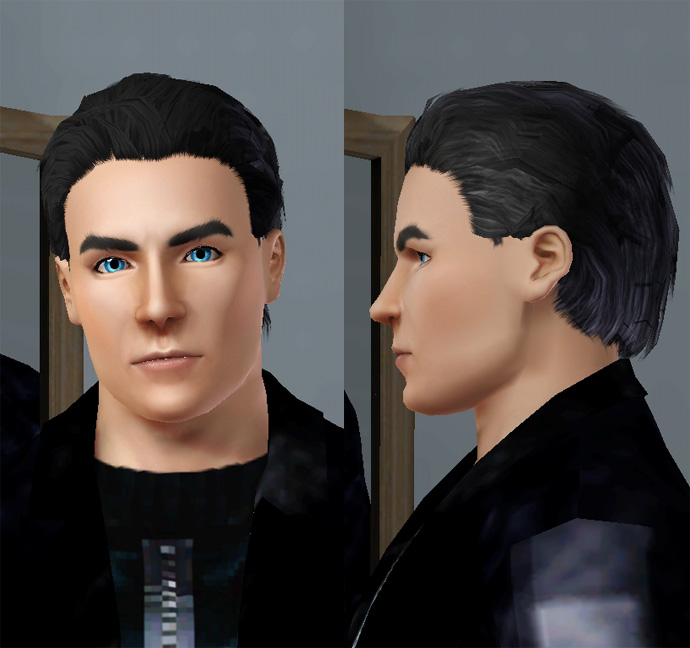
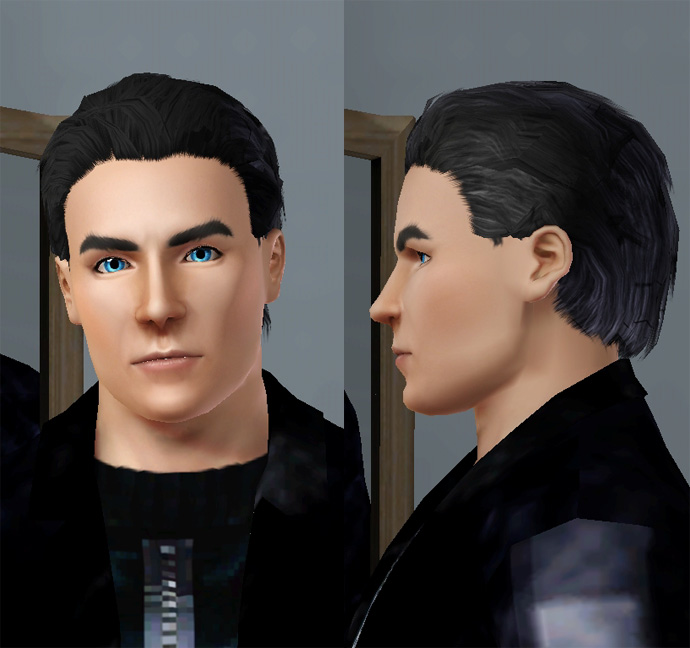
PaulDHairModel.jpg - width=690 height=648
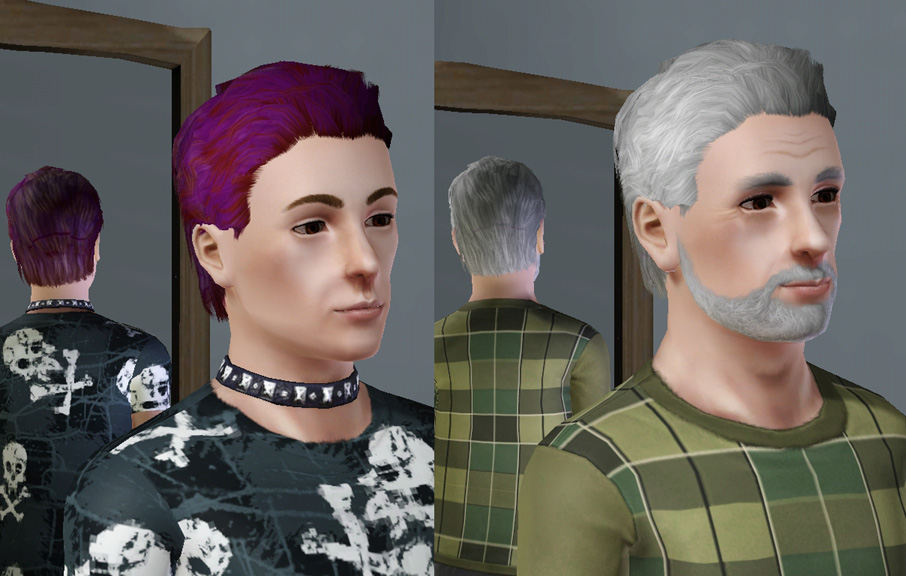
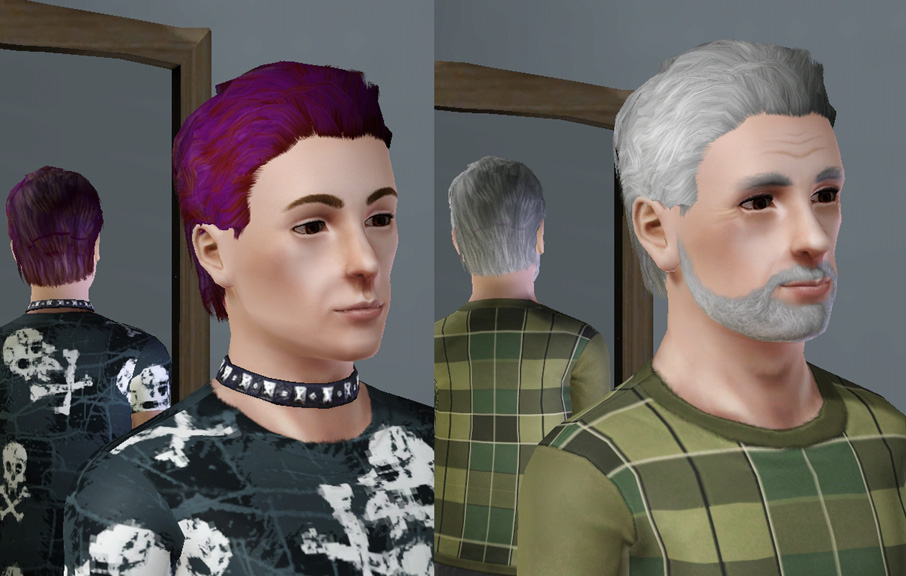
teentoelder.jpg - width=906 height=576
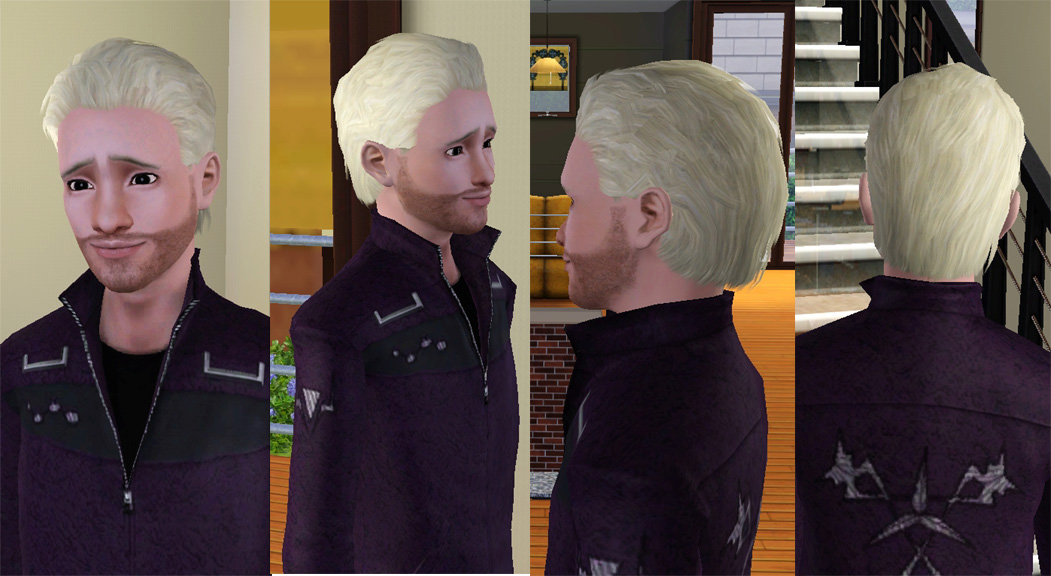
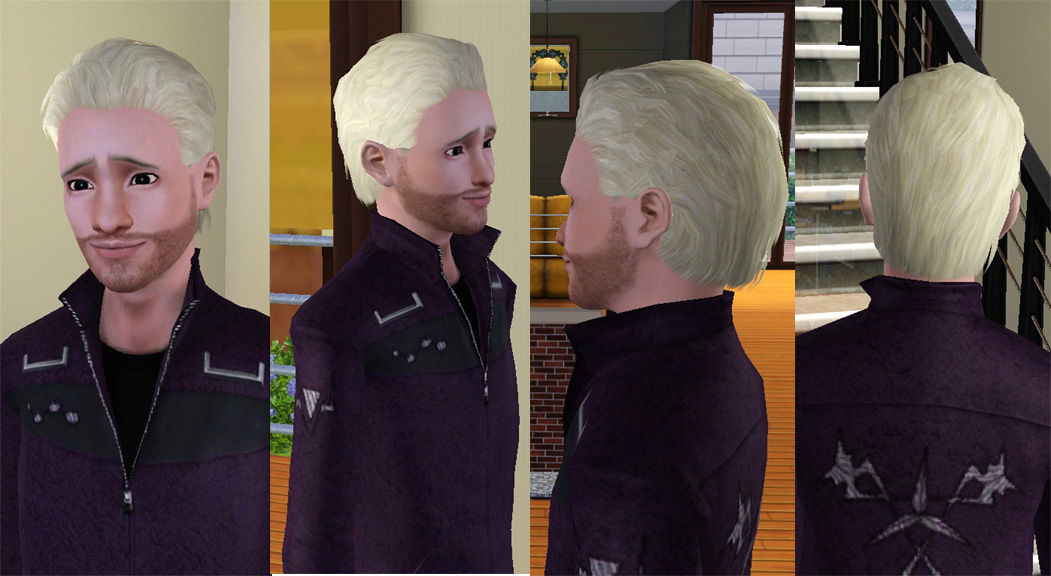
Cycl0n3hairmodel.jpg - width=1051 height=576
Picked Upload!
This is a picked upload! It showcases some of the best talent and creativity available on MTS and in the community.
Created by Esmeralda
Uploaded: 10th Oct 2009 at 10:49 PM
Updated: 6th Feb 2015 at 9:56 AM - Just removed outdated 'update' text, no changes to item itself.
Updated: 6th Feb 2015 at 9:56 AM - Just removed outdated 'update' text, no changes to item itself.
As there is such a dire lack of manly custom hair for men at present, with most custom male hairs being rather girly, I hope this will help towards filling the gap for those of us who like our men (including our sims) to look like men!
It's simply a modification of the 'Short Wavy Messy Hair' that comes with TS3 (it doesn't replace it, you will still have both), just with it smoothed down to be less wavy and less big and bouffant, and to eliminate the weird strands of hair that went across the ears. As just a TS3 modification, it has a low polycount of 2160.
The hair is enabled for men from Teen to Elder:
For a look at it in-game, I've given Cycl0n3 Sw0rd a makeover - I've made him into a nice platinum blonde bombshell.
INSTALL INSTRUCTIONS:
Unzip the .zip file, and copy the .package file to your Mods\Packages folder.
If you don't have a Mods\Packages folder and/or don't know how to install .package files, please see full instructions here: http://www.modthesims.info/wiki.php...g_Package_Files
Thank you for looking and I hope you'll find this useful for your manly sims!
Polygon Counts:
2160
It's simply a modification of the 'Short Wavy Messy Hair' that comes with TS3 (it doesn't replace it, you will still have both), just with it smoothed down to be less wavy and less big and bouffant, and to eliminate the weird strands of hair that went across the ears. As just a TS3 modification, it has a low polycount of 2160.
The hair is enabled for men from Teen to Elder:
For a look at it in-game, I've given Cycl0n3 Sw0rd a makeover - I've made him into a nice platinum blonde bombshell.
INSTALL INSTRUCTIONS:
Unzip the .zip file, and copy the .package file to your Mods\Packages folder.
If you don't have a Mods\Packages folder and/or don't know how to install .package files, please see full instructions here: http://www.modthesims.info/wiki.php...g_Package_Files
Thank you for looking and I hope you'll find this useful for your manly sims!
Polygon Counts:
2160
This is a new mesh, and means that it's a brand new self contained object that usually does not require a specific Pack (although this is possible depending on the type). It may have Recolours hosted on MTS - check below for more information.
| Filename | Size | Downloads | Date | |||||
|
MessyCombed-BackHairTM-EM_ByEsmeraldaF.zip
| Fixed version 12 May 2011 - removed dark patch at hairline that was on the original version
Size: 4.35 MB · Downloads: 104,575 · 10th Oct 2009 |
4.35 MB | 104,575 | 10th Oct 2009 | |||||
| For a detailed look at individual files, see the Information tab. | ||||||||
Key:
- - File was updated after upload was posted
Install Instructions
Quick Guide:
1. Click the file listed on the Files tab to download the file to your computer.
2. Extract the zip, rar, or 7z file. Now you will have either a .package or a .sims3pack file.
For Package files:
1. Cut and paste the file into your Documents\Electronic Arts\The Sims 3\Mods\Packages folder. If you do not already have this folder, you should read the full guide to Package files first: Sims 3:Installing Package Fileswiki, so you can make sure your game is fully patched and you have the correct Resource.cfg file.
2. Run the game, and find your content where the creator said it would be (build mode, buy mode, Create-a-Sim, etc.).
For Sims3Pack files:
1. Cut and paste it into your Documents\Electronic Arts\The Sims 3\Downloads folder. If you do not have this folder yet, it is recommended that you open the game and then close it again so that this folder will be automatically created. Then you can place the .sims3pack into your Downloads folder.
2. Load the game's Launcher, and click on the Downloads tab. Find the item in the list and tick the box beside it. Then press the Install button below the list.
3. Wait for the installer to load, and it will install the content to the game. You will get a message letting you know when it's done.
4. Run the game, and find your content where the creator said it would be (build mode, buy mode, Create-a-Sim, etc.).
Extracting from RAR, ZIP, or 7z: You will need a special program for this. For Windows, we recommend 7-Zip and for Mac OSX, we recommend Keka. Both are free and safe to use.
Need more help?
If you need more info, see:
1. Click the file listed on the Files tab to download the file to your computer.
2. Extract the zip, rar, or 7z file. Now you will have either a .package or a .sims3pack file.
For Package files:
1. Cut and paste the file into your Documents\Electronic Arts\The Sims 3\Mods\Packages folder. If you do not already have this folder, you should read the full guide to Package files first: Sims 3:Installing Package Fileswiki, so you can make sure your game is fully patched and you have the correct Resource.cfg file.
2. Run the game, and find your content where the creator said it would be (build mode, buy mode, Create-a-Sim, etc.).
For Sims3Pack files:
1. Cut and paste it into your Documents\Electronic Arts\The Sims 3\Downloads folder. If you do not have this folder yet, it is recommended that you open the game and then close it again so that this folder will be automatically created. Then you can place the .sims3pack into your Downloads folder.
2. Load the game's Launcher, and click on the Downloads tab. Find the item in the list and tick the box beside it. Then press the Install button below the list.
3. Wait for the installer to load, and it will install the content to the game. You will get a message letting you know when it's done.
4. Run the game, and find your content where the creator said it would be (build mode, buy mode, Create-a-Sim, etc.).
Extracting from RAR, ZIP, or 7z: You will need a special program for this. For Windows, we recommend 7-Zip and for Mac OSX, we recommend Keka. Both are free and safe to use.
Need more help?
If you need more info, see:
- For package files: Sims 3:Installing Package Fileswiki
- For Sims3pack files: Game Help:Installing TS3 Packswiki
Also Thanked - Users who thanked this download also thanked:
Packs Needed
None, this is Sims 3 base game compatible!
Other Information
Hair Style:
– Shiny/Realistic
– Natural Colours
Maxis Flags:
– Not Applicable
Bin Type:
– Binned
Age:
– Teen
– Young Adult
– Adult
– Elder
Tags
#hair
About Me
Retired from The Sims for now but I'll still check for questions or PMs. Thank you to those who liked my Sims stuff, love all of you. My Fallout 4 mods: https://www.nexusmods.com/fallout4/...?tab=user+files and https://colorfulcommonwealth.proboards.com/ which also has Sims mods not uploaded here, plus tutorials on making Fallout 4 and Starfield cc. Currently figuring out Starfield cc creation.
MY POLICY: I'm easygoing, please just don't copy my creations or claim them to be your own work. You may include my creations with your sims or lots, just credit me with a link back to the item.
MY POLICY: I'm easygoing, please just don't copy my creations or claim them to be your own work. You may include my creations with your sims or lots, just credit me with a link back to the item.