
 Sign in to Mod The Sims
 The Sims 3 Recategorizer (UPDATE Late Night!)
 The Sims 3 Recategorizer (UPDATE Late Night!)
MTS has all free content, all the time. Donate to help keep it running.
SCREENSHOTS
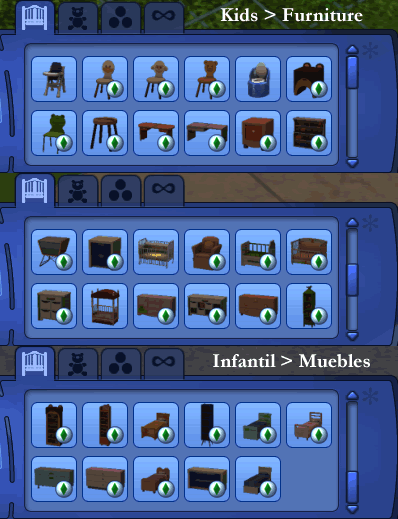
kidsFurniture.gif - width=398 height=519
Kids > Furniture
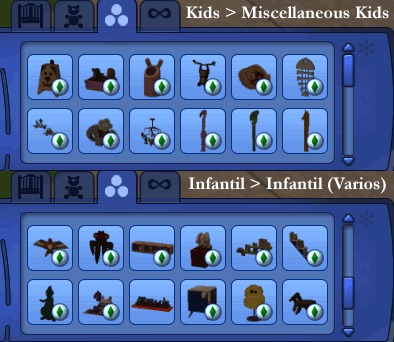
kidsMiscellaneous.gif - width=394 height=342
Kids > Miscellaneous Kids
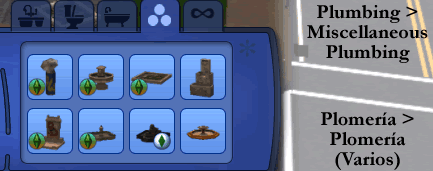
plumbingMiscellaneous.gif - width=433 height=171
Plumbing > Miscellaneous Plumbing

Created by Sims MX
Uploaded: 15th Dec 2009 at 7:21 PM
Updated: 13th Mar 2013 at 3:53 AM - Updated files.
Updated: 13th Mar 2013 at 3:53 AM - Updated files.
The Sims 3 Recategorizer
 This mod is outdated, an up-tp-date version can be obtained from Simlogical.
Have you wondered: why are Fountains under the Miscellaneous Décor category instead of Miscellaneous Plumbing? Or why are three dining chairs under Miscellaneous Comfort instead of Dining Chairs? For the picky ones, Sims MX has a fix!
This mod will recategorize base game, World Adventures, Ambitions, High-End Loft Stuff and Store items into proper categories. Below is a summary.
What It Does?:
 Rearranges the Catalog Unlocks Hidden Stuff Fixes Placement Flags Fixes Other Stuff:
File Names:
Store File Names:
Notes:
Prices weren't modified, they are EAxis original's.
Changelog:
v1.0 (12/13/09): Released.
v1.1 (12/15/09): Added Storybook, Explorer's Loot and Regal Living set, made other fixes.
v1.2 (02/07/10): Added Gothique, Chinese New Year, Riverview, New Orleans and Sims Celebration sets, made other fixes.
v1.3 (02/28/10): Added HELS recategorizer.
v1.4 (03/06/10): Added Faire Folk Life & Club Vaindenburger recategorizers.
v1.5 (03/13/10):Recategorizes clothing. Added Wild Wears recategorizer. No longer available.
v1.6 (06/13/10): Recategorizes Happy Valentines! set. Base game, World Adventures and Explorer's Loot files were modified to include items in the new Sculptures sorting category. Clothing recategorizers are no longer available.
v1.7 (06/14/10): Added Island Villa, Championship Dreams, It's Game Time!, Hacienda Luxury and Faire Folk Outdoors recategorizers.
v1.8 (06/26/10): Added Ambitions recategorizer. World Adventures and base game files were updated for Ambitions.
v1.9 (08/07/10): Added latest Store sets; updated base game, World Adventures and Ambitions files; added unlocked stencils; fixed placement flags; reduced file size.
v2.0 (08/10/10): Added more store sets (I forgot); made other fixes (see above).
v2.1 (10/02/10): Added Late Night recategorizer.
Additional Credits: S3OC & S3PE creators and developers.
Phaenoh for creating a mod like this one for The Sims 2.
Clara (from MATY) for her unlocked stencils and for letting me include them here.
Anach.
 This mod is outdated, an up-tp-date version can be obtained from Simlogical.
 Have you wondered: why are Fountains under the Miscellaneous Décor category instead of Miscellaneous Plumbing? Or why are three dining chairs under Miscellaneous Comfort instead of Dining Chairs? For the picky ones, Sims MX has a fix!
This mod will recategorize base game, World Adventures, Ambitions, High-End Loft Stuff and Store items into proper categories. Below is a summary.
What It Does?:
 Rearranges the Catalog
- Fountains were moved to the Miscellaneous Plumbing sorting category.
- Office chairs were moved to the Dining Chairs sorting category.
- Partitions were removed from the Living Room Sort and added them to the Accents sub-sort in the Bathroom Room Sort.
- Pedestal Sinks were removed from the Kitchen Room Sort.
- Table and Floor Lamps were removed from the Kitchen Room Sort.
- Candles and Torches were removed from Nursery Room Sort (won't somebody please think of the children?!).
- Double Beds were removed from the the Nursery Room Sort.
- Kids-related bookcases, dressers, surfaces, chairs, and beds were moved to the Furniture sorting category.
- Kids-related paintings, shelves, and sculptures were moved to the Miscellaneous Kids sorting category.
- China Cabinets were moved to the Cabinets sorting category.
- Shelfs were moved to the Displays sorting category.
- Several Store items were properly categorized, for example: Stäncké wall clock is no longer in the Fences category.
- Store Sculptures and Statues were moved to the new Sculptures sorting category.
- Bars, Bubble Bars, and Professional Bars were removed from the Miscellaneous Surfaces sorting category.
- Buffet Tables were removed from the Dining Tables sorting category.
- Parking Spaces, Bike Racks and Garage Doors were moved to the Miscellaneous Vehicles sorting category.
- Gobo Lights and Ducts that were cluttering the Miscellaneous Debug sorting category were moved to the Parties and Miscellaneous Décor sub-categories respectively.
Unlocks Hidden Stuff- Permanent tents and public picnic blanket can be found in the Miscellaneous Debug sub-category.
- Aspiration and Career rewards such as the Collection Helper, The Fox, Teleporter, Firefighter's Coat, Firefighter of the Year Trophy and Moodlet Manager can be bought from the Debug category.
- Special items (Thief's Coin, Mummy Snacks, Pemmican, Tear of Horus, etc.) sold by the Special Merchant can be bought from the Tomb Objects sorting category.
- 14 Ambitions sculptures, 5 music boxes and one dining chair that were hidden can now be bought from the Buy Mode catalog (without the buydebug cheat).
- Hidden stencils for several Store items (from the following sets: Storybook, Interior Castle, It's Game Time!, Championship Dreams, Animals Abound, Mischief Makers’ Bedrooms and the Commanding Shoji Screen) were unlocked. (Thanks to Clara from MATY).
- The Parking Space for Food Trucks was unlocked. It can be found in the Miscellaneous Vehicles sorting category.
- Shells, trash chutes, and wall mailboxes can be bought from the Miscellaneous Debug sub-category.
- An electric guitar, director's chair, hot tub, tv, trailer and car that were hidden can now be bought from Buy Mode catalog (without the buydebug cheat).
Fixes Placement Flags- Placement flags for several basegame and Riverview items were fixed.
- Store umbrellas (Shades of Grass and The Sun Shade 3000) now require a slot in order to be placed.
Fixes Other Stuff:- Topic ratings for TVs, Stereos, Firepits, etc. were fixed.
- A decorative column from World Adventures is now a functional column.
- Pastorial Reflections is now a fully functional mirror.
File Names:- recategorized_ep3.package: Recategorizes Late Night items. Requires The Sims 3 Late Night.
Store File Names: Notes:Prices weren't modified, they are EAxis original's.
Changelog:
v1.0 (12/13/09): Released.
v1.1 (12/15/09): Added Storybook, Explorer's Loot and Regal Living set, made other fixes.
v1.2 (02/07/10): Added Gothique, Chinese New Year, Riverview, New Orleans and Sims Celebration sets, made other fixes.
v1.3 (02/28/10): Added HELS recategorizer.
v1.4 (03/06/10): Added Faire Folk Life & Club Vaindenburger recategorizers.
v1.5 (03/13/10):
v1.6 (06/13/10): Recategorizes Happy Valentines! set. Base game, World Adventures and Explorer's Loot files were modified to include items in the new Sculptures sorting category. Clothing recategorizers are no longer available.
v1.7 (06/14/10): Added Island Villa, Championship Dreams, It's Game Time!, Hacienda Luxury and Faire Folk Outdoors recategorizers.
v1.8 (06/26/10): Added Ambitions recategorizer. World Adventures and base game files were updated for Ambitions.
v1.9 (08/07/10): Added latest Store sets; updated base game, World Adventures and Ambitions files; added unlocked stencils; fixed placement flags; reduced file size.
v2.0 (08/10/10): Added more store sets (I forgot); made other fixes (see above).
v2.1 (10/02/10): Added Late Night recategorizer.

Additional Credits: S3OC & S3PE creators and developers.
Phaenoh for creating a mod like this one for The Sims 2.
Clara (from MATY) for her unlocked stencils and for letting me include them here.
Anach.
| Filename | Size | Downloads | Date | |||||
|
recategorized_ep3.zip
| Recategorizes Late Night items only.
Size: 33.6 KB · Downloads: 4,609 · 3rd Nov 2010 |
33.6 KB | 4,609 | 3rd Nov 2010 | |||||
| For a detailed look at individual files, see the Information tab. | ||||||||
Key:
- - File was updated after upload was posted
Install Instructions
Recommended
The creator also recommends the following uploads:
Also Thanked - Users who thanked this download also thanked:
Packs Needed
None, this is Sims 3 base game compatible!
Other Information
Type:
– Fixed
: Fixed EA mistakes
– Maxis Content Recategorizers
Tags
#buy mode, #catalog, #recategorizer, #clean-up, #rearranged, #organized, #debug, #rewards, #unlocked