
 Sign in to Mod The Sims
 MilkShape Plugin : Cat's Sims Mesh Mirror
 MilkShape Plugin : Cat's Sims Mesh Mirror
MTS has all free content, all the time. Donate to help keep it running.
SCREENSHOTS
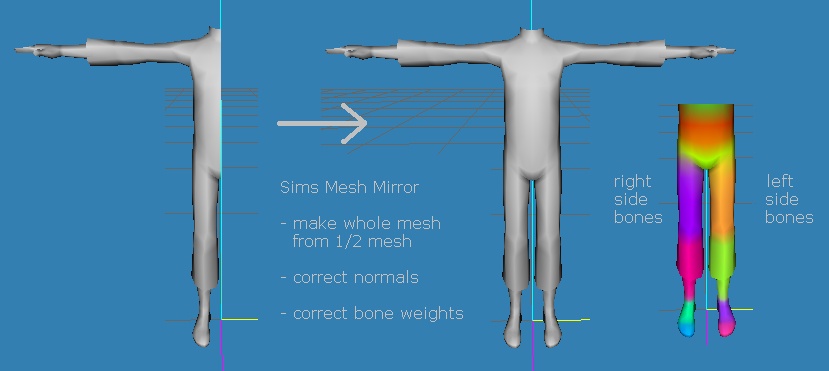
simsMeshMirror.jpg - width=829 height=371
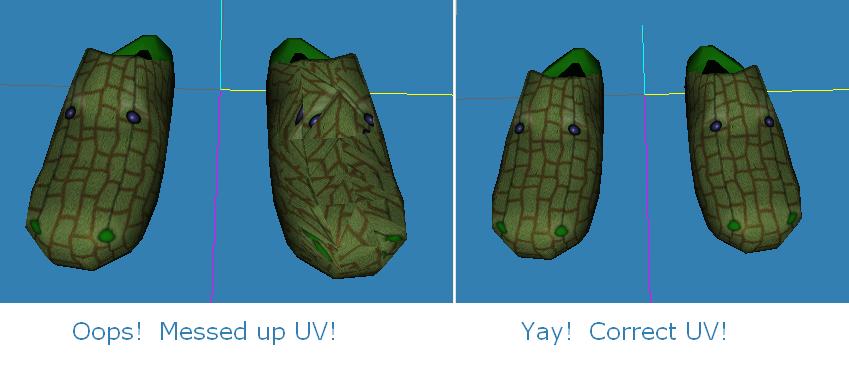
simsMeshMirrorFix.jpg - width=849 height=365


Uploaded: 22nd Jan 2012 at 8:25 AM
Updated: 27th Nov 2013 at 2:49 PM by Nysha
Updated: 27th Nov 2013 at 2:49 PM by Nysha
Cat's Sims Mesh Mirror
This MilkShape plugin makes a whole body clothing mesh from a half mesh, or a two shoe mesh from a one shoe mesh.
- mirror about X=0
- correct normals
- correct bone weights (left and right)
- correct front / back faces
- does NOT alter UV (use UV Flip)
Installation
Download, unzip, and put the file(s) in your MilkShape folder.
Look in the MilkShape Vertex menu for Cat's Sims Mesh Mirror.
Instructions
1) Create a mesh for the right side only (or left side only), such as half a body mesh or one shoe. Make sure the normals and bone weights are set as you wish.
2) In the Groups tab, select the 1/2 mesh group and duplicate it with CTRL-D. (The duplicate is now selected.)
3) In the Vertex menu, select Cat's Sims Mirror Mesh. You now have two mesh groups, a left side and a right side.
4) Right now, the two mesh groups have identical UV maps. They use the exact same parts of the texture. This may be what you want for shoes, but maybe not for clothing. If not, adjust the UV map now. You can use the UV Flip plugins for this.
5) Now you can merge the left and right side mesh groups into one mesh group with Regroup. Don't forget to update the group name and comment.
Thanks
Huge thanks to wes_h for the original MilkShape Unimesh plugins, and for helping me learn how to make plugins. Thanks to the makers of MilkShape.
.
This MilkShape plugin makes a whole body clothing mesh from a half mesh, or a two shoe mesh from a one shoe mesh.
- mirror about X=0
- correct normals
- correct bone weights (left and right)
- correct front / back faces
- does NOT alter UV (use UV Flip)
Installation
Download, unzip, and put the file(s) in your MilkShape folder.
Look in the MilkShape Vertex menu for Cat's Sims Mesh Mirror.
Instructions
1) Create a mesh for the right side only (or left side only), such as half a body mesh or one shoe. Make sure the normals and bone weights are set as you wish.
2) In the Groups tab, select the 1/2 mesh group and duplicate it with CTRL-D. (The duplicate is now selected.)
3) In the Vertex menu, select Cat's Sims Mirror Mesh. You now have two mesh groups, a left side and a right side.
4) Right now, the two mesh groups have identical UV maps. They use the exact same parts of the texture. This may be what you want for shoes, but maybe not for clothing. If not, adjust the UV map now. You can use the UV Flip plugins for this.
5) Now you can merge the left and right side mesh groups into one mesh group with Regroup. Don't forget to update the group name and comment.
Thanks
Huge thanks to wes_h for the original MilkShape Unimesh plugins, and for helping me learn how to make plugins. Thanks to the makers of MilkShape.
June 10, 2010 UPDATE - Fixed UV mapping bug. Please redownload!
.
| Filename | Type | Size |
|---|---|---|
| msCatsSimsMeshMirror.7z | 7z | |
| msCatsSimsMeshMirror.dll | dll | 18432 |
| Filename | Size | Downloads | Date | |||||
|
msCatsSimsMeshMirror.7z
Size: 8.3 KB · Downloads: 2,791 · 22nd Jan 2012 |
8.3 KB | 2,791 | 22nd Jan 2012 | |||||
| For a detailed look at individual files, see the Information tab. | ||||||||
Key:
- - File was updated after upload was posted
Install Instructions
Basic Download and Install Instructions:
1. Download: Click the download link to save the .rar or .zip file(s) to your computer.
2. Extract the zip, rar, or 7z file.
3. Place in Downloads Folder: Cut and paste the .package file(s) into your Downloads folder:
1. Download: Click the download link to save the .rar or .zip file(s) to your computer.
2. Extract the zip, rar, or 7z file.
3. Place in Downloads Folder: Cut and paste the .package file(s) into your Downloads folder:
- Origin (Ultimate Collection): Users\(Current User Account)\Documents\EA Games\The Sims™ 2 Ultimate Collection\Downloads\
- Non-Origin, Windows Vista/7/8/10: Users\(Current User Account)\Documents\EA Games\The Sims 2\Downloads\
- Non-Origin, Windows XP: Documents and Settings\(Current User Account)\My Documents\EA Games\The Sims 2\Downloads\
- Mac: Users\(Current User Account)\Documents\EA Games\The Sims 2\Downloads
- Mac x64: /Library/Containers/com.aspyr.sims2.appstore/Data/Library/Application Support/Aspyr/The Sims 2/Downloads
- For a full, complete guide to downloading complete with pictures and more information, see: Game Help: Downloading for Fracking Idiots.
- Custom content not showing up in the game? See: Game Help: Getting Custom Content to Show Up.
- If you don't have a Downloads folder, just make one. See instructions at: Game Help: No Downloads Folder.
Recommended
The creator also recommends the following uploads:
Also Thanked - Users who thanked this download also thanked:
Packs Needed
None, this is Sims 2 base game compatible!
Other Information
Operating System:
– Windows
: Windows XP, Windows Vista, Windows 7, etc
Utility Type:
– Meshing Tools
: Tools and utilities helpful to meshers.
Plugin Type:
– Milkshape
: Plugins for Milkshape 3D
Tags
Cat's News
------------------MESHES--------------------
+ all my meshes in tables UPDATED 7/19/2010
------------------SOFTWARE--------------------
+ Got mystery recolors with no tooltips in BodyShop? Add filename tooltips automatically!
+ quick and easy hair binner, no SimPE needed
+ MilkShape Plugins
--- Sims Mesh Mirror
--- UV Flip
--- UV Merge
+ all my meshes in tables UPDATED 7/19/2010
------------------SOFTWARE--------------------
+ Got mystery recolors with no tooltips in BodyShop? Add filename tooltips automatically!
+ quick and easy hair binner, no SimPE needed
+ MilkShape Plugins
--- Sims Mesh Mirror
--- UV Flip
--- UV Merge
More Downloads BETA
Here are some more of my downloads: