
 Sign in to Mod The Sims
 Vampire Aninyosaloh's Mythos Vampire and Lycan Eyes as Contatcts or Creature Defaults
 Vampire Aninyosaloh's Mythos Vampire and Lycan Eyes as Contatcts or Creature Defaults
MTS has all free content, all the time. Donate to help keep it running.
SCREENSHOTS
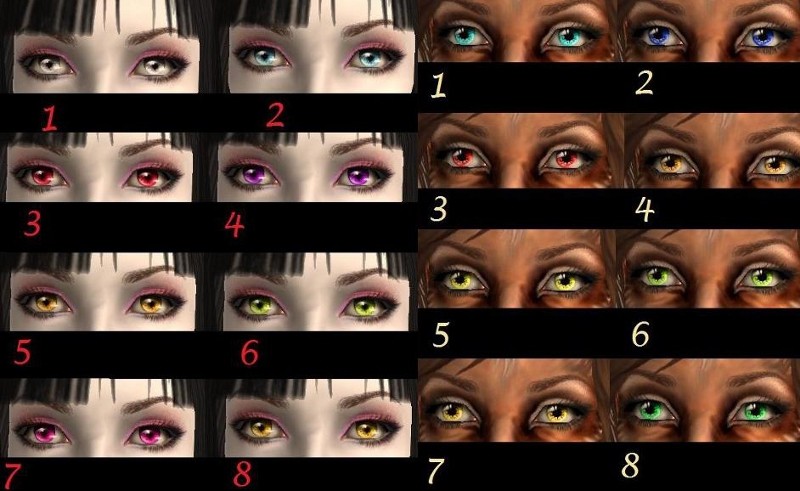

VampireAndWerewolf.jpg - width=800 height=491
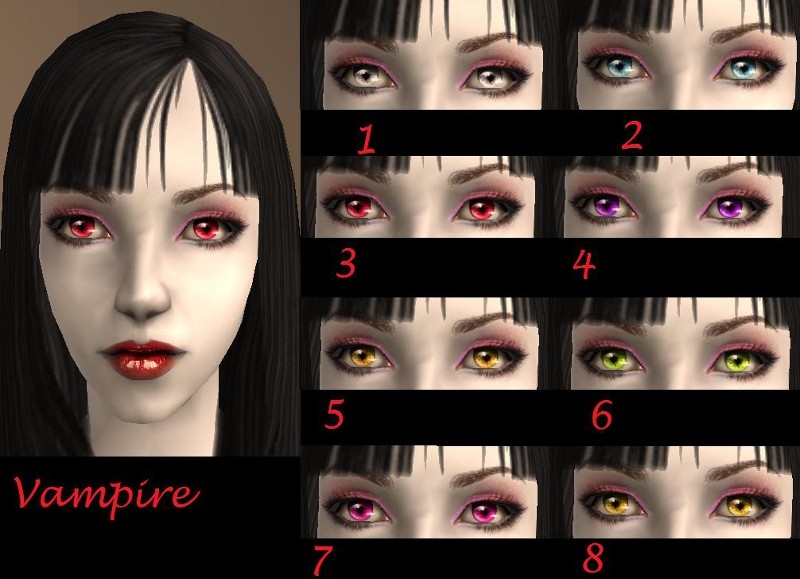
Vampire.jpg - width=800 height=579
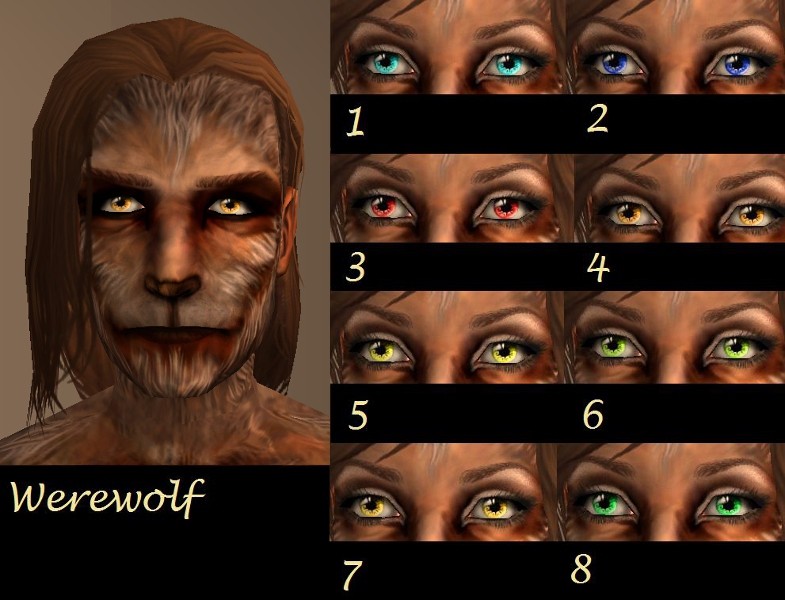
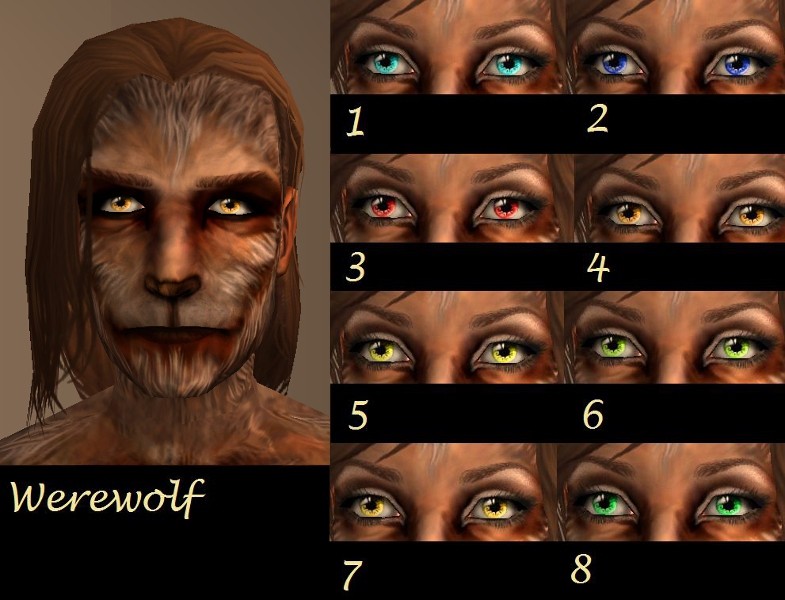
Werewolf.jpg - width=785 height=600
I really love playing lycan sims. Not so much a fan of vampires, because they just die if you get them in sunlight, but a lot of people like them, and Vampire Aninyosaloh included vampire eyes in her latest eye set , so I figured I would make some for them too.
There are two versions of both of her sets of eyes. One is contacts, meaning they are found under costume makeup, and you can take your lycan, or vampire sim to the mirror to give them those eyes. You can use all of the contacts together. The other version, and the most time consuming (literally, took me from about 2pm to 10pm, this is my job people!, 8 hr shift!) are the defaults. You can only use one of the default lycan + one of the default vampire together at a time. You can't use more than one lycan, or more than one vampire in your downloads folder at a time. I wanted to make supernatural defaults, because if you have a lycan, they do have a human state, but with the defaults, they will only have these eyes in their lycan state. Also with the vampires, the vampire defaults will replace all NPC vampire eyes, and it's a little extra time consuming to give all your NPC vampires contacts.
So I really hope you enjoy this! Took me forever!
Credits:
Huge credit goes to Vampire Aninyosaloh (Nina) for allowing me to use her textures. The creature skins were unlocked by Treeag, so I could take shots in CAS. The Custom CAS screen was made by HystericalParoxysm, the eyebrows, and makeup besides lipstick was made by Bruno, and the lipstick on the vampire was made by AnnitaSims all creators at modthesims!
All files compressed with The Compressorizer thanks to jfade!
Vampire:
Werewolf:
There are two versions of both of her sets of eyes. One is contacts, meaning they are found under costume makeup, and you can take your lycan, or vampire sim to the mirror to give them those eyes. You can use all of the contacts together. The other version, and the most time consuming (literally, took me from about 2pm to 10pm, this is my job people!, 8 hr shift!) are the defaults. You can only use one of the default lycan + one of the default vampire together at a time. You can't use more than one lycan, or more than one vampire in your downloads folder at a time. I wanted to make supernatural defaults, because if you have a lycan, they do have a human state, but with the defaults, they will only have these eyes in their lycan state. Also with the vampires, the vampire defaults will replace all NPC vampire eyes, and it's a little extra time consuming to give all your NPC vampires contacts.
So I really hope you enjoy this! Took me forever!
Credits:
Huge credit goes to Vampire Aninyosaloh (Nina) for allowing me to use her textures. The creature skins were unlocked by Treeag, so I could take shots in CAS. The Custom CAS screen was made by HystericalParoxysm, the eyebrows, and makeup besides lipstick was made by Bruno, and the lipstick on the vampire was made by AnnitaSims all creators at modthesims!
All files compressed with The Compressorizer thanks to jfade!
Vampire:
Werewolf:
| Filename | Size | Downloads | Date | |||||
|
Werewolf_Vampire_aninyosaloh_Werewolf_Eyes_8_Defaults_jimTNW.zip
Size: 2.49 MB · Downloads: 1,128 · 27th Jul 2010 |
2.49 MB | 1,128 | 27th Jul 2010 | |||||
|
Werewolf_Vampire_aninyosaloh_Werewolf_Eyes_7_Defaults_jimTNW.zip
Size: 2.49 MB · Downloads: 1,406 · 27th Jul 2010 |
2.49 MB | 1,406 | 27th Jul 2010 | |||||
|
Werewolf_Vampire_aninyosaloh_Werewolf_Eyes_6_Defaults_jimTNW.zip
Size: 2.49 MB · Downloads: 1,138 · 27th Jul 2010 |
2.49 MB | 1,138 | 27th Jul 2010 | |||||
|
Werewolf_Vampire_aninyosaloh_Werewolf_Eyes_5_Defaults_jimTNW.zip
Size: 2.49 MB · Downloads: 1,209 · 27th Jul 2010 |
2.49 MB | 1,209 | 27th Jul 2010 | |||||
|
Werewolf_Vampire_aninyosaloh_Werewolf_Eyes_4_Defaults_jimTNW.zip
Size: 2.49 MB · Downloads: 1,679 · 27th Jul 2010 |
2.49 MB | 1,679 | 27th Jul 2010 | |||||
|
Werewolf_Vampire_aninyosaloh_Werewolf_Eyes_3_Defaults_jimTNW.zip
Size: 2.49 MB · Downloads: 1,251 · 27th Jul 2010 |
2.49 MB | 1,251 | 27th Jul 2010 | |||||
|
Werewolf_Vampire_aninyosaloh_Werewolf_Eyes_2_Defaults_jimTNW.zip
Size: 2.49 MB · Downloads: 1,096 · 27th Jul 2010 |
2.49 MB | 1,096 | 27th Jul 2010 | |||||
|
Werewolf_Vampire_aninyosaloh_Werewolf_Eyes_1_Defaults_jimTNW.zip
Size: 2.49 MB · Downloads: 1,271 · 27th Jul 2010 |
2.49 MB | 1,271 | 27th Jul 2010 | |||||
|
Vampire_Vampire_aninyosaloh_Vampire_Eyes_Defaults_8_jimTNW.zip
Size: 380.6 KB · Downloads: 1,529 · 27th Jul 2010 |
380.6 KB | 1,529 | 27th Jul 2010 | |||||
|
Vampire_Vampire_aninyosaloh_Vampire_Eyes_Defaults_7_jimTNW.zip
Size: 380.6 KB · Downloads: 1,605 · 27th Jul 2010 |
380.6 KB | 1,605 | 27th Jul 2010 | |||||
|
Vampire_Vampire_aninyosaloh_Vampire_Eyes_Defaults_6_jimTNW.zip
Size: 380.7 KB · Downloads: 1,474 · 27th Jul 2010 |
380.7 KB | 1,474 | 27th Jul 2010 | |||||
|
Vampire_Vampire_aninyosaloh_Vampire_Eyes_Defaults_5_jimTNW.zip
Size: 380.3 KB · Downloads: 1,689 · 27th Jul 2010 |
380.3 KB | 1,689 | 27th Jul 2010 | |||||
|
Vampire_Vampire_aninyosaloh_Vampire_Eyes_Defaults_4_jimTNW.zip
Size: 380.5 KB · Downloads: 1,683 · 27th Jul 2010 |
380.5 KB | 1,683 | 27th Jul 2010 | |||||
|
Vampire_Vampire_aninyosaloh_Vampire_Eyes_Defaults_3_jimTNW.zip
Size: 380.1 KB · Downloads: 3,177 · 27th Jul 2010 |
380.1 KB | 3,177 | 27th Jul 2010 | |||||
|
Vampire_Vampire_aninyosaloh_Vampire_Eyes_Defaults_2_jimTNW.zip
Size: 379.8 KB · Downloads: 1,762 · 27th Jul 2010 |
379.8 KB | 1,762 | 27th Jul 2010 | |||||
|
Vampire_Vampire_aninyosaloh_Vampire_Eyes_Defaults_1_jimTNW.zip
Size: 380.0 KB · Downloads: 2,153 · 27th Jul 2010 |
380.0 KB | 2,153 | 27th Jul 2010 | |||||
|
Contacts_Werewolf_Vampire_aninyosaloh_Werewolf_Contacts_jimTNW.zip
Size: 54.5 KB · Downloads: 2,803 · 27th Jul 2010 |
54.5 KB | 2,803 | 27th Jul 2010 | |||||
|
Contacts_Vampire_Vampire_aninyosaloh_Vampire_Contacts_jimTNW.zip
Size: 54.2 KB · Downloads: 4,313 · 27th Jul 2010 |
54.2 KB | 4,313 | 27th Jul 2010 | |||||
| For a detailed look at individual files, see the Information tab. | ||||||||
Key:
- - File was updated after upload was posted
Install Instructions
Basic Download and Install Instructions:
1. Download: Click the download link to save the .rar or .zip file(s) to your computer.
2. Extract the zip, rar, or 7z file.
3. Place in Downloads Folder: Cut and paste the .package file(s) into your Downloads folder:
1. Download: Click the download link to save the .rar or .zip file(s) to your computer.
2. Extract the zip, rar, or 7z file.
3. Place in Downloads Folder: Cut and paste the .package file(s) into your Downloads folder:
- Origin (Ultimate Collection): Users\(Current User Account)\Documents\EA Games\The Sims™ 2 Ultimate Collection\Downloads\
- Non-Origin, Windows Vista/7/8/10: Users\(Current User Account)\Documents\EA Games\The Sims 2\Downloads\
- Non-Origin, Windows XP: Documents and Settings\(Current User Account)\My Documents\EA Games\The Sims 2\Downloads\
- Mac: Users\(Current User Account)\Documents\EA Games\The Sims 2\Downloads
- Mac x64: /Library/Containers/com.aspyr.sims2.appstore/Data/Library/Application Support/Aspyr/The Sims 2/Downloads
- For a full, complete guide to downloading complete with pictures and more information, see: Game Help: Downloading for Fracking Idiots.
- Custom content not showing up in the game? See: Game Help: Getting Custom Content to Show Up.
- If you don't have a Downloads folder, just make one. See instructions at: Game Help: No Downloads Folder.
Recommended
The creator also recommends the following uploads:
Also Thanked - Users who thanked this download also thanked:
Packs Needed
Other Information
Eye Type:
– Default
: Default Replacement
– Contacts
Eye Style:
– Fantasy
: Fantasy (demons and fairies etc)
Tags
Packs Needed
| Base Game | |
|---|---|
 | Sims 2 |
| Expansion Pack | |
|---|---|
 | Nightlife |
 | Pets |
Creations by joninmobile (TheNinthWave)
I'm officially, permanently retired from creating at MTS, however I do create for my own website TheNinthWaveSims.com. I no longer take requests. If you send me a request in pm, I will kindly decline. However, if you would like to make a request from another creator you may do so. Here are the links to The Sims 2 Creators who take requests and The Sims 3 Creators who take requests. Don't post in those threads, simply PM the creators who posted there. Don't steal my creations, other than that, do whatever you want.
I hope you enjoy all the downloads I've brought to you over the years. It's been fun. Being a part of The Sims community has had it's ups and downs for me, but I keep on truckin' nonetheless. Lots and lots of drama, lots of pain and sorrow, but lots of laughs, and good times too. Made so many new friends over the years, and it all started by uploading to MTS way back in 2006. Have fun with my creations, that's what they're here for!
~ Jon
More Downloads BETA
Here are some more of my downloads: