
 Sign in to Mod The Sims
 The Sims 3 Crash Log Analyzer
 The Sims 3 Crash Log Analyzer
MTS has all free content, all the time. Donate to help keep it running.
SCREENSHOTS
ts3_crash_log_analyzer_2_0_1.png - width=520 height=418
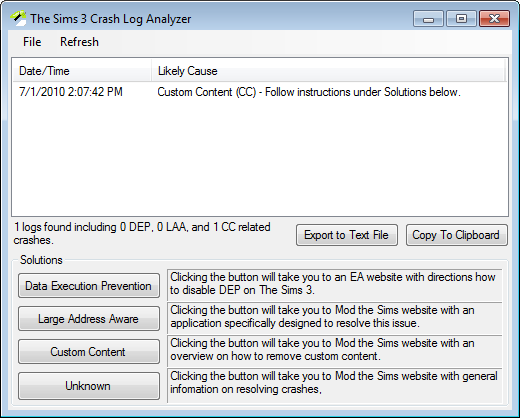
An image of Crash Log Analyzer running.

Uploaded: 20th Aug 2010 at 10:11 PM
Updated: 9th Jan 2018 at 7:19 PM
Updated: 9th Jan 2018 at 7:19 PM
I will no longer be watching the comments page after The Sims 4 launches on September 4, 2014.
Translations:
-Deutsch
Summary:
The Sims 3 Crash Log Analyzer (CLA) parses crash logs (xcpt*.txt) in the the Documents\Electronic Arts\The Sims 3 directory. It then attempts to discover what most likely caused the crash which CLA displays under the "Likely Cause" column.
This is a tool to help diagnose crashes. It is not a miracle worker.
System Requirements:
-Microsoft .NET Framework 4.0 Client Profile. Mac OS X is not supported.
-An internet connection is required to get the names of The Sims 3 executables. If you don't have an internet connection, it will ask for a "*.plf" file. Download the current version here and point to it when it requests it.
Usage:
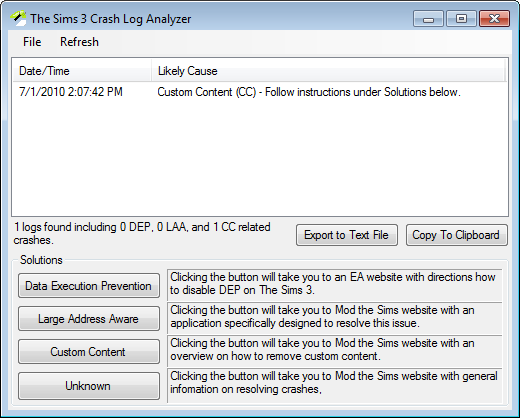
Upon opening CLA, you will see a list of crashes and their likely causes. You can click on the corresponding buttons under solutions for assistance in solving those specific issues. If you are getting a lot of "Unknowns," you may either click on "Export to Text File" which prompts you to save it or click on "Copy BB Code" which copies the data to your clipboard to be pasted in the comments (see below) or the official Sims 3 Forums.
CLA does not delete any logs by default. If you wish to delete the logs, you can do so under the File menu.
Please note that download threads are not for game help and support.
While this program can be helpful in troubleshooting certain issues with your game, download threads are not meant to provide solutions to game problems. Please do not post your crash log stuff here to ask for further help - please use the Help section here at MTS, starting with this: Game Help:Sims 3 Game Problemwiki and following the instructions, each step, in order. This FAQ: Game Help:Sims 3 Crashingwiki can also be helpful. If you continue to have problems even after trying ALL of the steps in the above-linked two FAQs, you can post a new thread in the Help Q&A forums (there's a link at the top of every FAQ) and we will be happy to offer you help for your problems one-on-one. Make sure to include a detailed list of everything you've tried to fix the problem (not just "I've done the FAQs" but a description of the steps you took, in your own words) as well as the summary version of your system specs, using the form you can copy-paste from this page: Game Help:System Specswiki
Unknown Crashes:
If you are getting a lot of unknown crashes, you can use the "Copy to Clipboard" button and paste the results in the comments section.
This information may be used to expand the library of crashes the application can recognize.
Please be aware that is it very unlikely reporting unknown crashes will result in good, immediate advice to fix the crashes. I would recommend looking here for a list of things to try to fix the problem. If you happen to figure out what fixed the crashes you reported previously, please provide an update so that I can perhaps automate the detection of that specific type of crash for people that experience the same problem.
Additional Credits:
Sim Jett and members of the official The Sims 3 forums for testing and research.
Translations:
-Deutsch
Summary:
The Sims 3 Crash Log Analyzer (CLA) parses crash logs (xcpt*.txt) in the the Documents\Electronic Arts\The Sims 3 directory. It then attempts to discover what most likely caused the crash which CLA displays under the "Likely Cause" column.
This is a tool to help diagnose crashes. It is not a miracle worker.
System Requirements:
-Microsoft .NET Framework 4.0 Client Profile. Mac OS X is not supported.
-An internet connection is required to get the names of The Sims 3 executables. If you don't have an internet connection, it will ask for a "*.plf" file. Download the current version here and point to it when it requests it.
Usage:
Upon opening CLA, you will see a list of crashes and their likely causes. You can click on the corresponding buttons under solutions for assistance in solving those specific issues. If you are getting a lot of "Unknowns," you may either click on "Export to Text File" which prompts you to save it or click on "Copy BB Code" which copies the data to your clipboard to be pasted in the comments (see below) or the official Sims 3 Forums.
CLA does not delete any logs by default. If you wish to delete the logs, you can do so under the File menu.
Please note that download threads are not for game help and support.
While this program can be helpful in troubleshooting certain issues with your game, download threads are not meant to provide solutions to game problems. Please do not post your crash log stuff here to ask for further help - please use the Help section here at MTS, starting with this: Game Help:Sims 3 Game Problemwiki and following the instructions, each step, in order. This FAQ: Game Help:Sims 3 Crashingwiki can also be helpful. If you continue to have problems even after trying ALL of the steps in the above-linked two FAQs, you can post a new thread in the Help Q&A forums (there's a link at the top of every FAQ) and we will be happy to offer you help for your problems one-on-one. Make sure to include a detailed list of everything you've tried to fix the problem (not just "I've done the FAQs" but a description of the steps you took, in your own words) as well as the summary version of your system specs, using the form you can copy-paste from this page: Game Help:System Specswiki
Unknown Crashes:
If you are getting a lot of unknown crashes, you can use the "Copy to Clipboard" button and paste the results in the comments section.
This information may be used to expand the library of crashes the application can recognize.
Please be aware that is it very unlikely reporting unknown crashes will result in good, immediate advice to fix the crashes. I would recommend looking here for a list of things to try to fix the problem. If you happen to figure out what fixed the crashes you reported previously, please provide an update so that I can perhaps automate the detection of that specific type of crash for people that experience the same problem.
Additional Credits:
Sim Jett and members of the official The Sims 3 forums for testing and research.
| Filename | Size | Downloads | Date | |||||
|
ts3cla.zip
| 1.69.43 - Minor update to stop skuversion.txt nag.
Size: 35.8 KB · Downloads: 21,053 · 9th Jan 2018 |
35.8 KB | 21,053 | 9th Jan 2018 | |||||
| For a detailed look at individual files, see the Information tab. | ||||||||
Key:
- - File was updated after upload was posted
Install Instructions
Quick Guide:
1. Click the file listed on the Files tab to download the file to your computer.
2. Extract the zip, rar, or 7z file. Now you will have either a .package or a .sims3pack file.
For Package files:
1. Cut and paste the file into your Documents\Electronic Arts\The Sims 3\Mods\Packages folder. If you do not already have this folder, you should read the full guide to Package files first: Sims 3:Installing Package Fileswiki, so you can make sure your game is fully patched and you have the correct Resource.cfg file.
2. Run the game, and find your content where the creator said it would be (build mode, buy mode, Create-a-Sim, etc.).
For Sims3Pack files:
1. Cut and paste it into your Documents\Electronic Arts\The Sims 3\Downloads folder. If you do not have this folder yet, it is recommended that you open the game and then close it again so that this folder will be automatically created. Then you can place the .sims3pack into your Downloads folder.
2. Load the game's Launcher, and click on the Downloads tab. Find the item in the list and tick the box beside it. Then press the Install button below the list.
3. Wait for the installer to load, and it will install the content to the game. You will get a message letting you know when it's done.
4. Run the game, and find your content where the creator said it would be (build mode, buy mode, Create-a-Sim, etc.).
Extracting from RAR, ZIP, or 7z: You will need a special program for this. For Windows, we recommend 7-Zip and for Mac OSX, we recommend Keka. Both are free and safe to use.
Need more help?
If you need more info, see:
1. Click the file listed on the Files tab to download the file to your computer.
2. Extract the zip, rar, or 7z file. Now you will have either a .package or a .sims3pack file.
For Package files:
1. Cut and paste the file into your Documents\Electronic Arts\The Sims 3\Mods\Packages folder. If you do not already have this folder, you should read the full guide to Package files first: Sims 3:Installing Package Fileswiki, so you can make sure your game is fully patched and you have the correct Resource.cfg file.
2. Run the game, and find your content where the creator said it would be (build mode, buy mode, Create-a-Sim, etc.).
For Sims3Pack files:
1. Cut and paste it into your Documents\Electronic Arts\The Sims 3\Downloads folder. If you do not have this folder yet, it is recommended that you open the game and then close it again so that this folder will be automatically created. Then you can place the .sims3pack into your Downloads folder.
2. Load the game's Launcher, and click on the Downloads tab. Find the item in the list and tick the box beside it. Then press the Install button below the list.
3. Wait for the installer to load, and it will install the content to the game. You will get a message letting you know when it's done.
4. Run the game, and find your content where the creator said it would be (build mode, buy mode, Create-a-Sim, etc.).
Extracting from RAR, ZIP, or 7z: You will need a special program for this. For Windows, we recommend 7-Zip and for Mac OSX, we recommend Keka. Both are free and safe to use.
Need more help?
If you need more info, see:
- For package files: Sims 3:Installing Package Fileswiki
- For Sims3pack files: Game Help:Installing TS3 Packswiki
Also Thanked - Users who thanked this download also thanked:
Packs Needed
None, this is Sims 3 base game compatible!
Other Information
Operating System:
– Windows
: Windows XP, Windows Vista, Windows 7, etc
Utility Type:
– Miscellaneous
: Tools which do not fit into the above categories.
Plugin Type:
– Not Applicable
: Standalone tools
Tags
About Me
If it involves a computer, I probably do it (building, repairing, programming, gaming, reverse engineering, etc.).
I own almost all 'Sim' titles (from the original SimCity to The Sims 3) and a devout fan of Will Wright.
I own almost all 'Sim' titles (from the original SimCity to The Sims 3) and a devout fan of Will Wright.
More Downloads BETA
Here are some more of my downloads: