
 Sign in to Mod The Sims
 Exercise Bike - game correction
 Exercise Bike - game correction
MTS has all free content, all the time. Donate to help keep it running.
SCREENSHOTS
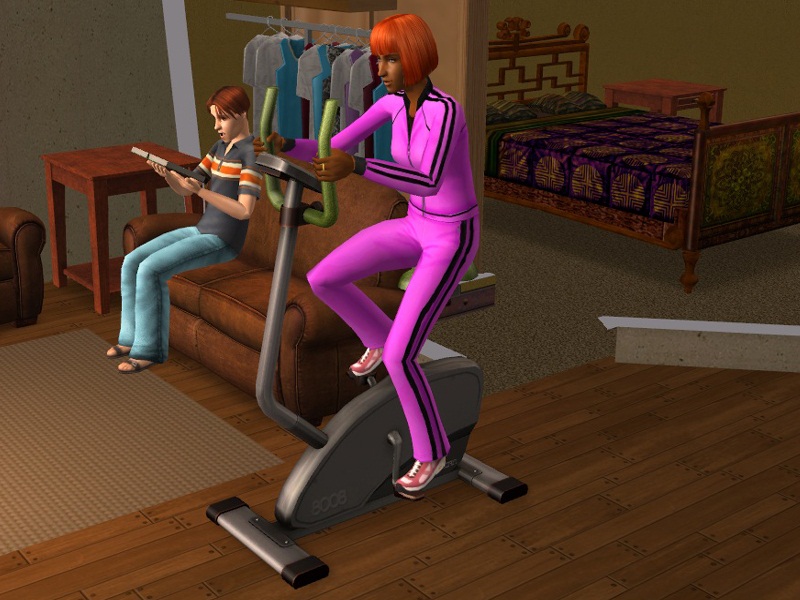
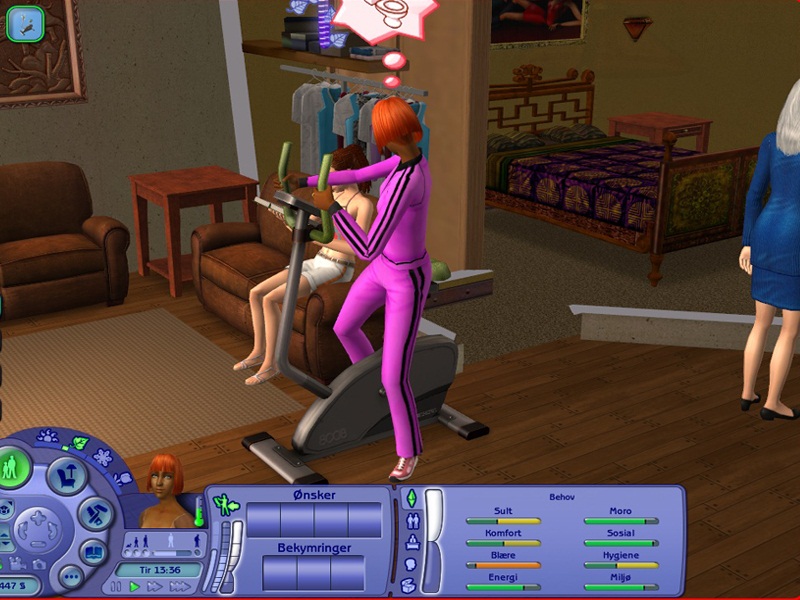
Bike1.jpg - width=800 height=600
Sims will only work out autonomously in the Exercise Bike if their motives are high.
Bike2.jpg - width=800 height=600
This is what happens if the any of the sims motives get critical - they stop.
Created by xptl297
Uploaded: 31st Jan 2012 at 4:32 AM
Did your sims use this bike absurdly addicted? Tsst, tsst! This is an equipment that we buy only to collect a little bit more dust in the room. Normally we resell it without use. Not sims, they use it as if it was the best thing in the world. Too much for my patience.
This package changes the behaviour the following way:
Sims cannot use it autonomously if their motive Comfort is less than almost full, or if they have full pot in body skill and are in a liveable lot. If it is you that command, well, then it is your responsibility. In a community lot, motives will decide the use.
The original code dropped the motive Energy. Nah, nah, this equipment is so boring that would drop your mood before your energy. I changed to drop comfort instead. It will also drop bladder to make it more boring.
Original code also didn't have any check to stop sims to use it, that is why they could die on it. The only check was the classical "Wait for Notify", that means, wait until the player decided to stop it.
Well, I added a check for sims physical and fisiologic condition at every movement, so now sims are able to stop self when any of their motives reach critical levels.
Now you can add the bike to your fitness center without concerns. It is anyway the only place people feel encouraged to use it!
Additional Credits:
I used TS2 and SimPE to make this mod.
This package changes the behaviour the following way:
Sims cannot use it autonomously if their motive Comfort is less than almost full, or if they have full pot in body skill and are in a liveable lot. If it is you that command, well, then it is your responsibility. In a community lot, motives will decide the use.
The original code dropped the motive Energy. Nah, nah, this equipment is so boring that would drop your mood before your energy. I changed to drop comfort instead. It will also drop bladder to make it more boring.
Original code also didn't have any check to stop sims to use it, that is why they could die on it. The only check was the classical "Wait for Notify", that means, wait until the player decided to stop it.
Well, I added a check for sims physical and fisiologic condition at every movement, so now sims are able to stop self when any of their motives reach critical levels.
Now you can add the bike to your fitness center without concerns. It is anyway the only place people feel encouraged to use it!

Additional Credits:
I used TS2 and SimPE to make this mod.
| Filename | Size | Downloads | Date | |||||
|
Bike.rar
| Game correction Package. If you ask me what is wrong with it, I'll be forced to ask you What was right before?
Size: 337.6 KB · Downloads: 3,052 · 31st Jan 2012 |
337.6 KB | 3,052 | 31st Jan 2012 | |||||
| For a detailed look at individual files, see the Information tab. | ||||||||
Key:
- - File was updated after upload was posted
Install Instructions
Basic Download and Install Instructions:
1. Download: Click the download link to save the .rar or .zip file(s) to your computer.
2. Extract the zip, rar, or 7z file.
3. Place in Downloads Folder: Cut and paste the .package file(s) into your Downloads folder:
1. Download: Click the download link to save the .rar or .zip file(s) to your computer.
2. Extract the zip, rar, or 7z file.
3. Place in Downloads Folder: Cut and paste the .package file(s) into your Downloads folder:
- Origin (Ultimate Collection): Users\(Current User Account)\Documents\EA Games\The Sims™ 2 Ultimate Collection\Downloads\
- Non-Origin, Windows Vista/7/8/10: Users\(Current User Account)\Documents\EA Games\The Sims 2\Downloads\
- Non-Origin, Windows XP: Documents and Settings\(Current User Account)\My Documents\EA Games\The Sims 2\Downloads\
- Mac: Users\(Current User Account)\Documents\EA Games\The Sims 2\Downloads
- Mac x64: /Library/Containers/com.aspyr.sims2.appstore/Data/Library/Application Support/Aspyr/The Sims 2/Downloads
- For a full, complete guide to downloading complete with pictures and more information, see: Game Help: Downloading for Fracking Idiots.
- Custom content not showing up in the game? See: Game Help: Getting Custom Content to Show Up.
- If you don't have a Downloads folder, just make one. See instructions at: Game Help: No Downloads Folder.
Also Thanked - Users who thanked this download also thanked:
Packs Needed
Other Information
Type:
– Fixed
: Fixed Maxis Mistakes
Tags
Packs Needed
| Base Game | |
|---|---|
 | Sims 2 |
| Expansion Pack | |
|---|---|
 | Free Time |
 | Apartment Life |
About Me
Everything posted by me is free for everyone's use. You may clone, recolor, modify and repost so long you do not use my Guids. I took possession of ALL guids that starts with 0x003bdXXX, if any used by others, will override mine or have yours overriden.
Please do not enter my threads only to say Thank you or anyway boast my downloads. If you like them, donate to the site instead (if you can afford), otherwise I thank you for your visit. Negative inputs are accepted if you have justifiable basis for your statements, that can help me technically. Have fun!
My newest objects and mods can also be found at
www.simfansuk.com
Please do not enter my threads only to say Thank you or anyway boast my downloads. If you like them, donate to the site instead (if you can afford), otherwise I thank you for your visit. Negative inputs are accepted if you have justifiable basis for your statements, that can help me technically. Have fun!
My newest objects and mods can also be found at
www.simfansuk.com
More Downloads BETA
Here are some more of my downloads: