
 Sign in to Mod The Sims
 Official MTS 2013 Photo Contest Calendar -2 Versions!- + Holidays!
 Official MTS 2013 Photo Contest Calendar -2 Versions!- + Holidays!
MTS has all free content, all the time. Donate to help keep it running.
SCREENSHOTS
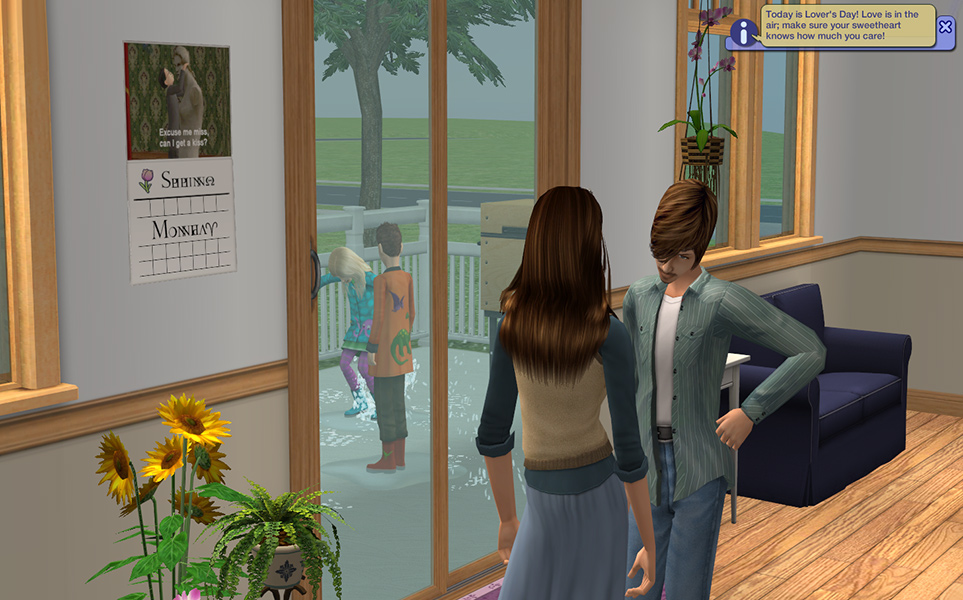

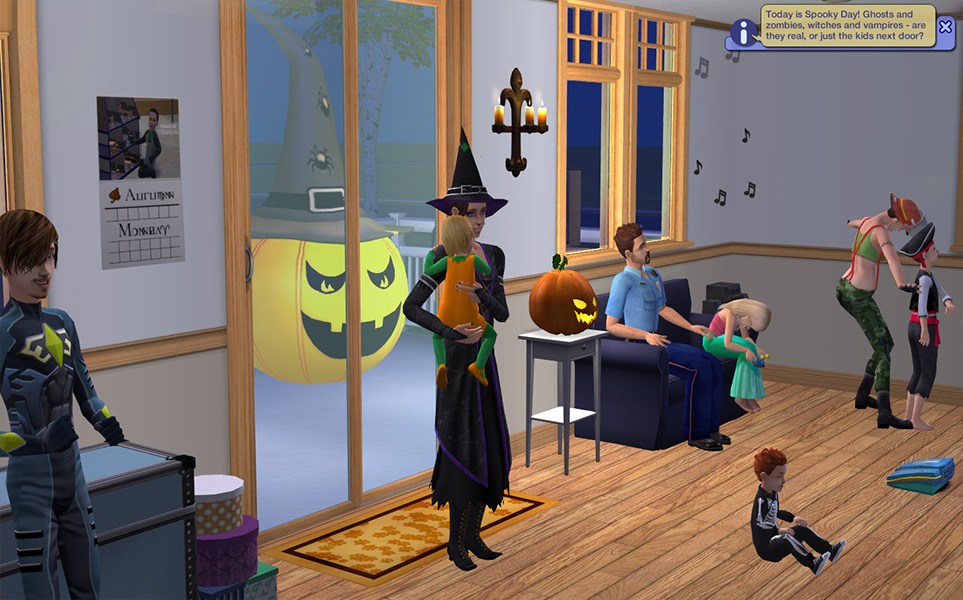
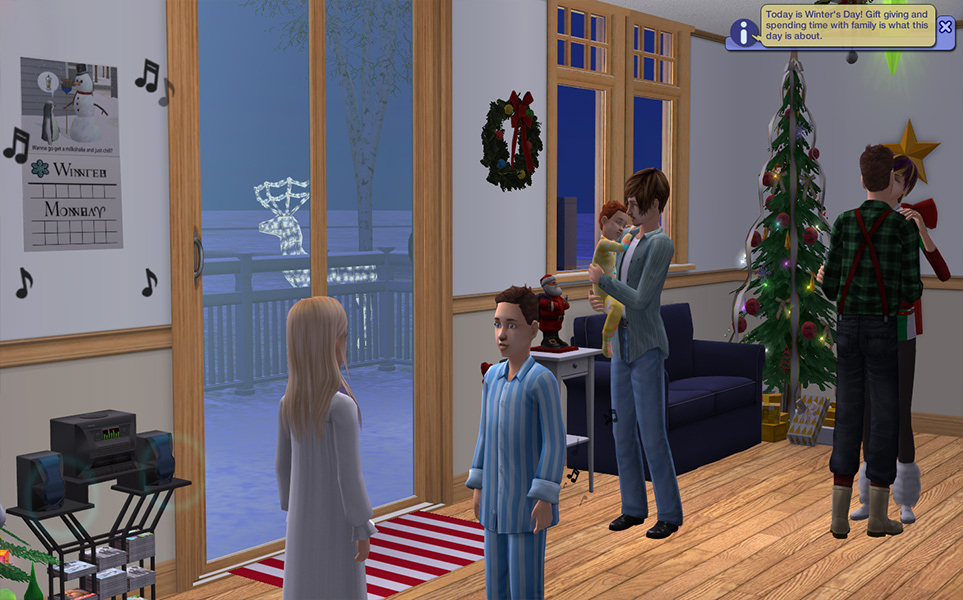

Calendar-Spring.jpg - width=963 height=600
Calendar-Summer.jpg - width=963 height=600
Calendar-Autumn.jpg - width=963 height=600
Calendar-Winter.jpg - width=963 height=600
Calendar-12.jpg - width=1280 height=1024
Calendar-20.jpg - width=1280 height=1024
Calendar-Preview.jpg - width=582 height=477

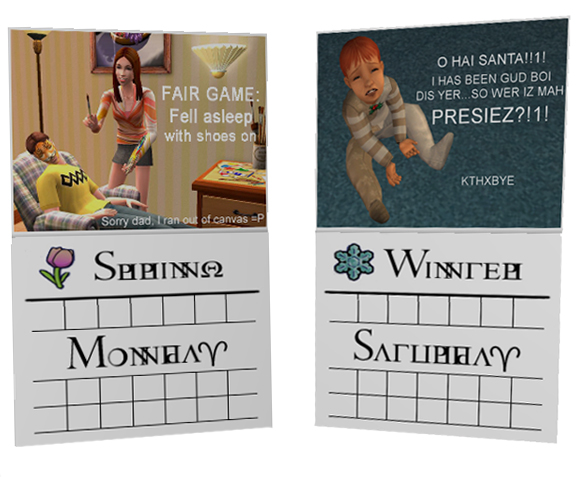
This year's MTS Calendar contest was not quite as popular as the previous year, but we still had a lot of great entries. Once again the winners were used to create a 12 day calendar. As last time a special 20 day SSN calendar was also done. But, I'm not content to just sit back and upload what is essentially a recolored clone of a previous project, so I added new features to this one! Yay! (I also went back and added them into the old calendar in case anyone likes that one better.)
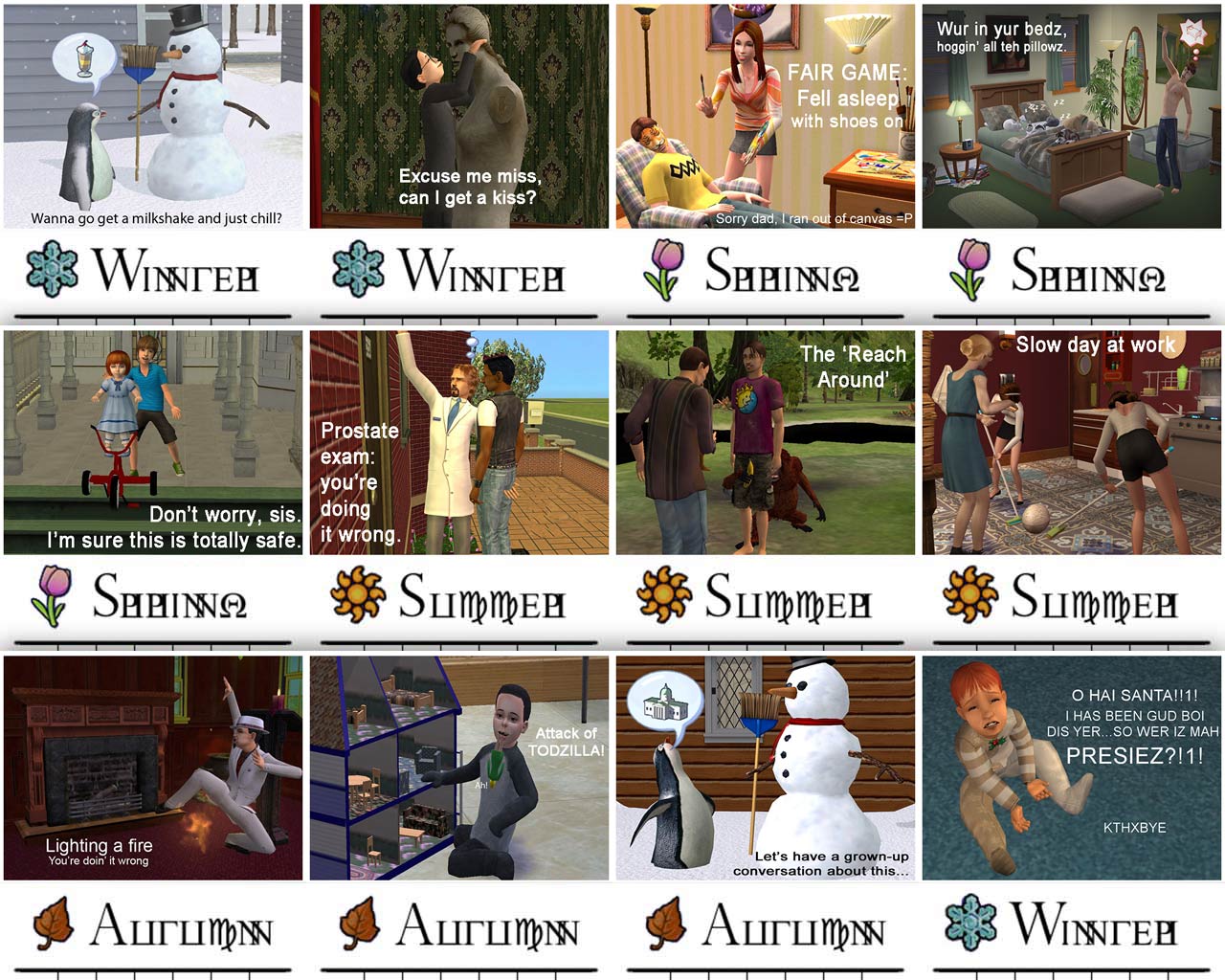
The filler images were chosen by looking at the highest non-winning scores. Anyone who had already won a spot on the calendar was skipped over to let others have a shot. The full 12 and 20 photos are on a collage attached at the bottom of this post. The winners names' are included in the catalog description of each calendar.
With the 12 Day calendar you can choose which month to start at and every night around midnight the photo will roll over to the next. Unfotunately, the setting will not stick after a lot reload, so you will have to remember to reset it each time you enter the lot. The calendar itself costs $100 and is in the decorative > wall hangings category.
The 20 Day calendar is made for those of your with Seasons, where each season is 5 days long and your year is 20 days. As part of the new updates, this calendar does not need to be set at all. It will automatically set the day to the correct weekday (as does the 12 day one), the season to whatever season you happen to be in, and the picture to the day of the year. The 'year' starts at the top of the seasons UI, btw. As another special new feature, in debug mode (testingcheatsenabled) you can now change which day of the week it is and change the season to the first day of any season. This was done to help you sync your neighborhood up easier. It's a tad cheaty, so that's why its only in debug mode.
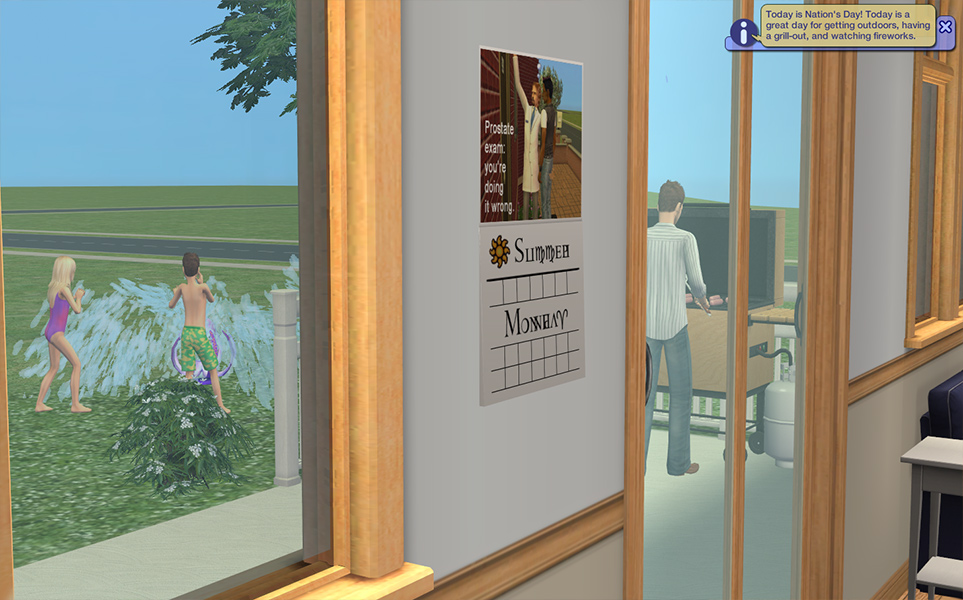
Additionally, I've also created a 20 Day calendar that includes Holidays! It is identical to the normal 20 Day calendar, but on 8 days throughout the year you will be notified via pop up message that today is a holiday and what that holiday is celebrating. It is entirely up to you to decide if you actually want your sims to observe the holiday, so it's pretty harmless. The holidays were created by doing some research on the TS3 holidays and then tweaking them, and adding in a few holidays that are already present in our games (with the Holiday Packs) and also a few things that many simmers share in common. MTS celebrates Great Ideas Day on April 1st, and every simmer whose played a Legacy or most other challenge knows you need a Founder to get started.
It is up to you whether you intend to observe these holidays, or if different sim families celebrate different ones. I've found in my game Winter's Eve and Day gets celebrated if there are kids in the house and if not, then the adults celebrate New Years Eve instead. Lover's Day has become a big wedding and engagement day, and the kids love Llama Fools Day. How you play with these new days is up to you, and you can of course let some holidays go by unnoticed, like Arbor Day, does anyone even know what month that is in?
Enjoy!
-Phae
P.S. Congrats to our winners!
Polygon Counts:
The calendars have 16 faces, super low poly to make up for the slightly larger texture files.
Additional Credits:
Heaven for hosting the contest, and the staff for judging.
Neder for the day changing code.
Paladin's Palace for the season changing debug code.
Inge for creating the page flipping code on the original calendar.
Black Spirit for the day of the week code.
Our lolful images were provided by (winners) SweetCat4444, godspeed, aisquared, Phaenoh, MimiSim, joandsarah77, nikel23, DigitalSympathies, tarysaah, tcbandie10, whiterider, Croutonian and (runner ups) XanderGC, MimiSim, HugeLunatic, ohbehave007, cespencer7, jbeach34, esmeiolanthe, and metalfreak666.
The filler images were chosen by looking at the highest non-winning scores. Anyone who had already won a spot on the calendar was skipped over to let others have a shot. The full 12 and 20 photos are on a collage attached at the bottom of this post. The winners names' are included in the catalog description of each calendar.
With the 12 Day calendar you can choose which month to start at and every night around midnight the photo will roll over to the next. Unfotunately, the setting will not stick after a lot reload, so you will have to remember to reset it each time you enter the lot.
 The calendar itself costs $100 and is in the decorative > wall hangings category.
The 20 Day calendar is made for those of your with Seasons, where each season is 5 days long and your year is 20 days. As part of the new updates, this calendar does not need to be set at all. It will automatically set the day to the correct weekday (as does the 12 day one), the season to whatever season you happen to be in, and the picture to the day of the year. The 'year' starts at the top of the seasons UI, btw. As another special new feature, in debug mode (testingcheatsenabled) you can now change which day of the week it is and change the season to the first day of any season. This was done to help you sync your neighborhood up easier. It's a tad cheaty, so that's why its only in debug mode.

Additionally, I've also created a 20 Day calendar that includes Holidays! It is identical to the normal 20 Day calendar, but on 8 days throughout the year you will be notified via pop up message that today is a holiday and what that holiday is celebrating. It is entirely up to you to decide if you actually want your sims to observe the holiday, so it's pretty harmless.
The holidays were created by doing some research on the TS3 holidays and then tweaking them, and adding in a few holidays that are already present in our games (with the Holiday Packs) and also a few things that many simmers share in common. MTS celebrates Great Ideas Day on April 1st, and every simmer whose played a Legacy or most other challenge knows you need a Founder to get started.| Date | Holiday | Description |
|---|---|---|
| Spring 2nd | Lover's Day | Today is Lover's Day! Love is in the air; make sure your sweetheart knows how much you care! |
| Spring 4th | Llama Fools Day | Today is Llama Fools Day! Pranks on llamas and pranks by llamas; don't fall for them or you'll be the butt of the joke! |
| Summer 3rd | Nation's Day | Today is Nation's Day! Today is a great day for getting outdoors having a grill-out and watching fireworks. |
| Fall 1st | Founders Day | Today is Founders Day! Appreciating grandparents and remembering ancestors; today is a day to be thankful. |
| Fall 4th | Spooky Day | Today is Spooky Day! Ghosts and zombies witches and vampires - are they real or just the kids next door? |
| Winter 3rd | Winter's Eve | Today is Winter's Eve! Make sure you have a tree and some cookies if you want Santa to come tonight! |
| Winter 4th | Winter's Day | Today is Winter's Day! Gift giving and spending time with family is what this day is about. |
| Winter 5th | New Year's Eve | Today is New Year's Eve! The best New Years' parties start at 8 so don't be late! |
It is up to you whether you intend to observe these holidays, or if different sim families celebrate different ones. I've found in my game Winter's Eve and Day gets celebrated if there are kids in the house and if not, then the adults celebrate New Years Eve instead. Lover's Day has become a big wedding and engagement day, and the kids love Llama Fools Day. How you play with these new days is up to you, and you can of course let some holidays go by unnoticed, like Arbor Day, does anyone even know what month that is in?
Enjoy!
-Phae
P.S. Congrats to our winners!
Polygon Counts:
The calendars have 16 faces, super low poly to make up for the slightly larger texture files.
Additional Credits:
Heaven for hosting the contest, and the staff for judging.
Neder for the day changing code.
Paladin's Palace for the season changing debug code.
Inge for creating the page flipping code on the original calendar.
Black Spirit for the day of the week code.
Our lolful images were provided by (winners) SweetCat4444, godspeed, aisquared, Phaenoh, MimiSim, joandsarah77, nikel23, DigitalSympathies, tarysaah, tcbandie10, whiterider, Croutonian and (runner ups) XanderGC, MimiSim, HugeLunatic, ohbehave007, cespencer7, jbeach34, esmeiolanthe, and metalfreak666.
This is a new mesh, and means that it's a brand new self contained object that usually does not require a specific Pack (although this is possible depending on the type). It may have Recolours hosted on MTS - check below for more information.
| Filename | Size | Downloads | Date | |||||
|
MTS-2013-TS2-20DayCalendar-Holidays.rar
| Requires SSN
Size: 2.03 MB · Downloads: 3,181 · 2nd Jan 2013 |
2.03 MB | 3,181 | 2nd Jan 2013 | |||||
|
MTS-2013-TS2-20DayCalendar.rar
| Requires SSN
Size: 2.03 MB · Downloads: 1,238 · 2nd Jan 2013 |
2.03 MB | 1,238 | 2nd Jan 2013 | |||||
|
MTS-2013-TS2-12DayCalendar.rar
| BaseGame
Size: 1.28 MB · Downloads: 1,337 · 2nd Jan 2013 |
1.28 MB | 1,337 | 2nd Jan 2013 | |||||
| For a detailed look at individual files, see the Information tab. | ||||||||
Key:
- - File was updated after upload was posted
Install Instructions
Basic Download and Install Instructions:
1. Download: Click the download link to save the .rar or .zip file(s) to your computer.
2. Extract the zip, rar, or 7z file.
3. Place in Downloads Folder: Cut and paste the .package file(s) into your Downloads folder:
1. Download: Click the download link to save the .rar or .zip file(s) to your computer.
2. Extract the zip, rar, or 7z file.
3. Place in Downloads Folder: Cut and paste the .package file(s) into your Downloads folder:
- Origin (Ultimate Collection): Users\(Current User Account)\Documents\EA Games\The Sims™ 2 Ultimate Collection\Downloads\
- Non-Origin, Windows Vista/7/8/10: Users\(Current User Account)\Documents\EA Games\The Sims 2\Downloads\
- Non-Origin, Windows XP: Documents and Settings\(Current User Account)\My Documents\EA Games\The Sims 2\Downloads\
- Mac: Users\(Current User Account)\Documents\EA Games\The Sims 2\Downloads
- Mac x64: /Library/Containers/com.aspyr.sims2.appstore/Data/Library/Application Support/Aspyr/The Sims 2/Downloads
- For a full, complete guide to downloading complete with pictures and more information, see: Game Help: Downloading for Fracking Idiots.
- Custom content not showing up in the game? See: Game Help: Getting Custom Content to Show Up.
- If you don't have a Downloads folder, just make one. See instructions at: Game Help: No Downloads Folder.
Recommended
The creator also recommends the following uploads:
Also Thanked - Users who thanked this download also thanked:
Blurb and Updatez:
- Please don't reupload my work anywhere else. Just point them back here, I'm not going anywhere! :)
- Please ask permission before using my work as a base for your project. I almost always say 'yes' and often times I will help you with your project! :bunny:
- If you make something (like a story or a video) and it has something of mine in it, send me the link, I love to see my stuff 'in action'!
- Sadly, but honestly, I can't take on requests. You can ask if it's something already related to one of my current projects, but I'm not likely to take on your project for you. MTS has lots of wonderful tutorials ;)
More Downloads BETA
Here are some more of my downloads: