
 Sign in to Mod The Sims
 Will Loyd Wright DollHouse Now Recolourable *Updated 2007-04-04*
 Will Loyd Wright DollHouse Now Recolourable *Updated 2007-04-04*
MTS has all free content, all the time. Donate to help keep it running.
SCREENSHOTS

purchase.jpg - width=776 height=468
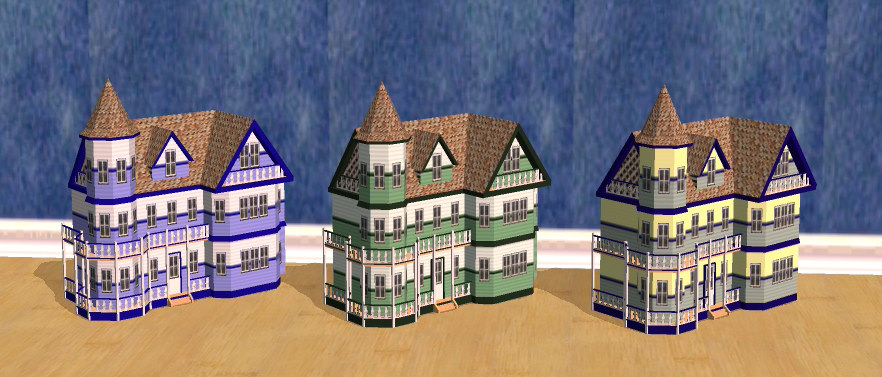
recolours.jpg - width=882 height=377
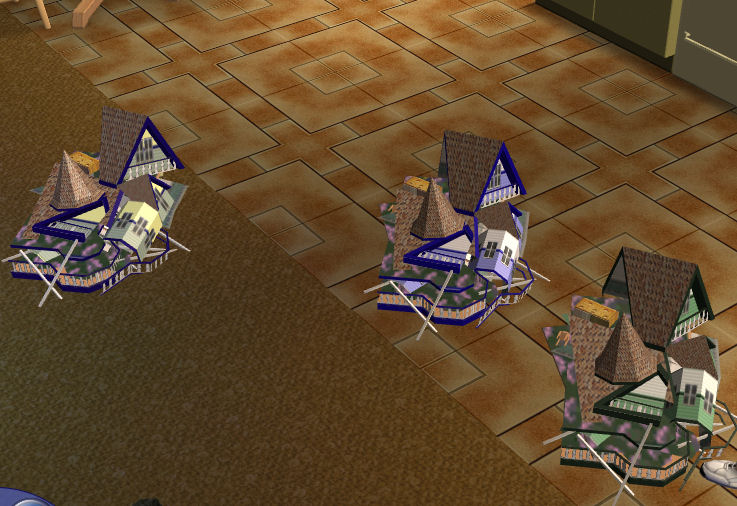
SS_dollhouse_smashed.jpg - width=737 height=506
Picked Upload!
This is a picked upload! It showcases some of the best talent and creativity available on MTS and in the community.
Created by SnowStorm
Uploaded: 11th Jun 2005 at 2:05 AM
Updated: 5th Nov 2008 at 1:07 PM by -Maylin-
Updated: 5th Nov 2008 at 1:07 PM by -Maylin-
 While working on a new project I figured out how to make the house recolorable and not revert upon being smashed! You will need to redownload the mesh and recolors. If you've created any recolors you will need to redo them as they will no longer work with the package. I've updated my 2 recolors to work with the updated mesh.
*original post*
So many people wanted this, and it was bugging me so I persisted until I got this to work. This is the original mesh of the house, with all animations and interactions. I've modified the package so it would be recolourable. It has it's own unique guid, so it will not overwrite the original doll house.
I've included 2 recolours. These were just quick recolours to test the implementation.
This is a new mesh, and means that it's a brand new self contained object that usually does not require a specific Pack (although this is possible depending on the type). It may have Recolours hosted on MTS - check below for more information.
| Filename | Size | Downloads | Date | |||||
|
SS_dollhouse_recolors.zip
Size: 69.3 KB · Downloads: 12,369 · 5th Apr 2007 |
69.3 KB | 12,369 | 5th Apr 2007 | |||||
|
SS_RecolourableWillLoydWrightDollHouse.zip
Size: 147.9 KB · Downloads: 14,145 · 5th Apr 2007 |
147.9 KB | 14,145 | 5th Apr 2007 | |||||
| For a detailed look at individual files, see the Information tab. | ||||||||
Key:
- - File was updated after upload was posted
Install Instructions
Basic Download and Install Instructions:
1. Download: Click the download link to save the .rar or .zip file(s) to your computer.
2. Extract the zip, rar, or 7z file.
3. Place in Downloads Folder: Cut and paste the .package file(s) into your Downloads folder:
1. Download: Click the download link to save the .rar or .zip file(s) to your computer.
2. Extract the zip, rar, or 7z file.
3. Place in Downloads Folder: Cut and paste the .package file(s) into your Downloads folder:
- Origin (Ultimate Collection): Users\(Current User Account)\Documents\EA Games\The Sims™ 2 Ultimate Collection\Downloads\
- Non-Origin, Windows Vista/7/8/10: Users\(Current User Account)\Documents\EA Games\The Sims 2\Downloads\
- Non-Origin, Windows XP: Documents and Settings\(Current User Account)\My Documents\EA Games\The Sims 2\Downloads\
- Mac: Users\(Current User Account)\Documents\EA Games\The Sims 2\Downloads
- Mac x64: /Library/Containers/com.aspyr.sims2.appstore/Data/Library/Application Support/Aspyr/The Sims 2/Downloads
- For a full, complete guide to downloading complete with pictures and more information, see: Game Help: Downloading for Fracking Idiots.
- Custom content not showing up in the game? See: Game Help: Getting Custom Content to Show Up.
- If you don't have a Downloads folder, just make one. See instructions at: Game Help: No Downloads Folder.
Recolours of this mesh
There are 2 recolours of this mesh on MTS:
Also Thanked - Users who thanked this download also thanked:
Distribution Policy
This policy applies to ALL my creations, unless otherwise stated in the items' thread.
More Downloads BETA
Here are some more of my downloads: