
 Sign in to Mod The Sims
 Bowtie Bedroom Suite 7 new meshes + extras *UPDATE 8/26/06*
 Bowtie Bedroom Suite 7 new meshes + extras *UPDATE 8/26/06*
MTS has all free content, all the time. Donate to help keep it running.
SCREENSHOTS
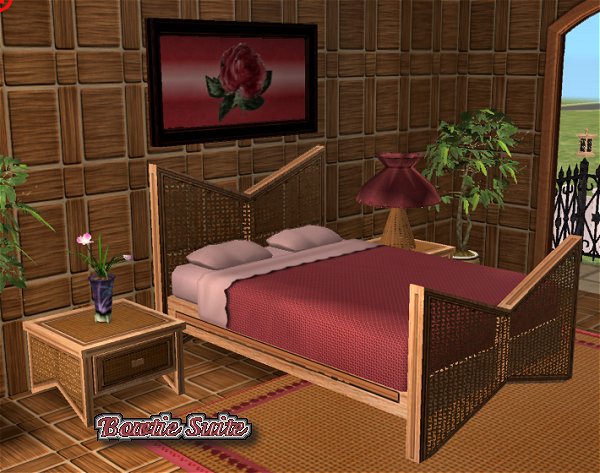

BowtieSuite1.jpg - width=600 height=473
BowtieSuiteSeteeSet.jpg - width=600 height=417
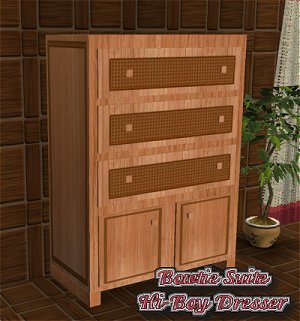
BowtieSuiteDresser.jpg - width=300 height=321
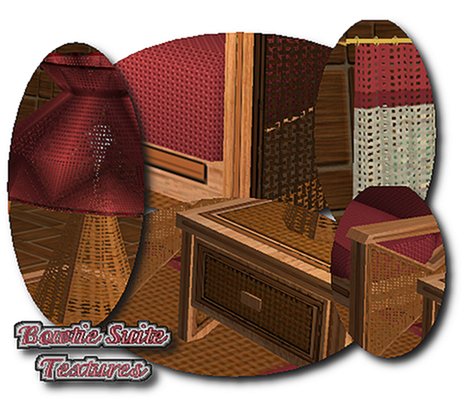
BowtieSuiteTextures.jpg - width=473 height=404
Picked Upload!
This is a picked upload! It showcases some of the best talent and creativity available on MTS and in the community.

Created by CTNutmegger
Uploaded: 4th Jul 2005 at 4:34 AM
Updated: 26th Aug 2006 at 6:42 AM - Updated the drapery mesh 8/26/06
Updated: 26th Aug 2006 at 6:42 AM - Updated the drapery mesh 8/26/06
Updated the drapery mesh to get rid of a couple of flaws that were annoying me  8/26/06
Hello again, are you tired of me yet? :LOL:
This is my newest creation, actually I made the bed mesh quite a while ago, and finally finished the rest of the set today.
There are 7 new meshes --
Bed -- Polygons = 1568, Vertices = 1041
Side Table -- Polygons = 106, Vertices = 208
Coffee Table -- Polygons = 82, Vertices = 162
Lamp -- Polygons = 1010, Vertices = 864
Loveseat -- Polygons = 1004, Vertices = 954
Chair -- Polygons = 572, Vertices = 649
Curtains -- Polygons = 632, Vertices = 700
Also included are a painting, matching bedding, and rug.
The rug needs the mesh by Echo found HERE.
I'm so sorry, I totally forgot to upload the Dresser....oops!!! The Dresser is a recolor of my "Simple HiBoy" Dresser, the mesh can be found in THIS POST.
The Curtains have two parts, the zip has both included, this is necessary to make them work on diagonal walls.
All should work in the original TS2 without University, however, they are all Uni. compatible.
You will need to have the CEP Program, found at the SimPE site under "Download", installed, for some items to appear in the game.
Please let me know if you have any problem with any of the objects and I'll do my best to correct it.
My Rules --
My meshes are FREE to re-color as you want, however if you post on a pay site, the mesh MUST remain a free download, or post a link to a free download.
Anything made by me is File-Share-Friendly and MUST remain that way.
**UPDATE 5 July**
There was a problem with the original lamp, for some reason it was not recolorable, so, after trying almost every table lamp that I could use as a base I finally found one that works. I had to redo the UV map, but at least now it's not only recolorable, but the shade and the lampbase are now mix and match and can be recolored separately.
The name is the same so the new version will overwrite the old one in your game.
**UPDATE 6 July**
I was asked for the wall and floor files, so I've added the wall file here, there is a dark and light version in both the rar and zip files. The floors are already uploaded and are available in my Waterbed Suite post.
UPDATE 8/21/05
Changed the comfort, sleep and relax values on the bed to match their posted values.
Enjoy, Kathy :D
 8/26/06
Hello again, are you tired of me yet? :LOL:
This is my newest creation, actually I made the bed mesh quite a while ago, and finally finished the rest of the set today.
There are 7 new meshes --
Bed -- Polygons = 1568, Vertices = 1041
Side Table -- Polygons = 106, Vertices = 208
Coffee Table -- Polygons = 82, Vertices = 162
Lamp -- Polygons = 1010, Vertices = 864
Loveseat -- Polygons = 1004, Vertices = 954
Chair -- Polygons = 572, Vertices = 649
Curtains -- Polygons = 632, Vertices = 700
Also included are a painting, matching bedding, and rug.
The rug needs the mesh by Echo found HERE.
I'm so sorry, I totally forgot to upload the Dresser....oops!!! The Dresser is a recolor of my "Simple HiBoy" Dresser, the mesh can be found in THIS POST.
The Curtains have two parts, the zip has both included, this is necessary to make them work on diagonal walls.
All should work in the original TS2 without University, however, they are all Uni. compatible.
You will need to have the CEP Program, found at the SimPE site under "Download", installed, for some items to appear in the game.
Please let me know if you have any problem with any of the objects and I'll do my best to correct it.
My Rules --
My meshes are FREE to re-color as you want, however if you post on a pay site, the mesh MUST remain a free download, or post a link to a free download.
Anything made by me is File-Share-Friendly and MUST remain that way.
**UPDATE 5 July**
There was a problem with the original lamp, for some reason it was not recolorable, so, after trying almost every table lamp that I could use as a base I finally found one that works. I had to redo the UV map, but at least now it's not only recolorable, but the shade and the lampbase are now mix and match and can be recolored separately.
The name is the same so the new version will overwrite the old one in your game.
**UPDATE 6 July**
I was asked for the wall and floor files, so I've added the wall file here, there is a dark and light version in both the rar and zip files. The floors are already uploaded and are available in my Waterbed Suite post.
UPDATE 8/21/05
Changed the comfort, sleep and relax values on the bed to match their posted values.
Enjoy, Kathy :D
This is a new mesh, and means that it's a brand new self contained object that usually does not require a specific Pack (although this is possible depending on the type). It may have Recolours hosted on MTS - check below for more information.
| Filename | Size | Downloads | Date | |||||
|
CTN_BowtieBed.zip
Size: 156.3 KB · Downloads: 4,993 · 21st Aug 2005 |
156.3 KB | 4,993 | 21st Aug 2005 | |||||
|
CTN_Wall-WoodSquared.zip
Size: 59.3 KB · Downloads: 4,987 · 6th Jul 2005 |
59.3 KB | 4,987 | 6th Jul 2005 | |||||
|
CTN_BowtieTableLamp.zip
Size: 250.8 KB · Downloads: 5,444 · 6th Jul 2005 |
250.8 KB | 5,444 | 6th Jul 2005 | |||||
|
CTN_SimpleHiBoyDresser-BowtieSuite.zip
Size: 66.9 KB · Downloads: 6,598 · 4th Jul 2005 |
66.9 KB | 6,598 | 4th Jul 2005 | |||||
|
CTN_Bowtie-Tables.zip
Size: 275.0 KB · Downloads: 6,051 · 4th Jul 2005 |
275.0 KB | 6,051 | 4th Jul 2005 | |||||
|
CTN_Bowtie-LoveseatChair.zip
Size: 554.0 KB · Downloads: 6,061 · 4th Jul 2005 |
554.0 KB | 6,061 | 4th Jul 2005 | |||||
|
CTN_Bowtie-Draperies.zip
Size: 57.8 KB · Downloads: 8,011 · 4th Jul 2005 |
57.8 KB | 8,011 | 4th Jul 2005 | |||||
|
CTN_Bowtie-BeddingRugPainting.zip
Size: 202.1 KB · Downloads: 6,134 · 4th Jul 2005 |
202.1 KB | 6,134 | 4th Jul 2005 | |||||
| For a detailed look at individual files, see the Information tab. | ||||||||
Key:
- - File was updated after upload was posted
Install Instructions
Basic Download and Install Instructions:
1. Download: Click the download link to save the .rar or .zip file(s) to your computer.
2. Extract the zip, rar, or 7z file.
3. Place in Downloads Folder: Cut and paste the .package file(s) into your Downloads folder:
1. Download: Click the download link to save the .rar or .zip file(s) to your computer.
2. Extract the zip, rar, or 7z file.
3. Place in Downloads Folder: Cut and paste the .package file(s) into your Downloads folder:
- Origin (Ultimate Collection): Users\(Current User Account)\Documents\EA Games\The Sims™ 2 Ultimate Collection\Downloads\
- Non-Origin, Windows Vista/7/8/10: Users\(Current User Account)\Documents\EA Games\The Sims 2\Downloads\
- Non-Origin, Windows XP: Documents and Settings\(Current User Account)\My Documents\EA Games\The Sims 2\Downloads\
- Mac: Users\(Current User Account)\Documents\EA Games\The Sims 2\Downloads
- Mac x64: /Library/Containers/com.aspyr.sims2.appstore/Data/Library/Application Support/Aspyr/The Sims 2/Downloads
- For a full, complete guide to downloading complete with pictures and more information, see: Game Help: Downloading for Fracking Idiots.
- Custom content not showing up in the game? See: Game Help: Getting Custom Content to Show Up.
- If you don't have a Downloads folder, just make one. See instructions at: Game Help: No Downloads Folder.
Recolours of this mesh
There are 1 recolours of this mesh on MTS:
Also Thanked - Users who thanked this download also thanked:
Packs Needed
None, this is Sims 2 base game compatible!
*My Work, My Rules*
My Rules for My Meshes --
Free to recolor and post for download as you wish, as long as the mesh itself remains a FREE download. You are welcome to use it on any lots you post for download as well. My work is to always remain File-Share-Friendly.
If you want to edit one of my meshes, please have the decency to ask.
Please do not take and post as your own, I do consider that to be stealing and I will find you.
Enjoy, Kathy
Free to recolor and post for download as you wish, as long as the mesh itself remains a FREE download. You are welcome to use it on any lots you post for download as well. My work is to always remain File-Share-Friendly.
If you want to edit one of my meshes, please have the decency to ask.
Please do not take and post as your own, I do consider that to be stealing and I will find you.
Enjoy, Kathy
More Downloads BETA
Here are some more of my downloads: