
 Sign in to Mod The Sims
 Skeleton Selection
 Skeleton Selection
MTS has all free content, all the time. Donate to help keep it running.
SCREENSHOTS

coffinskel.jpg - width=596 height=417
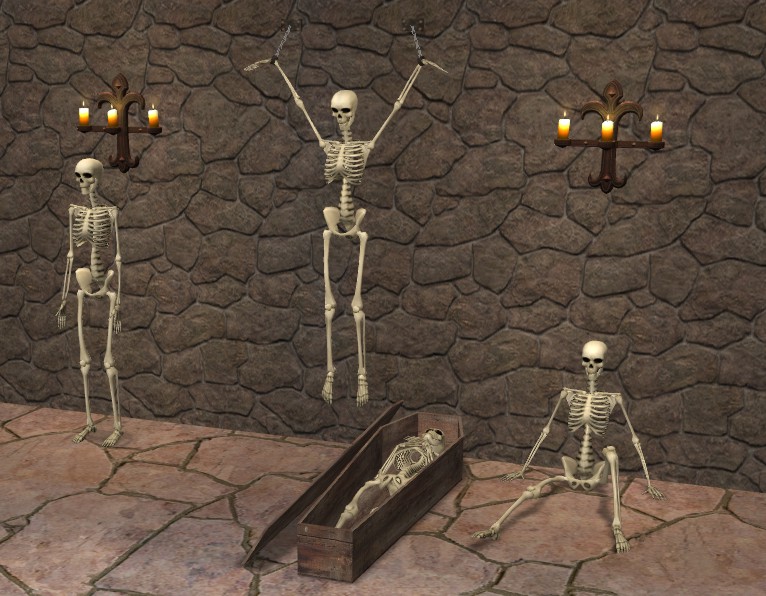
threeskels.jpg - width=766 height=596
Picked Upload!
This is a picked upload! It showcases some of the best talent and creativity available on MTS and in the community.

Created by gromit
Uploaded: 9th Oct 2005 at 9:34 PM
Updated: 9th Oct 2005 at 9:58 PM - Added link to hanging Skeleton
Updated: 9th Oct 2005 at 9:58 PM - Added link to hanging Skeleton
The mesh for these was extracted from the game :-
EA GAMES/The Sims 2/TSData/Res/Sims3D/Sims03.package
All I have done is re-coloured and manipulated them plus make the old musty coffin.
Created and Textured in MilkShape 3D 1.7.6
Packaged using SimPE 48c
EP-Ready (Uni & NL Not required)
Colour-Enabled
Poly Counts :-
Skeleton in coffin 3076
Sitting Skeleton 3012
Standing Skeleton 3012
Thaught it was about time to have the Standing Skeleton without its stand to use anywhere plus a couple extra now we have NightLife.
Feel free to re-colour.
The wall hanging Skeleton can be found here
Thanks to all at Modthesims2
EA GAMES/The Sims 2/TSData/Res/Sims3D/Sims03.package
All I have done is re-coloured and manipulated them plus make the old musty coffin.
Created and Textured in MilkShape 3D 1.7.6
Packaged using SimPE 48c
EP-Ready (Uni & NL Not required)
Colour-Enabled
Poly Counts :-
Skeleton in coffin 3076
Sitting Skeleton 3012
Standing Skeleton 3012
Thaught it was about time to have the Standing Skeleton without its stand to use anywhere plus a couple extra now we have NightLife.
Feel free to re-colour.
The wall hanging Skeleton can be found here
Thanks to all at Modthesims2

This is a new mesh, and means that it's a brand new self contained object that usually does not require a specific Pack (although this is possible depending on the type). It may have Recolours hosted on MTS - check below for more information.
| Filename | Size | Downloads | Date | |||||
|
StandingSkeleton.zip
Size: 180.7 KB · Downloads: 32,105 · 9th Oct 2005 |
180.7 KB | 32,105 | 9th Oct 2005 | |||||
|
SittingSkeleton.zip
Size: 191.0 KB · Downloads: 35,994 · 9th Oct 2005 |
191.0 KB | 35,994 | 9th Oct 2005 | |||||
|
CoffinSkeleton.zip
Size: 239.8 KB · Downloads: 35,816 · 9th Oct 2005 |
239.8 KB | 35,816 | 9th Oct 2005 | |||||
| For a detailed look at individual files, see the Information tab. | ||||||||
Key:
- - File was updated after upload was posted
Install Instructions
Basic Download and Install Instructions:
1. Download: Click the download link to save the .rar or .zip file(s) to your computer.
2. Extract the zip, rar, or 7z file.
3. Place in Downloads Folder: Cut and paste the .package file(s) into your Downloads folder:
1. Download: Click the download link to save the .rar or .zip file(s) to your computer.
2. Extract the zip, rar, or 7z file.
3. Place in Downloads Folder: Cut and paste the .package file(s) into your Downloads folder:
- Origin (Ultimate Collection): Users\(Current User Account)\Documents\EA Games\The Sims™ 2 Ultimate Collection\Downloads\
- Non-Origin, Windows Vista/7/8/10: Users\(Current User Account)\Documents\EA Games\The Sims 2\Downloads\
- Non-Origin, Windows XP: Documents and Settings\(Current User Account)\My Documents\EA Games\The Sims 2\Downloads\
- Mac: Users\(Current User Account)\Documents\EA Games\The Sims 2\Downloads
- Mac x64: /Library/Containers/com.aspyr.sims2.appstore/Data/Library/Application Support/Aspyr/The Sims 2/Downloads
- For a full, complete guide to downloading complete with pictures and more information, see: Game Help: Downloading for Fracking Idiots.
- Custom content not showing up in the game? See: Game Help: Getting Custom Content to Show Up.
- If you don't have a Downloads folder, just make one. See instructions at: Game Help: No Downloads Folder.
Also Thanked - Users who thanked this download also thanked:
Packs Needed
None, this is Sims 2 base game compatible!
More Downloads BETA
Here are some more of my downloads: