
 Sign in to Mod The Sims
- Site Map >
- Modding and Creation >
- Sims 2 Creation >
- Tutorials >
- General Modding - Attention Modders: GUID Database Reminder & Tutorial
- Site Map >
- Modding and Creation >
- Sims 2 Creation >
- Tutorials >
- General Modding - Attention Modders: GUID Database Reminder & Tutorial
Replies: 14 (Who?), Viewed: 53981 times.



#1
 28th Jan 2007 at 11:47 PM
Last edited by Numenor : 28th Jan 2007 at 11:56 PM.
28th Jan 2007 at 11:47 PM
Last edited by Numenor : 28th Jan 2007 at 11:56 PM.
28th Jan 2007 at 11:47 PM
Last edited by Numenor : 28th Jan 2007 at 11:56 PM.
 Attention Modders: GUID Database Reminder & Tutorial
GUID DATABASE REMINDER & TUTORIAL
Everything You Always Wanted to Know About GUIDs
But Were Afraid to Ask
Everything You Always Wanted to Know About GUIDs
But Were Afraid to Ask

========================================================
No time (or inclination ) to read everything? Then look for the
  marks!
========================================================
No time (or inclination
 ) to read everything? Then look for the
  marks!
========================================================
IMPORTANT: All the following information apply to OBJECTS (technically, anything that contains an Object Data (OBJD) file: Careers, Majors, career outfits and NPCs outfits, game controllers); it does NOT apply to recolours, BodyShop stuff, walls, fences, etc.Remember: whenever your custom creation contains an Object Data (OBJD) file, then you need to follow the instructions provided below.
INTRODUCTION
The "GUID" (acronym for Globally Unique IDentifier) is a unique number that identifies an object, making it different from any other object in the game.
It's extremely important that each object has its own GUID: if two objects share the same GUID, they will "conflict", and the game will be able to see only one of them!In order to prevent conflicts between objects created by different modders, a special GUID DATABASE has been set up.
The GUID Database is currently located at SimPE site: http://sims.ambertation.de/en/guiddb/.
Every object creator is strongly invited to create his/her own account in the GUID Database, so to avoid possible conflicts (read below to know how to create an account).HOW THE GUID DATABASE WORKS
Once the modder has created an account, he can reserve a "GUID Block" for his exclusive use; a "GUID Block" (also called "GUID Range") is a group of 256 consecutive GUIDs, expressed in hexadecimal numbers, all having in common the first six characters (for example: from 0x89ABCD00 to 0x89ABCDFF).
Whenever the modder creates a new object, he can register a new GUID for it, picking it from his own GUID Block.
Most of the operations involving the GUID Database can be performed from within SimPE, without visiting the GUID Database web page; in case of problems, however, it's always possible to connect to the web page and perform all the needed operations using the standard web interface (unless the site is down, of course
). In the following tutorials, we'll explain how to perform the various operations using SimPE's internal interface; an explanation of the GUID Web Interface can be found at the end of this post. TUTORIAL - PART 1: HOW TO REGISTER A NEW ACCOUNTThis step must be done only once: there is no need to register multiple accounts.
This Part 1 requires that you have already created your new cloned object; look at the following picture, and follow the instructions provided below.

- Open your package with SimPE; in the "Resource Tree" panel, select the "Object Data (OBJD)" entry; then select one of the OBJD that appear in the "Resource List" panel.
- In the Plugin View, click the link "Get GUID": a new window labeled "Register Object GUID" will pop up.
- Fill in a username of your choice (all in lower case, with no spaces or non-standard characters), then a password of your choice (again, avoid using odd characters and spaceds) and lastly your email.
- Click "Register new user": a small window will pop up, with a warning that you can just ignore, at the moment. Click Yes to proceed.
- After few moments (be patient), another little window will open up, saying "Welcome (your username)"; click OK to close it.
- The registration process is over: an account with your username and password has been created in the GUID Database, and your first GUID Block has been reserved for you.
- Now, the only thing left is to register your very first GUID: look at the following screenshot.

- Be sure that the "New Object" tab is selected.
- Fill in the name of your object in the "Object Name" field: I strongly suggest to use a descriptive name, otherwise you won't be able to retrieve the right GUID from the GUID list, if needed.
- Click "Register Object": the window will close and the new GUID will be automatically placed into your OBJD (in the "GUID" field).
- Click "Update MMAT and Commit", so to confirm the new GUID; leave unchecked the option "Update all MMATs" (read in the FAQ the difference between a normal "Commit", "Update MMATs and Commit" and "Update all MMATs").
TUTORIAL - PART 2: REGISTERING NEW GUIDsThis part of the tutorial requires that you have already registered an account to the GUID Database and reserved a GUID Block for yourself (as explained in Part 1).
NOTE: these steps must be performed for every OBJD file in your package; if you package contains 10 OBJDs, you need to register 10 GUIDs!
In order to register new GUIDs for your object, open your package with SimPE and look at the following picture:

- In the "Resource Tree" panel, select the "Object Data (OBJD)" entry; then select one of the OBJD that appear in the "Resource List" panel.
- In the Plugin View, click the link "Get GUID": a new window labeled "Register Object GUID" will pop up. Your username, password and email should already be there, if you have correctly registered your account (if you don't see your username, password and email, read the FAQs).
- Be sure that the "New Object" tab is selected.
- Fill in the name of your object in the "Object Name" field: I strongly suggest to use a descriptive name, otherwise you won't be able to retrieve the right GUID from the GUID list, if needed.
- Click "Register Object": the window will close and the new GUID will be automatically placed into your OBJD (in the "GUID" field).
- Click "Update MMAT and Commit", so to confirm the new GUID; leave unchecked the option "Update all MMATs" (read in the FAQ the difference between a normal "Commit", "Update MMATs and Commit" and "Update all MMATs").
- REPEAT the all the steps above for ALL the OBJD in your package!
TUTORIAL - PART 3: RESERVING AN ADDITIONAL GUID BLOCK
If you have already registered 256 objects, thus running out of GUIDs, you can add another GUID block to your account.
IMPORTANT: please add a new GUID block only when you have completely used up your previous one! The GUIDs are limited, let's not waste them! SimPE has a built-in function that counts the available (= not registered) GUIDs in your block; when the count reaches zero, the button "Add GUID Block" becomes active: just click it and a new block of 256 GUIDs will be reserved for you (the available GUIDs counts changes from zero to 256).
GUID MANAGEMENT USING THE WEB INTERFACE
Though SimPE provides a useful built-in interface, as explained in the tutorials above, in some cases you may find useful to access the GUID Database using the standard web interface, i.e. connecting to the Database web page using your internet browser.
Using the web interface is extremely intuitive (no need for detailed screenshots here
).Connecting to the GUID Database Web Page you can perform many tasks, including (but not limited to) the ones explained in the tutorials above.
When you first connect to the GUID web interface you will see this page:

If you still haven't created your account, you can do it here, by clicking the "Register Account" link, and following the on-screen instructions.
NOTE - If you create an account on the web page, you can't specify a password (like you do using the SimPE built-in interface); the password will be automatically generated and sent to the provided email address.
Once the account has been created, you can login (using your username and the password received by email).
IMPORTANT! Write your username all in lower case, or the system won't recognize you.
When logged in, the main page will change to this one:

From here, you can reserve your first (or an additional) GUID block and register a GUID for your object.
There is also an extremely useful function, that can be accessed only via web (it's not available in SimPE's built-in interface): you can manage your already registered GUIDs.If, for instance, you have registered a GUID by mistake, or you have specified a wrong Object Name while registering a GUID, you can easily access the list of all your registered GUIDs and edit them at will.
Just click the link "List my Objects" and you will get a full list of all your registered GUID, that you can conveniently sort by Object Name or by GUID number (click on the column titles: clicking the title again reverses the order). At the end of each line, you can see the two links Edit and Delete, whose purpose is obvious
Also from the GUID web page you can perform additional tasks, such as changing your preferences (including the password) and browsing other creators' registered GUIDs.
I've finally started my Journal. Information only, no questions.
My latest activity: CEP 9.2.0! - AnyGameStarter 2.1.1 (UPD) - Scriptorium v.2.2f - Photo & Plaques hide with walls - Magazine Rack (UPD) - Animated Windows Hack (UPD) - Custom Instrument Hack (UPD) - Drivable Cars Without Nightlife (UPD) - Courtesy Lights (FIX) - Custom Fence-Arches - Painting-TV - Smarter Lights (UPD)
I *DON'T* accept requests, sorry.
Advertisement
#2
28th Jan 2007 at 11:47 PM
Last edited by Numenor : 29th Jan 2007 at 8:46 PM.
28th Jan 2007 at 11:47 PM
Last edited by Numenor : 29th Jan 2007 at 8:46 PM.
GUID: Frequently Asked Questions
- "Commit", "Update MMATs and Commit", "Update all MMATs": What is the difference? In brief - SimPE was designed to perform a smart replacement of the GUIDs in the MMATs, updating them only if needed. Therefore, my suggestion is to always click "Update MMATs and Commit" (leaving *unchecked* the option "Update all MMATs"!). Of course, you should always keep in mind that any automatic routine might fail, if misused or used under unusual circumstances.
In detail - When you register a new GUID, the "GUID" field of the Object Data is automatically updated, and the new GUID replaces the old one.
If the object is recolourable, then the package contains also one or more Material Overrides (MMAT), that must be correctly updated too, otherwise the recolours won't work.
Regarding the MMATs, you have three options:- The "Commit" button: clicking it just confirms the new GUID in the Object Data; no changes are made to the MMATs;
- The "Update MMAT and Commit" button: this button performs a smart replacement in the MMATs; all the MMAts are scanned, and whenever the original GUID is found, it is replaced by the new one; if the GUID in the MMAT is different than the original one, no replacement occurs.
- The "Update all MMATs" checkbox: if you tick this option, all the MMATs are updated, regardless the original value contained in them; a total replacement occurs, instead of the smart replacement explained above.
Your freshly cloned package contains two OBJD (with GUIDs "AAA" and "BBB") and two MMATs (both with GUID "BBB"). You select the first OBJD (having GUID "AAA") and register a new GUID for it; as a consequence, in the OBJD, the "AAA" is replaced by "111". At this point:- if you just click "Commit", the MMATs are not updated at all;
- if you click "Update MMATs and Commit", the two MMATs (containing "BBB") are NOT updated, because they do NOT contain the original GUID "AAA";
- if you tick the checkbox "Update all MMATs" and then click "Update MMATs", then both the MMATs are updated, prescinding from the original GUID they contained.
(To be continued...)
I've finally started my Journal. Information only, no questions.
My latest activity: CEP 9.2.0! - AnyGameStarter 2.1.1 (UPD) - Scriptorium v.2.2f - Photo & Plaques hide with walls - Magazine Rack (UPD) - Animated Windows Hack (UPD) - Custom Instrument Hack (UPD) - Drivable Cars Without Nightlife (UPD) - Courtesy Lights (FIX) - Custom Fence-Arches - Painting-TV - Smarter Lights (UPD)
I *DON'T* accept requests, sorry.

#3
10th Aug 2007 at 9:48 AM
10th Aug 2007 at 9:48 AM
how long does it usually take to get your password for getting a guid block?
#4
12th Aug 2007 at 2:38 AM
12th Aug 2007 at 2:38 AM
It should be almost immediate, in my experience... While writing this tutorial, for example, I registered two new accounts, and I could use them immediately. If you are experiencing delays, perhaps its due to some malfunction of SimPE site?
I've finally started my Journal. Information only, no questions.
My latest activity: CEP 9.2.0! - AnyGameStarter 2.1.1 (UPD) - Scriptorium v.2.2f - Photo & Plaques hide with walls - Magazine Rack (UPD) - Animated Windows Hack (UPD) - Custom Instrument Hack (UPD) - Drivable Cars Without Nightlife (UPD) - Courtesy Lights (FIX) - Custom Fence-Arches - Painting-TV - Smarter Lights (UPD)
I've finally started my Journal. Information only, no questions.
My latest activity: CEP 9.2.0! - AnyGameStarter 2.1.1 (UPD) - Scriptorium v.2.2f - Photo & Plaques hide with walls - Magazine Rack (UPD) - Animated Windows Hack (UPD) - Custom Instrument Hack (UPD) - Drivable Cars Without Nightlife (UPD) - Courtesy Lights (FIX) - Custom Fence-Arches - Painting-TV - Smarter Lights (UPD)
I *DON'T* accept requests, sorry.
#5
12th Aug 2007 at 5:15 AM
Last edited by wndy26 : 18th Aug 2007 at 3:11 AM.
Reason: Another question!!
12th Aug 2007 at 5:15 AM
Last edited by wndy26 : 18th Aug 2007 at 3:11 AM.
Reason: Another question!!
Thanks Numenor, I think it was my email client because when I reregistered with my yahoo addy and a different user name I got the email before I could even get my yahoo email open.
Update: Numenor...I am wondering if there is a way to view and free up used guid's that I don't intend to keep - such as I worked through some tutorials but have other ideas that I would rather use those GUID's for, can those just be reassigned in SimPE to a new object and will the database be updated with the most recent object name?
Update: Numenor...I am wondering if there is a way to view and free up used guid's that I don't intend to keep - such as I worked through some tutorials but have other ideas that I would rather use those GUID's for, can those just be reassigned in SimPE to a new object and will the database be updated with the most recent object name?
Test Subject
#6
9th Aug 2008 at 4:28 AM
9th Aug 2008 at 4:28 AM
Posts: 2
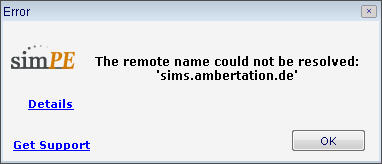
i can't register GUID
The remote name coukd not be resolved: 'sims.ambertation.de'.
I tried many times, my computer does not connect the internet so i think it maybe the cause. Can u help me? And thanks anyway

#7
9th Aug 2008 at 7:38 AM
9th Aug 2008 at 7:38 AM
utdzeo - Registering a GUID using the SimPE tool does require an internet connection. If the PC you have the Sims on is not connected to the Internet, you can go to the SimPE site directly and register GUIDs from their website:
sims.ambertation.de
Then you can enter those numbers into the GUID box in SimPE yourself without needing to let it connect to the Internet.
sims.ambertation.de
Then you can enter those numbers into the GUID box in SimPE yourself without needing to let it connect to the Internet.
Test Subject
#8
15th Jul 2009 at 8:57 PM
15th Jul 2009 at 8:57 PM
Posts: 12
I tried to register on the site, but it's saying no registration allowed? :S
Test Subject
#9
21st Jul 2009 at 9:24 AM
Last edited by Tarante11a : 21st Jul 2009 at 7:52 PM.
21st Jul 2009 at 9:24 AM
Last edited by Tarante11a : 21st Jul 2009 at 7:52 PM.
Posts: 29
[I have also just tried to register but the site says that user registration isn't allowed. Does anyone know if or when it's going to be up and running again?
I've only just started playing Sims 2 and am trying my hand at some mods - but am I right in thinking that the Sims 2 forums are a bit quiet because everyone is working on Sims 3?]
Actually, I've managed to register and get an account through SimPE itself. I clicked on 'Object Data' in the Resource tree and the resulting window at the bottom has a set of boxes, one of which has blue clickable text saying 'get GUID'. I clicked it and it automatically took me through the process of registering. Hope you can do the same.
I've only just started playing Sims 2 and am trying my hand at some mods - but am I right in thinking that the Sims 2 forums are a bit quiet because everyone is working on Sims 3?]
Actually, I've managed to register and get an account through SimPE itself. I clicked on 'Object Data' in the Resource tree and the resulting window at the bottom has a set of boxes, one of which has blue clickable text saying 'get GUID'. I clicked it and it automatically took me through the process of registering. Hope you can do the same.
Test Subject
#10
6th Nov 2010 at 9:29 PM
6th Nov 2010 at 9:29 PM
Posts: 4
I have recently tried to registar for GUID and I was denied also.
#11
6th Nov 2010 at 11:29 PM
6th Nov 2010 at 11:29 PM
Posts: 1,221
Thanks: 433 in 3 Posts
The information on the SimPE site says to generate your own random number and input that for the GUID, and if you share your item, you just note that the GUID was generated randomly, so if people have a problem they know that they can change the number to eliminate the conflict.
It's 0x followed by 8 hexadecimal digits. That's a very big number, so there's a lot of space for not conflicting.
It's 0x followed by 8 hexadecimal digits. That's a very big number, so there's a lot of space for not conflicting.
Test Subject
#12
15th Nov 2010 at 3:35 AM
15th Nov 2010 at 3:35 AM
Posts: 4
Thank you! It seems simple enough but when I tried to create my own guid, my mesh still showed up over the original. Did I need to do more than 1 guid number or did not put the my made up guid in the right spot?

#13
25th Dec 2010 at 2:02 AM
25th Dec 2010 at 2:02 AM
Posts: 53
Thanks: 818 in 2 Posts
Has SimPE disabled the creation of new accounts for GUID blocks now? I tried directly through the site and also following Tarante11a's advice of trying through the program itself but neither have worked :/
#14
25th Dec 2010 at 3:04 PM
Last edited by Ambular : 25th Dec 2010 at 3:58 PM.
25th Dec 2010 at 3:04 PM
Last edited by Ambular : 25th Dec 2010 at 3:58 PM.
Posts: 547
Thanks: 17011 in 40 Posts
Quote: Originally posted by TheDerangedSim
| Has SimPE disabled the creation of new accounts for GUID blocks now? I tried directly through the site and also following Tarante11a's advice of trying through the program itself but neither have worked :/ |
New blocks have not been accessible for some time, and the only person who is able to fix this has apparently been long AWOL.
I queried Pescado about it a while back and was told that the range of possible GUID's is so vast, and their format so basically meaningless, that any randomly-generated 8-digit hex number is highly unlikely to clash with an existing mod or item (especially now that relatively few new ones are liable to be produced.)
So I'd suggest you find a random hex generator, use whatever number comes up and just post a note with anything you upload that you did so. (For extra safety, you could scroll to the very end of the existing GUID blocks listed on the SimPE site and stick with using numbers beyond that range.)

#15
12th Jun 2016 at 11:22 PM
12th Jun 2016 at 11:22 PM
Posts: 52
Thanks: 10225 in 19 Posts
Thanks a lot for subject
Who Posted
|
|