
 Sign in to Mod The Sims
- Site Map >
- Modding and Creation >
- Sims 2 Creation >
- Object Creation >
- Object Creation - Recolouring >
- Recolouring and Cloning Templates >
- CLONE Templates - Phones with working handset
- Site Map >
- Modding and Creation >
- Sims 2 Creation >
- Object Creation >
- Object Creation - Recolouring >
- Recolouring and Cloning Templates >
- CLONE Templates - Phones with working handset
Replies: 21 (Who?), Viewed: 41946 times.


#1
 21st Sep 2006 at 11:33 PM
Last edited by Numenor : 3rd Oct 2006 at 1:25 AM.
21st Sep 2006 at 11:33 PM
Last edited by Numenor : 3rd Oct 2006 at 1:25 AM.
21st Sep 2006 at 11:33 PM
Last edited by Numenor : 3rd Oct 2006 at 1:25 AM.
 CLONE Templates - Phones with working handset
CLONE TEMPLATES - WALL AND TABLE PHONE, WITH WORKING HANDSET
Why use a template?
Phones have a naughty habit: as soon as you go to Live Mode, they will create an handset for themselves; but the problem is that *all* the phones, including the cloned ones, always create the original Maxis handset, overriding yours.
To avoid this, you must create your own, separate handset, and then "reprogram" your phone to create your custom one, instead of the Maxis one.
With my ready-to-clone phone templates, and the following instructions, you will be able to create your own phone with working custom handset.
What template(s) to choose?
First off, you have to decide what type of phone are you going to create:
- for a wall-mounted phone, download the "Phone(WALL+HANDSET)" template;
- for a table phone, choose the "Phone(TABLE+HANDSET)" template
HOW TO USE THE TEMPLATES?
Follow these easy steps and you'll have a working phone set in a matter of clicks

- Start SimPE (always use the latest version), start Object Workshop and click the "OPEN" button (*not* the "Start" one!).
- Browse to the folder where you have unpacked the chosen templates, and load the MASTER package (the phone base).
- Select "Clone" and set the cloning option as shown below; then click "Start".
- Change the description of your phone, and the price, if you like.
- When the Scenegraph Rename Wizard pops up, take note of the exact ModelName, including the square brackets (you will need it later, so I suggest you to write it down); when done, just click OK and save your package with any name you like (I suggest to append "_base" to the package name).
- Open the OBJD and Register a new GUID by clicking the link "Get GUID"; then click "Update" and then "Commit". Save your package.
- Now start again Object Workshop, and repeat the entire procedure, cloning the SLAVE package (the handset). When you save the package, use the same name as the master phone, and append "_handset" at the end.
Remember to register the GUID for the handset, too! (and write it down: you will need it later).
- Select the GMND, then select the "tsMaterialsMeshName" block and edit the "String" value, replacing the part in square brackets with the "ModelName" that you have written down earlier (the one from the phone base); be sure to preserve intact the ##0x1c050000! prefix. COMMIT and save.
- Now open again the first package, your clone of the Master phone base.
- In the Resource Tree panel, on the top left, select "Behaviour Function (BHAV)"; in the top right panel, three BHAVs will appear: select the one labeled "Function - Main".
- Below, in the Plugin panel, all the lines of the BHAV will be displayed: scroll down until you see the line 1A, and select it.
- On the right, next to the label "Operands", there are two rows of little fields. You have to edit the first four, writing into them the GUID of the handset. In order to do so, split the GUID of the handset in 4 groups of two digits each, and then write one group in each of the four operands, but in reverse order: in the first operand, fill in the last two digits of your GUID, in the second operand put the second-last group of digits, and so on. For example, if your GUID is "AABBCCDD", you have to write in the operands: "DD" "CC" "BB" "AA". Then COMMIT and save.
- Your cloning procedure is finished

Now you have two separate packages, containing the phone base and the handset: the only thing to do is to unleash your fantasy and edit the meshes and the textures at will!
 IMPORTANT: When editing the mesh, never change the names of the mesh groups (subsets)! Also, try to create a mesh that fits the original size of the phone, otherwise it may look odd when the sims use the handset.
As a bottom line, don't be confused by the mesh groups names: the phone base package contains a mesh group named "handset"; but this mesh is hidden by the game as soon as you start Live Mode, and it is replaced by the "surface" mesh taken from the handset package. Quite odd, uh?
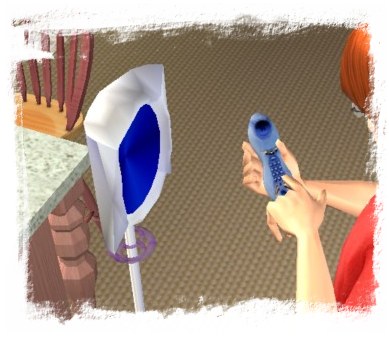
 FAQ - What is that futuristic phone shown in the first screenshot?
It's the Numenorean Stand-up Phone, an early donation gift that I have given to whom made a donation to my site. Now this gift is no longer available, but if you make a donation I might email it to you
TERMS OF USAGE OF THE TEMPLATES
Anyone can freely clone my Enhanced Templates to create his own objects, and can post his objects on any site.
It's only required to state that "the object is based on an Enhanced Template by Numenor", and post a link to this thread.
DO NOT REPOST OR REDISTRIBUITE THE TEMPLATES THEMSELVES!
Attached files:
 |
Phone(WALL+HANDSET)_Template.rar (62.2 KB, 689 downloads) |
| |
Phone(TABLE+HANDSET)_Template.rar (63.5 KB, 610 downloads) |
I've finally started my Journal. Information only, no questions.
My latest activity: CEP 9.2.0! - AnyGameStarter 2.1.1 (UPD) - Scriptorium v.2.2f - Photo & Plaques hide with walls - Magazine Rack (UPD) - Animated Windows Hack (UPD) - Custom Instrument Hack (UPD) - Drivable Cars Without Nightlife (UPD) - Courtesy Lights (FIX) - Custom Fence-Arches - Painting-TV - Smarter Lights (UPD)
I *DON'T* accept requests, sorry.
39 users say thanks for this.
(Who?)
Thanks
Advertisement

#2
22nd Sep 2006 at 12:15 PM
22nd Sep 2006 at 12:15 PM
Posts: 12
Thanks: 9 in 1 Posts
Thank you Numenor for this great Tutorial and Clone Templates  , as you know I have been attempting to clone the phone obviously with no success, but now with your great wisdom and the templates I have succeeded, this is just my first attempt and it works..so thank you for sharing.
Andrea :D
 , as you know I have been attempting to clone the phone obviously with no success, but now with your great wisdom and the templates I have succeeded, this is just my first attempt and it works..so thank you for sharing.
Andrea :D

#3
22nd Sep 2006 at 1:11 PM
22nd Sep 2006 at 1:11 PM
Posts: 195
Thanks: 1174 in 3 Posts
Cool beans!
Hopefully this will herald a whole plethora of custom phones, which we desperatly need!!
Great work. I am looking forward to what you folks produce.
Hopefully this will herald a whole plethora of custom phones, which we desperatly need!!
Great work. I am looking forward to what you folks produce.

#4
22nd Sep 2006 at 3:12 PM
22nd Sep 2006 at 3:12 PM
Posts: 43
Oh man, this is just too awesome. I made a antique vintage victorian wall phone months ago, but of course the handset was always the Maxis one. Cool--I'm off to redo my phone.
Thanks
Thanks
#5
25th Nov 2006 at 11:05 AM
25th Nov 2006 at 11:05 AM
Can you see the problem with the phone?
Hi Numenor i don't think i need to explain again because i have sent you alot of PM's, well let me recap.Everything is working fine with the phone, the textures, the mesh the catalog all of that is perfect but when i place my phone on the table it appears there but then it dissapears and turns into this: take a look.
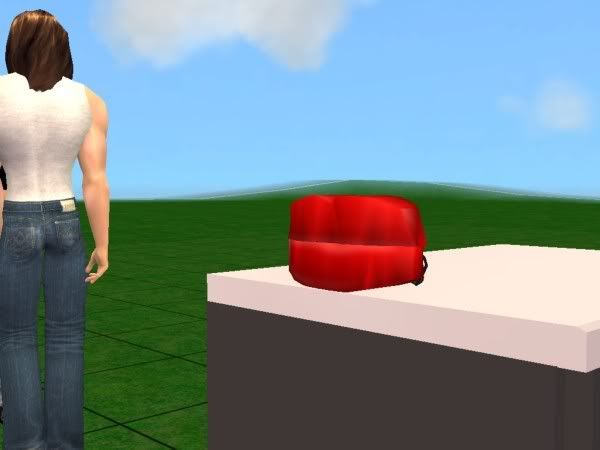
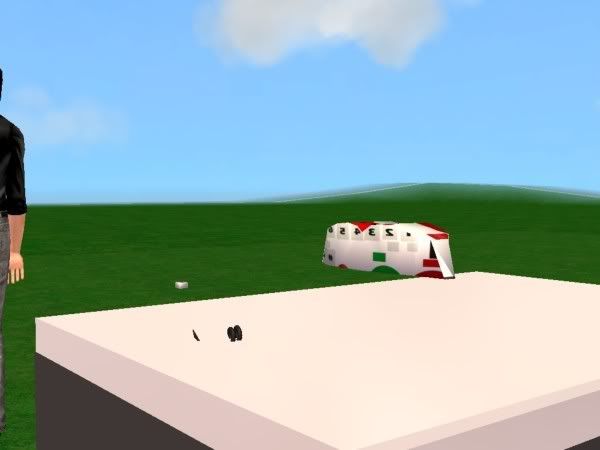
I attached the phone package in a zip so you can see the problem thanks.
Attached files:
| |
Redhotlips Phone.rar (1.08 MB, 77 downloads) - View custom content | |
                  Size   Packed Ratio  Date   Time     Attr      CRC   Meth Ver
-------------------------------------------------------------------------------
 Base
                     0        0   0% 24-11-06 15:58  .D.....   00000000 m0  2.0
 Base/Redlipsbase copy.png
                218318   216179  99% 23-11-06 23:34  .....A.   00FD91AA m5f 2.9
 Base/Redlipsbase.bmp
               1049654    28092   2% 23-11-06 22:47  .....A.   69E2A216 m5f 2.9
 Base/Redlipsbase.mtl
                  4698      213   4% 23-11-06 22:20  .....A.   E382B3C1 m5f 2.9
 Base/Redlipsbase.obj
               1080282   261796  24% 23-11-06 22:47  .....A.   D78B2BE4 m5f 2.9
 Base/Red_Hot_Lips_Phone_Base.package
               1254036   297556  23% 23-11-06 23:38  .....A.   868AC364 m5f 2.9
 Base/Thumbs.db
                  7168     4337  60% 25-11-06 13:02  ...HSA.   9EEDB037 m5f 2.9
 Base/[travis-23.11.2006-132f3b]_root_rot_gmdc.mtl
                  4698      213   4% 23-11-06 23:12  .....A.   E382B3C1 m5f 2.9
 Base/[travis-23.11.2006-132f3b]_root_rot_gmdc.obj
               1076485   276086  25% 23-11-06 23:12  .....A.   9665869F m5f 2.9
 Handset
                     0        0   0% 24-11-06 15:58  .D.....   00000000 m0  2.0
 Handset/Copy of Red_Hot_Lips_Phone_Handset.package
                 23174     9674  41% 23-11-06 20:04  .....A.   7DAD8325 m5f 2.9
 Handset/Redhotlipshandset.bmp
               1049654    15878   1% 23-11-06 22:27  .....A.   68F1C541 m5f 2.9
 Handset/Redhotlipshandset.mtl
                   207      102  49% 23-11-06 22:00  .....A.   6C1B31C1 m5f 2.9
 Handset/Redhotlipshandset.obj
                 18157     4933  27% 23-11-06 22:26  .....A.   241CA1AC m5f 2.9
 Handset/Red_Hot_Lips_Phone_Handset.package
                 24008     7437  30% 23-11-06 22:28  .....A.   E6777BD4 m5f 2.9
 Handset/Thumbs.db
                  5120     2725  53% 25-11-06 13:02  ...HSA.   329B81A2 m5f 2.9
 Handset/[travis-23.11.2006-133b31]_root_rot_gmdc.mtl
                   207      102  49% 23-11-06 22:27  .....A.   6C1B31C1 m5f 2.9
 Handset/[travis-23.11.2006-133b31]_root_rot_gmdc.obj
                 18123     5049  27% 23-11-06 22:27  .....A.   E11796CF m5f 2.9
-------------------------------------------------------------------------------
   18          5833989  1130372  19%
|
||
#6
26th Nov 2006 at 2:15 AM
26th Nov 2006 at 2:15 AM
All the errors were in the mesh: you have correctly followed the tutorial, but the mesh had several serious problems...
1) BASE - In the original phone there are two main meshes: "surface" (the phone base) and "handset" (the handset). In your mesh, basically the entire phone was included in the "handset" (apart from small pieces of cable). As explained in my post, the "handset" becomes invisible as soon as you go to Live mode, and that's why your entire phone become invisible.
Also, the entire mesh was off-center, compared to the original mesh included in my template: this explains why the two handsets, visible in the screenshots, are in different positions.
2) HANDSET - In the original package there is only one mesh, named "surface", that is actual handset visible during game play. The mesh borrows the texture from the base, and therefore it must be mapped on the same texture used for the base (in other words, the "surface" mesh from the handset package must have the same UVmapping then the "handset" mesh from the base package).
If you look at your own map templates, that you have included in the zip, you will see how different are the UVmaps.
Also, your custom handset was rotated by 180°, compared to the mesh contained in my template.
3) GENERAL PROBLEMS. Here are some advices that you should always follow, when creating meshes.
I'm attaching the fixed mesh, loaded in the related packages.
...pheww...! I can't believe I've spent so much time on this phone!!! You owe me a beer
I've finally started my Journal. Information only, no questions.
My latest activity: CEP 9.2.0! - AnyGameStarter 2.1.1 (UPD) - Scriptorium v.2.2f - Photo & Plaques hide with walls - Magazine Rack (UPD) - Animated Windows Hack (UPD) - Custom Instrument Hack (UPD) - Drivable Cars Without Nightlife (UPD) - Courtesy Lights (FIX) - Custom Fence-Arches - Painting-TV - Smarter Lights (UPD)
1) BASE - In the original phone there are two main meshes: "surface" (the phone base) and "handset" (the handset). In your mesh, basically the entire phone was included in the "handset" (apart from small pieces of cable). As explained in my post, the "handset" becomes invisible as soon as you go to Live mode, and that's why your entire phone become invisible.
Also, the entire mesh was off-center, compared to the original mesh included in my template: this explains why the two handsets, visible in the screenshots, are in different positions.
2) HANDSET - In the original package there is only one mesh, named "surface", that is actual handset visible during game play. The mesh borrows the texture from the base, and therefore it must be mapped on the same texture used for the base (in other words, the "surface" mesh from the handset package must have the same UVmapping then the "handset" mesh from the base package).
If you look at your own map templates, that you have included in the zip, you will see how different are the UVmaps.
Also, your custom handset was rotated by 180°, compared to the mesh contained in my template.
3) GENERAL PROBLEMS. Here are some advices that you should always follow, when creating meshes.
- Poly count: you phone had more than 11000 facets! It's definitely too a huge number of facets for a 1-tile object. The main problem was the spiral cable: spirals are terrible for sims-meshes because they are extremely smoothed curves. You should created curved surfaces (like spirals) with a much lower number of subdivisions, and then apply a high smoothing value with UVmapper: you'll get the same effect with an extremely lower poly count. Now your phone has a little more than 1000 facets (which is still high, but I can't spend more time on this...
Another trick that you should use to keep a low poly count is to remove the hidden facets: for instance, the number keys are visible from both sides, and this is a waste of useful resources. Select the hidden facets and assign them the "hole" material. - The mesh is exported from Wings splitted in numerous parts? This is due to a bad export setting. The next time you export an OBJ, select Export / Wavefront OBJ and click on the little box next to the word "Wavefront"; in the option panel that opens up, *deselect* the option "One group per material". You have to do this only once: Wings will remember the setting.
I'm attaching the fixed mesh, loaded in the related packages.
...pheww...! I can't believe I've spent so much time on this phone!!! You owe me a beer

Attached files:
| |
Red_Hot_Lips_Phone.rar (148.9 KB, 124 downloads) - View custom content | |
                  Size   Packed Ratio  Date   Time     Attr      CRC   Meth Ver
-------------------------------------------------------------------------------
 Red_Hot_Lips_Phone_Base.package
                832444   141745  17% 26-11-06 03:01  .....A.   B961C87E m5e 2.9
 Red_Hot_Lips_Phone_Handset.package
                 39480    10563  26% 26-11-06 03:00  .....A.   3045BB48 m5b 2.9
-------------------------------------------------------------------------------
    2           871924   152308  17%
|
||
I've finally started my Journal. Information only, no questions.
My latest activity: CEP 9.2.0! - AnyGameStarter 2.1.1 (UPD) - Scriptorium v.2.2f - Photo & Plaques hide with walls - Magazine Rack (UPD) - Animated Windows Hack (UPD) - Custom Instrument Hack (UPD) - Drivable Cars Without Nightlife (UPD) - Courtesy Lights (FIX) - Custom Fence-Arches - Painting-TV - Smarter Lights (UPD)
I *DON'T* accept requests, sorry.
#7
1st Dec 2006 at 9:27 AM
Last edited by AbstractSIMmer187 : 1st Dec 2006 at 9:33 AM.
1st Dec 2006 at 9:27 AM
Last edited by AbstractSIMmer187 : 1st Dec 2006 at 9:33 AM.
OMG you are certainly the best person on MTS2 when it comes to probs, meshes and help, thank you so much, i feel like kissing your toes :D, my goodness thanks so much for your help and if i knew where you stayed i would surely buy you a beer, thanks.
LOL i noticed that i placed the buttons in the wrong place, i have been meshing for some time but this was extremely hard for me ;D
BTW here is the beer you well deserve click Here To Collect Beer
LOL i noticed that i placed the buttons in the wrong place
, i have been meshing for some time but this was extremely hard for me ;DBTW here is the beer you well deserve click Here To Collect Beer
#8
1st Dec 2006 at 5:37 PM
1st Dec 2006 at 5:37 PM
Slurp! That beer definitely looks tasty, thanks!
Keep in mind the advice I've given you, and never overlook the details, and you'll build perfect object
I've finally started my Journal. Information only, no questions.
My latest activity: CEP 9.2.0! - AnyGameStarter 2.1.1 (UPD) - Scriptorium v.2.2f - Photo & Plaques hide with walls - Magazine Rack (UPD) - Animated Windows Hack (UPD) - Custom Instrument Hack (UPD) - Drivable Cars Without Nightlife (UPD) - Courtesy Lights (FIX) - Custom Fence-Arches - Painting-TV - Smarter Lights (UPD)
Keep in mind the advice I've given you, and never overlook the details, and you'll build perfect object
I've finally started my Journal. Information only, no questions.
My latest activity: CEP 9.2.0! - AnyGameStarter 2.1.1 (UPD) - Scriptorium v.2.2f - Photo & Plaques hide with walls - Magazine Rack (UPD) - Animated Windows Hack (UPD) - Custom Instrument Hack (UPD) - Drivable Cars Without Nightlife (UPD) - Courtesy Lights (FIX) - Custom Fence-Arches - Painting-TV - Smarter Lights (UPD)
I *DON'T* accept requests, sorry.

#9
10th Dec 2006 at 10:27 PM
10th Dec 2006 at 10:27 PM
Posts: 173
Thanks: 27 in 1 Posts
wow that's a great turtorial! thanks! but is there a turtorial on actually making the custom phone? like how to mesh it and make it work?
#10
10th Dec 2006 at 11:12 PM
10th Dec 2006 at 11:12 PM
Ehm... no, there isn't such a specific tutorial. But in the Create forum there are several tutorials (including the famous "Start to Finish" tutorial by JWoods) that explain how to create simple meshes. for more complex meshes, you have to rely on your own resources, or on tutorials posted on sites related to the 3D editor you use.
I've finally started my Journal. Information only, no questions.
My latest activity: CEP 9.2.0! - AnyGameStarter 2.1.1 (UPD) - Scriptorium v.2.2f - Photo & Plaques hide with walls - Magazine Rack (UPD) - Animated Windows Hack (UPD) - Custom Instrument Hack (UPD) - Drivable Cars Without Nightlife (UPD) - Courtesy Lights (FIX) - Custom Fence-Arches - Painting-TV - Smarter Lights (UPD)
I've finally started my Journal. Information only, no questions.
My latest activity: CEP 9.2.0! - AnyGameStarter 2.1.1 (UPD) - Scriptorium v.2.2f - Photo & Plaques hide with walls - Magazine Rack (UPD) - Animated Windows Hack (UPD) - Custom Instrument Hack (UPD) - Drivable Cars Without Nightlife (UPD) - Courtesy Lights (FIX) - Custom Fence-Arches - Painting-TV - Smarter Lights (UPD)
I *DON'T* accept requests, sorry.


#11
12th Dec 2006 at 9:54 AM
12th Dec 2006 at 9:54 AM
Hello Numenor. I have made a few phones that work well, no one had any problems. I saw these and wondered whether or not i should use them or do it the way i have been doing it. What i was wondering was, *what* exactly these do, such as do they serve a benefit compared to the way i have been doing it or do they make it easier for people ?
#12
12th Dec 2006 at 10:11 PM
12th Dec 2006 at 10:11 PM
JohnBrehaut1 - You are skilled enough to create a working phone by yourself, and therefore you probably won't have any benefit from using this template. If your custom phones create correctly the handset, are recolourable, and the handset gets automatically the same texture as the base, then you don't need this template.
I've finally started my Journal. Information only, no questions.
My latest activity: CEP 9.2.0! - AnyGameStarter 2.1.1 (UPD) - Scriptorium v.2.2f - Photo & Plaques hide with walls - Magazine Rack (UPD) - Animated Windows Hack (UPD) - Custom Instrument Hack (UPD) - Drivable Cars Without Nightlife (UPD) - Courtesy Lights (FIX) - Custom Fence-Arches - Painting-TV - Smarter Lights (UPD)
I've finally started my Journal. Information only, no questions.
My latest activity: CEP 9.2.0! - AnyGameStarter 2.1.1 (UPD) - Scriptorium v.2.2f - Photo & Plaques hide with walls - Magazine Rack (UPD) - Animated Windows Hack (UPD) - Custom Instrument Hack (UPD) - Drivable Cars Without Nightlife (UPD) - Courtesy Lights (FIX) - Custom Fence-Arches - Painting-TV - Smarter Lights (UPD)
I *DON'T* accept requests, sorry.
#13
13th Dec 2006 at 3:46 AM
13th Dec 2006 at 3:46 AM
ok, thank you for the information


#15
2nd Sep 2007 at 5:57 AM
Last edited by Stormboy15 : 2nd Sep 2007 at 6:32 AM.
2nd Sep 2007 at 5:57 AM
Last edited by Stormboy15 : 2nd Sep 2007 at 6:32 AM.
Posts: 17
Thanks: 331 in 5 Posts
What program...?
Do phones come with animations?
I can't use Milkshape because im from Australia and everything from other countries is double the price ($50!! For Milkshape!!)
Could i edit the mesh and expect the phone to work in the game?
When i mean expect to work i mean like be able to call and stuff
I use Blender/Windg 3d btw
well when you have time, please reply
Chocolate Disciple

#16
2nd Sep 2007 at 9:31 AM
2nd Sep 2007 at 9:31 AM
Posts: 403
Thanks: 48431 in 74 Posts
Try to use Blender. There is now a .smd import/export for Blender. This does allow the joints and bones to be imported back into SimPE.
Here
http://modthesims2.com/member/showthread.php?t=246658
If you like my creations, you may consider to make a little donation to support my site and my modding activity.
MaryLou's Sims 2 World - MaryLou Sims 2 Forum (Italiano)
Here
http://modthesims2.com/member/showthread.php?t=246658
If you like my creations, you may consider to make a little donation to support my site and my modding activity.
MaryLou's Sims 2 World - MaryLou Sims 2 Forum (Italiano)
#17
2nd Sep 2007 at 7:20 PM
2nd Sep 2007 at 7:20 PM
Phones do have animations, but they are NOT applied to the mesh using joints. You probably noticed that the handset is a separate mesh: the reason is that this way, animations can be applied to the entire handset mesh, without using joints.
Just to clear up, joints are used whenevere a part of the mesh must be animated, while the main object stands still (e.g. a drawer of the dresser); but if an entire mesh must be moved, no joints are needed at all.
Therefore, you can edit the phone meshes following MaryLou's advice, or you could even work in plain OBJ format, using Wings3D.
I've finally started my Journal. Information only, no questions.
My latest activity: CEP 9.2.0! - AnyGameStarter 2.1.1 (UPD) - Scriptorium v.2.2f - Photo & Plaques hide with walls - Magazine Rack (UPD) - Animated Windows Hack (UPD) - Custom Instrument Hack (UPD) - Drivable Cars Without Nightlife (UPD) - Courtesy Lights (FIX) - Custom Fence-Arches - Painting-TV - Smarter Lights (UPD)
Just to clear up, joints are used whenevere a part of the mesh must be animated, while the main object stands still (e.g. a drawer of the dresser); but if an entire mesh must be moved, no joints are needed at all.
Therefore, you can edit the phone meshes following MaryLou's advice, or you could even work in plain OBJ format, using Wings3D.
I've finally started my Journal. Information only, no questions.
My latest activity: CEP 9.2.0! - AnyGameStarter 2.1.1 (UPD) - Scriptorium v.2.2f - Photo & Plaques hide with walls - Magazine Rack (UPD) - Animated Windows Hack (UPD) - Custom Instrument Hack (UPD) - Drivable Cars Without Nightlife (UPD) - Courtesy Lights (FIX) - Custom Fence-Arches - Painting-TV - Smarter Lights (UPD)
I *DON'T* accept requests, sorry.
#18
3rd Sep 2007 at 7:17 AM
3rd Sep 2007 at 7:17 AM
Posts: 17
Thanks: 331 in 5 Posts
Thank you *alot*.
I have had issues when importing .obj files from Blender into SimPE.
I am trying Wings3d and it is more easier to use.
MaryLou, i shall try that new .smd import/export and see if it works.
~Stormboy15
P.S Expect a new mesh phone from me soon
Chocolate Disciple
I have had issues when importing .obj files from Blender into SimPE.
I am trying Wings3d and it is more easier to use.
MaryLou, i shall try that new .smd import/export and see if it works.
~Stormboy15
P.S Expect a new mesh phone from me soon
Chocolate Disciple
#19
3rd Sep 2007 at 2:03 PM
3rd Sep 2007 at 2:03 PM
Stormboy, the OBJ files created with Wings can't be imported directly into SimPE: they are slightly incompatible, just like the Blender ones. Always load the OBJ files into UVmapper and immediately save them, in order to make them perfectly compatible with SimPE.
I've finally started my Journal. Information only, no questions.
My latest activity: CEP 9.2.0! - AnyGameStarter 2.1.1 (UPD) - Scriptorium v.2.2f - Photo & Plaques hide with walls - Magazine Rack (UPD) - Animated Windows Hack (UPD) - Custom Instrument Hack (UPD) - Drivable Cars Without Nightlife (UPD) - Courtesy Lights (FIX) - Custom Fence-Arches - Painting-TV - Smarter Lights (UPD)
I've finally started my Journal. Information only, no questions.
My latest activity: CEP 9.2.0! - AnyGameStarter 2.1.1 (UPD) - Scriptorium v.2.2f - Photo & Plaques hide with walls - Magazine Rack (UPD) - Animated Windows Hack (UPD) - Custom Instrument Hack (UPD) - Drivable Cars Without Nightlife (UPD) - Courtesy Lights (FIX) - Custom Fence-Arches - Painting-TV - Smarter Lights (UPD)
I *DON'T* accept requests, sorry.
#20
3rd Sep 2007 at 2:14 PM
3rd Sep 2007 at 2:14 PM
Posts: 17
Thanks: 331 in 5 Posts
Ahhhhh thanks!
Sorry i had a big blank in the gap between my ears
I shall try again
Chocolate Disciple
Sorry i had a big blank in the gap between my ears
I shall try again
Chocolate Disciple

#21
3rd Jan 2008 at 3:38 AM
3rd Jan 2008 at 3:38 AM
So I noticed that all these phones and such are mobile...how would one go about creating a phone that the sim does not walk away from the wall with? Would that have to be edited within the bhav's via the specific animations? I did notice that when sims use a payphone they don't walk around with it...would those animations be the ones to use? Are the animations attached to the handset?
#22
4th Jan 2008 at 3:03 AM
4th Jan 2008 at 3:03 AM
The sims using a payphone don't move, NOT because they are using a payphone per se, but because they are calling a taxi. Even in residential lots, sims calling a taxi don't move away from the phone.
The animations are not stored in the phone, but in the "Phone call - Transportation - Taxi" controller (the phones have several "plugins", one for each type of phone call).
Unfortunately, if you force your cloned phone to use the "taxi" animations, every call made by the sims will end up in a taxi request, because the very same BHAV (contained in the controller) manages both the animations and the result of the call.
I've finally started my Journal. Information only, no questions.
My latest activity: CEP 9.2.0! - AnyGameStarter 2.1.1 (UPD) - Scriptorium v.2.2f - Photo & Plaques hide with walls - Magazine Rack (UPD) - Animated Windows Hack (UPD) - Custom Instrument Hack (UPD) - Drivable Cars Without Nightlife (UPD) - Courtesy Lights (FIX) - Custom Fence-Arches - Painting-TV - Smarter Lights (UPD)
The animations are not stored in the phone, but in the "Phone call - Transportation - Taxi" controller (the phones have several "plugins", one for each type of phone call).
Unfortunately, if you force your cloned phone to use the "taxi" animations, every call made by the sims will end up in a taxi request, because the very same BHAV (contained in the controller) manages both the animations and the result of the call.
I've finally started my Journal. Information only, no questions.
My latest activity: CEP 9.2.0! - AnyGameStarter 2.1.1 (UPD) - Scriptorium v.2.2f - Photo & Plaques hide with walls - Magazine Rack (UPD) - Animated Windows Hack (UPD) - Custom Instrument Hack (UPD) - Drivable Cars Without Nightlife (UPD) - Courtesy Lights (FIX) - Custom Fence-Arches - Painting-TV - Smarter Lights (UPD)
I *DON'T* accept requests, sorry.
Who Posted
|
|