Welcome to Mod The Sims.
Have an account? Sign in:
User Name:  
Password:  
If you don't have an account, why not
sign up now? It's free!
Other sites: · Yearbook
Want to order The Sims 3: World Adventures Expansion Pack and help the site out? Click here to order it from our Amazon.com store!
Skinset recolor actionset + autobatch for complete beginner in photoshop

Reply
 
Search this Thread
Old 25th Feb 2007, 01:31 AM DefaultSkinset recolor actionset + autobatch for complete beginner in photoshop # 1
Navetsea
Original Poster

Scholar
  

Join Date: Feb 2005
Posts: 1,074
Thanks: 35888 in 67 Posts

View My Journal


you need Adobe Photoshop to use this tutorial
and not Photoshop Elements (lite version of adobe Photoshop)

it has many pictures and simple .gif pictures of each step
for people who don't like to read much or people with picture/comic book mindset ^___^

it is zip ed MHTML file, extract the file using WinZIP and doubleclick it to view in IE / your system's default internet browser.
Screenshots
Click image for larger version

Name:  qualitydegrades.gif
Views: 0
Size:  61.7 KB   Click image for larger version

Name:  automatdialogbox.jpg
Views: 0
Size:  39.3 KB   Click image for larger version

Name:  makingaction.gif
Views: 0
Size:  102.6 KB  
Download - please read all instructions before downloading any files!
Downloads are not available to guests. Please login.

the adult version of my skin at SexySims2
the MTS version (barbie edition) are also available at my page there
the INSIMadult version also available at warlokk's guest add-on skintones there
Reply With Quote
Old 4th Mar 2007, 03:03 PM # 2
HystericalParoxysm
Wheeeeee!!!


Join Date: Jan 1970
Posts: 17,002
Thanks: 239027 in 194 Posts

View My Journal


Could have sworn I'd moved this already.
Reply With Quote
Old 5th Mar 2007, 12:35 AM # 3
Navetsea
Original Poster

Scholar
  

Join Date: Feb 2005
Posts: 1,074
Thanks: 35888 in 67 Posts

View My Journal


thanks HP ^___^, wow you are a saint (looking at the avatar)

the adult version of my skin at SexySims2
the MTS version (barbie edition) are also available at my page there
the INSIMadult version also available at warlokk's guest add-on skintones there
Reply With Quote
Old 8th Mar 2007, 10:10 AM # 4
Shamael
Lab Assistant

Join Date: Dec 2006
Posts: 97


Yep!!! Since I new to Photoshop, this guide realy helps!
Matur Nuwun!!!

...and soon all turned to black,
more black.
And the whites,
shall become black too...
Reply With Quote
Old 10th Mar 2007, 02:24 PM # 5
corvidophile2
Top Secret Researcher
 

Join Date: Feb 2006
Posts: 1,906
Thanks: 62 in 5 Posts


Thank you so much Navetsea this is really helpful!

You will find my older and newest creations here
Reply With Quote
Old 23rd Mar 2007, 07:47 PM # 6
alkaloid
Field Researcher
  

Join Date: Feb 2006
Posts: 330
Thanks: 16498 in 86 Posts


This is an awesome tutorial, and you do a great job of explaining actions. :D
Reply With Quote
Old 26th Aug 2007, 04:26 PM # 7
Jwilson5
Test Subject
 

Join Date: May 2005
Posts: 54
Thanks: 3566 in 10 Posts


Thanks for this, appreciate the help.
Reply With Quote
Old 23rd Feb 2008, 08:39 AM # 8
hewujing
Lab Assistant

Join Date: Feb 2005
Posts: 120


Thanks for this, appreciate the help.
Reply With Quote
Old 25th Feb 2008, 03:23 PM # 9
Navetsea
Original Poster

Scholar
  

Join Date: Feb 2005
Posts: 1,074
Thanks: 35888 in 67 Posts

View My Journal


my goodness, copy pasted comments like what I got on my Xmas sms ^_^;

the adult version of my skin at SexySims2
the MTS version (barbie edition) are also available at my page there
the INSIMadult version also available at warlokk's guest add-on skintones there
Reply With Quote
Old 22nd Apr 2008, 11:14 AM # 10
Tramen
Lab Assistant
 

Join Date: Apr 2007
Posts: 247


Just a question - I have Photoshop Elements which you say not to use; why? I want to recolour a skintone and this seems like the most simple tutorial out there but I just want to know if I can achieve this or not with Photoshop Elements.
Reply With Quote
Old 23rd Apr 2008, 02:56 AM # 11
Navetsea
Original Poster

Scholar
  

Join Date: Feb 2005
Posts: 1,074
Thanks: 35888 in 67 Posts

View My Journal


because Photoshop elements is a very basic version of photoshop, it does not have quick mask option, it does not have pen tools, and it also does not have action command. you can't group your layer into folders, etc.
That's what I know from my Photoshop elements 2.

And sadly this tutorial is based on action command.

the adult version of my skin at SexySims2
the MTS version (barbie edition) are also available at my page there
the INSIMadult version also available at warlokk's guest add-on skintones there
Reply With Quote
Old 1st Jul 2008, 03:57 AM # 12
belovedstar
Test Subject

Join Date: Sep 2006
Posts: 10


Thank you so much Navetsea! You're great! THnkas for share with us!

Happy simming time
Reply With Quote
Old 6th Jul 2008, 09:11 PM # 13
shishmish
Test Subject

Join Date: Dec 2006
Posts: 44


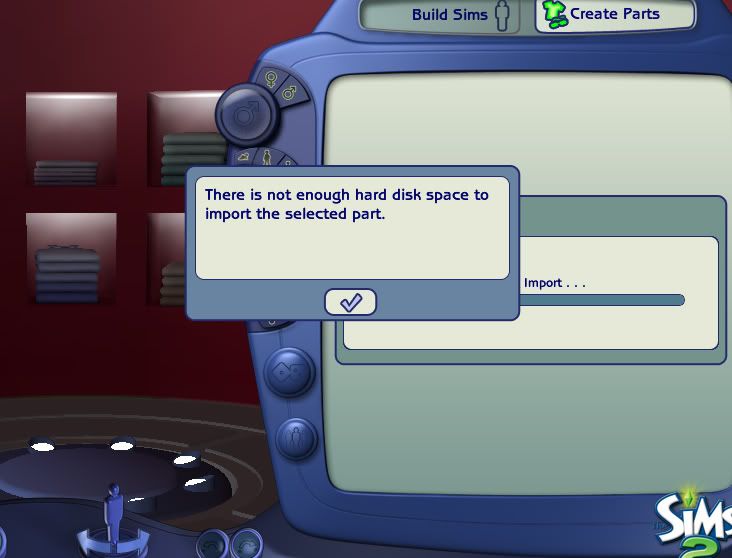
Fantastic tutorial! I've managed to get all the way to the Importing part then I get stuck; when I try to import it I get this message:


Which is odd as I have 274GB left of my C:/ drive What could be causing this? I shut down BS instead of leaving it open, incase that makes any difference.
Reply With Quote
Reply


Section jump:


All times are GMT +1. The time now is 06:29 AM.

Style: More Options

Powered by: vBulletin Version 3.0.14
Copyright ©2000 - 2009, Jelsoft Enterprises Ltd.
This site is not endorsed by or affiliated with Electronic Arts, or its licensors. Trademarks are the property of their respective owners. Game content and materials copyright Electronic Arts Inc. and its licensors. All Rights Reserved. MTS/MTS2 v2.9 based on vBulletin 3.0.14 with multiple hacks. ModTheSims, ModTheSims2 and MTS2 © 2004-2009. Hosted by LayeredTech.
You are being served by www.modthesims.info powered by pink boyshorts with black lace and a lavender bra with embroidered flowers and a sheer organza bow