
 Sign in to Mod The Sims
- Site Map >
- Modding and Creation >
- Sims 2 Creation >
- Tutorials >
- Objects - Tutorial: How to update custom fridges and computers to enable latest EP functions
- Site Map >
- Modding and Creation >
- Sims 2 Creation >
- Tutorials >
- Objects - Tutorial: How to update custom fridges and computers to enable latest EP functions
Replies: 18 (Who?), Viewed: 34182 times.



#1
 26th May 2008 at 2:54 PM
Last edited by Lord Darcy : 6th Oct 2008 at 3:45 AM.
Reason: Added base game compatible version of updater package
26th May 2008 at 2:54 PM
Last edited by Lord Darcy : 6th Oct 2008 at 3:45 AM.
Reason: Added base game compatible version of updater package
26th May 2008 at 2:54 PM
Last edited by Lord Darcy : 6th Oct 2008 at 3:45 AM.
Reason: Added base game compatible version of updater package
 Tutorial: How to update custom fridges and computers to enable latest EP functions
=================================================================
How to update custom fridges and computers to enable latest EP functions
=================================================================
How to update custom fridges and computers to enable latest EP functions
=================================================================
Each EP adds new functions to many existing objects. The most notable examples are computers and fridges. Computers are updated by virtually every EP to include new EP-specific functions. Fridges were updated first by OFB (Make/Make Many), then by Seasons (Get Leftovers/Stock), and again by FreeTime (Serve Platter).
However, most of custom objects are cloned from base game objects, either because they were made before EPs came out, or because the creator chose to retain base game compatibility.
Sometimes we can get lucky and can enjoy all new EP-specific functions without losing reverse compatibility, like doors or wardrobes. But more often than not, we can't have both.
Some creators update their creations whenever new features are introduced by each EP, offering separate versions for each EP. But the majority of custom objects remain outdated. So we are left with gorgeous custom fridges that Sims can't take out leftovers from, or stylish custom TVs that Sims can't watch movies on or tinker with.
I have been providing "Updater Packages" of various types of custom objects for FreeTime in this MATY thread. (Similar thread for Apartment Life) Go read it if you have some experience in SimPE. This tutorial may be too long-winded for you, as it was written with people in mind who have no previous experience in SimPE, with more detailed step-by-step instruction and plenty of screenshots.
In this tutorial, I'll explain how to update custom fridges and computers to the latest EP (currently FreeTime), as they are in the highest demand for update. Basically, the same method can be applied to most of other objects as well.
You can get required "Updater Packages" for other kinds of objects in the above MATY thread.
[How to Update Custom Fridges]
For this tutorial, I'll use this fridge from 4ESF.
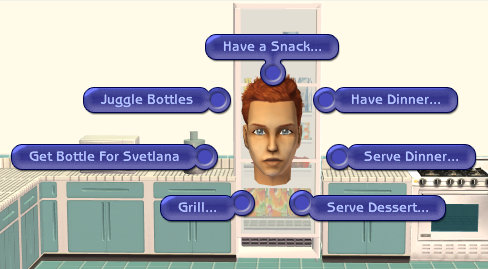
You can see that this fridge has only base game functions.
1. Get "Updater Package" for Fridges
Download attached FreeTime "Updater Package" for fridges and extract to convenient folder.
 There are 2 versions of updater packages. Pick only one of them.
 Fridge_UpdatedResources_FT_20080425.rar: Fridges updated with this version will make the game crash while being loaded in pre-Pets EPs. It can only be used for Pets or later EPs. This version is for end-users who wish to update their downloaded fridges only for personal use. Fridge_UpdatedResources_FT_BaseGameCompatible.rar: This version is for object creators who wish to update their fridges to FreeTime without losing base game compatibility.
Note that it was originally made for fridges cloned from base game. For fridges cloned from later EPs, you also have to change all BHAVs to 0x8007 format, and fix the version bit in OBJD to 139 (decimal).
You can see 4 subfolders in the Windows Explorer.
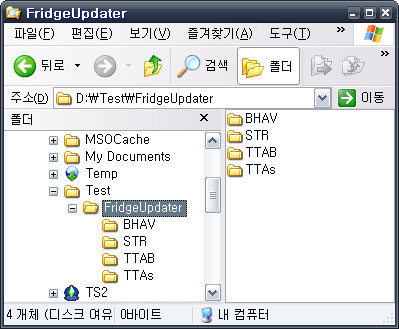
(Sorry for unrecognizable characters in the pic. As I use Korean version of Windoze, I couldn't help it. But the important bits are all in English so rest assured.
 )
)2. Opening your custom fridge in SimPE
Back up your custom fridge first, in case you mess up something.
Open the custom fridge you want to update in SimPE.
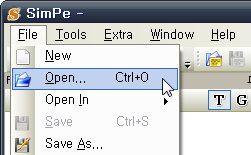
You can use File - Open In - Downloads if you want to open the custom fridge directly from your Downloads folder.
3. Finding the right type of resources to add or edit
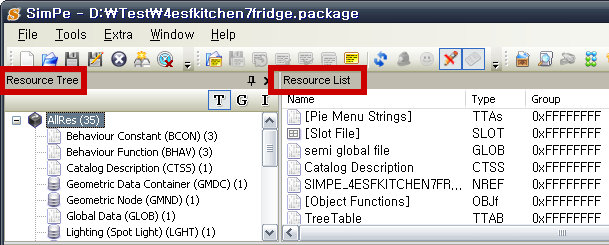
The left top window is Resource Tree, and the right top window is Resource List.
(If you can't find those 2 windows in your SimPE, reset the layout in Extra - Preferences - SimPE Settings - reset Layout.)
Take a look at Resource Tree window on the left.
Resources are grouped by various Types. Each Type has 4-lettered acronym at the end of name, e.g. BCON for Behaviour Constant or TTAB for Pie Menu Functions. You need to look for the same acronyms as subfolder names you've extracted at Step 1.
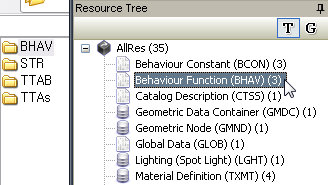
4. Adding a new Behaviour Function (BHAV)
Select Behaviour Function (BHAV) in the Resource Tree window. Fridges cloned from base game have only 3 BHAVs. The rest of resources will be filtered out of Resource List window, leaving only 3 BHAVs visible.
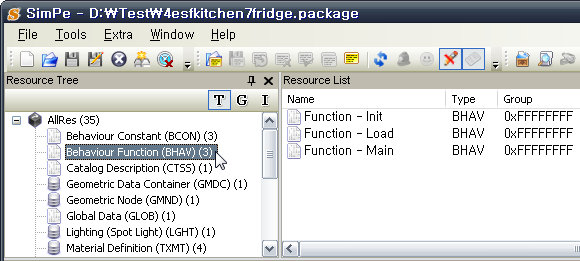
In the Resource List window, press Instance tab once to sort resources by Instance number. Don't be confused with Instance (high).

Back to Windows Explorer. Open BHAV folder. You'll find 2 files, one with .simpe and the other with .xml extension.
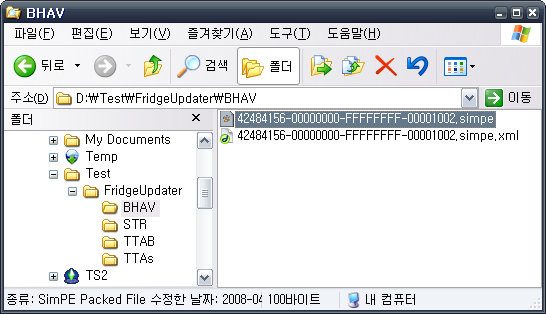
Take a look at the filename of .simpe file.
42484156-00000000-FFFFFFFF-00001002.simpe
The bold part indicates Instance number. In SimPE's Resource List window, see if you can find the matching BHAV with the same Instance number of 0x00001002. You'll find none.
It means that new BHAV was added to fridges by one of later EPs. You must add it to your custom fridge to make it fully functioning.
Right-click on blank space of Resource List window and select Add.
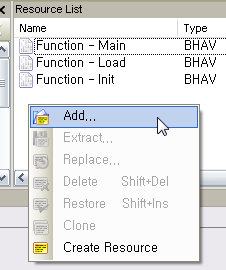
Go to BHAV folder and select .xml file.
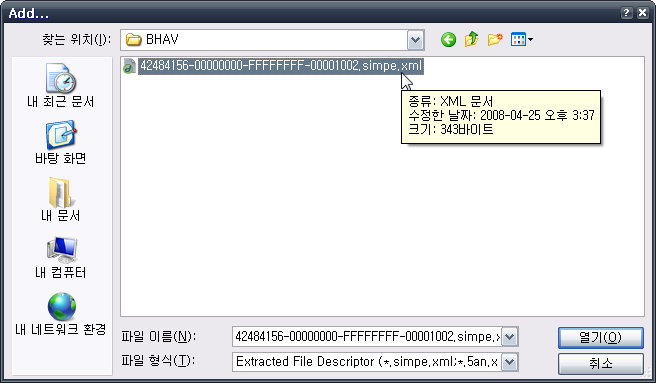
A new BHAV with the Instance number of 0x00001002 will appear in Italic. Save.
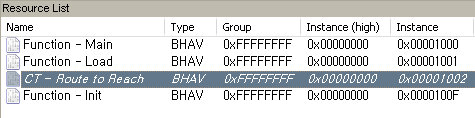 If you CAN find an existing BHAV with the same Instance number of 0x00001002, it means that your custom fridge was cloned from one of EPs. Instead of adding a new BHAV, you must replace existing BHAV.
Right-click on 0x00001002 BHAV and select Replace, go to BHAV folder and select the file with .simpe extension.
In case you're updating other types of objects, and there are multiple resources in the subfolder, you have to repeat it to every resource.5. Replacing Pie Menu Functions (TTAB)
Pie Menu of an object is made up of Pie Menu Functions (TTAB) and Pie Menu Strings (TTAs). They are updated almost always whenever new functions are added to objects by EPs.
(There are exceptions, but I won't discuss them right now.)
Without updating Pie Menus, new functions will not come up when you're clicking on objects.
Select Pie Menu Functions (TTAB) in Resource Tree window. Most objects have only one TTAB resource, so there is little room for confusion. Select TreeTable in Resource List window.
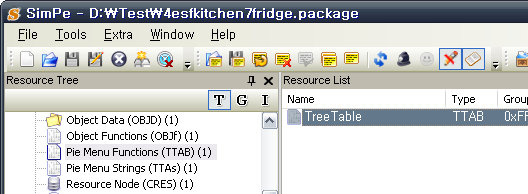
Look at Plugin View window. As you can see, none of EP functions (Make/Make Many, Get Leftovers etc.) are present.
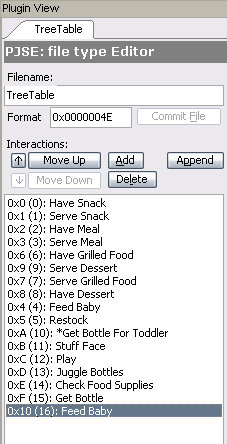
Right-click on TreeTable in Resource List window and select Replace.
This time, there is no need to find correct resource with the same Instance number, as there is only one TTAB resource for fridges.
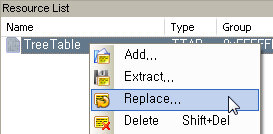
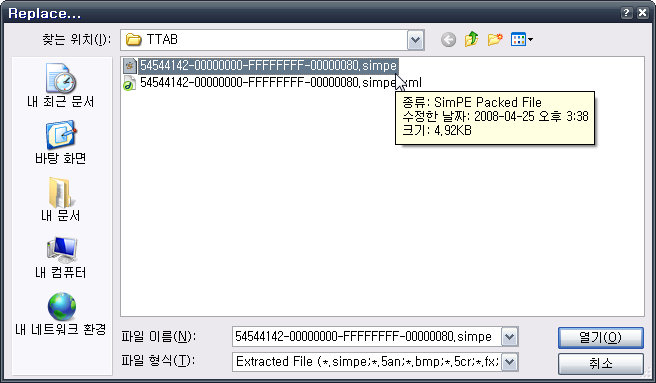
Go to TTAB folder and select the file with .simpe extension. A confirmation dialog box (Resource Changed) will pop up. Select Yes.
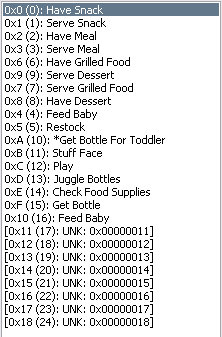
New unknown (UNK) lines will appear in Plugin View. Save.
6. Replacing Pie Menu Strings (TTAs)
By now you must have got some hang of it - missing resources must be added, while existing resources must be replaced.
Like TTAB, fridges have only one TTAs. Select Pie Menu Strings (TTAs) in Resource Tree window, and select [Pie Menu Strings] in Resource List window. Right-click on it and select Replace. Go to TTAs folder and select the file with .simpe extension. Yes to dialog box.
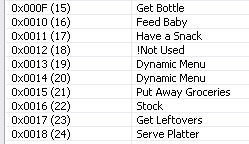
Pie menu strings for EP features will appear at the bottom of the list. Save.
7. Replacing Text Lists (STR#)
Back to Windows Explorer. Go to STR folder. Note the Instance number in the filename.
53545223-00000000-FFFFFFFF-00000100.simpe
You know the drill. Back to SimPE, select Text Lists (STR#) in Resource Tree window.
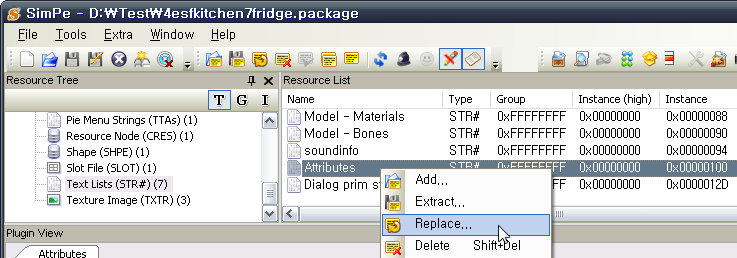
Find the correct resource to replace by the Instance number. (In this case, Attributes)
Right-click on Attributes and select Replace. Go to STR folder and select the file with .simpe extension. Yes to dialog box. Save.
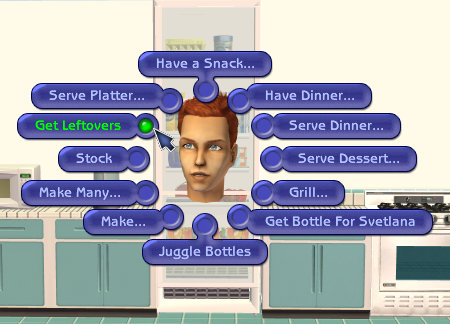
Congratulations, you're done!
Now all functions up to FreeTime are enabled for this lovely fridge.
Whenever new EP adds new features to existing objects, "Updater Package" must be remade. If you want to know how to make "Updater Package", this post will be of help.
-------------------------------------------------------------------------
Please move this post to the appropriate forum if it's not the right place to post something like this.
Attached files:
 |
Fridge_UpdatedResources_FT_20080425.rar (8.4 KB, 357 downloads) - View custom content | |
                  Size   Packed Ratio  Date   Time     Attr      CRC   Meth Ver
-------------------------------------------------------------------------------
 BHAV/42484156-00000000-FFFFFFFF-00001002.simpe
                   100       57  57% 25-04-08 15:37  .....A.   904A320A m5b 2.9
 BHAV/42484156-00000000-FFFFFFFF-00001002.simpe.xml
                   343      194  56% 25-04-08 15:37  .....A.   55E9C3DA m5b 2.9
 STR/53545223-00000000-FFFFFFFF-00000100.simpe
                   132       68  51% 25-04-08 15:39  .....A.   12F530A3 m5b 2.9
 STR/53545223-00000000-FFFFFFFF-00000100.simpe.xml
                   342      194  56% 25-04-08 15:39  .....A.   A3F037E3 m5b 2.9
 TTAB/54544142-00000000-FFFFFFFF-00000080.simpe
                  5045      362   7% 25-04-08 15:38  .....A.   7C6D1953 m5b 2.9
 TTAB/54544142-00000000-FFFFFFFF-00000080.simpe.xml
                   342      190  55% 25-04-08 15:38  .....A.   9BE44887 m5b 2.9
 TTAs/54544173-00000000-FFFFFFFF-00000080.simpe
                 36469     5378  14% 25-04-08 15:39  .....A.   6C00A078 m5b 2.9
 TTAs/54544173-00000000-FFFFFFFF-00000080.simpe.xml
                   342      192  56% 25-04-08 15:39  .....A.   C315CB6A m5b 2.9
 BHAV
                     0        0   0% 25-04-08 15:37  .D.....   00000000 m0  2.0
 STR
                     0        0   0% 25-04-08 15:39  .D.....   00000000 m0  2.0
 TTAB
                     0        0   0% 25-04-08 15:38  .D.....   00000000 m0  2.0
 TTAs
                     0        0   0% 25-04-08 15:39  .D.....   00000000 m0  2.0
-------------------------------------------------------------------------------
   12            43115     6635  15%
|
||
| |
Fridge_UpdatedResources_FT_BaseGameCompatible.rar (9.1 KB, 157 downloads) - View custom content | |
                  Size   Packed Ratio  Date   Time     Attr      CRC   Meth Ver
-------------------------------------------------------------------------------
 Fridge_UpdatedResources_FT_BaseGameCompatible/BHAV/42484156-00000000-FFFFFFFF-00001002.simpe
                    99       57  57% 28-05-08 22:52  .....A.   95E1AB64 m5b 2.9
 Fridge_UpdatedResources_FT_BaseGameCompatible/BHAV/42484156-00000000-FFFFFFFF-00001002.simpe.xml
                   343      194  56% 28-05-08 22:52  .....A.   55E9C3DA m5b 2.9
 Fridge_UpdatedResources_FT_BaseGameCompatible/STR/53545223-00000000-FFFFFFFF-00000100.simpe
                   132       68  51% 25-04-08 15:39  .....A.   12F530A3 m5b 2.9
 Fridge_UpdatedResources_FT_BaseGameCompatible/STR/53545223-00000000-FFFFFFFF-00000100.simpe.xml
                   342      194  56% 25-04-08 15:39  .....A.   A3F037E3 m5b 2.9
 Fridge_UpdatedResources_FT_BaseGameCompatible/TTAB/54544142-00000000-FFFFFFFF-00000080.simpe
                  6429      404   6% 28-05-08 23:32  .....A.   E0807B75 m5b 2.9
 Fridge_UpdatedResources_FT_BaseGameCompatible/TTAB/54544142-00000000-FFFFFFFF-00000080.simpe.xml
                   342      190  55% 28-05-08 23:32  .....A.   9BE44887 m5b 2.9
 Fridge_UpdatedResources_FT_BaseGameCompatible/TTAs/54544173-00000000-FFFFFFFF-00000080.simpe
                 36469     5378  14% 25-04-08 15:39  .....A.   6C00A078 m5b 2.9
 Fridge_UpdatedResources_FT_BaseGameCompatible/TTAs/54544173-00000000-FFFFFFFF-00000080.simpe.xml
                   342      192  56% 25-04-08 15:39  .....A.   C315CB6A m5b 2.9
 Fridge_UpdatedResources_FT_BaseGameCompatible/BHAV
                     0        0   0% 28-05-08 22:52  .D.....   00000000 m0  2.0
 Fridge_UpdatedResources_FT_BaseGameCompatible/STR
                     0        0   0% 25-04-08 15:39  .D.....   00000000 m0  2.0
 Fridge_UpdatedResources_FT_BaseGameCompatible/TTAB
                     0        0   0% 28-05-08 23:32  .D.....   00000000 m0  2.0
 Fridge_UpdatedResources_FT_BaseGameCompatible/TTAs
                     0        0   0% 25-04-08 15:39  .D.....   00000000 m0  2.0
 Fridge_UpdatedResources_FT_BaseGameCompatible
                     0        0   0% 28-05-08 22:05  .D.....   00000000 m0  2.0
-------------------------------------------------------------------------------
   13            44498     6677  15%
|
||
NO Requests! | How to update fridges/computers to FT | Booty - Get pay items for free!
Check out my Journal for updates on past creations.
Recent Updates: Pie Menu Text Strings Fix | Teen Style Stuff Computer and Stereo Fix | IKEA Home Stuff Objects Fix
Advertisement
#2
26th May 2008 at 2:55 PM
Last edited by Lord Darcy : 27th May 2008 at 3:40 PM.
Reason: Additional step for adding College options
26th May 2008 at 2:55 PM
Last edited by Lord Darcy : 27th May 2008 at 3:40 PM.
Reason: Additional step for adding College options
How to Update Custom Computers
In FreeTime, updating custom computers became easier than before.
1. Open your custom computer in SimPE.
2. Editing Object Data (OBJD)
Select Object Data (OBJD) in Resource Tree window, and select the only one available resource in the Resource List window.
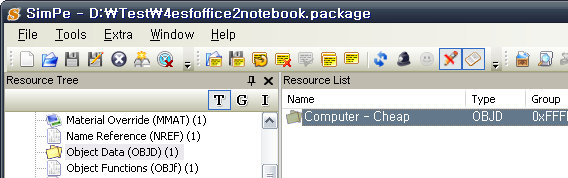
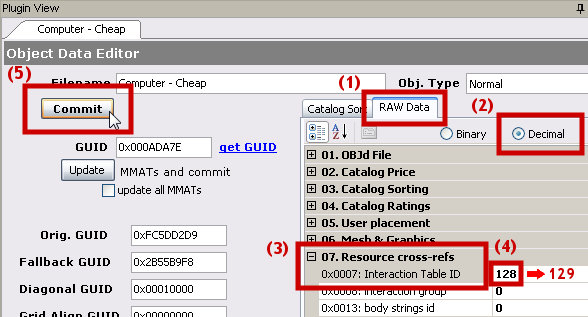
In Plugin View, select RAW Data tab, and select Decimal to change numbers from hex to decimal.
Scroll down (or close other lines) until you find the line named 07. Resource cross-refs.
Select the line named Interaction Table ID, and change the value from 128 to 129. Press Commit and Save.
3. Checking Uni compatibility
To enable "Write Term Paper" for YAs, you need to make sure that the custom computer has a reference to Term Paper computer screen movie.
In the Resource Tree Window, select Text Lists (STR#). Click on Model - Materials in the Resource List window.
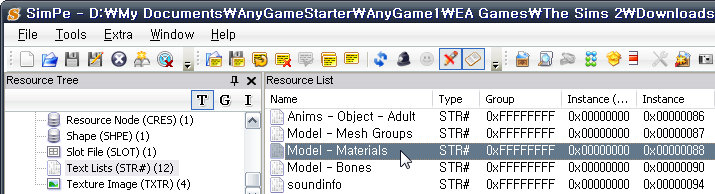
In Plugin View, set the language to English, and look for these strings:
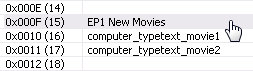
If you can find those lines, you're done. But if you can't, you must add these strings after existing ones, otherwise YAs will reset out of the custom computer when they're trying to write term papers.
If there are no existing strings starting with ##0x1C050000!, you can safely replace the whole resource with the attached file, just like you replace Text List (STR#) in above fridge tutorial. It means that the custom computer in question doesn't have any custom screen images.
However, if there are strings starting with ##0x1C050000! and you replaced the whole resource with the attached file, all custom computer screen will revert to Maxis defaults. Sometimes they're just redundant duplicates of Maxis defaults, but some custom computers DO have their own custom screens.
4. Adding strings manually
To keep custom computer screens intact, you have to manually add those strings by yourself.
In Plugin View, set the language to English. Click Add button several times to add new strings until you reach 0x0015(21).
Click the first newly added line, 0x000E. Click Replace string button on the left. A popup window will come up.
Click ComputerGlobals tab, select 0x0088 Model - Materials, and click Okay.
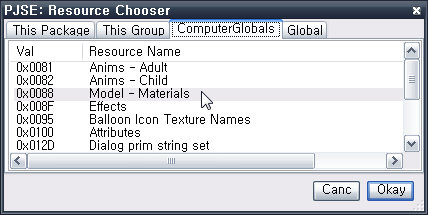
A new popup window will come up. Choose the same line as you chose in Plugin View, 0xE. Click OK. The 0x000E string will be replaced with the blank string.
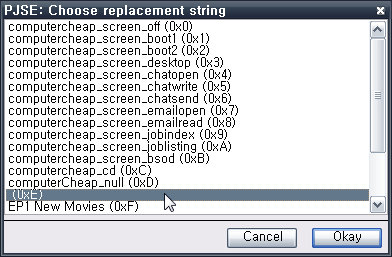
Repeat the same process for all newly added lines up to 0x15. Click Commit File and save.
You may have to sell and rebuy custom computers for them to pick up change.
Computers are one of those "exceptions" that I mentioned earlier. As of FT, pie menus of computers are handled in semi-global level. No need to fiddle with TTAB and TTAs, as they're now only vestigial. Once updated for FT, I expect that computers will remain compatible with Apartment Life as well.
Attached files:
| |
ComputerCheap_UpdatedResources_FT.rar (3.2 KB, 328 downloads) - View custom content | |
                  Size   Packed Ratio  Date   Time     Attr      CRC   Meth Ver
-------------------------------------------------------------------------------
 Computer - Cheap/BCON/42434F4E-00000000-FFFFFFFF-00001008.simpe
                    68       51  75% 27-05-08 23:34  .....A.   7E6F1E63 m5b 2.9
 Computer - Cheap/BCON/42434F4E-00000000-FFFFFFFF-00001008.simpe.xml
                   343      193  56% 27-05-08 23:34  .....A.   A8B9F66E m5b 2.9
 Computer - Cheap/RTFM.txt
                   189      150  79% 27-05-08 23:40  .....A.   48989CB9 m5b 2.9
 Computer - Cheap/STR - Optional/53545223-00000000-FFFFFFFF-00000088.simpe
                 16701      863   5% 27-05-08 18:22  .....A.   EB47325C m5b 2.9
 Computer - Cheap/STR - Optional/53545223-00000000-FFFFFFFF-00000088.simpe.xml
                   342      193  56% 27-05-08 18:22  .....A.   21C3A8C2 m5b 2.9
 Computer - Cheap/BCON
                     0        0   0% 27-05-08 23:34  .D.....   00000000 m0  2.0
 Computer - Cheap/STR - Optional
                     0        0   0% 27-05-08 23:37  .D.....   00000000 m0  2.0
 Computer - Cheap
                     0        0   0% 27-05-08 23:34  .D.....   00000000 m0  2.0
-------------------------------------------------------------------------------
    8            17643     1450   8%
|
||
NO Requests! | How to update fridges/computers to FT | Booty - Get pay items for free!
Check out my Journal for updates on past creations.
Recent Updates: Pie Menu Text Strings Fix | Teen Style Stuff Computer and Stereo Fix | IKEA Home Stuff Objects Fix

#3
15th Sep 2008 at 10:28 AM
15th Sep 2008 at 10:28 AM
Posts: 24
cool thanks for the updates.
What goes around comes back around
http://www.missingstudios.com/ms/signaturegenerator/finished/mysig_1137404670.jpg
What goes around comes back around
http://www.missingstudios.com/ms/signaturegenerator/finished/mysig_1137404670.jpg

#4
16th Sep 2008 at 9:30 PM
16th Sep 2008 at 9:30 PM
Posts: 165
Thanks!

#5
22nd Sep 2008 at 5:59 AM
Last edited by Bethgael : 22nd Sep 2008 at 6:00 AM.
Reason: my keyboard is lysdexic
22nd Sep 2008 at 5:59 AM
Last edited by Bethgael : 22nd Sep 2008 at 6:00 AM.
Reason: my keyboard is lysdexic
Posts: 50
Thanks: 471 in 5 Posts
Thankyou for this tute, very clear. 
Quick q: is it possible to do this for mirrors as well?
Quick q: is it possible to do this for mirrors as well?
Test Subject
#6
2nd Jun 2009 at 9:33 PM
2nd Jun 2009 at 9:33 PM
Posts: 3
What if you don't have free time? I have BV, NL, Univ, OFB, Kitchen and Bath, NL. I have the alienware computer from the exchange. How do I update it so that it has the vacation and college functions?
~Candie~
~Candie~

#7
20th Aug 2009 at 1:39 AM
20th Aug 2009 at 1:39 AM
Posts: 28
Thanks for the tutorial
Keep love in your heart. A life without it is like a sunless garden when the flowers are dead. - Oscar Wilde.
Keep love in your heart. A life without it is like a sunless garden when the flowers are dead. - Oscar Wilde.
Test Subject
#8
6th Jun 2010 at 4:05 PM
6th Jun 2010 at 4:05 PM
Posts: 36
Lord Darcy, thank you!! As a SimPE newbie... I can't being to tell you how this has helped tremendously. Like everyone else, there are some few pieces of REALLY favorite custom objects that I like... but I was torn because those objects (like Pacotaco's iMac computer) became useless in my game because they lacked the functionality of the latest EPs.
After this tutorial, now I know how to fix it myself. Thanks!!!
After this tutorial, now I know how to fix it myself. Thanks!!!
Test Subject
#9
19th Jul 2010 at 9:15 AM
19th Jul 2010 at 9:15 AM
Posts: 7
thanks
Test Subject
#10
20th Jul 2010 at 9:19 AM
20th Jul 2010 at 9:19 AM
Posts: 7
v.nce
Test Subject
#11
20th Jul 2010 at 9:23 AM
20th Jul 2010 at 9:23 AM
Posts: 7
slow downpc

#12
6th Aug 2010 at 11:34 AM
6th Aug 2010 at 11:34 AM
I really made the update t work with those tutorials and now I guess everything else like custom bookcases can be updated in a similar way. Thank you for the tutorials Lord_Darcy. I've learned something new.

#13
18th Sep 2010 at 3:30 PM
18th Sep 2010 at 3:30 PM
Posts: 20
Could anyone help, please? In updating Computers:
I don't understand where should I look into to see if there are strings with ##0x1C050000!
In what resource or where?
I don't understand where should I look into to see if there are strings with ##0x1C050000!
In what resource or where?
Those who dream by day bring beauty to the world. The art and the music, the stories and the heart.
N.Roberts
#14
18th Sep 2010 at 11:40 PM
18th Sep 2010 at 11:40 PM
Quote: Originally posted by koshechka
|
Could anyone help, please? In updating Computers: I don't understand where should I look into to see if there are strings with ##0x1C050000! In what resource or where? |
They are located just above these strings.
NO Requests! | How to update fridges/computers to FT | Booty - Get pay items for free!
Check out my Journal for updates on past creations.
Recent Updates: Pie Menu Text Strings Fix | Teen Style Stuff Computer and Stereo Fix | IKEA Home Stuff Objects Fix
#15
19th Sep 2010 at 6:47 PM
19th Sep 2010 at 6:47 PM
Posts: 20
Oh, Thanks a lot  .
.
 .
.
Those who dream by day bring beauty to the world. The art and the music, the stories and the heart.
N.Roberts
#16
6th Oct 2010 at 9:25 PM
6th Oct 2010 at 9:25 PM
Posts: 20
Please, excuse me for posting my question here.
But unfortunately I can't register on MATY to ask it there...
I wanted to update mirrors, but all the links in MATY thread are leading to nowhere.
If there are any ways to update them???
Thank you in advance.
But unfortunately I can't register on MATY to ask it there...
I wanted to update mirrors, but all the links in MATY thread are leading to nowhere.
If there are any ways to update them???
Thank you in advance.
Those who dream by day bring beauty to the world. The art and the music, the stories and the heart.
N.Roberts

#17
11th Feb 2011 at 1:38 AM
11th Feb 2011 at 1:38 AM
Posts: 109
I don't have freetime, so would this still work for me? I only have the expansions up to Seasons. :/
Also I want to use the functions of Monique's computers on some other custom computers I downloaded, I've never made objects before but would cloning monique's computer and replacing the mesh and textures with that of the downloaded computer work? It's only for personal use and not for upload purposes.
Also I want to use the functions of Monique's computers on some other custom computers I downloaded, I've never made objects before but would cloning monique's computer and replacing the mesh and textures with that of the downloaded computer work? It's only for personal use and not for upload purposes.


#18
29th Dec 2011 at 1:27 PM
29th Dec 2011 at 1:27 PM
Posts: 116
Thanks: 14338 in 23 Posts
Hi, is there any way to change this for a custom piano? I have one which doesn't give my Sim any enthusiasm points.
Test Subject
#19
18th Sep 2013 at 9:04 AM
18th Sep 2013 at 9:04 AM
Posts: 7
this thread was absolutely perfect for me. After I updated all my cc bookcases, computers and fridges, I was wondering how to update custom beds and toilets to allow pets to use them. Hopefully, someone is able to reply to this.
Who Posted
|
|